10+ years in software | IIT Guwahati .
My mission: Simplify AI & scalable systems.
Helping businesses build better. 👇Join my newsletter for deep dives. 🧠
Hey there! Welcome to my profile.
My journey so far:
🎓 Graduated from IIT Guwahati
💻 Spent 10+ years building and scaling backend systems for millions of users.
Now, my focus is on sharing what I've learned and exploring the frontier where scalability meets AI.
👇 (1/3)
Stop treating your database like a synchronous API.
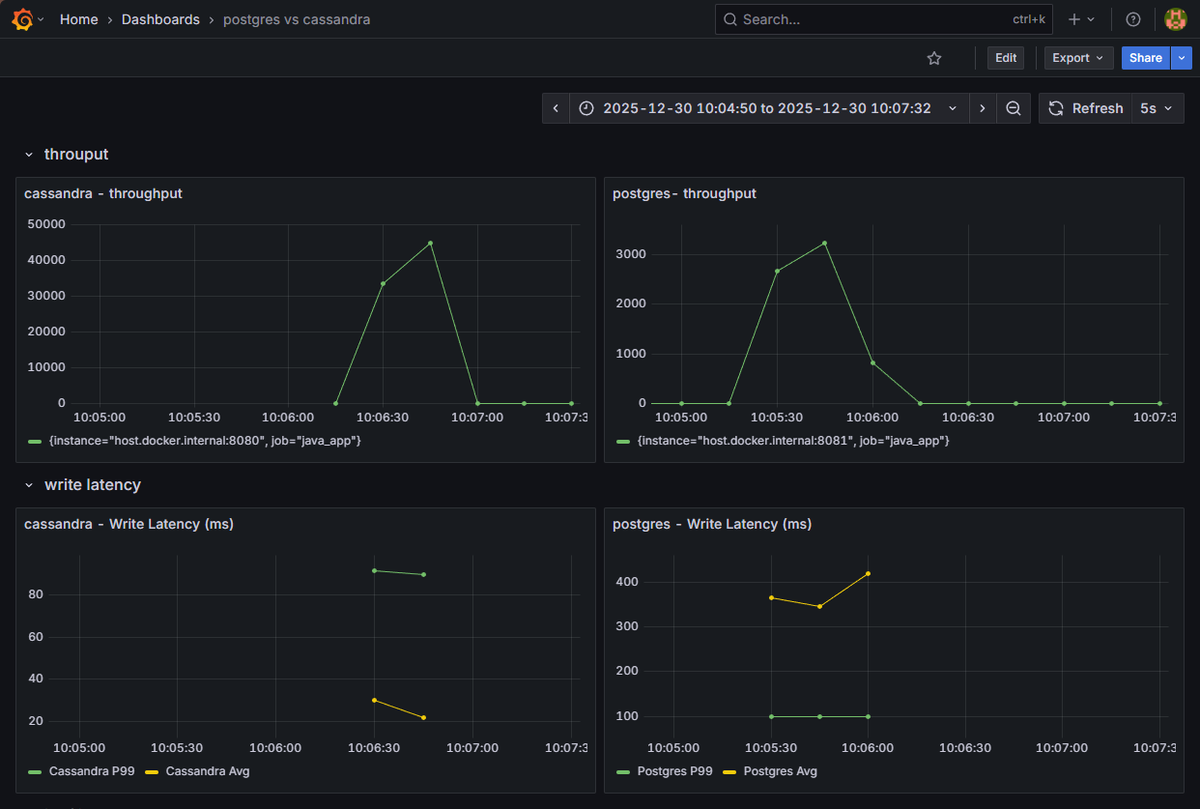
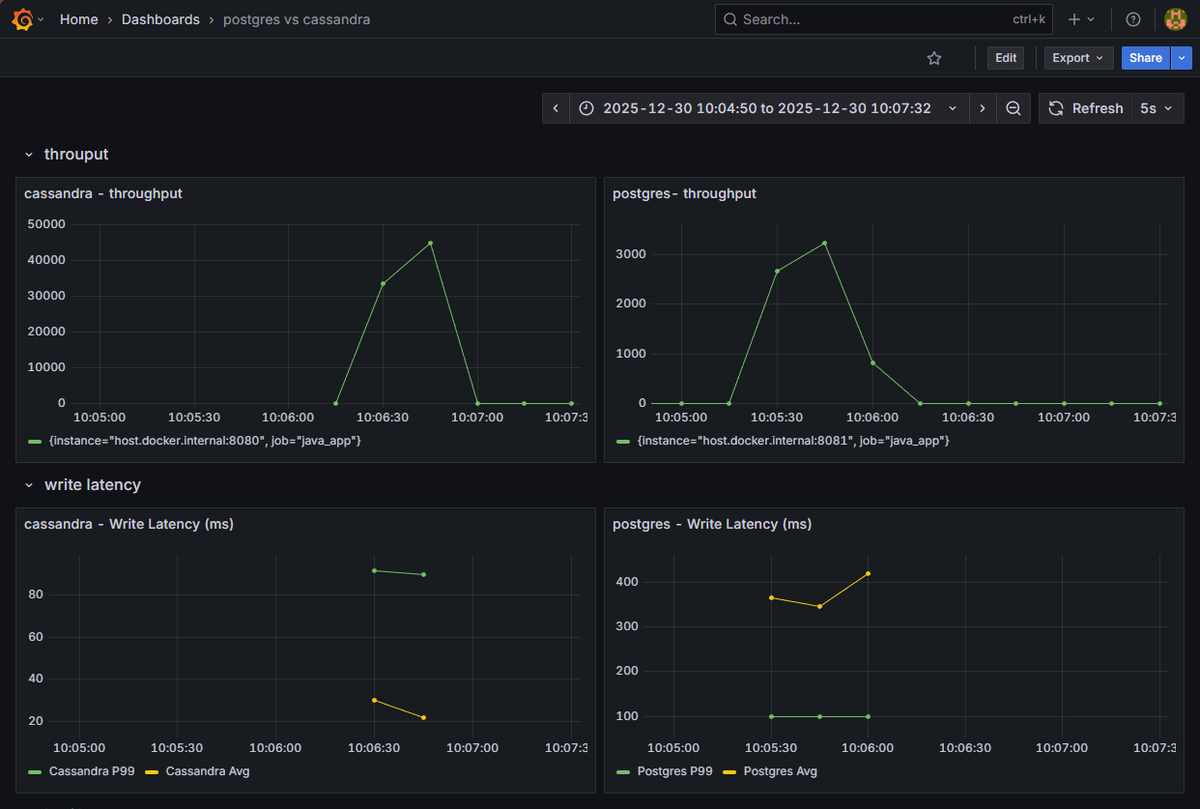
I recently built a simulation of a WhatsApp-scale messaging system to test how different databases handle the "Thundering Herd" problem—10,000+ users sending messages simultaneously.
The results weren't just surprising; they were a wake-up call for anyone designing high-scale systems.
Here is the breakdown of my journey from 270 req/s to 32,000+ req/s. 🚀
1️⃣ Phase 1: The "Naive" Approach (Synchronous)
I started how we all start: A simple INSERT INTO messages loop in Java. I tried this with both Postgres and Cassandra.
❌ Postgres (Sync): 270 msg/sec
❌ Cassandra (Sync): 433 msg/sec
The Problem? Blocking I/O. Every single message forced the main thread to wait for a network roundtrip and a disk sync. It felt like trying to fill a swimming pool with a teaspoon.
2️⃣ Phase 2: The "Buffer" Trick (Redis + Batches)
Next, I introduced a Redis Write-Back buffer. We write to Redis instantly, accumulate 100 messages, and then COPY them to Postgres in one go.
✅ Redis + Postgres Batching: 1,193 msg/sec (~4x boost)
The Catch? ⚠️ Durability. If the server crashes while messages are in the Redis buffer, that data is gone forever. You told the user "Sent ✅" but the database never saved it. For a "Typing..." indicator, this is fine. For a financial transaction or a critical message? It's a disaster waiting to happen.
3️⃣ Phase 3: The "Async" Revolution
Finally, I stripped away the buffers and went full Non-Blocking I/O using Vert.x (for Postgres) and the Datastax Async Driver (for Cassandra).
Instead of waiting for the database to say "OK", we fire thousands of requests and handle the acknowledgments via callbacks.
The Results:
🚀 Postgres (Async): 2,720 msg/sec
🤯 Cassandra (Async): 32,798 msg/sec
💡 The Conclusion
1. Async is King: Both databases saw massive gains just by unblocking the thread. Postgres jumped 10x (270 → 2720).
2. Architecture Matters (LSM vs B-Tree): Even with the exact same Async code, Cassandra was ~12x faster than Postgres. Why?
Postgres (B-Tree): Every insert requires jumping around the disk to update indexes (Random I/O).
Cassandra (LSM Tree): Appends data sequentially to a commit log (Sequential I/O).
🔖 The Lesson? If you are building a read-heavy app (dashboards, e-commerce), stick with Postgres. But if you need to ingest millions of events or messages? You need an LSM-tree database and Non-Blocking I/O.
Please find the GitHub link in comments.
One question guys.. related to high level system design..
if you design Whatsapp, would it be a read heavy system or write heavy system?
do remember that the number of messages sent by sender (which would be written on our app) are equal to receiver's message count (which would be read from our app)
although, in group conversation.. there might be more reads, or not.. depends on design.
So is it READ HEAVY -- or -- WRITE HEAVY?
Your team needs to build a new AI-powered "chat with your docs" (RAG) feature. What's your move in 2025?
A) Build (In-House): Go with LangChain/LlamaIndex + pg_vector/Elasticsearch. You get total control, but you own all the complex maintenance.
B) Buy (Managed Service): Use a vendor API that handles everything from ingestion to retrieval. It's fast to implement, but it's a black box and can get expensive.
What's your deciding factor: control, cost, or speed-to-market?
We accept eventual consistency for scale, but it can create maddening user experiences.
What's the worst user-facing bug you've seen caused by it?
> "I just updated my profile picture, why is the old one still showing?"
> "I know I deleted that item from my cart, but it's still there at checkout!"
> "My new password works on the app, but not on the website."
Share your eventual consistency horror story. 👇
What is the real documentation culture at your company? Be honest.
> First-Class Citizen: No PR is merged without thorough documentation updates.
> Afterthought: We "catch up" on docs the week before a big release (maybe).
> Archaeology: The docs exist, but they're all 3 years out of date and misleading.
> "The Code Is The Doc": ...and no one understands the code.
What's your reality?
@RaulJuncoV These projects are all about navigating the CAP theorem. The Instagram feed (Project 1) might lean toward Availability. But the E-commerce checkout (Project 3) must prioritize Consistency. Defending that choice is the real skill.
@arpit_bhayani Great breakdown. That high MTTF strategy (like active-active multi-region) usually costs a lot more. Focusing on a fast MTTR is often more affordable. It really highlights the cost versus reliability trade-off.
Your application is scaling. You've auto-scaled your compute pods. You've added read replicas to your database.
What is the next bottleneck you're bracing for?
A) Primary DB Write Contention: All those reads were fine, but now every write is waiting in a queue.
B) A 3rd-Party API: Your app is fast, but you're getting rate-limited by a critical external service.
C) Network Latency: Your microservices are too "chatty," and the network calls are adding up.
D) Connection Pooling: Your DB is fine, but your app is running out of available connections.
What's your prediction for your own system?
This thread is just scratches the surface. I've put together a much more detailed, deep-dive blog post covering all these topics.
We explore:
-> How the Inverted Index and Levenshtein distance work in Lexical Search.
-> Detailed workflows with diagrams for Phonetic and Semantic search.
-> How vector embeddings and KNN algorithms power "mind-reading" search.
-> A full comparison table to help you choose the right tool for your job.
If you want to truly level-up your understanding of search, you'll want to read this.
Check out the full deep-dive here:
https://t.co/QzNTlWX2gH
Subject: Is your search bar costing you users?
"No results found."
As developers and product builders, those three words are a quiet failure. We've all been there, staring at a search bar, knowing the data is in there, but failing to retrieve it.
Why is search so hard to get right?
We often treat it as a solved problem. Slap in a LIKE clause and call it a day, right?
But a truly great search experience—one that feels intuitive, forgiving, and almost magical—is a craft. It requires understanding that not all search queries are the same.
The tool must match the task. I've been diving deep into this, and it really breaks down into 3 levels:
Level 1: The Gatekeeper (Lexical Search) This is your literal-minded guard. It's all about matching exact text, powered by the classic Inverted Index.
What it's good for: Product SKUs, error codes, logs, and anywhere precision is king.
Where it fails: "home" vs. "house", or a simple typo.
Level 2: The Sound Alike (Phonetic Search) This one doesn't care about spelling; it cares about sound. Using algorithms like Metaphone or NYSIIS, it groups "Catherine" and "Kathryn" together.
What it's good for: Searching names in a CRM, genealogy, or any data entered over the phone.
Where it fails: Homophones. It has no concept of meaning, so "night" and "knight" are the same to it.
Level 3: The Mind Reader (Semantic Search) This is where the magic happens. It's not about keywords; it's about intent and meaning. Using vector embeddings (think BERT, GPT), it understands that "My bicycle has a puncture" is asking for "How to fix a flat tire."
What it's good for: Q&A systems, recommendation engines, and understanding what your user really wants.
Where it fails: It's computationally expensive and useless for things without semantic meaning (like SKU err-8475).
The Takeaway?
The best search isn't one of these. It's a hybrid.
---------
A user types "runing shoos."
1. Phonetic/Fuzzy search corrects it to "running shoes."
2. Synonymic search adds "trainers" & "sneakers."
Lexical search finds exact brand/product matches.
3. Semantic search finds conceptually similar items like "lightweight athletic footwear."
4. Stop building simple gatekeepers. Start building wise librarians.
Want to checkout the search algos in detail.. check it out in the next thread.
What's the most challenging search problem you've ever had to solve? Let's talk in the comments.
You have to build a production AI agent that can use tools (e.g., call APIs, search). What's your actual framework choice today?
A) LangChain: The big, powerful "batteries-included" framework.
B) LlamaIndex: More data/RAG-focused, but has strong agent capabilities.
C) Minimal Library: Just use Instructor or LiteLLM for reliable function calling and nothing else.
D) Raw API Calls: 100% in-house. You're building the agent loop and state management from scratch.
What's your go-to, and what's the one thing you wish it did better?
@RaulJuncoV it's just such a simple thing to follow.. and I've seen weeks of discussion among frontend, backend, PMs and QAs just to alight on some contract.. but if the contract would have been clear from the start.. those problems would never have arise.
@govardhana_mk You're right. People forget K8s is just the start. You still need monitoring, service mesh, and security on top. It's an entire ecosystem
@arpit_bhayani Insightful lines from shared blog : "Don’t let your great idea die in silence. Talk. Listen. Iterate. Build, and remember: ideas rarely win on merit alone; they win because someone cared enough to make others care too"
Let's talk about GraphQL. What's your real production experience?
1. It's a Game-Changer: Our frontend and mobile teams love it. Total flexibility, no more over-fetching.
2. It's a Trap: The N+1 query problem, complex caching, and lack of built-in rate-limiting by default created a performance and security nightmare.
3. It's a Niche Tool: We only use it for its intended "Backend-for-Frontend" (BFF) layer, not for everything.
4. Never Touched It: REST and gRPC are all we need.
What's your story?