As an AI Engineer. Please learn
>Harness engineering, not just prompt engineering
>Context engineering, not just long prompts
>Prompt caching vs. semantic caching tradeoffs
>KV cache management, eviction, reuse, and memory pressure at scale
>Prefill vs. decode latency and why they optimize differently
>Continuous batching, paged attention, and throughput optimization
>Speculative decoding vs. quantization vs. distillation tradeoffs
>INT8, INT4, FP8, AWQ, GPTQ, and when quantization hurts quality
>Structured output failures, schema validation, repair loops, and fallback chains
>Function calling reliability, tool contracts, argument validation, and idempotency
>Agent guardrails, loop budgets, tool budgets, and termination conditions
>Model routing, graceful fallback logic, and degraded-mode UX
>RAG architecture: chunking, embeddings, hybrid search, reranking, and freshness
>Retrieval evals: recall, precision, grounding, attribution, and citation quality
>Evals: golden sets, regression tests, adversarial tests, LLM-as-judge, and human evals
>LLM observability as a first-class discipline: traces, spans, tokens, latency, errors, and drift
>Cost attribution per feature, workflow, tenant, and user journey not just per model
>Safety engineering: prompt injection defense, data leakage prevention, and permission boundaries
>Multi-tenant isolation, cache safety, and cross-user context contamination prevention
>Fine-tuning vs. in-context learning vs. RAG vs. distillation and when each is the wrong tool
>Latency, quality, cost, and reliability tradeoffs across the full inference stack
>Production failure modes: hallucinated tool calls, malformed JSON, stale retrieval, runaway agents, and silent eval regressions
this is f*cking gold
Andrej Karpathy joined Anthropic five weeks ago.
A friend on his team just showed me the exact LOOPS.md file he actually uses.
I dropped it into my setup. The very first response was different.
Not slightly different. Completely different.
Claude stopped giving generic answers and started working exactly the way I think.
You don't talk to the model anymore. You build the system that talks to the model for you.
Bookmark it before it gets lost in your feed.
Read it now, then check the article below.
Anthropic engineer:
"You can build 5 assistants in one afternoon. Each one handles a task you've been doing manually every single day."
In 45 minutes he shows exactly how to do it from scratch, step by step.
Most people are still doing all of this by hand.
Watch the session, then save the guide below.
Finally, a proper chat UI for Hermes Agent (open-source)!
Hermes ships an official dashboard, but it's primarily built for management, and its chat is just a terminal piped into a browser tab.
Hermes Web UI is an open-source chat-first alternative. It's self-hosted and points at your existing ~/.hermes state, so there's nothing new to configure.
- It's a native web chat, not a terminal in a tab
- Sessions group by date with a context ring
- Kanban renders the agent's task board
- Spaces manages your workspaces
- Skills panel lists the full catalog
- Tasks panel shows cron jobs
- Insights show usage and activity
- Memory shows MEMORY and SOUL files
- Logs tails the agent, gateway, and error logs
The whole setup runs 100% locally, binds to localhost by default, and you reach it over an SSH tunnel or Tailscale from your phone.
I have shared the Hermes Web UI GitHub repo in the replies.
Do note that it's a community project, not official, so expect occasional rough edges (concurrent profile runs are blocked for now).
To dive deeper into Hermes Agent, my co-founder wrote a full masterclass about it, covering the learning loop, the memory tiers, self-evolving skills, GEPA, and running multiple isolated agents.
Read it below.
Hermes Agent. Zero to full autonomous operation. One complete course.
Installation. Skills. Memory. MCP. Scheduler. Multi-agent.
Works while you sleep.
The people who build this system will never manually operate a content, research, or business workflow again.
The compounding starts from the first automated skill that runs.
Read this and bookmark it now.
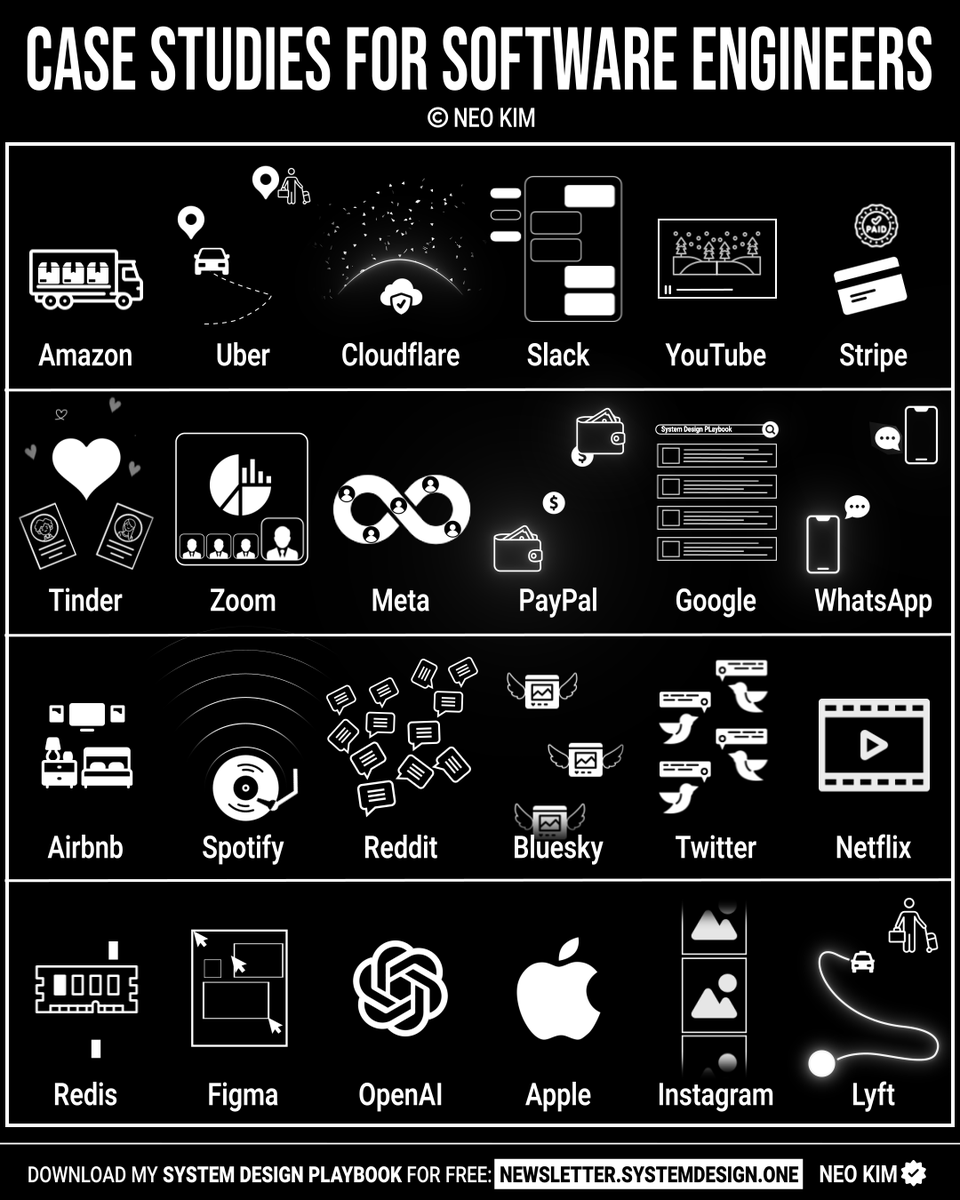
If you want to become good at system design (in 4 weeks), learn these case studies:
1 How Uber Computes ETA
→ https://t.co/t5G2mhzahX
2 How Amazon S3 Works
→ https://t.co/fOchSbdw3C
3 How Cloudflare Supports 55M RPS With Only 15 Postgres Clusters
→ https://t.co/b0xipkbADZ
4 How Slack Works
→ https://t.co/dpjG03ZvlL
5 How YouTube Works
→ https://t.co/dTVLjI8EYh
6 How Stripe Implements Idempotent API
→ https://t.co/EgUimEj49N
7 How Tinder Works
→ https://t.co/uTLfmUajeG
8 How Zoom Works
→ https://t.co/1UCWV4ompj
9 How Meta Serverless Works
→ https://t.co/jVCIuoN4wj
10 How PayPal Supports 1B Transactions per Day With Only 8 Virtual Machines
→ https://t.co/jT5qtgMZoA
11 How Google Search Works
→ https://t.co/DVlsy0vLPq
12 How WhatsApp Works
→ https://t.co/phAf30nR2M
13 How Airbnb Works
→ https://t.co/4NZMIlN70F
14 How Spotify Works
→ https://t.co/d1rGAvPIxA
15 How Reddit Works
→ https://t.co/J3ZrmwJ0q4
16 How Bluesky Works
→ https://t.co/wfo35CdFvm
17 How Twitter Timeline Works
→ https://t.co/T7xJTWL30C
18 How Netflix Works
→ https://t.co/dranI7xYyK
19 Top Redis Use Cases
→ https://t.co/7p2ZYBWXZG
20 How Figma Scaled to 4M Users
→ https://t.co/1jqCvhSAMF
21 How OpenAI ChatGPT Works
→ https://t.co/wgE4cxO7i2
22 How Instagram Scaled to 2.5B Users
→ https://t.co/q2DmyVcUCt
23 How Lyft Works
→ https://t.co/T9fvldjqC4
24 How Apple AirTags Work
→ https://t.co/02ChJDY5Y5
What else should make this list?
===
👋 PS - Want my System Design Playbook (for free)?
Join my newsletter with 200K+ software engineers now:
→ https://t.co/ByOFTtOihX
===
💾 Save & RT to help others master system design.
👤 Follow @systemdesignone + turn on notifications.
Claude thinks. Obsidian remembers. Hermes acts. Kimi finds. Cursor builds.Five tools.
Five distinct capabilities. None of them redundant.
One coordinated stack that compounds every layer into the next.
The full build with exact prompts and setups is in the article.
Anthropic CEO Dario Amodei:
"The cheapest way to use Claude is also the smartest. Most devs do the exact opposite"
this is one of the best interviews I've seen in a long time
in this interview he breaks down exactly how a system changes everything:
- the memory and context features that turn Claude into a second brain
- the knowledge architecture most users don't know Claude can build
- the integration layer that connects Claude to your actual workflow
- why typing one question at a time is the most expensive way to use Claude
if you've been using Claude for months and still start every conversation from scratch with zero context, you don't have a Claude problem. you have a system problem
instead of another show tonight, watch this
make sure to bookmark it before it gets lost in your feed
full guide in the article below
People think learning Claude takes days. It doesn't.
I wrote 17 free guides that teach it in hours:
Claude 101: https://t.co/QQDmzBAoH5
Claude Code: https://t.co/o782qegoKu
Claude Skills: https://t.co/RgQUCNMqzQ
Claude Connectors: https://t.co/cSPMBUNmRG
Claude for Excel: https://t.co/ZgmUFXd0Iw
How to Prompt: https://t.co/Sw2tg2PMMc
Claude Certificates: https://t.co/LyV7fegv4c
Claude for your team: https://t.co/NakViTGCAL
Stop Prompting Claude: https://t.co/45xPLDRB6Y
AI Slides (PPT in 2026): https://t.co/OY7cHDTV7l
Claude Design: https://t.co/FhlRSlH0aD
Set up Claude Cowork: https://t.co/4jygw4M1RO
Claude to sound like you: https://t.co/LyV7fegv4c
Stop writing like AI: https://t.co/JXKAVP6hdS
Claude as your computer: https://t.co/tQDrcs8drQ
Claude Cowork + Project: https://t.co/xU97EpdrEe
Stop hitting Claude limits: https://t.co/Yu24rPQafQ
___
1. Save this list for later (three dots, top right).
2. Share it with a friend by ♻️ reposting this image.
3. Subscribe to my free newsletter: https://t.co/psB7XxAv8w.
Anthropic's head of security:
"90% of our code is written by Claude. If yours is too and nobody's reviewing it, you're shipping bugs you'll never notice."
In 28 minutes he shows the exact security setup Anthropic uses internally to protect their own projects.
Watch the full interview, then save the config below 👇
Complete Claude Code Training 6 HOURS.
The most comprehensive Claude training on the internet.
From A to Z: setup, workflow creation, website deployment, agent team creation, browser automation, client prospecting and pricing your services.
All of it without writing a single line of code.
In the end: you use Claude Code like a pro and you monetize your skills.
Beginner or advanced, everything is there in one place, this course covers it all.
It's worth more than all those $500 courses you almost bought.
Keep it bookmarked and watch later.
Anthropic engineers finally showed how they actually use Claude Code internally
31 minutes of internal workflow that most Claude users will never see on their own
here's what they cover:
> how to set up project context files the right way
> custom commands that save hours of repeated work
> hooks that make Claude behave exactly how you need
> subagents and how to actually spec them properly
"your agent isn't the problem, your spec is"
the people who understand how Claude Code actually works inside Anthropic are shipping things everyone else thinks requires a whole team
that's exactly why I put together a breakdown of Claude features most people have never discovered
you can find it below
You can outsource your thinking but you cannot outsource your understanding.
That's the entire problem with ML education right now.
PyTorch will let you train a model without knowing what a gradient is. Keras will let you stack layers without knowing what any of them compute. The code runs. The model trains. You have output. You have zero understanding.
Simon J.D. Prince built a notebook collection that won't let you skip the hard part.
Shallow networks first. What does one layer actually compute? What do the decision regions look like? You see it geometrically before you write a single line.
Optimization compared, not prescribed. Line Search vs SGD vs Adam on the same problem. You watch them diverge. You understand why Adam isn't always the answer.
Backpropagation to Self-Attention to Graph Neural Networks as one continuous thread. Not isolated tutorials. One continuous thread from first principles to the modern stack.
Three lines of code can train a model. These notebooks make sure you understand the model you trained.
Here's the resource: https://t.co/9Sm1sYxpVO
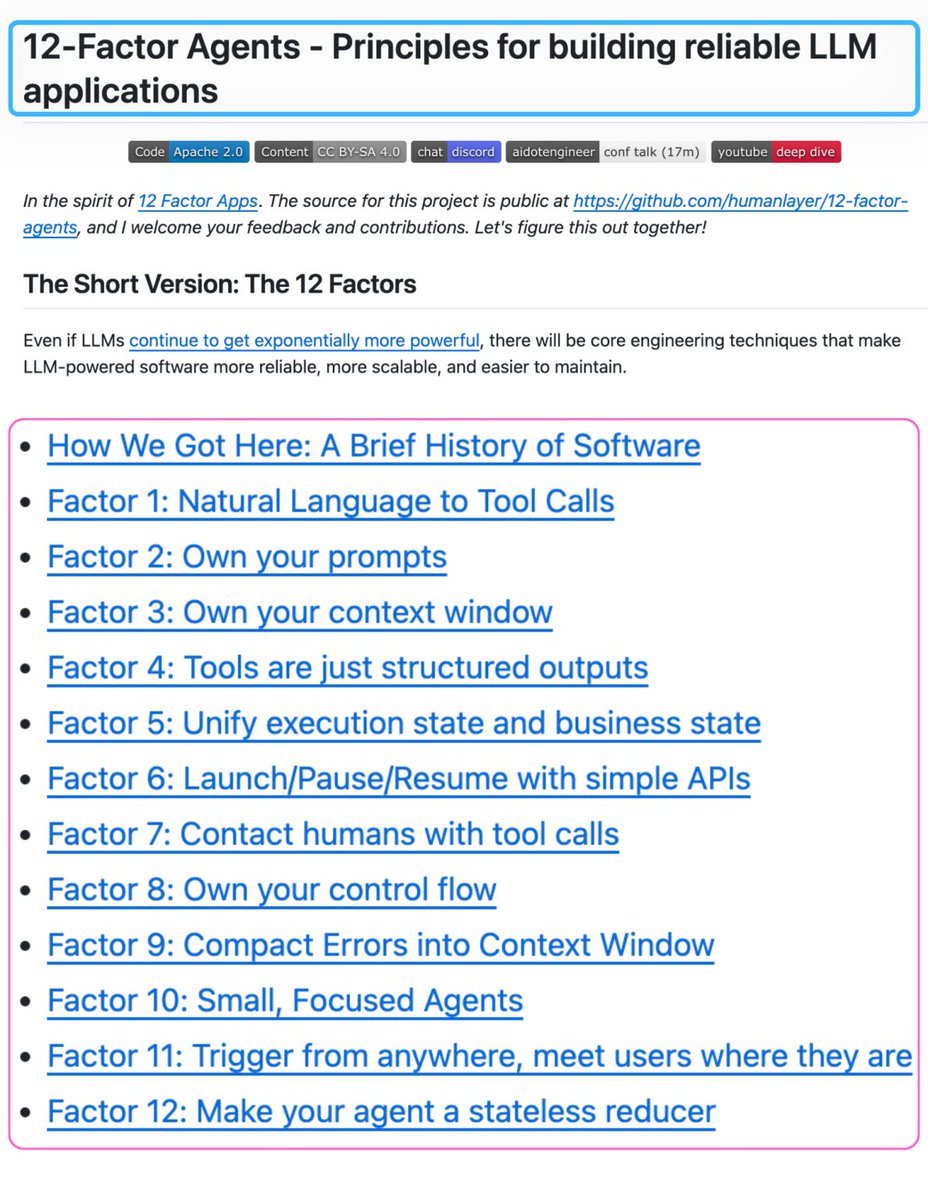
Someone documented the engineering principles behind AI agents that actually work in production.
It's called 12-Factor Agents.
Here's what each factor actually means and why it matters:
Factor 1 - Natural Language to Tool Calls
The LLM's only job is to decide what to do next, outputting structured JSON. Your deterministic code does the actual execution. This separation is what makes agents debuggable.
Factor 2 - Own your prompts
If a framework hides your prompts from you, you can't debug output quality. Visibility is non-negotiable.
Factor 3 - Own your context window
The context window is the agent's entire working memory. What you put in, in what order, with what compression, determines output quality more than model choice. This is context engineering, the most underrated skill in agent development.
Factor 4 - Tools are just structured outputs
Tool calling is not magic. It's JSON schema. The LLM outputs a structured object. Your code pattern-matches on it and executes. Demystify this and everything else gets simpler.
Factor 5 - Unify execution state and business state
Don't maintain two separate state systems. The agent's execution state and your application's business state should live in one place or you'll spend your life keeping them in sync.
Factor 6 - Launch/Pause/Resume with simple APIs
Production agents get interrupted. Users change their minds. Systems go down. Design for pause and resume from the start, not as an afterthought.
Factor 7 - Contact humans with tool calls Human approval isn't a special interrupt mechanism. It's just another tool the agent can call. This reframe makes human-in-the-loop trivial to add and trivial to remove.
Factor 8 - Own your control flow
Let the LLM decide what action to take. Keep the if/else and switch statements in your code. The moment a framework owns your control flow, debugging becomes reverse-engineering.
Factor 9 - Compact errors into context window
A failed tool call is information, not an exception to throw. Put the error back into context so the agent can reason about what went wrong and try differently.
Factor 10 - Small, focused agents
One agent. One job. Reliability degrades with scope. The agents that work in production do one thing well and hand off cleanly to the next.
Factor 11 - Trigger from anywhere
Email, Slack, webhook, cron, mobile app. The same agent should be triggerable from any surface without rewriting the core logic.
Factor 12 - Make your agent a stateless reducer
Given the same context window, the agent always produces the same next action. Test it like a function. Debug it like a function. This is the architectural principle that makes everything else tractable.
The fastest path to production AI is understanding these principles well enough to apply them inside what you're already building.
22k+ stars.
GitHub Repo: https://t.co/nQjPc8w3V1
Anthropic AI engineer just showed how to give AI agents real memory in 4 steps - and it changes everything
in 28 minutes he shows exactly how agents can remember across sessions, completely free
worth more than any $500 AI engineering course
here's what he covers:
• why agents forget everything between sessions
• memory stores - agents read, write across sessions
• dreaming - agents that improve their own memory
• 95% cache hit rate, so it stays cheap
most people are still copy-pasting context into every new chat - while the people who figured this out are building agents that get smarter every single night
watch full video then read article below
Do something different this weekend.
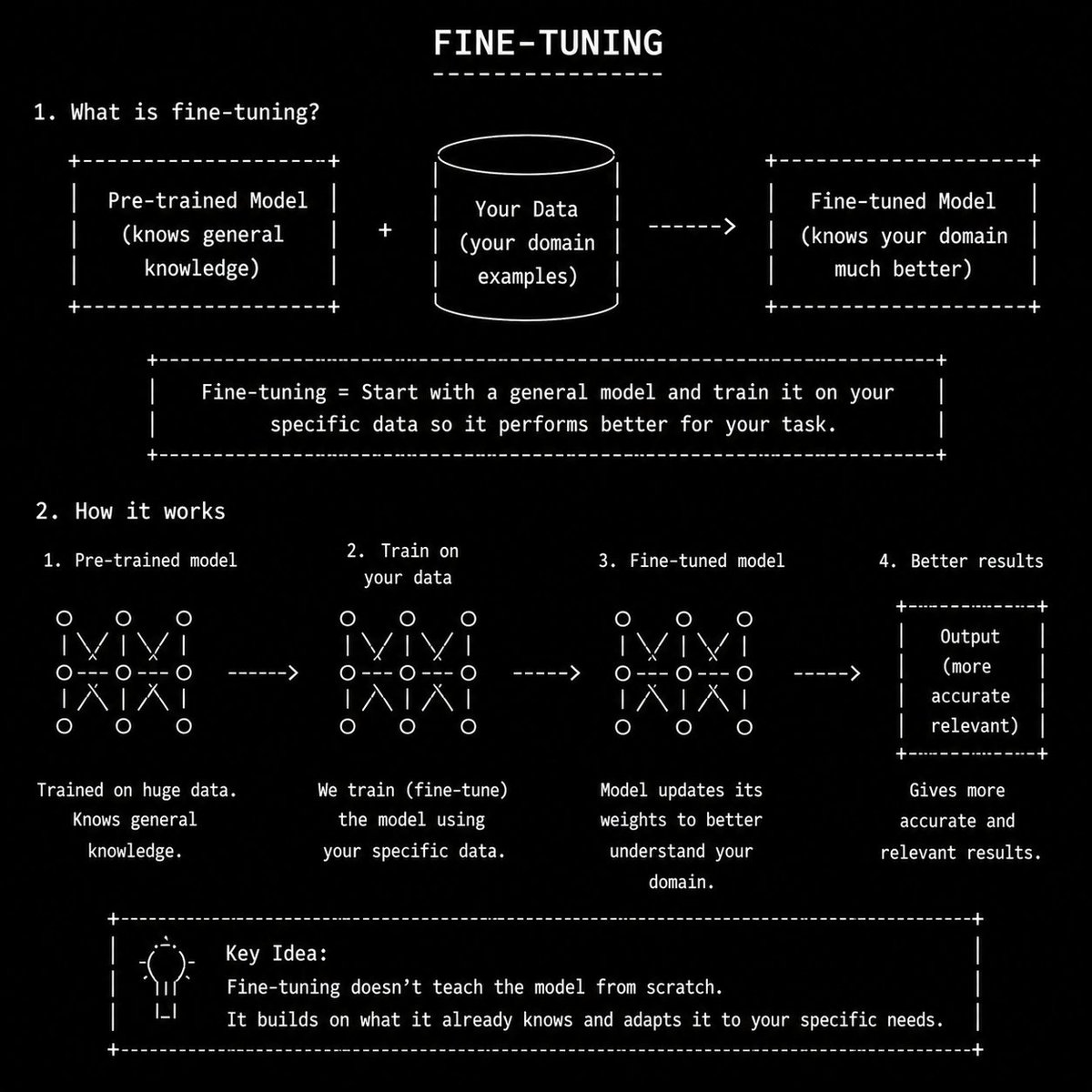
Become a PRO in AI Model Fine-tuning.
Paste this prompt in Codex/ChatGPT/Claude/Grok.
"You are an expert AI engineer and teacher.
Your job is to teach me modern LLM engineering and fine-tuning concepts from beginner to advanced level using very simple daily-life language.
Teach me step-by-step like a real mentor. Assume I am smart but new to the topic.
Foundations:
- LLM basics
- How AI models work
- Tokens
- Tokenization
- Context windows
- Embeddings
- Transformers
- Attention mechanism
- Parameters
- Training vs inference
- Open-source vs closed-source models
Datasets & Training:
- SFT datasets
- Instruction tuning
- Preference datasets
- Synthetic datasets
- Data curation
- Dataset cleaning
- Dataset formatting
- Fine-tuning basics
- Continued pretraining
- Hallucination reduction
Fine-Tuning:
- LoRA
- QLoRA
- DPO
- RLHF
- Quantization
- Model checkpoints
- Adapter tuning
- GGUF models
Inference & Optimization:
- KV cache
- Flash Attention
- Speculative decoding
- Inference optimization
- Model serving
- Batch inference
- GPU basics
- VRAM basics
- Latency vs quality tradeoffs
Local AI Ecosystem:
- llama.cpp
- Ollama
- vLLM
- MLX
- Hugging Face
- Unsloth
- Axolotl
- PEFT
- TRL library
RAG & Memory:
- RAG
- Vector databases
- Chunking
- Retrieval pipelines
- AI memory systems
- Semantic search
Agents & Workflows:
- Prompt engineering
- System prompts
- Tool calling
- Function calling
- AI agents
- Agentic workflows
- Multi-agent systems
- Browser agents
Model Types:
- VLMs
- SLMs
- Dense models
- MoE models
- Coding models
- Reasoning models
Deployment:
- Local inference
- On-device AI
- API serving
- Cloud GPUs
- Edge AI basics
Evaluation:
- AI benchmarks
- Human evals
- Cost-per-token analysis
- Speed benchmarking
- Quality benchmarking
Real-World Skills:
- Building chatbots
- Building AI copilots
- AI automation
- AI SaaS workflows
- AI coding workflows
- AI orchestration systems
- AI product thinking
Start from the absolute basics and gradually make me advanced.
Rules:
- Use simple English only
- Avoid academic jargon unless necessary
- Explain every difficult word in plain language
- Use real-world analogies and daily-life examples
- Use small code snippets when useful
- Show practical use cases
- Compare concepts side-by-side when helpful
- Teach from fundamentals first, then advanced concepts
- At the end of each topic:
- give a short summary
- give a simple mental model
- give beginner mistakes to avoid
- give a small exercise/project
I want deep understanding, not memorization."
Thank me later.
Most devs are barely scratching the surface with Claude Code.
Here's a full cheat sheet.
Core building blocks -
✦ CLAUDE[.]md - persistent project instructions and repo context loaded every session. Keep it short and durable.
✦ Skills - reusable workflows packaged in SKILL[.]md files, loaded on demand or when relevant. Use for repeatable tasks like code review, release checklists, and debugging playbooks.
✦ Hooks - user-defined shell commands, HTTP endpoints, or LLM prompts that run automatically at lifecycle points. Use for enforcement, not vague advice.
✦ Subagents - focused specialists with isolated context for side investigations, security reviews, and test generation. Don't spawn them for trivial edits.
✦ Agent Teams - multiple Claude Code sessions coordinated by a lead, with teammates working independently in parallel.
✦ MCP - Model Context Protocol connections to external tools and data. Connect only what you actually need.
✦ Plugins - installable bundles of skills, agents, hooks, and MCP servers for teams and repeated use.
Commands -
Setup:
/init → generate starter CLAUDE[.]md
/memory → edit memory files
/permissions → manage allow / ask / deny rules
/mcp → manage MCP server connections
/agents → manage subagents
During a task:
/plan → read-only mode before large changes
/model → switch model for the session
/effort → adjust reasoning depth
/context → visualize context window usage
/compact → summarize conversation to free context
/goal → keep working until a condition is met
/btw → ask a side question without polluting history
Review & ship:
/diff → inspect uncommitted changes
/review → deeper read-only code review pass
/security-review → security-focused review of pending changes
/doctor → diagnose installation and runtime issues
Advanced:
/background → detach session as a background agent
/batch → decompose a large change into parallel work units
/tasks → list running background tasks
/loop → run a prompt repeatedly on a schedule
Session control:
/clear → fresh conversation, keeps project memory
/resume → reopen an earlier conversation
/rewind → roll back code and conversation to a checkpoint (aliases: /checkpoint, /undo)
Best Practices -
✅ Keep CLAUDE[.]md short, durable, and repo-specific
✅ Use skills for repeatable procedures
✅ Use hooks for rules that must run automatically
✅ Use /context and /compact to control context growth
✅ Create only the MCP servers you actually need
✅ Review diffs and run tests before shipping
✅ Use subagents for deep side investigations so the main thread stays clean
✅ Prefer skills over giant always-on memory files
Failure Patterns -
✗ Giant CLAUDE[.]md with tutorials and fast-changing info
✗ No verification loop after edits
✗ Context drift from long sessions without /compact
✗ Too many connected MCP tools adding noise
✗ Touching unrelated code during a focused task
Treat it like an engineering environment, not a chat interface. The setup investment pays back on every task.
If you want to become good at AI engineering (in 3 weeks), then learn these 15 concepts:
1 AI Agents: Memory, State & Consistency
→ https://t.co/v8H7O00jub
2 Machine Learning System Design 101
→ https://t.co/9MkHcLb5e0
3 Design Personal AI Chat Assistant
→ https://t.co/nNWq3onTnW
4 How RAG Works
→ https://t.co/cGmunPTUlb
5 LLM Concepts - A Deep Dive
→ https://t.co/5lCKxq2g4N
6 How to Design an AI Agent
→ https://t.co/JvnPd9773A
7 What is Reinforcement Learning
→ https://t.co/AVpl9j1oit
8 How Vector Databases Work
→ https://t.co/FVxan8xHH3
9 Context Engineering 101
→ https://t.co/OMkiZhkODL
10 AI Coding Workflow 101
→ https://t.co/paIf9ksIU9
11 LLM Evals Explained
→ https://t.co/nv3Ol8W53p
12 How AI Agents Work
→ https://t.co/tk3zkCjRvg
13 How MCP Works
→ https://t.co/wgf8gHnnkn
14 Agentic Patterns Explained
→ https://t.co/8YdBBWvTj1
15 Multi-Agent Architecture Explained
→ https://t.co/rS5QQS7Jln
What else should make this list?
===
👋 PS - Want my System Design Playbook for FREE?
Join my newsletter with 210K+ software engineers right now:
→ https://t.co/ByOFTtOihX
===
💾 Save & RT to help others ace AI engineering.
👤 Follow @systemdesignone + turn on notifications.







![techNmak's tweet photo. Most devs are barely scratching the surface with Claude Code.
Here's a full cheat sheet.
Core building blocks -
✦ CLAUDE[.]md - persistent project instructions and repo context loaded every session. Keep it short and durable.
✦ Skills - reusable workflows packaged in SKILL[.]md files, loaded on demand or when relevant. Use for repeatable tasks like code review, release checklists, and debugging playbooks.
✦ Hooks - user-defined shell commands, HTTP endpoints, or LLM prompts that run automatically at lifecycle points. Use for enforcement, not vague advice.
✦ Subagents - focused specialists with isolated context for side investigations, security reviews, and test generation. Don't spawn them for trivial edits.
✦ Agent Teams - multiple Claude Code sessions coordinated by a lead, with teammates working independently in parallel.
✦ MCP - Model Context Protocol connections to external tools and data. Connect only what you actually need.
✦ Plugins - installable bundles of skills, agents, hooks, and MCP servers for teams and repeated use.
Commands -
Setup:
/init → generate starter CLAUDE[.]md
/memory → edit memory files
/permissions → manage allow / ask / deny rules
/mcp → manage MCP server connections
/agents → manage subagents
During a task:
/plan → read-only mode before large changes
/model → switch model for the session
/effort → adjust reasoning depth
/context → visualize context window usage
/compact → summarize conversation to free context
/goal → keep working until a condition is met
/btw → ask a side question without polluting history
Review & ship:
/diff → inspect uncommitted changes
/review → deeper read-only code review pass
/security-review → security-focused review of pending changes
/doctor → diagnose installation and runtime issues
Advanced:
/background → detach session as a background agent
/batch → decompose a large change into parallel work units
/tasks → list running background tasks
/loop → run a prompt repeatedly on a schedule
Session control:
/clear → fresh conversation, keeps project memory
/resume → reopen an earlier conversation
/rewind → roll back code and conversation to a checkpoint (aliases: /checkpoint, /undo)
Best Practices -
✅ Keep CLAUDE[.]md short, durable, and repo-specific
✅ Use skills for repeatable procedures
✅ Use hooks for rules that must run automatically
✅ Use /context and /compact to control context growth
✅ Create only the MCP servers you actually need
✅ Review diffs and run tests before shipping
✅ Use subagents for deep side investigations so the main thread stays clean
✅ Prefer skills over giant always-on memory files
Failure Patterns -
✗ Giant CLAUDE[.]md with tutorials and fast-changing info
✗ No verification loop after edits
✗ Context drift from long sessions without /compact
✗ Too many connected MCP tools adding noise
✗ Touching unrelated code during a focused task
Treat it like an engineering environment, not a chat interface. The setup investment pays back on every task.](https://pbs.twimg.com/media/HJBmdcybQAAU9RM.jpg)


