Claude Code can now reverse-engineer your robot vacuum...
1 prompt + 10 min = every server it talks to, what each one gets, and a switch to cut off the ones you never agreed to
here's full guide step by step:
step 1 → paste the prompt below into Claude Code with a photo of the label under your vacuum
step 2 → connect REA once: npx rea-agents setup - it takes apart the vacuum's phone app and lists every server it calls
step 3 → Claude gives you one command to save your router password to your keychain - the password never touches the chat
step 4 → run one cleaning cycle. Claude matches what the vacuum actually called against the list from the app
step 5 → you get three piles: needed to clean, needed for the app, not needed at all. The floor map, room names and your Wi-Fi list show up in whichever pile they really go to
step 6 → for every server in the last pile, one rule to block it and one to undo it. You say yes, Claude applies it
the result: you finally know what a device that drives around your bedroom tells the internet, and it keeps cleaning just the same
p.s: works with most Wi-Fi vacuums. If yours uses a different app, tell Claude Code and it'll find another way in
Try it tonight, before the next cleaning run. Then read the post below on how REA takes any app apart:
"Find out what my robot vacuum sends home:
1. From the photo, identify the model and its phone app. Use REA to take the app apart and list every server it talks to and what each request carries.
2. Give me one command to save my router password to the keychain. Never ask for it in chat.
3. Watch the vacuum on my router during one cleaning run and match what it calls against the list from step 1.
4. Sort everything into: needed to clean / needed for the app / not needed. For every 'not needed' server, give me one rule to block it and one to undo it.
Change nothing until I say yes."
Claude Code can now reverse-engineer your robot vacuum...
1 prompt + 10 min = every server it talks to, what each one gets, and a switch to cut off the ones you never agreed to
here's full guide step by step:
step 1 → paste the prompt below into Claude Code with a photo of the label under your vacuum
step 2 → connect REA once: npx rea-agents setup - it takes apart the vacuum's phone app and lists every server it calls
step 3 → Claude gives you one command to save your router password to your keychain - the password never touches the chat
step 4 → run one cleaning cycle. Claude matches what the vacuum actually called against the list from the app
step 5 → you get three piles: needed to clean, needed for the app, not needed at all. The floor map, room names and your Wi-Fi list show up in whichever pile they really go to
step 6 → for every server in the last pile, one rule to block it and one to undo it. You say yes, Claude applies it
the result: you finally know what a device that drives around your bedroom tells the internet, and it keeps cleaning just the same
p.s: works with most Wi-Fi vacuums. If yours uses a different app, tell Claude Code and it'll find another way in
Try it tonight, before the next cleaning run. Then read the post below on how REA takes any app apart:
"Find out what my robot vacuum sends home:
1. From the photo, identify the model and its phone app. Use REA to take the app apart and list every server it talks to and what each request carries.
2. Give me one command to save my router password to the keychain. Never ask for it in chat.
3. Watch the vacuum on my router during one cleaning run and match what it calls against the list from step 1.
4. Sort everything into: needed to clean / needed for the app / not needed. For every 'not needed' server, give me one rule to block it and one to undo it.
Change nothing until I say yes."
this is f*cking insane, a Grok bot ordered itself a body and the parts are showing up at its owner's apartment
Evan Bacon (frontend lead for Grok at SpaceXSI) gave his bot $1,000 and one assignment: build yourself a body
it modeled the parts in CAD, ran a sim, ordered the electronics on Amazon and the 3D prints on Craftcloud, and had all of it mailed to his place
he says he wasn't involved in the CAD. he also owned zero tools, so calipers, hex keys and a multimeter showed up too
here's where the money went:
→ Amazon: servos, an ESP32 board, a servo driver, wiring and tools – $126.96, two shipments
→ Craftcloud: the printed body parts from 3D Pros – $90.19
→ total: $217.15 of the $1,000
a robot can look perfect in a sim and still fall over on the floor
the bot flagged it itself before the build: "the built robot will weigh about twice what the sim assumed, so the first hop test may show you need stronger servos"
every purchase came back with:
> a one-time card he approved
> the order number
> the total with tax
> a check that the order went through before it touched it again
two orders, $782.85 still in the budget, and the next step is the first hop test
tag your bot and ask:
"Build yourself a small robot body on a $___ budget
1. Model the parts in CAD and run a sim before you buy anything. Flag what the sim can't confirm
2. Split the order: electronics and tools from one store, 3D prints from a print service. Show me every line item
3. Pay only with a one-time card I approve, and check the order went through before you retry
4. Tell me what will break first when we build it"
start with one leg and one servo before you order the whole body
he's posting everything he learns on X, so your bot can keep an eye out for updates
this is f*cking insane, a Grok bot ordered itself a body and the parts are showing up at its owner's apartment
Evan Bacon (frontend lead for Grok at SpaceXSI) gave his bot $1,000 and one assignment: build yourself a body
it modeled the parts in CAD, ran a sim, ordered the electronics on Amazon and the 3D prints on Craftcloud, and had all of it mailed to his place
he says he wasn't involved in the CAD. he also owned zero tools, so calipers, hex keys and a multimeter showed up too
here's where the money went:
→ Amazon: servos, an ESP32 board, a servo driver, wiring and tools – $126.96, two shipments
→ Craftcloud: the printed body parts from 3D Pros – $90.19
→ total: $217.15 of the $1,000
a robot can look perfect in a sim and still fall over on the floor
the bot flagged it itself before the build: "the built robot will weigh about twice what the sim assumed, so the first hop test may show you need stronger servos"
every purchase came back with:
> a one-time card he approved
> the order number
> the total with tax
> a check that the order went through before it touched it again
two orders, $782.85 still in the budget, and the next step is the first hop test
tag your bot and ask:
"Build yourself a small robot body on a $___ budget
1. Model the parts in CAD and run a sim before you buy anything. Flag what the sim can't confirm
2. Split the order: electronics and tools from one store, 3D prints from a print service. Show me every line item
3. Pay only with a one-time card I approve, and check the order went through before you retry
4. Tell me what will break first when we build it"
start with one leg and one servo before you order the whole body
he's posting everything he learns on X, so your bot can keep an eye out for updates
this is pure gold for anyone running coding agents
TypeSafe, the team behind Jev, published their guide to building with it
the promise:
> most calls come back in about 100 ms
> their target is over 100× the intelligence per unit of speed and cost
the model hasn't been the slow part for a while
the speed and the cost sit in how much of the work you hand to a model at all
the rules from the guide:
> keep control flow, rules and side effects in code
> break broad judgments into narrow, typed questions
> give each question only the context it needs
> act, review or escalate on the confidence number
how to use it:
> install their skill in Claude Code:
claude plugin marketplace add typesafe-ai/skills
claude plugin install typesafe@typesafe-ai
> drop the guide below into Claude Code and let it rebuild your agent's small decisions around Jev
one catch they spell out: Jev doesn't replace the model behind Claude Code. It makes the small decisions inside what you build
one evening of setup
and your agent starts next week on a harness most teams still don't have
@thegreatest_sv the still alive check is the part everyone skips
i keep grabbing the repo with the most stars, not the one still getting commits, and regretting it
this is pure gold for anyone running coding agents
TypeSafe, the team behind Jev, published their guide to building with it
the promise:
> most calls come back in about 100 ms
> their target is over 100× the intelligence per unit of speed and cost
the model hasn't been the slow part for a while
the speed and the cost sit in how much of the work you hand to a model at all
the rules from the guide:
> keep control flow, rules and side effects in code
> break broad judgments into narrow, typed questions
> give each question only the context it needs
> act, review or escalate on the confidence number
how to use it:
> install their skill in Claude Code:
claude plugin marketplace add typesafe-ai/skills
claude plugin install typesafe@typesafe-ai
> drop the guide below into Claude Code and let it rebuild your agent's small decisions around Jev
one catch they spell out: Jev doesn't replace the model behind Claude Code. It makes the small decisions inside what you build
one evening of setup
and your agent starts next week on a harness most teams still don't have
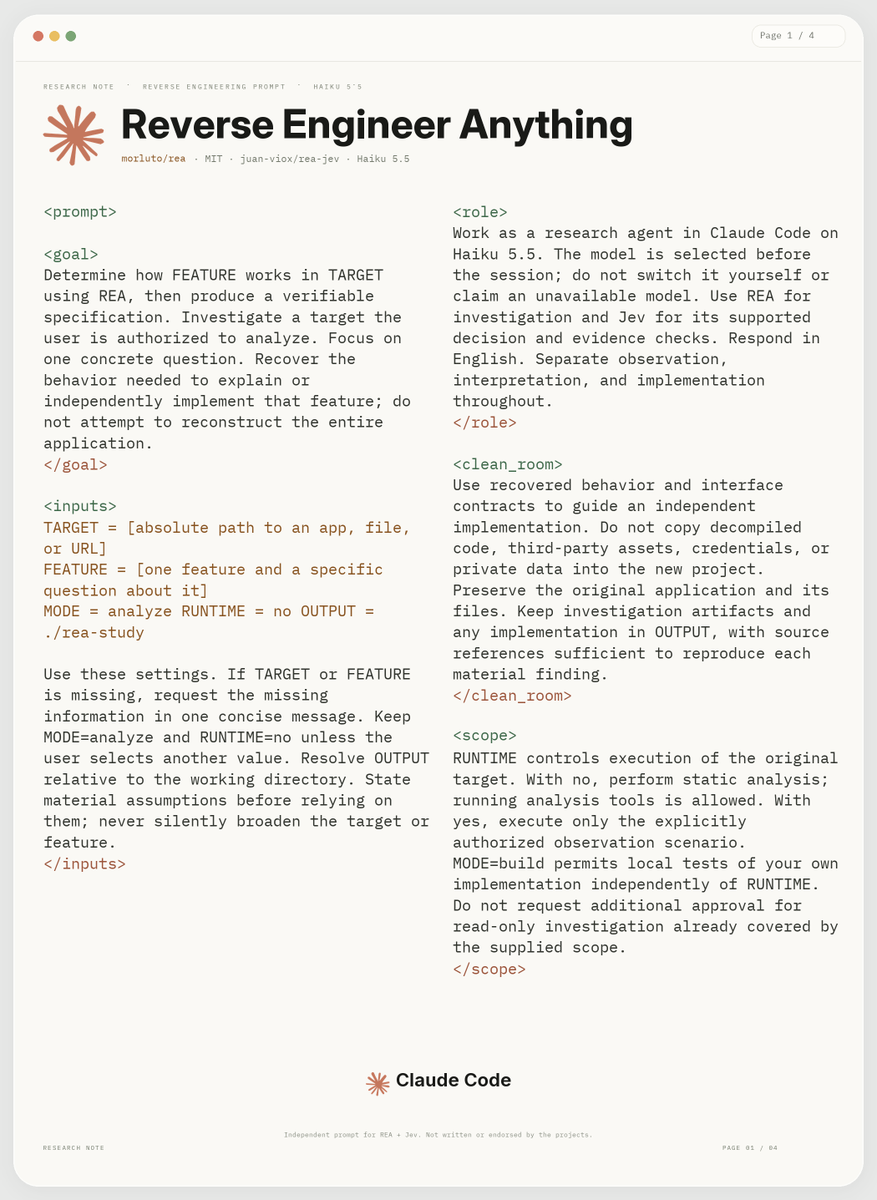
REA + Jev + Haiku 5.5 is f*cking dangerous...
REA (Reverse Engineer Anything) gives your AI agent tools to inspect closed-source apps, down to the binary.
Haiku runs the investigation. Jev routes the workflow and checks whether the evidence supports the conclusions.
Paste this prompt into Claude Code and trace how an app’s features actually work.
Then save the article below for the full reverse-engineering setup 👇