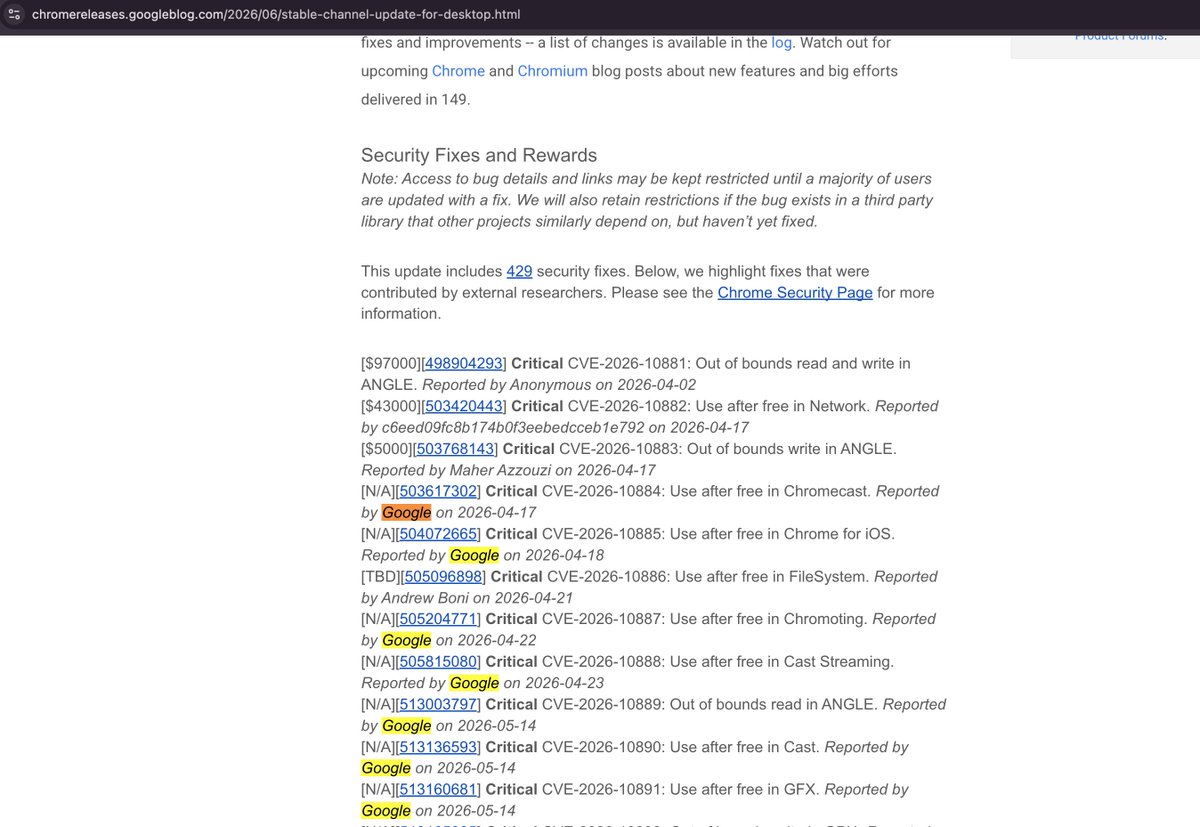
man, the silence from google is making me go crazy.
the new chrome release has 429 security fixes, mostly found by google itself. why don’t they want to tell the world how cool their latest AI/security work is?
at this point, it is absurd to not explain what is going on with this sudden spike.
‼️it seems Anthropic is ready to publicly launch a new version of Mythos, something better than Mythos Preview.
a codenamed model “Oceanus” was given access to some red teamers yesterday according to @synthwavedd.
it’s apparently been paused already, due to someone reselling access through a Chinese API proxy lmao 💀
Mythos pricing might also end up at with
$16 Input, $80 Output according to @scaling01
Introducing Agent Arena: real-world agentic evals at scale.
How do you evaluate agents doing actual work? We measure millions of live sessions where real users accomplish real tasks.
On Arena, models now get web search, filesystem, and terminal tools to complete complex workflows: writing code, creating slide deck, researching the web, building apps, and analyzing documents.
Every session produces rich signals. Users iterate with the agent turn-by-turn: approving, editing, correcting, praise or expressing frustration. The environment gives feedback too: shell errors, tool failures, recovery attempts, and more.
Our leaderboard measures each model's agentic performance using causal inference across five signals: task success, steerability, error recovery, user praise vs. complaint, and tool hallucination.
This leaderboard snapshot is built from 300K+ tasks, 2M+ tool calls, and 40M lines of code by agents.
Top labs in Agent Arena:
- #1 @OpenAI: GPT-5.5 (High)
- #2 @AnthropicAI: Claude-Opus-4.7 (Thinking)
- #3 @Zai_org: GLM-5.1
- #4 @GoogleDeepMind: Gemini-3.1-Pro
- #5 @Kimi_Moonshot: Kimi-K2.6
More analysis in the thread, with the full technical blog below.
anthropic's numbers: ~15% fewer turns and ~35% fewer output tokens per task vs 4.7. Fewer turns = less re-prompting = less total spend. https://t.co/U4HlBIJdom
I think we need to start differentiating who software engineers that vibe code and people with no technical background that vibe code.
Don’t get me wrong, both can do spaghetti code, but if you have a background and know what you’re doing, you can easily vibe code something with a really good structure and organization
Two backend engineers designed the same API.
Design A 👇
GET /users
GET /users/1
POST /users
DELETE /users/1
Design B 👇
GET /getUsers
GET /getUserById?id=1
POST /createUser
DELETE /deleteUser?id=1
Which one would you approve in a code review?
Most people pay with their phones at checkout without thinking twice. But Apple and Google handle these payments in different ways, and those differences can affect your privacy.
Here’s how it works.
Apple Pay: Your Card Never Leaves the Device
When you add a credit card to Apple Pay, your real card number is never stored on Apple’s servers. Instead, Apple sends your card information to a secure chip inside your device called the Secure Enclave, which turns it into a Device Account Number (DAN).
The DAN acts like a temporary identity for your card. It is unique to your device, cannot be used by anyone else, and is kept separate from your real card number. When you make a payment, your iPhone sends the DAN to the payment terminal or online store. The bank then matches the DAN to your real account and completes the transaction.
Your real card number never goes to a server or travels over a network. It stays encrypted on a chip in your device, and Apple cannot access it.
This is a real example of privacy by design. There is little risk for hackers because even if someone breaks into a retailer’s payment system, all they get is a DAN that won’t work on any other device.
Google Pay: Convenient, But With a Tradeoff
Google Pay works well but uses a different system. When you add your card, your information is sent to and stored on Google’s servers. Google then creates a Payment Token used for your transactions.
That token goes from your phone to the online store, then back to Google’s servers. Finally, your real card information is sent to your bank to complete the purchase.
Your data is tokenized and encrypted. Google’s security is excellent, and the risk for most people is low. But privacy advocates should consider:
Google holds your card data. On their servers. Indefinitely.
This means your financial information is stored by one of the world’s biggest advertising and data companies. Even if Google never misuses your data, it becomes a valuable target. If Google’s payment system were breached, the impact would be much bigger than a breach at a single store.
Architecture Is Privacy
This isn’t just about Apple and Google as brands. It’s about two very different ways of handling your data.
Apple’s approach is decentralized and keeps your data on your own device. Google’s approach is cloud-based, so your data is stored on their servers.
As someone who cares about privacy, I always ask: Where does the data live? Who controls it? What happens if something goes wrong? On these questions, Apple Pay’s design is stronger because of how it’s built.
What You Should Actually Do
If you use an iPhone, you can trust Apple Pay. Its tokenization system is one of the best ways to protect your payment privacy right now.
If you use Android, Google Pay is still safer than swiping your physical card since tokenization protects you from most retail data breaches. Just remember the tradeoff: your card data is stored on Google’s servers, so keep that in mind when considering your overall digital privacy.
In both cases, try to use mobile payments instead of physical cards whenever you can. You shouldn’t have to give your full card number to a checkout system anymore.