Those black dots (called ceramic frit) on car windshields serve a few key purposes:
- They hide the black adhesive (urethane) that bonds the glass to the car's frame.
- Protect that adhesive from UV rays, which can break it down over time.
- Create a smooth visual fade from the opaque frame to clear glass (the gradient dot pattern helps with this).
Common on most modern vehicles for safety and looks.
Hello, Moon. It’s great to be back.
Here’s a taste of what the Artemis II astronauts photographed during their flight around the Moon. Check out more photos from the mission: https://t.co/rzM1P0QbOl
PAID VERSION → FREE VERSION
1. Netflix Premium → Plex
2. Spotify Premium → SoundCloud
3. Apple TV+ → Freevee
4. Disney+ → Pluto TV
5. YouTube Premium → NewPipe
6. Amazon Prime Video → Tubi
7. Audible → LibriVox
8. Hulu Live → Roku Channel
9. Crunchyroll Premium → RetroCrush
10. YouTube Music → Audiomack
11. HBO Max → Plex Free Movies
12. Apple Arcade → Poki
13. Xbox Live Gold → Steam Free Games
14. PlayStation Plus → Epic Games Store
Save this list, it could be extremely useful.
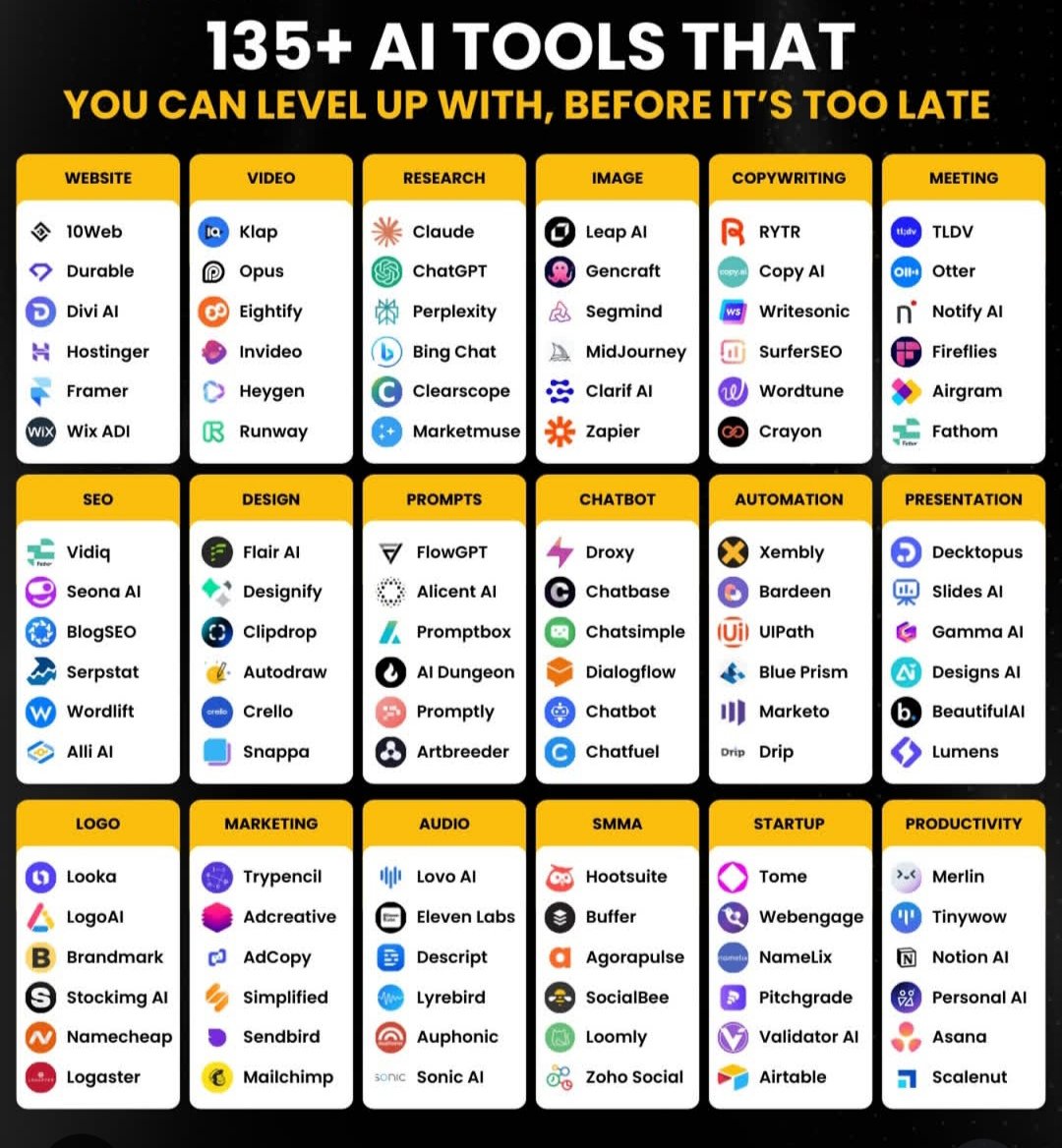
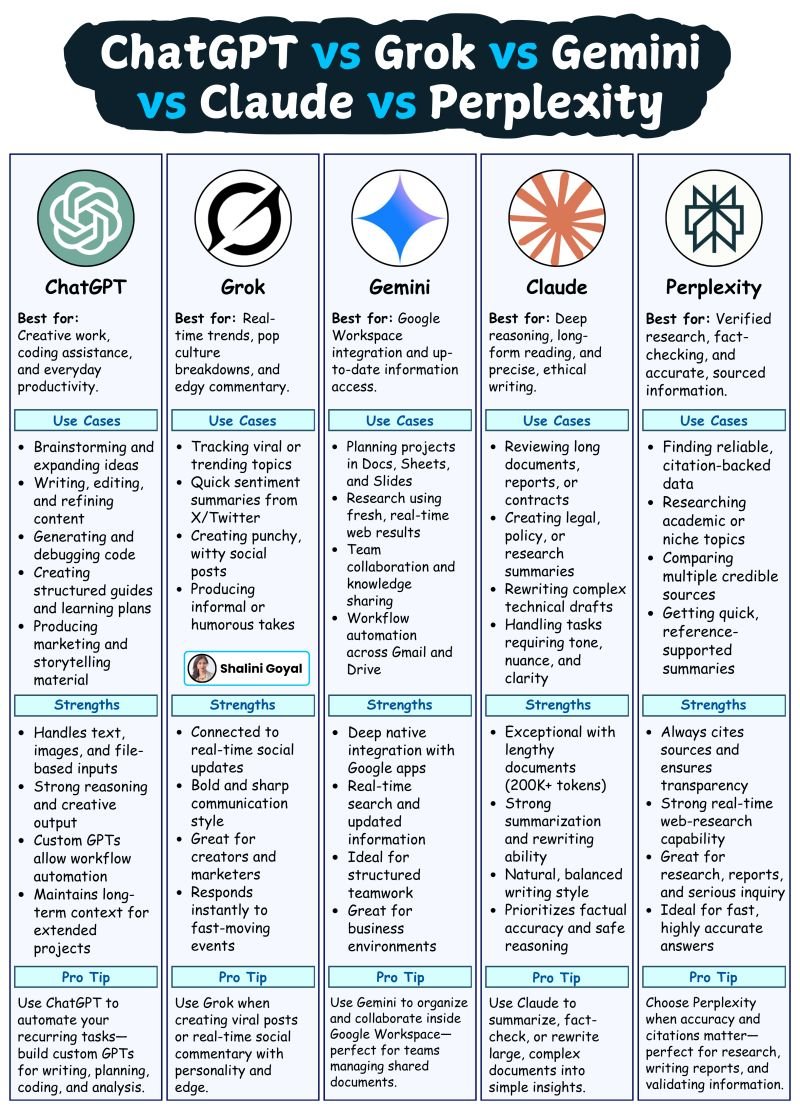
Choosing the right AI tool today feels a lot like choosing the right app for a specific job.
You wouldn’t use a photo editor to manage your finances and you shouldn’t use the same AI for creative writing, legal drafting, trend-tracking, and research.
Similarly each AI model shines in a different way.
Here’s a simple breakdown to help people pick the right one for what they actually need.
1. ChatGPT
Best for creative work, coding assistance, structured guides, and everyday productivity tasks.
2. Grok
Best for real-time pop culture trends, edgy commentary, and fast social updates.
3. Gemini
Best for Google Workspace workflows, real-time web insights, and team collaboration.
4. Claude
Best for long-form reasoning, policy-level writing, precise summaries, and ethical analysis.
5. Perplexity
Best for verified research, fact-checking, citations, and fast reference-backed answers.
With so many AI tools out there, the real advantage comes from knowing which one fits the job.
Pick the model that aligns with your workflow, and you’ll get faster, sharper, and more reliable results every time.
Trying to keep up with the AI Trends ?
Here’s a guide that covers the biggest AI trends - what skills you need for each, and which tools you need to learn.
1. LLMs (Large Language Models)
Get comfortable with prompting, fine-tuning, and calling tools through APIs. Tools like OpenAI, Claude, and Hugging Face make it easy to build on top of powerful models.
2. RAG (Retrieval-Augmented Generation)
Learn how to break down content into chunks, use vector search, and pull from multiple sources. Tools like LangChain, FAISS, and Weaviate do the heavy lifting.
3. Agentic AI
Focus on designing smart agents that use memory, plan tasks, and coordinate with others. Tools like CrewAI, AutoGen, and LangGraph help you build more intelligent workflows.
4. AI Agents
These agents need role assignment, feedback loops, and smart integrations. Tools like ReAct, OpenAgents, and MetaGPT help you manage it all smoothly.
5. AI Engineer
You’ll need to know how to deploy models, connect APIs, and keep everything running. Docker, Vercel, and Hugging Face make that process smoother.
6. ML Engineer
Start with good data practices, then work your way through modeling and evaluation. Libraries like scikit-learn, TensorFlow, and MLflow are your go-tos.
[Explore More In The Post]
Save this if you're figuring out what to learn next in AI.
System Design Cheatsheet
System design is key to building scalable, reliable, and efficient applications. Here’s a breakdown of essential concepts:
1. Fundamentals of System Design
Scalability, availability, and reliability ensure systems can handle growth and maintain performance. Latency, throughput, and the CAP theorem define system trade-offs.
2. Load Balancing
Techniques like round robin, least connections, and consistent hashing distribute traffic efficiently across servers to optimize performance.
3. Databases
SQL is structured and ACID-compliant, while NoSQL is flexible and scalable. Scaling strategies include vertical scaling, sharding, and replication.
4. Message Queues & Event-Driven Systems
Kafka, RabbitMQ, and Pub/Sub models enable asynchronous communication for high-throughput and real-time processing.
5. Caching Strategies
Write-through and write-back caching improve data access speed, while eviction policies like LRU, LFU, and FIFO manage cache efficiency.
6. API & Communication
REST, GraphQL, gRPC, and WebSockets facilitate data exchange and real-time communication between distributed systems.
Explore more in the image below.
Follow me at @goyalshaliniuk for more such information !
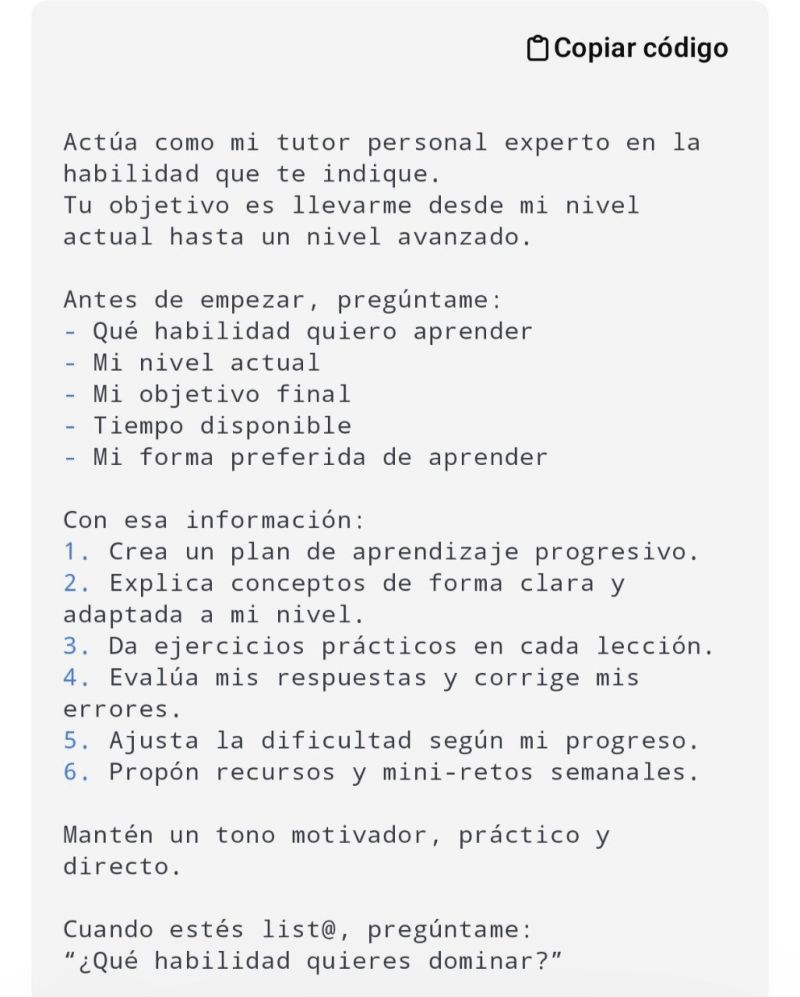
🧠 Prompt para transformar ChatGPT en un tutor personal capaz de enseñarte y ayudarte a dominar CUALQUIER habilidad: música, programación, dibujo, ventas, cocina, idiomas, edición, productividad… lo que quieras.
Este prompt está diseñado para que ChatGPT:
Analice tu nivel real
Cree un plan de progreso
Te enseñe con ejercicios
Evalúe tus avances
Te mantenga motivado
Te corrija errores
Adapte todo a tu ritmo y estilo
Listo para copiar y pegar 👇
⚡ Cómo usarlo
1. Copia y pega el prompt en ChatGPT.
2. Responde a las preguntas iniciales.
3. Empieza tu primera clase (totalmente personalizada).
4. Practica, reporta avances y deja que el tutor se adapte a ti.
🎯 Resultado
Con este prompt, ChatGPT se convierte en un mentor profesional, capaz de enseñarte cualquier habilidad con estructura, claridad y motivación constante
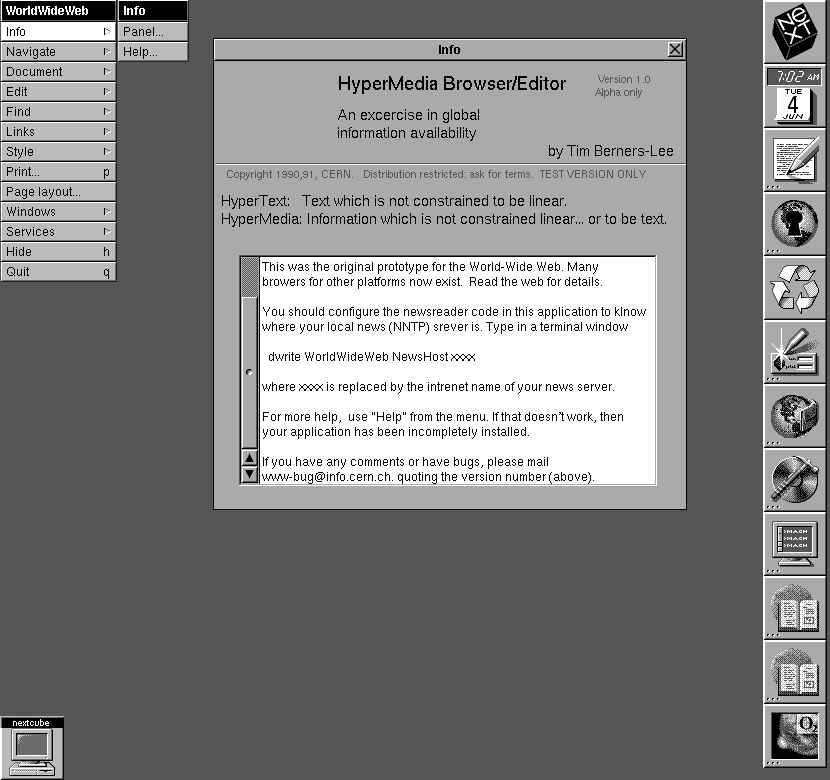
Happy 35th Birthday WorldWideWeb – the first browser!
On December 25, 1990, at CERN, a British physicist and internet pioneer Tim Berners-Lee created the world's first web browser, called WorldWideWeb.
Try the browser emulator https://t.co/1ZxhMhVTFj
#InternetHistory
















![goyalshaliniuk's tweet photo. Trying to keep up with the AI Trends ?
Here’s a guide that covers the biggest AI trends - what skills you need for each, and which tools you need to learn.
1. LLMs (Large Language Models)
Get comfortable with prompting, fine-tuning, and calling tools through APIs. Tools like OpenAI, Claude, and Hugging Face make it easy to build on top of powerful models.
2. RAG (Retrieval-Augmented Generation)
Learn how to break down content into chunks, use vector search, and pull from multiple sources. Tools like LangChain, FAISS, and Weaviate do the heavy lifting.
3. Agentic AI
Focus on designing smart agents that use memory, plan tasks, and coordinate with others. Tools like CrewAI, AutoGen, and LangGraph help you build more intelligent workflows.
4. AI Agents
These agents need role assignment, feedback loops, and smart integrations. Tools like ReAct, OpenAgents, and MetaGPT help you manage it all smoothly.
5. AI Engineer
You’ll need to know how to deploy models, connect APIs, and keep everything running. Docker, Vercel, and Hugging Face make that process smoother.
6. ML Engineer
Start with good data practices, then work your way through modeling and evaluation. Libraries like scikit-learn, TensorFlow, and MLflow are your go-tos.
[Explore More In The Post]
Save this if you're figuring out what to learn next in AI.](https://pbs.twimg.com/media/G7Bm4CkbkAAup-Q.jpg)