$BSHD LIVE
CA: 0x86d2371d508c3f39cd4dce58d0ee406250d57777
Bashard is decentralized object storage on BNB Chain.
Files are erasure-coded into 20 shards on the user's device and stored across 20 independent nodes. Any 7 shards restore the full file. Storage is certified on-chain by 2/3 of the node committee, and nodes are audited every epoch: lose data and lose stake.
BSHD is the network's utility token. It is used to pay for storage, to stake as a node operator, and to delegate to nodes for a share of storage fees.
Website: https://t.co/VFNuODVrcj
App: https://t.co/dXdFjFUMbz
Scan: https://t.co/qjFba7LbXh
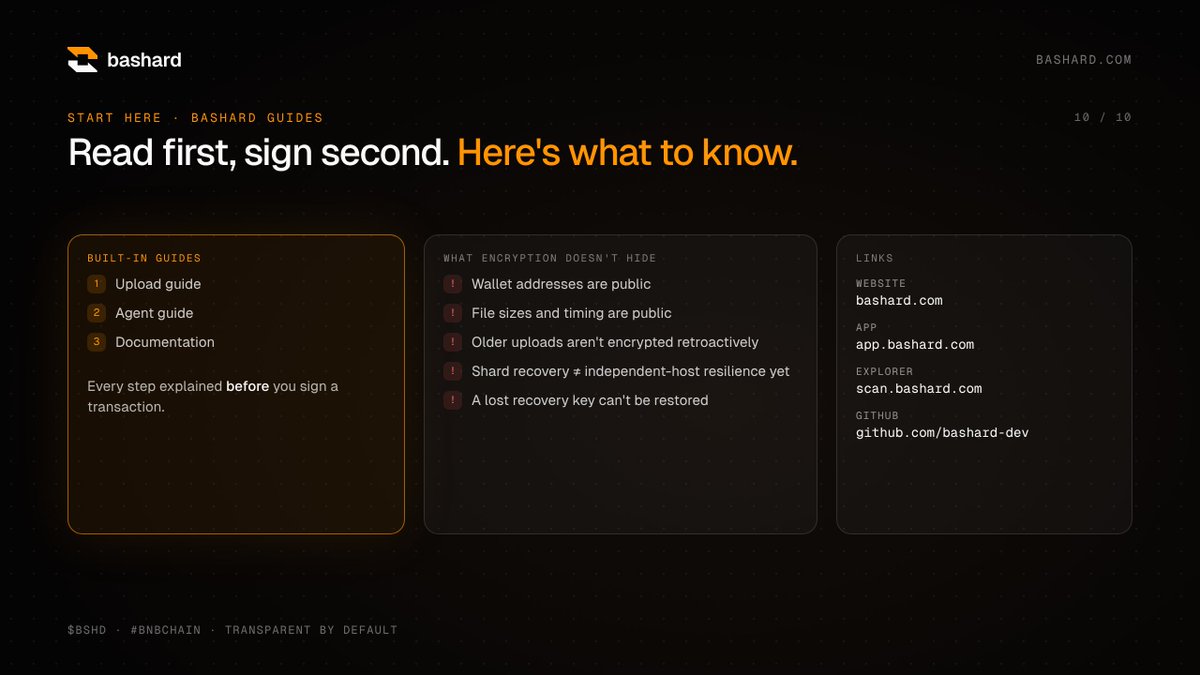
New to Bashard? Read first, sign second. 📘
The upload guide, agent guide and docs walk you through every step before you sign anything.
We also tell you what encryption doesn’t hide: wallet addresses, file sizes and timing are public. Honest by default.
🌐 https://t.co/VFNuODUTmL
📱 https://t.co/dXdFjFUem1
🔎 https://t.co/qjFba7KE7J
Don’t trust us. Verify it. 🔎
BashardScan shows every tape, track, node, epoch and staking event on-chain, but never your file and never your key.
First Agentic Wallet storage on mainnet:
0.3 BSHD → Tape #4 → Track #3 → Certified ✅ → exact SHA-256 match
🔗 https://t.co/qjFba7LbXh
Two things you never want:
❌ your storage expiring quietly
❌ your tokens moving quietly
Bashard renewal checks watch your tapes and draft an extension before expiry. Nothing is signed until YOU approve it.
Automation without giving up control
Got a Binance Agent ID? Your agent can now store on Bashard under its own name. 🏷
① Claim your .ai name in the Binance app
② Add your agent in Bashard
③ Run preflight: Bashard checks that your Agent ID matches the agent wallet before it pays or stores
Open to every agent, not just ours. We’ve already proven it on mainnet: Tape #4 → Track #3 → decrypted, with an exact hash match.
@BinanceWallet@heyibinance@BNBCHAIN
Bashard Update: Agent Workflows
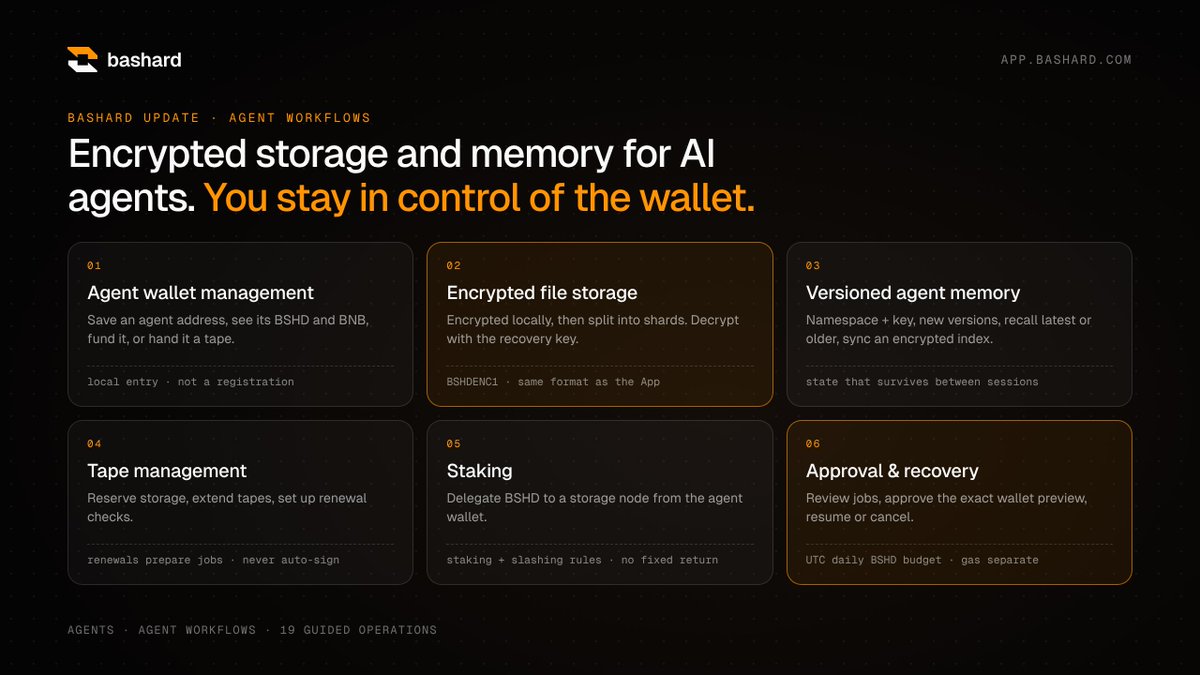
AI agents can now use Bashard for encrypted storage and long-term memory on BNB Chain, and the owner keeps control of every transaction.
What’s new
▸ Agent wallets: save an agent’s address, then fund it with BSHD + BNB or hand it a tape
▸ Encrypted storage: files are encrypted locally before they’re sharded, in the same BSHDENC1 format as the App
▸ Versioned memory: store, version and recall agent state across sessions
▸ Tape management: reserve, extend, renewal checks
▸ Staking: delegate BSHD to storage nodes from the agent wallet
▸ Approvals: every transaction stops at a wallet preview, plus a daily $BSHD budget
How it works
1️⃣ App → Agents: save and fund the agent wallet
2️⃣ pnpm agent init + preflight on the agent’s machine
3️⃣ Reserve a tape → review the preview → approve
4️⃣ Back up the recovery key → encrypted upload
5️⃣ App → Agent workflows: 19 guided operations
What runs where
The website only prepares commands. The agent tool runs locally, and the owner approves each transaction.
⚠️ Never enter a private key or seed phrase on the website. Lost recovery keys can’t be restored.
Status: the CLI is source-only for now. It’s tested on local contracts with a simulated Binance adapter, and real Binance MPC execution isn’t verified yet.
🔗 https://t.co/dXdFjFUMbz
Your AI agent needs a wallet, a budget, and somewhere to store things. 🤖
The Bashard Agents page gives you all three in one place:
▸ track every agent wallet
▸ fund it with BSHD + BNB
▸ hand it a tape, files included
Built for @BinanceWallet Agentic Wallet users on @BNBCHAIN.
We’re looking for node operators. 🖥
Register a Bashard storage node with:
▸ a public HTTPS endpoint
▸ a signer address
▸ your commission rate
▸ a BSHD self-stake
More independent hosts = a stronger network. Selected nodes store shards and earn each epoch.
Builders on @BNBChainDevs 👀 reply 🖥 if you’re in.
Your $BSHD can do more than sit in a wallet. ⚡
Delegate it to the storage nodes that keep the network’s data alive.
▸ Pick a node and delegate
▸ Unstake anytime, withdraw after 2 epochs
▸ Rewards come from real protocol activity
No fake APY promises. Slashing rules apply while you unbond.
Bashard Update: Agent Workflows
AI agents can now use Bashard for encrypted storage and long-term memory on BNB Chain, and the owner keeps control of every transaction.
What’s new
▸ Agent wallets: save an agent’s address, then fund it with BSHD + BNB or hand it a tape
▸ Encrypted storage: files are encrypted locally before they’re sharded, in the same BSHDENC1 format as the App
▸ Versioned memory: store, version and recall agent state across sessions
▸ Tape management: reserve, extend, renewal checks
▸ Staking: delegate BSHD to storage nodes from the agent wallet
▸ Approvals: every transaction stops at a wallet preview, plus a daily $BSHD budget
How it works
1️⃣ App → Agents: save and fund the agent wallet
2️⃣ pnpm agent init + preflight on the agent’s machine
3️⃣ Reserve a tape → review the preview → approve
4️⃣ Back up the recovery key → encrypted upload
5️⃣ App → Agent workflows: 19 guided operations
What runs where
The website only prepares commands. The agent tool runs locally, and the owner approves each transaction.
⚠️ Never enter a private key or seed phrase on the website. Lost recovery keys can’t be restored.
Status: the CLI is source-only for now. It’s tested on local contracts with a simulated Binance adapter, and real Binance MPC execution isn’t verified yet.
🔗 https://t.co/dXdFjFUMbz
No monthly subscription. No surprise bill. 📼
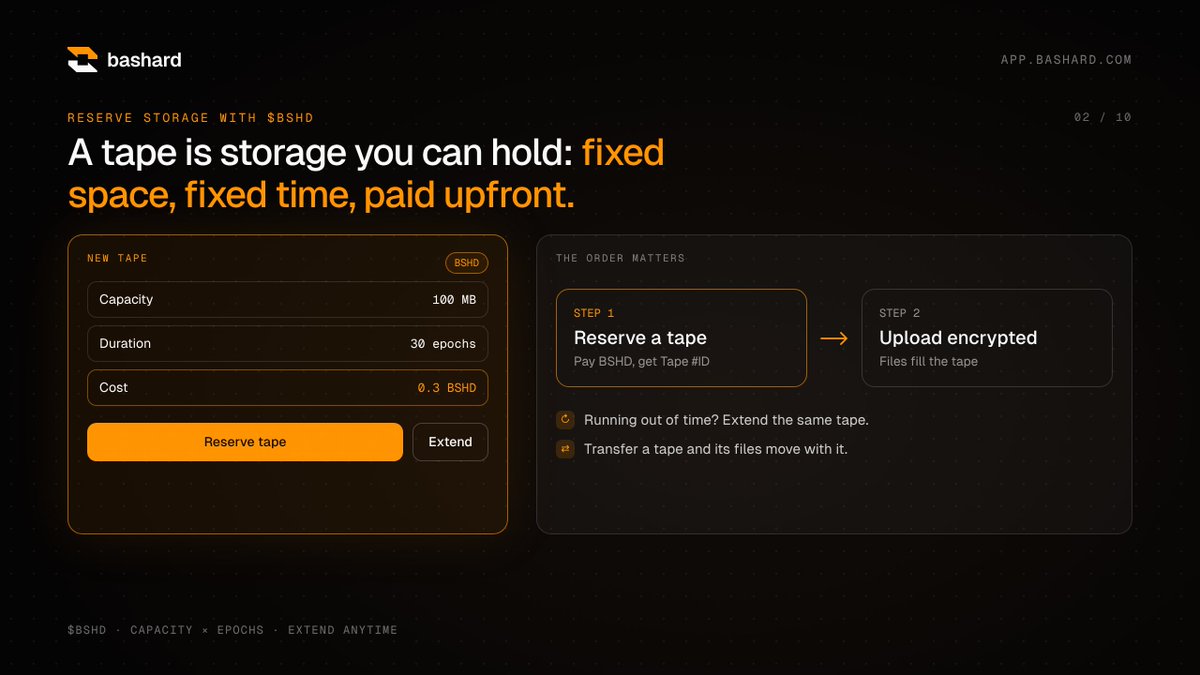
On Bashard you reserve a “tape”: fixed space, fixed time, paid upfront in $BSHD.
100 MB for 30 epochs? 0.3 BSHD.
Need more time? Extend it.
Want to hand it over? Transfer it, files included.
How to Use Bashard Agent Workflows with Binance Agentic Wallet
Want to use an agent wallet to reserve storage, upload encrypted files, and manage on-chain actions with BSHD? Here’s the workflow.
Start here: https://t.co/nNZGmitoXY
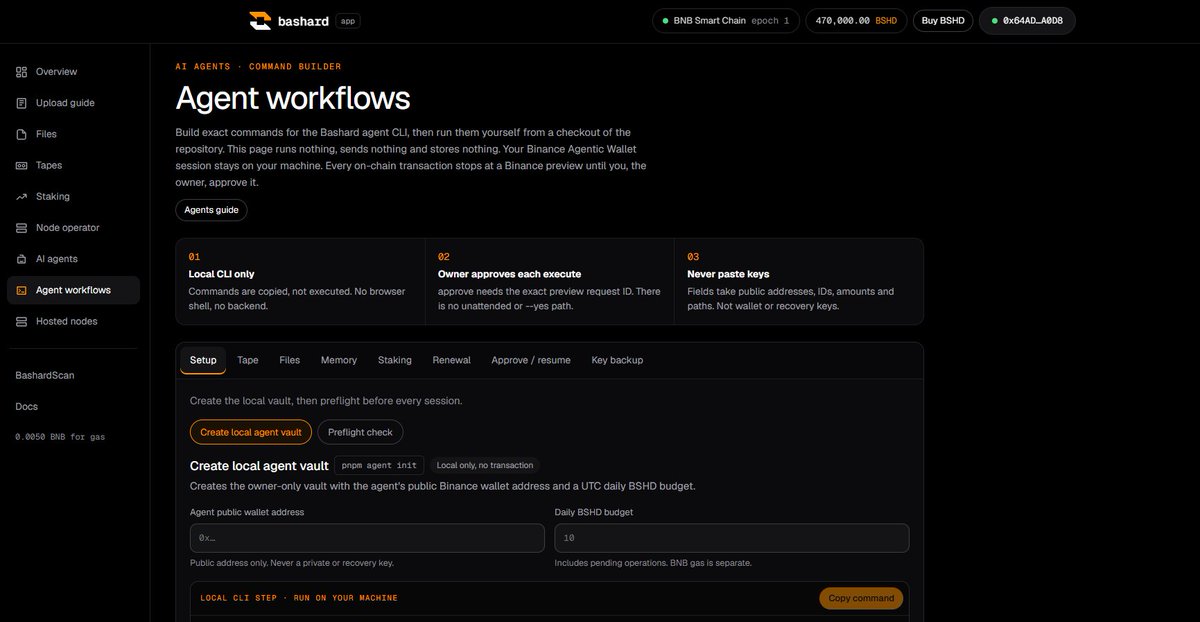
Open Agent workflows in the sidebar.
Important: this page is a command builder, not a browser-based agent runner. Fill in the fields, copy the generated command, and run it locally from your Bashard repository checkout.
1. Prepare your Binance Agentic Wallet
Connect the official Binance Agentic Wallet CLI to your Binance App and enable Developer Mode.
Fund the agent’s BSC wallet with:
• BSHD for storage payments or staking.
• BNB for network fees.
Use the agent wallet’s public address during setup not your private key.
2. Create your local agent vault
Under Setup → Create local agent vault, enter the agent’s public wallet address and your daily BSHD budget.
Copy and run the command, then run Preflight check to check the wallet connection, balances, network, and local vault.
The BSHD budget includes pending operations. BNB gas is separate.
3. Reserve a tape first
A tape is your storage allocation. Create it before uploading a file.
Open Tape → Reserve a tape, choose the capacity and number of epochs, then run the generated command.
Review the Binance preview before approving it. An allowance approval and the reservation may require separate previews.
After confirmation, keep the resulting Tape ID.
4. Prepare your encrypted upload
Open Files → Encrypted upload.
Enter your Tape ID and the path to a file on the machine running the agent. Files must be 32 MiB or smaller.
The agent encrypts the file locally with AES-256-GCM and creates a recovery key before requesting on-chain approval.
5. Back up the recovery key
Use Key backup → Locate recovery key with the upload’s Object ID.
Securely copy the recovery-key file somewhere separate from the encrypted data—ideally outside the agent machine. Confirm the backup only after you have actually made it.
Never paste a recovery key or wallet private key into the command-builder fields, a public post, or GitHub.
6. Review and approve each transaction
Open Approve / resume and use the Job ID and exact Preview Request ID returned by the CLI.
Check the operation, amount, contract, and estimated network fee before approving. For a new encrypted upload, also confirm that its recovery key is backed up.
Registration and certification are separate on-chain steps. Approve each preview individually.
If Binance requests confirmation in the app, complete it and resume the same job. Do not start another upload just because confirmation is pending.
7. Verify and recover your file
Once complete, keep the Track ID, Object ID, and transaction hashes.
Check the track on https://t.co/Bwd5dryI8W and confirm its Certified status. You can also use Verify mainnet proof for the completed job.
To recover the original file, use Files → Download and decrypt with the Track ID and the matching local Object ID or recovery-key file.
Other available workflows
• Memory: save and recover encrypted, versioned files.
• Staking: delegate BSHD to a selected node after reviewing the transaction.
• Renewal: configure checks that draft tape-extension jobs. Each transaction still needs approval.
The essential order:
Set up wallet → Run preflight → Reserve tape → Prepare encrypted upload → Back up key → Approve registration and certification → Verify → Download and decrypt.
Keep your recovery key safe. Without it, Bashard cannot decrypt your file.
AI agents are brilliant… until the session ends and they forget everything. 🧠
Bashard gives agents encrypted, versioned memory:
▸ save under a namespace + key
▸ every save is a new version
▸ recall the latest or any earlier one
▸ sync to another machine
Memory that outlives the session
Bashard Mainnet Update: Binance Agentic Wallet
A real storage workflow has now been completed on BNB Smart Chain mainnet using Binance Agentic Wallet, with Agent ID https://t.co/ebSPlkxiQf.
Here’s what happened:
• 0.3 BSHD paid to reserve 100 MB for 30 epochs Tape #4.
• A test image encrypted with AES-256-GCM before upload.
• Ciphertext uploaded and registered as Track #3.
• On-chain certification completed status: Certified.
• File downloaded, decrypted, and verified against the original with an exact SHA-256 match.
Every transaction was previewed and explicitly approved before execution. The records were verified through two BSC RPC endpoints and returned SUCCESS in Binance’s transaction history.
Verify the mainnet activity:
Storage payment:
https://t.co/UvlFfGcAuw
Encrypted file registration:
https://t.co/5Kw8Ai6wiy
Storage certification:
https://t.co/DJjRzJPhYu
For $BSHD, this is a demonstrated utility: an agent wallet paying for storage, storing encrypted data, and recovering the original file.
We’re still early. This test used one active committee member; it does not establish independent-host resilience or prove every product flow.
But this milestone is real: mainnet payment, encrypted upload, on-chain certification, and verified recovery.
Your cloud provider can open your files. Bashard can’t. 🔐
Files are encrypted on YOUR device with AES-256-GCM, then split into 20 shards across storage nodes. Any 7 rebuild the encrypted copy, and only your recovery key unlocks it.
Encrypted file storage, live on @BNBCHAIN mainnet.
How to Use Bashard Agent Workflows with Binance Agentic Wallet
Want to use an agent wallet to reserve storage, upload encrypted files, and manage on-chain actions with BSHD? Here’s the workflow.
Start here: https://t.co/nNZGmitoXY
Open Agent workflows in the sidebar.
Important: this page is a command builder, not a browser-based agent runner. Fill in the fields, copy the generated command, and run it locally from your Bashard repository checkout.
1. Prepare your Binance Agentic Wallet
Connect the official Binance Agentic Wallet CLI to your Binance App and enable Developer Mode.
Fund the agent’s BSC wallet with:
• BSHD for storage payments or staking.
• BNB for network fees.
Use the agent wallet’s public address during setup not your private key.
2. Create your local agent vault
Under Setup → Create local agent vault, enter the agent’s public wallet address and your daily BSHD budget.
Copy and run the command, then run Preflight check to check the wallet connection, balances, network, and local vault.
The BSHD budget includes pending operations. BNB gas is separate.
3. Reserve a tape first
A tape is your storage allocation. Create it before uploading a file.
Open Tape → Reserve a tape, choose the capacity and number of epochs, then run the generated command.
Review the Binance preview before approving it. An allowance approval and the reservation may require separate previews.
After confirmation, keep the resulting Tape ID.
4. Prepare your encrypted upload
Open Files → Encrypted upload.
Enter your Tape ID and the path to a file on the machine running the agent. Files must be 32 MiB or smaller.
The agent encrypts the file locally with AES-256-GCM and creates a recovery key before requesting on-chain approval.
5. Back up the recovery key
Use Key backup → Locate recovery key with the upload’s Object ID.
Securely copy the recovery-key file somewhere separate from the encrypted data—ideally outside the agent machine. Confirm the backup only after you have actually made it.
Never paste a recovery key or wallet private key into the command-builder fields, a public post, or GitHub.
6. Review and approve each transaction
Open Approve / resume and use the Job ID and exact Preview Request ID returned by the CLI.
Check the operation, amount, contract, and estimated network fee before approving. For a new encrypted upload, also confirm that its recovery key is backed up.
Registration and certification are separate on-chain steps. Approve each preview individually.
If Binance requests confirmation in the app, complete it and resume the same job. Do not start another upload just because confirmation is pending.
7. Verify and recover your file
Once complete, keep the Track ID, Object ID, and transaction hashes.
Check the track on https://t.co/Bwd5dryI8W and confirm its Certified status. You can also use Verify mainnet proof for the completed job.
To recover the original file, use Files → Download and decrypt with the Track ID and the matching local Object ID or recovery-key file.
Other available workflows
• Memory: save and recover encrypted, versioned files.
• Staking: delegate BSHD to a selected node after reviewing the transaction.
• Renewal: configure checks that draft tape-extension jobs. Each transaction still needs approval.
The essential order:
Set up wallet → Run preflight → Reserve tape → Prepare encrypted upload → Back up key → Approve registration and certification → Verify → Download and decrypt.
Keep your recovery key safe. Without it, Bashard cannot decrypt your file.
Bashard Mainnet Update: Binance Agentic Wallet
A real storage workflow has now been completed on BNB Smart Chain mainnet using Binance Agentic Wallet, with Agent ID https://t.co/ebSPlkxiQf.
Here’s what happened:
• 0.3 BSHD paid to reserve 100 MB for 30 epochs Tape #4.
• A test image encrypted with AES-256-GCM before upload.
• Ciphertext uploaded and registered as Track #3.
• On-chain certification completed status: Certified.
• File downloaded, decrypted, and verified against the original with an exact SHA-256 match.
Every transaction was previewed and explicitly approved before execution. The records were verified through two BSC RPC endpoints and returned SUCCESS in Binance’s transaction history.
Verify the mainnet activity:
Storage payment:
https://t.co/UvlFfGcAuw
Encrypted file registration:
https://t.co/5Kw8Ai6wiy
Storage certification:
https://t.co/DJjRzJPhYu
For $BSHD, this is a demonstrated utility: an agent wallet paying for storage, storing encrypted data, and recovering the original file.
We’re still early. This test used one active committee member; it does not establish independent-host resilience or prove every product flow.
But this milestone is real: mainnet payment, encrypted upload, on-chain certification, and verified recovery.
Bashard Mainnet Update: Binance Agentic Wallet
A real storage workflow has now been completed on BNB Smart Chain mainnet using Binance Agentic Wallet, with Agent ID https://t.co/ebSPlkxiQf.
Here’s what happened:
• 0.3 BSHD paid to reserve 100 MB for 30 epochs Tape #4.
• A test image encrypted with AES-256-GCM before upload.
• Ciphertext uploaded and registered as Track #3.
• On-chain certification completed status: Certified.
• File downloaded, decrypted, and verified against the original with an exact SHA-256 match.
Every transaction was previewed and explicitly approved before execution. The records were verified through two BSC RPC endpoints and returned SUCCESS in Binance’s transaction history.
Verify the mainnet activity:
Storage payment:
https://t.co/UvlFfGcAuw
Encrypted file registration:
https://t.co/5Kw8Ai6wiy
Storage certification:
https://t.co/DJjRzJPhYu
For $BSHD, this is a demonstrated utility: an agent wallet paying for storage, storing encrypted data, and recovering the original file.
We’re still early. This test used one active committee member; it does not establish independent-host resilience or prove every product flow.
But this milestone is real: mainnet payment, encrypted upload, on-chain certification, and verified recovery.
Bashard Update: Agent Workflows
AI agents can now use Bashard for encrypted storage and long-term memory on BNB Chain, and the owner keeps control of every transaction.
What’s new
▸ Agent wallets: save an agent’s address, then fund it with BSHD + BNB or hand it a tape
▸ Encrypted storage: files are encrypted locally before they’re sharded, in the same BSHDENC1 format as the App
▸ Versioned memory: store, version and recall agent state across sessions
▸ Tape management: reserve, extend, renewal checks
▸ Staking: delegate BSHD to storage nodes from the agent wallet
▸ Approvals: every transaction stops at a wallet preview, plus a daily $BSHD budget
How it works
1️⃣ App → Agents: save and fund the agent wallet
2️⃣ pnpm agent init + preflight on the agent’s machine
3️⃣ Reserve a tape → review the preview → approve
4️⃣ Back up the recovery key → encrypted upload
5️⃣ App → Agent workflows: 19 guided operations
What runs where
The website only prepares commands. The agent tool runs locally, and the owner approves each transaction.
⚠️ Never enter a private key or seed phrase on the website. Lost recovery keys can’t be restored.
Status: the CLI is source-only for now. It’s tested on local contracts with a simulated Binance adapter, and real Binance MPC execution isn’t verified yet.
🔗 https://t.co/dXdFjFUMbz
What actually happens inside Bashard?
Who keeps your files, and why would they keep them safe?
1. Operators run storage servers and lock BSHD as stake.
2. The nodes with the most stake form the committee and hold the encrypted pieces of each file. Any 7 of 20 rebuild it.
3. Holders can delegate BSHD to a node and receive pool shares. Leaving takes 2 epochs, and that stake can still be slashed while it waits.
4. Users pay BSHD for storage. It's paid out every epoch: commission to the operator, the rest back into the pool.
5. Nodes are tested. Fail, and the committee votes: the slashed stake goes to the burn address, and the node is jailed.
Honest storage earns. Lost data burns.
Being clear about today: the network currently runs on one bootstrap operator. The video shows how the system works once independent operators join, which is milestone 04 on our roadmap.
Rewards come from real storage fees. No fixed return.
Explore → https://t.co/dXdFjFUMbz
Verify → https://t.co/qjFba7LbXh
BSHD Staking: How to Get Started and Earn
Put your BSHD to work by delegating it to a Bashard node.
Getting started:
1. Connect your wallet at https://t.co/nNZGmitoXY on BNB Smart Chain.
2. Open Staking and review the available nodes, their status and commission.
3. Enter the amount of BSHD you want to delegate, then click Stake.
4. Review and confirm the token approval and staking transaction in your wallet.
5. Once confirmed, your position will appear under Your stake.
You’ll need BNB for transaction fees. No tape reservation is required tapes are for file storage, not staking.
Where will staking dividends come from?
$BSHD has a 2% buy tax and a 2% sell tax. Our plan is to allocate the revenue collected from these taxes entirely to dividends distributed through staking.
That means the planned dividend pool will depend on actual tax revenue, rather than a promised fixed return.
To exit a staking position, select Unstake all, wait the contract’s two-epoch unbonding period, then use Withdraw when your balance becomes available. Staked and unbonding funds remain subject to the network’s penalty rules.
Stake $BSHD. Support the network. Follow your position in the App.
An agent with a name should also have a memory.
Bashard is preparing agent workflows on BNB Chain: Binance Agentic Wallet signs, files are encrypted before they leave the agent, and memory stays versioned and recoverable.
AI agents will need more than payments. They’ll need somewhere to keep what they know.
We’re preparing Bashard agents on BNB Chain: encrypted storage and versioned memory, signed with Binance Agentic Wallet, and the owner approves every transaction.
https://t.co/iS3Iji5xSl
When BNB started 9 years ago, I never thought I would be ringing the bell for a blockchain token (treasury) on NASDAQ one day. I don’t know what shows crypto and tradfi converging more than this.
#BNB Standard
BashardScan is already showing storage reservations, certified uploads, operator registrations, and staking activity on BSC mainnet.
The latest snapshot:
• 2.07M BSHD in total stake
• 2 certified tracks in the last 24 hours
• 112 KB stored
• A new hosted operator registered, with additional staking activity recorded
These are recorded network events not just numbers on a landing page. You can open Scan, inspect the activity, and follow the associated transactions.
The current epoch still has one serving committee member. Newly registered operators are separate from the current committee; participation is determined when the next committee is selected.
We’re still early. Storage usage is small, and there is more to build and validate as the network grows. But Bashard already has working infrastructure and verifiable mainnet activity.
Follow the progress through the data.
Scan: https://t.co/Bwd5dryI8W
App: https://t.co/nNZGmitoXY
$BSHD
BNB Chain is designing a new L1 in the open, built for trading, payments, privacy and AI.
Those last two have one thing in common: data.
AI agents need memory, datasets and documents.
Privacy apps need encrypted files nobody else can read.
None of that belongs in blockspace. But all of it needs on-chain guarantees.
That's the pattern we already run on BSC:
→ files encrypted on the user's device
→ ciphertext split into 20 shards, any 7 rebuild it
→ the chain stores only commitments: payments, registrations, certifications, staking
→ the public record shows activity, never contents
Chain for coordination. Storage nodes for data. Keys for the user.
The NewL1 design is open for builder feedback, and storage and privacy each have their own track:
https://t.co/vgItCFIHuV
We'll be sharing what we've learned running encrypted storage on BSC.
Bashard Roadmap: 10 planned releases 🟧
From mainnet storage to a broader storage network.
These are planned releases, not features available today. Each one ships when its milestone is met.
PRODUCT
01 · Clearer uploads
Checks for network, tape capacity, BSHD and gas before you upload, plus clear steps from encryption to confirmed storage.
✓ Done when: a new user goes from wallet to confirmed record with no confusing status.
02 · Stronger recovery
Better key export and verification, clear errors for wrong keys or damaged backups, and versioned file formats.
✓ Done when: an encrypted backup restores on another device.
Bashard still can't restore a lost key. That never changes.
03 · Storage lifecycle
Clear capacity, usage and expiry, with warnings before paid storage ends.
✓ Done when: you always know what's left, when it expires and what to do.
NETWORK
04 · Independent multi-operator storage
Onboarding for new operators, shards placed across separate infrastructure, and public evidence of who stores what.
✓ Done when: recovery is proven across independent operators.
20 shards alone ≠ 20 independent operators.
05 · Better BashardScan
Separate states for transaction, indexed record, certification and retrieval check, plus public node health.
TOKEN
06 · Tax-funded staking distributions
Revenue from BSHD's 2% buy and 2% sell tax goes to staking distributions, with published rules and on-chain records, kept separate from node rewards.
Distributions depend on actual revenue. No fixed APY, no guaranteed return.
DEVELOPERS
07 · Developer tools
SDK docs with working examples, clear API contracts, and keys that stay under the user's control.
ANDROID
08 · Closed beta
Reserve → encrypt → upload → recover, on Android.
The app will never ask for your seed phrase or private key.
09 · Public release
Stable release after the beta, via channels such as Google Play, subject to their review. No assumed date.
SCALE
10 · Network expansion
More operators based on real demand, measured capacity, tested recovery and transparent reporting.
Simpler storage. Stronger recovery. Independent operators. Transparent distributions. Android. Developer integrations.
Working releases and verifiable results, not announcements alone.
https://t.co/VFNuODVrcj · https://t.co/dXdFjFUMbz · https://t.co/qjFba7LbXh
Bashard Progress: What Exists Today and What Matters Long Term
Building storage infrastructure is not finished when a contract goes live.
The important question is what users can do now and what still needs to develop.
The current foundation
Bashard has a BNB Smart Chain mainnet implementation with $BSHD integrated into its storage and staking contracts.
The product is separated into three public interfaces:
• https://t.co/pmEm7L2Zoi — project information
• https://t.co/nNZGmitoXY — storage and staking
• https://t.co/Bwd5dryI8W — network records and activity
The App includes client-side file encryption, recovery-key verification, tape reservations, and a guided upload process.
A completed public-node recovery check retrieved seven shards and reconstructed a known 65,536-byte test file with a matching SHA-256 checksum. That is evidence of the tested retrieval path not a claim that every possible failure has been eliminated.
The current infrastructure stage
The bootstrap storage setup uses one operator. Sharding within that setup should not be presented as independent multi-operator redundancy.
Expanding independent custody and demonstrating recovery across separate operators are meaningful long-term milestones.
$BSHD