🚨HOW TO ENABLE DLSS 4.5 - NVIDIA APP🚨
1. Open NVIDIA App and go to "Drivers" tab.
2. Update your drivers to 591.74 or newer.
3. Go to "Settings", then "About" tab, check if your NVIDIA App is updated to 11.0.6.374 or newer. If not, enable experimental slider in about section to update it.
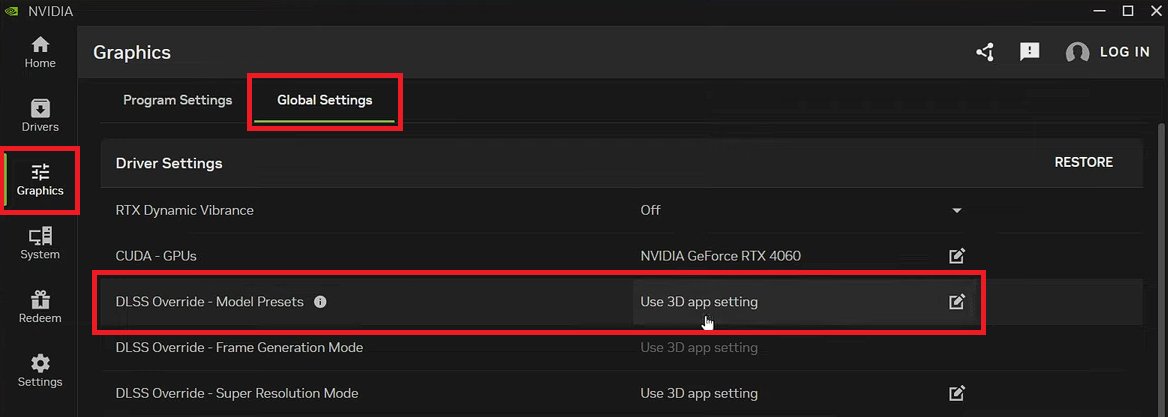
4. If everything is correctly updated, go to "Graphics", then "Global Settings".
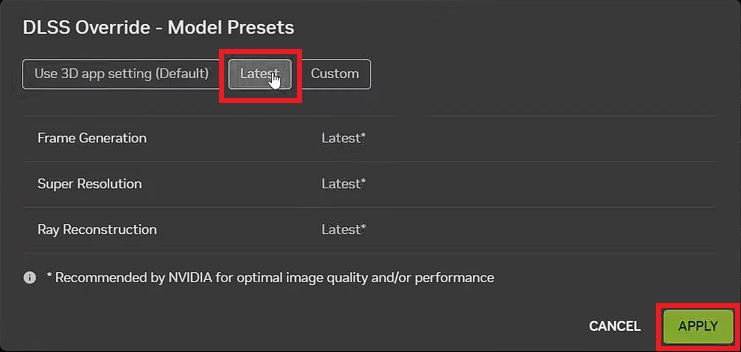
5. At "DLSS Override - Model Presets", choose "Latest" and hit Apply.
6. Done, just enable DLSS in your game (it will work for ANY game that supports DLSS).