Hey my CyberBestie, I have exciting news to share with you and a huge favor to ask. I am part of the Affiliation program by @TCMSecurity.
If you planning on getting any of there certification or attend live session kindly use my affiliate link: https://t.co/gaCJ55PMW4
I completed the Web Security Academy lab:
User ID Controlled by Request Parameter, with Unpredictable User IDs
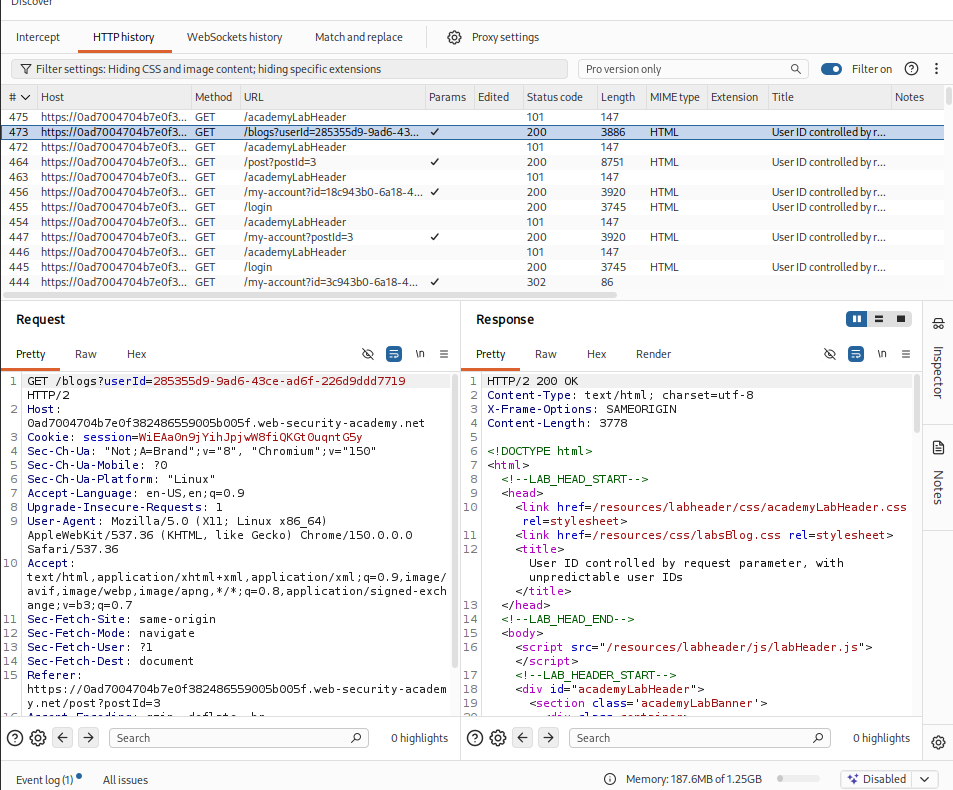
I logged into the application using the credentials provided for the lab: wiener:peter. After signing in, I navigated to My Account, where my API key was displayed. Unlike the previous lab, I noticed that the id parameter was no longer a simple username. Instead, it had been replaced with what appeared to be an unpredictable user identifier.
At first, this seemed to prevent the same IDOR attack since I could no longer guess another user's identifier by simply changing the value from wiener to carlos.
Instead of assuming the application was secure, I continued exploring the available functionality. One endpoint that stood out was the Home page, which displayed blog posts written by different users, including administrator, wiener, and carlos.
As I browsed the blog posts, I noticed something interesting. Whenever I opened one of Carlos's posts, the URL changed to:
/blogs?userId=<user-id>
This immediately caught my attention because the application was exposing Carlos's unique userId in the URL. Although the identifier was unpredictable, it was no longer secret because it was disclosed through another part of the application.
With Carlos's userId now available, I returned to the account endpoint:
/my-account?id=<user-id>
I replaced my own user ID with the userId I had obtained from Carlos's blog post and sent the request.
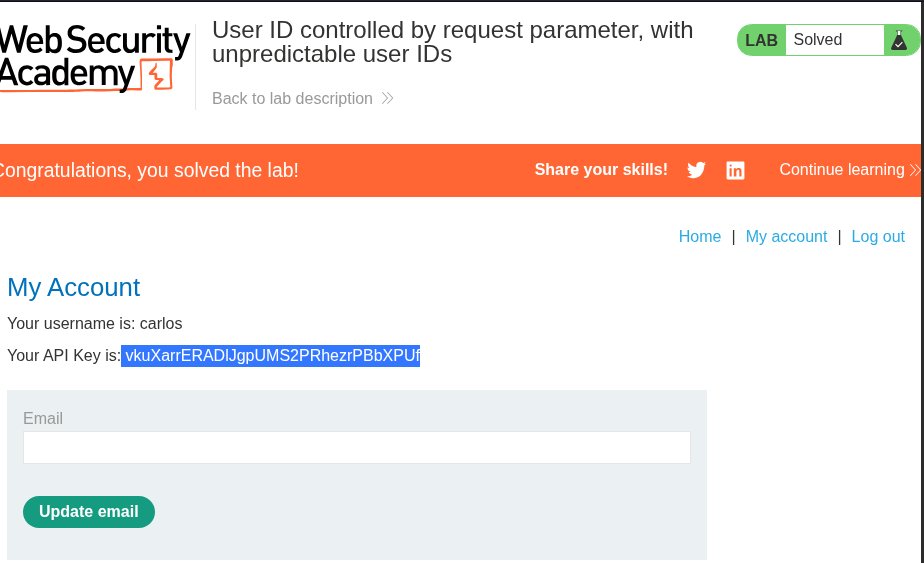
The server responded with Carlos's account information, including his API key. There were no authorization checks to verify that I was requesting my own account, even though I was authenticated as wiener.
This demonstrates that simply replacing predictable identifiers with random or unpredictable ones is not enough to prevent an IDOR vulnerability. If those identifiers are exposed elsewhere in the application, an attacker can still obtain them and use them to access unauthorized resources. The real security control should be proper server-side authorization that verifies whether the authenticated user is permitted to access the requested resource.
By discovering Carlos's userId through the blog endpoint and reusing it in the /my-account request, I was able to expose his API key and successfully solve the lab.
@WebSecAcademy
https://t.co/nzhkmf9UDk
I completed the Web Security Academy lab:
User ID Controlled by Request Parameter
I logged into the application using the credentials provided for the lab: wiener:peter. After signing in, I navigated to the My Account page, where I noticed that my API key was displayed on the screen.
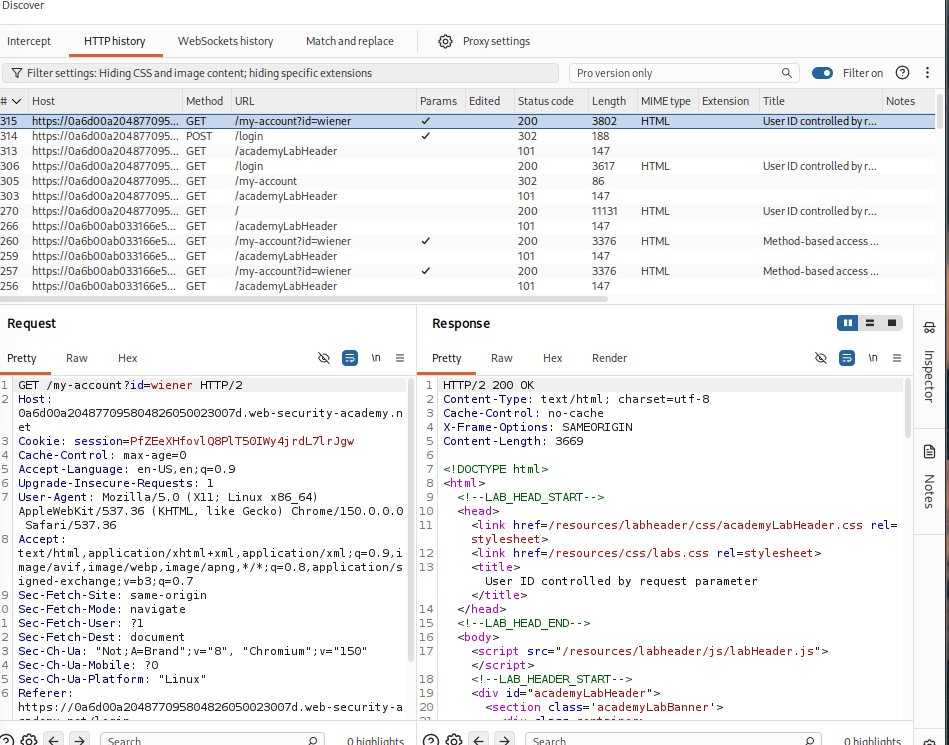
Seeing that immediately made me wonder how the application determined which user's API key to display. Looking at the request, I noticed that the account information was controlled by the id parameter. My first thought was: What happens if I simply change the value from wiener to carlos?
API keys are highly sensitive because they function much like passwords or digital signatures for applications. They authenticate requests and grant access to APIs, databases, cloud services, or other protected resources. Since an API cannot distinguish between a legitimate user and an attacker who possesses a valid API key, exposing these keys can have serious security consequences.
To test this, I sent the request to Burp Suite Repeater and changed the parameter from:
id=wiener
to:
id=carlos
I then resent the request to see how the application would respond.
To my surprise, the server returned a 200 OK response. There were no additional authorization checks to verify that I was actually carlos.
To confirm the finding, I repeated the same modification directly in the browser by changing the id value in the URL. The page immediately displayed Carlos's API key.
What makes this vulnerability particularly serious is how little effort was required to exploit it. I did not need to bypass authentication or perform any complex attack. I simply modified a user-controlled request parameter, and the application returned another user's sensitive information.
This is a classic example of an Insecure Direct Object Reference (IDOR) vulnerability, where the application relies on user-supplied identifiers without verifying that the authenticated user is authorized to access the requested resource. Instead of validating ownership, the application trusted the value of the id parameter, allowing me to retrieve another user's API key simply by changing the request.
With Carlos's API key successfully exposed, the lab was solved.
@WebSecAcademy
https://t.co/qcyaZVkIgm
I completed the Web Security Academy lab:
Method-based access control can be circumvented
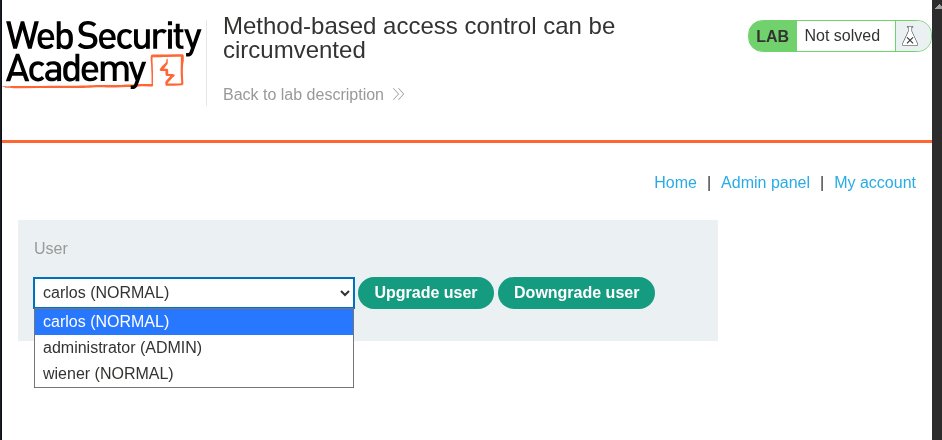
In this lab, I was provided with the administrator credentials: administrator:admin. After logging in, I started exploring the different endpoints and features available to the administrator account. One feature that immediately caught my attention was the Admin Panel, specifically the User List, where I could either Upgrade user or Downgrade user. The list contained the following users:
carlos (NORMAL)
administrator (ADMIN)
wiener (NORMAL)
To understand how the functionality worked, I decided to click Upgrade user for carlos. As soon as I did, Carlos was instantly promoted to an administrator. This made me curious about the HTTP request responsible for the action, so I intercepted the traffic in Burp Suite.
I found that the application sent a POST request to the /admin-roles endpoint, and the server responded with a 302 Found, indicating that the role change had been processed successfully.
Next, I wanted to see how the application behaved from the perspective of a normal user. The lab also provided the credentials wiener:peter, so I opened an Incognito window and logged in as wiener, who does not have administrative privileges.
As usual, I explored the available endpoints to understand what a normal user could access. There was nothing particularly interesting from the interface, but I already knew about the /admin-roles endpoint from my earlier testing as the administrator.
This made me wonder what would happen if I replayed the same request using Wiener's session. I copied Wiener's Cookie: session value and replaced the administrator's session cookie in the intercepted POST request to /admin-roles.
As expected, the server returned a 401 Unauthorized response, meaning the application correctly rejected the request. At first glance, this looked secure, but I have learned that developers do not always validate every possible request variation. Instead of stopping there, I continued testing.
My next step was to modify the HTTP method. I first changed the request method from POST to POSTX to see how the application handled an unexpected method. This time, the server responded with a 400 Bad Request and a Missing parameter error. That response suggested the application was processing the request differently rather than rejecting it outright.
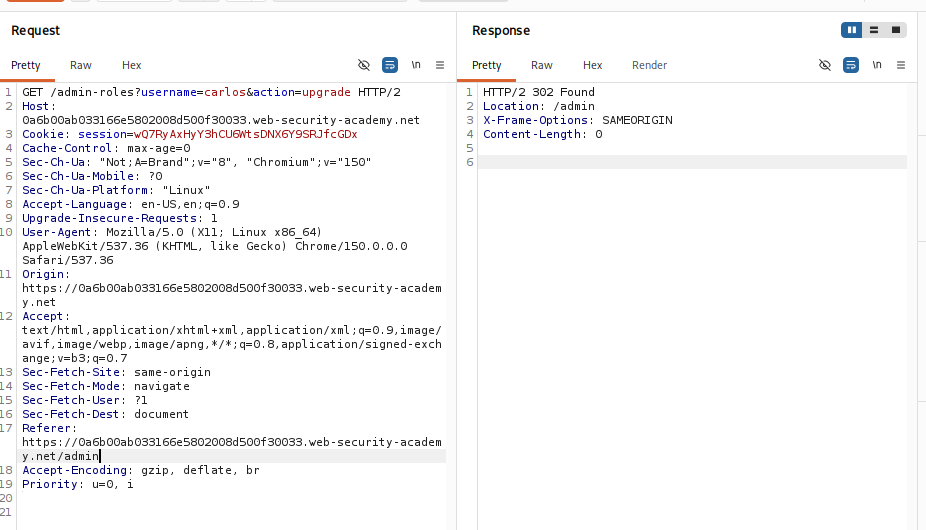
From Burp Repeater, I then right-clicked the request and selected Change request method, which automatically converted the original POST request into a GET request.
Surprisingly, the server responded with a 302 Found instead of rejecting the request.
Seeing this, I modified the username parameter from carlos to wiener and resent the request.
Once again, the response was 302 Found.
When I refreshed the application, I discovered that the wiener account had been successfully upgraded to an administrator, even though the request was made from a non-admin account.
This demonstrates a serious access control vulnerability. The application correctly enforced authorization checks for POST requests but failed to apply the same checks when the request method was changed to GET. Because the authorization logic was tied to a specific HTTP method rather than the underlying action, I was able to gain administrative privileges without proper authorization.
This lab highlights an important lesson: authorization should be enforced consistently regardless of the HTTP method used. If security controls only validate one request method, attackers can often bypass them simply by sending the same request using a different method.
@WebSecAcademy
https://t.co/U3NQENeAdp
I completed the Web Security Academy lab:
URL-based access control can be circumvented
I started by clicking through all the available endpoints to see how each one responded. The endpoint I was most interested in was the `admin panel`. When I tried to access it, the application returned an `Access Denied` message, which confirmed that some form of authorization check was in place.
From my study notes, I remembered the `X-Original-URL` header. This is a non-standard HTTP request header that some web applications and frameworks use to override or redefine the target URL path of an incoming request. It is processed by backend servers when front-end proxies, load balancers, or web application firewalls rewrite or pass routing information.
This ties directly into the OWASP API Security testing guidance on authorization weaknesses. The goal is to identify situations where an authenticated user can access resources or perform actions beyond their assigned permissions, resulting in horizontal or vertical privilege escalation. Although some authorization tests also cover unauthenticated access or post-logout scenarios, the primary focus is ensuring that authorization controls are properly enforced for authenticated users and different roles.
With that in mind, I sent the request to Burp Suite Repeater and added the header:
```http
X-Original-URL: /invalid
```
I wanted to see how the application would respond if I attempted to override the original path. The server returned a `404 Not Found`, which suggested that the header was being processed, even though the path itself did not exist.
Next, I experimented with different values such as `/valid`, but that also resulted in a `404 Not Found`. I then changed the header to:
```http
X-Original-URL: /admin
```
This was where things became interesting. Instead of denying access, the request was treated as though I had permission to access the admin functionality. Even though I was not an administrator, I was now able to reach admin-only functionality. In this lab, that meant I had the privileges needed to delete user accounts.
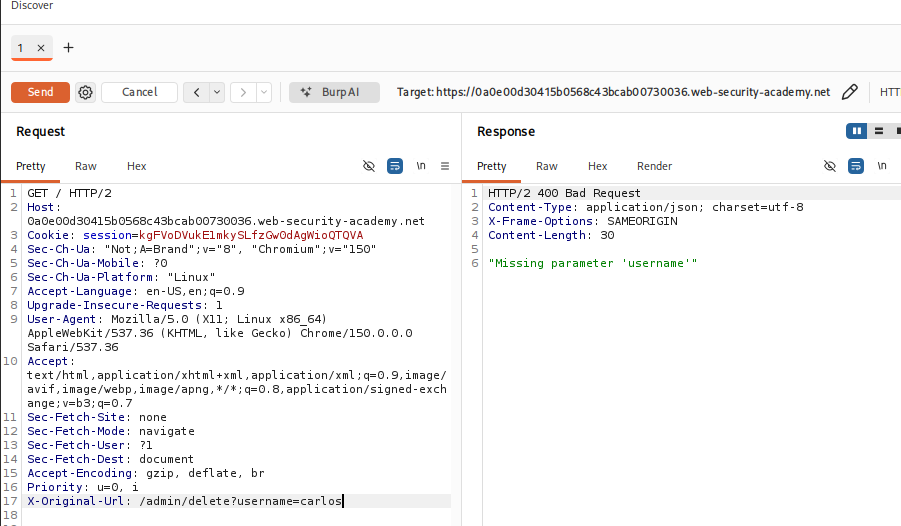
The next step was deleting the `carlos` user. I initially tried navigating to the functionality through the website and also attempted adding the required path in Burp by changing the `X-Original-URL` value to `/admin/delete` while including `?username=carlos`. Neither approach worked.
After thinking it through, I decided to leave the `X-Original-URL` header as `/admin/delete` and instead place the query parameter directly on the original GET request:
```text
?username=carlos
```
This time, the server responded with a `302 Found`. At first, I thought nothing had happened because the Burp response did not reveal much. However, when I checked the actual website, I saw that the `carlos` account had been deleted and the lab was marked as solved.
One lesson I took away from this lab is not to rely solely on Burp Suite's responses. Sometimes an application responds with a redirect or another minimal response, making it seem as though nothing happened. It's always worth monitoring the web application itself while testing requests, because successful exploits are not always obvious from the HTTP response alone.
@WebSecAcademy
https://t.co/Q9IsELyVxz
🏆 Congratulations to @Byt3Ra1 , @TheCyberGuyZW and @_CyNjaX_
Don't forget to send us your email with the choice of exam at [email protected] so we can send you the exam link.
A round of applause for everyone who participated! 👏
Stay tuned for more opportunities and thanks to the incredible support from our community 🎉🙏
Yay!!!
I just earned my highest bounty ever for a single report since I joined this field.
I earned $20,000 for a critical issue discovered.
#bugbounty
Nexus machine Unlocked #10
Join us for our next HTB Zimbabwe meetup as we explore Nexus, an easy Linux machine that showcases how seemingly small misconfigurations can be chained together into a full system compromise.
During this session, we'll discuss:
-Effective enumeration strategies
-Credential exposure and secrets management
-Web application security assessment
-Linux privilege escalation concepts
-Security lessons and defensive best practices
About Nexus
Nexus is an easy-difficulty Linux machine featuring an exposed Gitea repository that leaks credentials, alongside a job posting that reveals valid usernames. Those credentials provide access to a vulnerable Krayin CRM instance (CVE-2026-38526), illustrating how application vulnerabilities and exposed secrets can combine to expand access. Further enumeration uncovers additional credentials for SSH access, while a vulnerable Gitea template synchronization service demonstrates how directory traversal flaws can ultimately lead to root-level compromise.
Whether you're new to @hackthebox_eu or an experienced security professional, this meetup is a great opportunity to learn, share knowledge, and connect with Zimbabwe's growing cybersecurity community.
Date: 25 July 2025
Time: 16:00 CAT
Platform: Discord, on the Main-Stage. Check the link to the Discord in the comment section.
I hope to see you there. Another week, another machine to learn from.
https://t.co/O8DIR5MIri #Meetup via @Meetup
I really don't have any word's this is my first bounty after a year of hardwork .
Thanks everyone who show support in my last post really appreciated and good luck to all of you keep hunting and keep learning ☺️ one day your bounty gonna found you .
Goodnight 🌑