I spent 2 days speeding up an API endpoint...
And I made it 15x faster.
The endpoint did heavy calculations and pulled data from several services, so it didn’t scale.
My process was simple:
- Find the slowest code
- Fix the queries
- Cut external calls
- Add caching last
Measure everything. The slow parts were obvious:
- DB calls inside a loop
- Repeated external calls
- Duplicate calculations
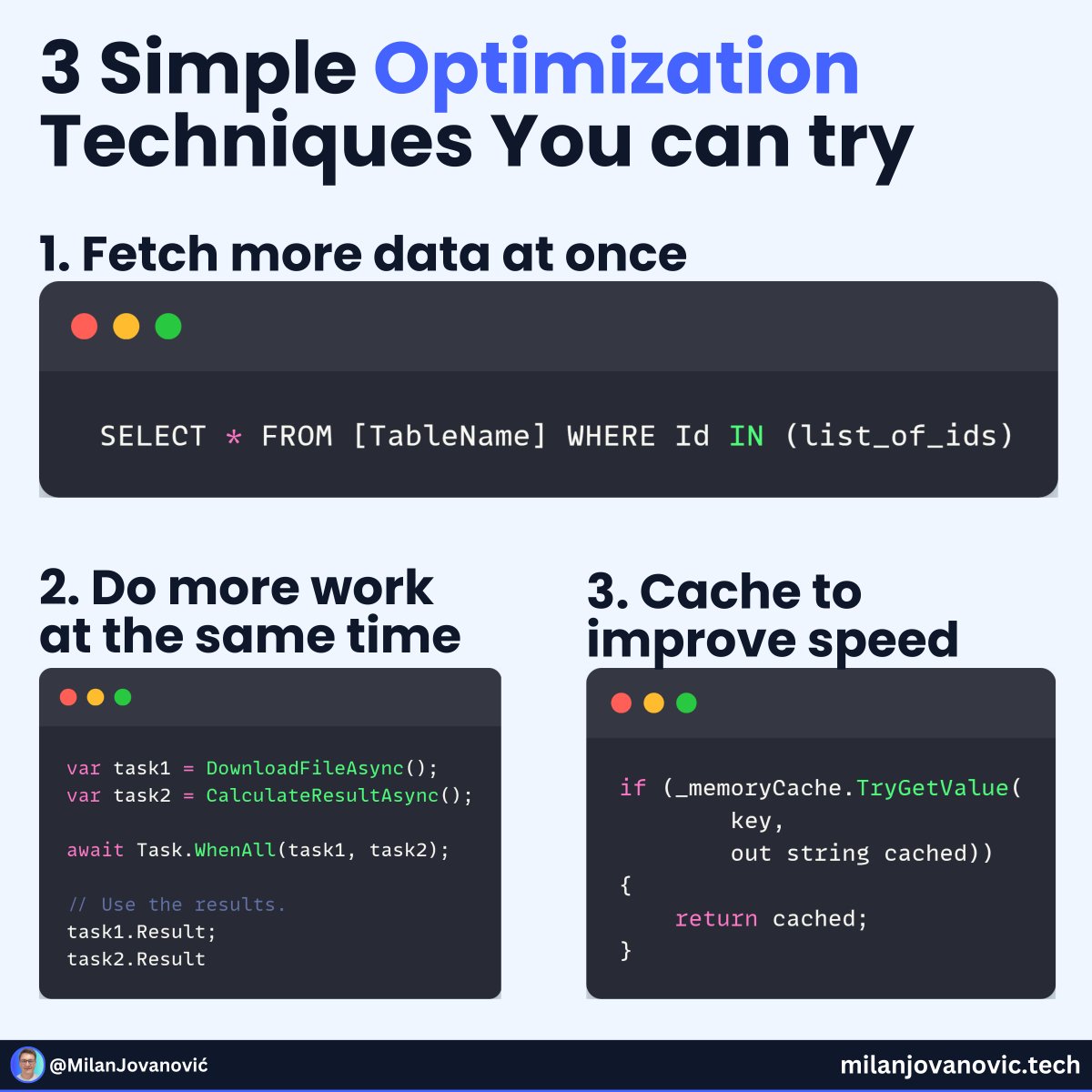
Database round trips cost time, so avoid loops and batch what you can.
Independent service calls? Run them concurrently.
Still slow? Add caching with clear expiration rules (IMemoryCache / IDistributedCache).
For distributed systems, OpenTelemetry makes the bottlenecks visible.
👉 Here’s how: https://t.co/bUjenFbPvR
What would you do differently?
---
Sign up for the .NET Weekly with 75K+ other engineers, and get a free Clean Architecture template: https://t.co/hZHGZo9b4z
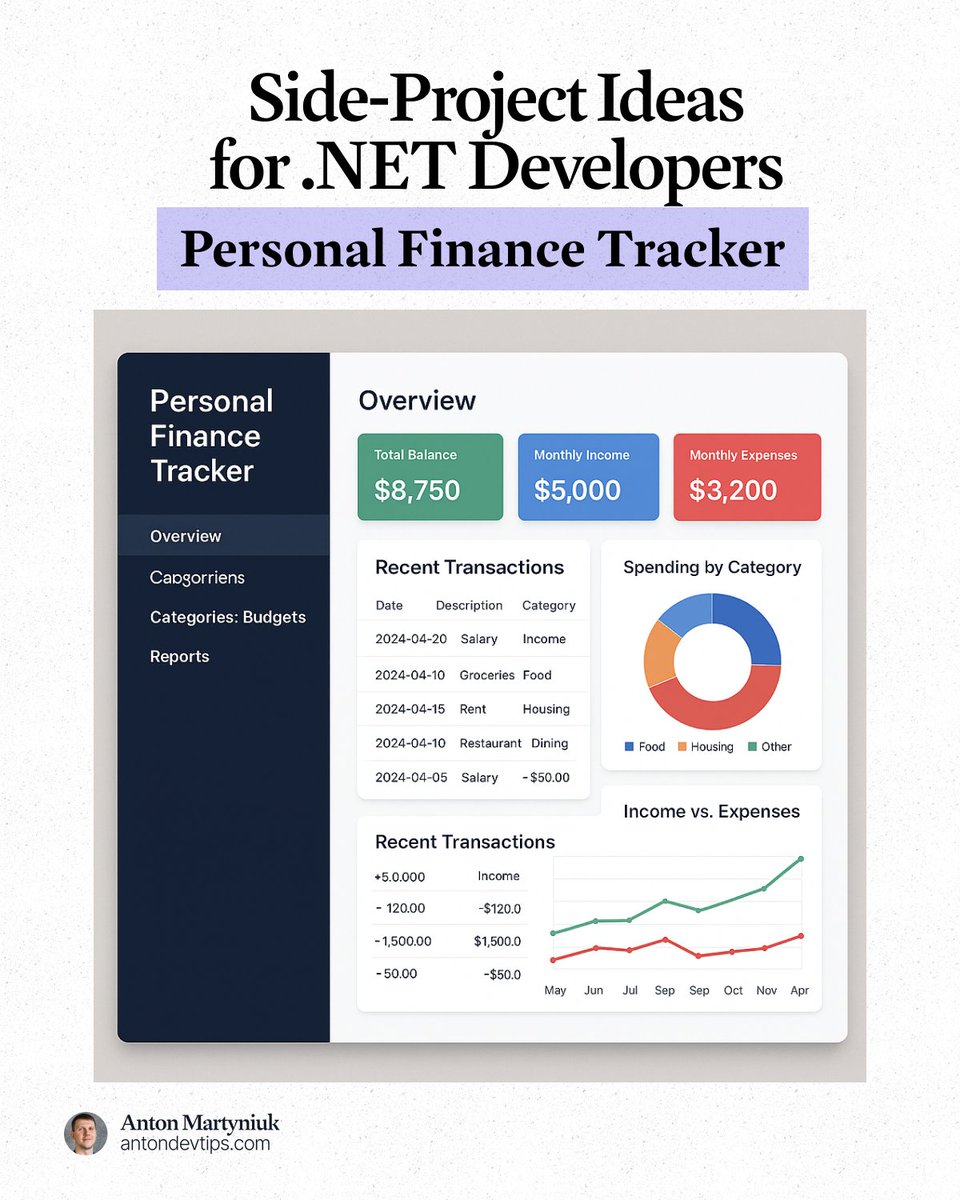
If you want to level up your .NET skills, try building a 𝗣𝗲𝗿𝘀𝗼𝗻𝗮𝗹 𝗙𝗶𝗻𝗮𝗻𝗰𝗲 𝗧𝗿𝗮𝗰𝗸𝗲𝗿 that feels like a real production system.
This project is simple to understand, but deep enough to teach real architecture.
📌 Here's what we're building
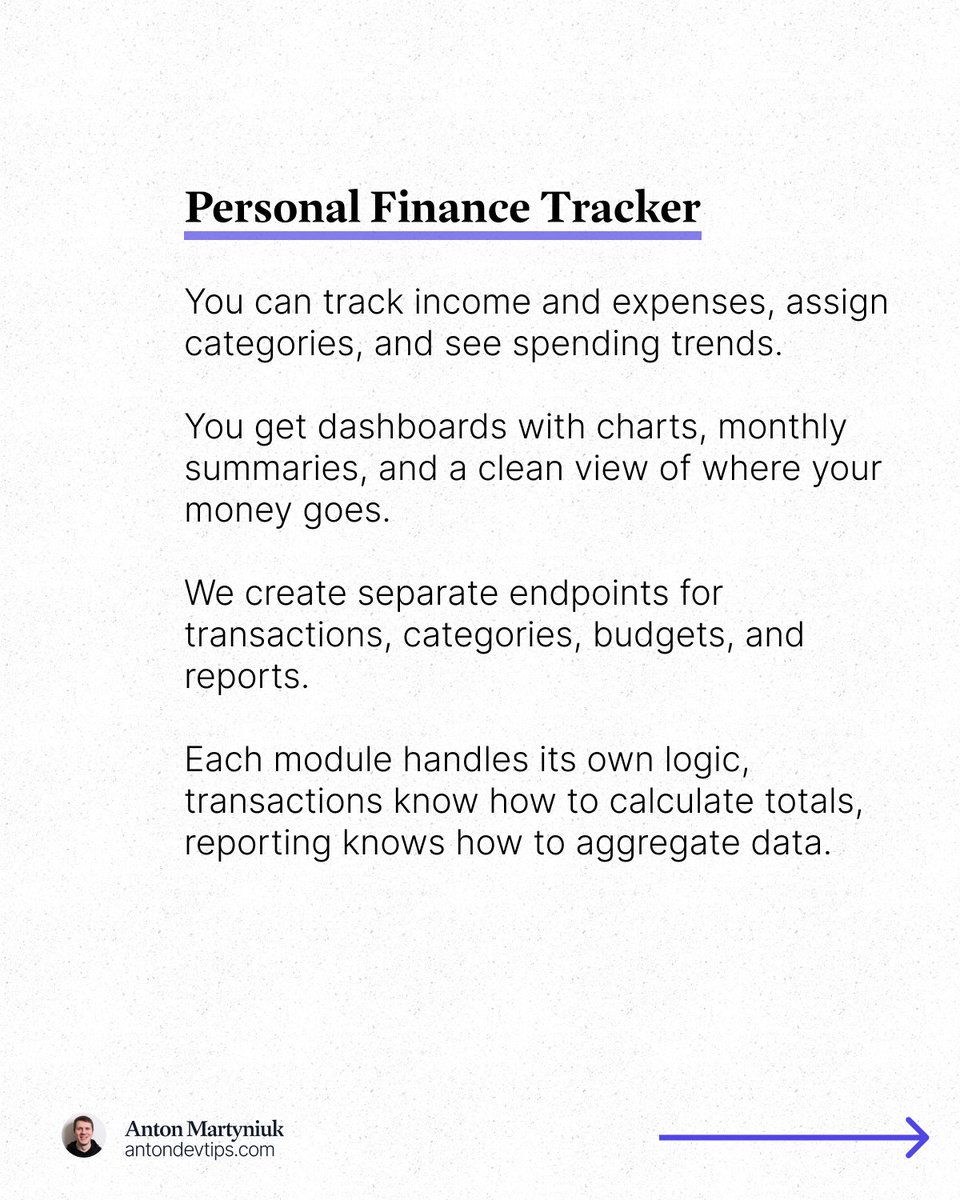
You can track income and expenses, assign categories, and see spending trends.
You get dashboards with charts, monthly summaries, and a clean view of where your money goes.
And the stack is fully modern:
• ASP .NET Core 10 Web API
• React dashboard
• Neon Postgres
• Azure App Service
• Azure Static Web Apps
📌 Backend: ASP .NET Core 10 Web API
We create separate endpoints for transactions, categories, budgets, and reports.
Each module handles its own logic, transactions know how to calculate totals, reporting knows how to aggregate data.
Here is what we will use:
• Minimal APIs
• EF Core
• FluentValidation
• Scheduling with TickerQ
• Observability with OpenTelemetry
• Integration Tests with xUnit and TestContainers
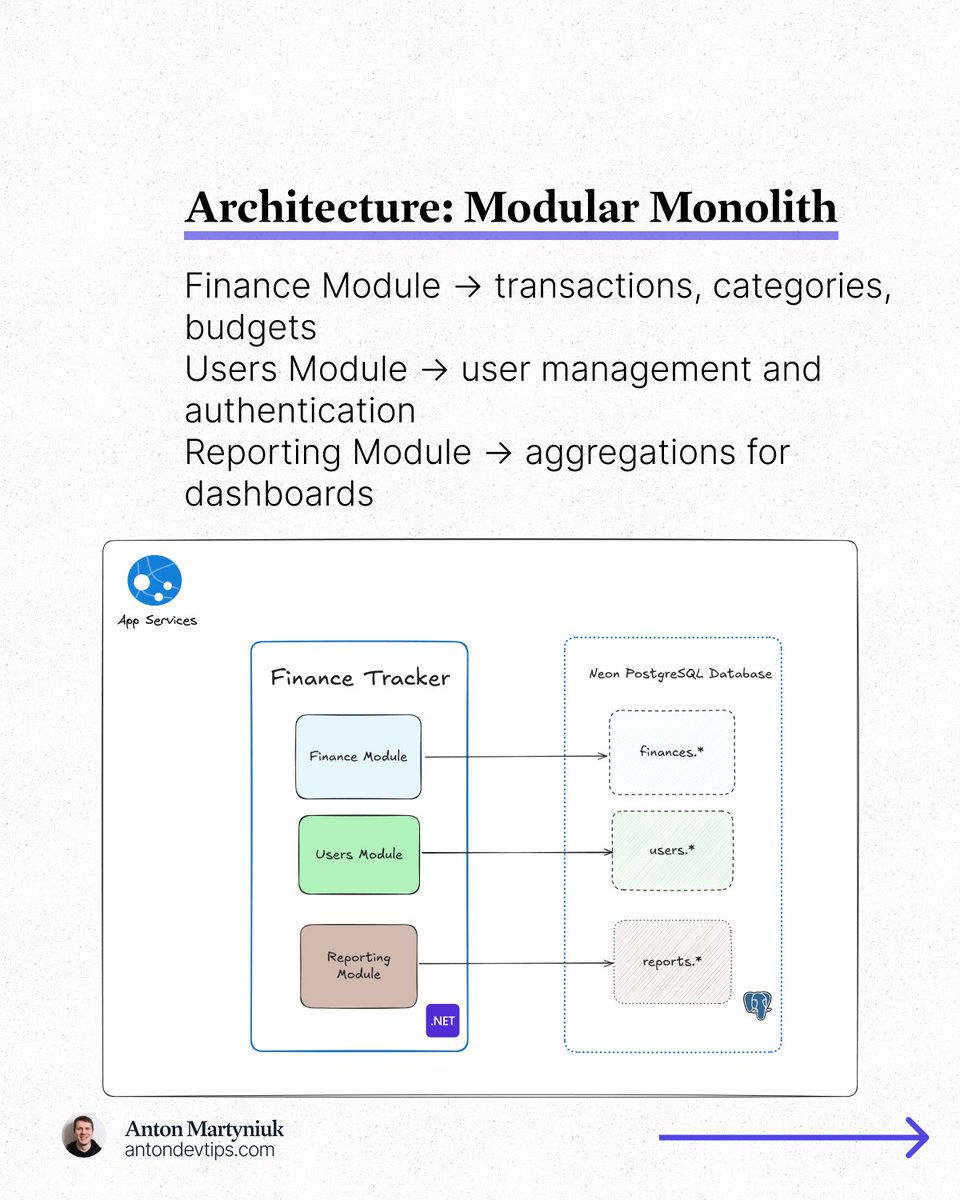
📌 Why a Modular Monolith
A modular monolith keeps everything in one deployable unit but gives us clear boundaries.
1️⃣ Finance Module → transactions, categories, budgets
2️⃣ Users Module → user management and authentication
3️⃣ Reporting Module → aggregations for dashboards
This setup avoids the complexity of microservices while using structure that scales.
📌 Database: Neon Postgres
Neon is perfect here because:
↳ Autoscaling
↳ Generous free tier
↳ Serverless architecture
↳ Fully compatible with EF Core Npgsql package
We design a simple schema:
• users
• accounts
• transactions
• categories
• budgets
📌 Frontend: React + Chart.js
The UI has 4 main parts:
1️⃣ Overview dashboard
2️⃣ Transactions page
3️⃣ Categories and budgets
4️⃣ Reports with charts
React Query handles data fetching.
React Hook Form handles validation.
Chart.js shows spending trends and income vs expenses.
Everything is simple, fast, and focused on real usability.
📌 Deployment: Azure App Service + Azure Static Web Apps
The backend runs on Azure App Service → easy deploy, environment variables, scaling, SSL.
The frontend runs on Azure Static Web Apps → global CDN, cheap, clean CI/CD.
GitHub Actions builds and deploys both automatically.
Building this project will teach you real Architecture, Modular Monolith design, Minimal APIs, and cloud deployment.
If you want to build a Finance Tracker project, I recommend using my production-ready Modular Monolith .NET project template:
↳ https://t.co/3e9TrX98YT
——
♻️ Repost to help others build a real project
➕ Follow me ( @AntonMartyniuk ) to improve your .NET and Architecture Skills
📌 Save this post for future reference!
10 Secrets Senior developers use to make Controllers 10x better, that middles and juniors don't know.
What are they? 👇
𝟭. 𝗞𝗲𝗲𝗽 𝗖𝗼𝗻𝘁𝗿𝗼𝗹𝗹𝗲𝗿𝘀 𝗧𝗵𝗶𝗻
↳ Controllers should not hold your business logic.
↳ They should just handle requests and responses.
↳ Move logic to services or application layers to keep them clean and testable.
𝟮. 𝗣𝗿𝗲𝗳𝗲𝗿 𝗠𝗲𝘁𝗵𝗼𝗱 𝗜𝗻𝗷𝗲𝗰𝘁𝗶𝗼𝗻
↳ You don't need to inject everything in the constructor.
↳ Inject only what the method needs — directly into the method parameters.
↳ It makes your Controller lighter and easier to maintain.
𝟯. 𝗨𝘀𝗲 𝗣𝗿𝗼𝗯𝗹𝗲𝗺𝗗𝗲𝘁𝗮𝗶𝗹𝘀 𝗳𝗼𝗿 𝗘𝗿𝗿𝗼𝗿𝘀
↳ Stop returning custom error models.
↳ Use ProblemDetails — a built-in, standard format for API errors.
↳ It makes your error responses consistent and clear.
𝟰. 𝗧𝗮𝗸𝗲 𝗔𝗱𝘃𝗮𝗻𝘁𝗮𝗴𝗲 𝗼𝗳 𝗔𝗽𝗶𝗖𝗼𝗻𝘁𝗿𝗼𝗹𝗹𝗲𝗿 𝗖𝗼𝗻𝘃𝗲𝗻𝘁𝗶𝗼𝗻𝘀
↳ Use [ApiController] — it handles model validation, binding, and response generation for you.
↳ Less boilerplate, more clean code.
𝟱. 𝗔𝗽𝗽𝗹𝘆 𝗙𝗶𝗹𝘁𝗲𝗿𝘀 𝗳𝗼𝗿 𝗖𝗿𝗼𝘀𝘀-𝗖𝘂𝘁𝘁𝗶𝗻𝗴 𝗖𝗼𝗻𝗰𝗲𝗿𝗻𝘀
↳ Don't repeat logging, validation, or exception handling in every Controller.
↳ Use filters like ActionFilter or ExceptionFilter to handle them globally.
𝟲. 𝗨𝘀𝗲 𝗥𝗼𝘂𝘁𝗲 𝗖𝗼𝗻𝘀𝘁𝗿𝗮𝗶𝗻𝘁𝘀 𝗮𝗻𝗱 𝗣𝗮𝘁𝘁𝗲𝗿𝗻𝘀
↳ Add route constraints (like {id:int} or {slug:alpha}) to improve routing and prevent invalid requests.
↳ It keeps your endpoints predictable and self-documented.
𝟳. 𝗥𝗲𝘁𝘂𝗿𝗻 𝗧𝘆𝗽𝗲𝗱 𝗥𝗲𝘀𝘂𝗹𝘁𝘀
↳ Instead of IActionResult, use typed results like Ok<T>(), NotFound(), or Results<T>().
↳ This improves clarity, testability, and Swagger documentation.
𝟴. 𝗛𝗮𝗻𝗱𝗹𝗲 𝗩𝗮𝗹𝗶𝗱𝗮𝘁𝗶𝗼𝗻 𝗣𝗿𝗼𝗽𝗲𝗿𝗹𝘆
↳ Don't validate manually in every Controller method.
↳ Use [ApiController] and data annotations — automatic validation with clean 400 responses.
𝟵. 𝗚𝗿𝗼𝘂𝗽 𝗘𝗻𝗱𝗽𝗼𝗶𝗻𝘁𝘀 𝗟𝗼𝗴𝗶𝗰𝗮𝗹𝗹𝘆
↳ Organize your routes by domain or feature, not by layer.
↳ Keep related endpoints close together — your API will be easier to navigate and scale.
𝟭𝟬. 𝗨𝘀𝗲 𝗢𝘂𝘁𝗽𝘂𝘁 𝗖𝗮𝗰𝗵𝗶𝗻𝗴
↳ Speed up responses by caching frequent results with OutputCache.
↳ You'll reduce load on your database and make your app feel much faster.
Which of these secrets do you already use in your Controllers? 👇
——
Stop wasting weeks setting up projects.
Start building production features day 1 with a free .NET template:
↳ https://t.co/NbpnOC7hIZ
——
♻️ Repost to help others make their Controllers 10x better
➕ Follow me ( @AntonMartyniuk ) to improve your .NET and Architecture Skills
𝗛𝗼𝘄 𝗗𝗡𝗦 𝘄𝗼𝗿𝗸𝘀?
If you're a web developer or DevOps engineer, you should know what happens when you type https:// website .com into your browser and press Enter.
The first step is to translate this text-based domain into a machine-readable numerical IP address. This is the role of a DNS server, which acts as a phonebook on the Internet.
Here is what happens under the hood. Four servers deliver an IP address to the client: recursive resolvers, root name servers, TLD name servers, and authoritative name servers.
The steps are as follows:
𝟭. 𝗗𝗡𝗦 𝗥𝗲𝘀𝗼𝗹𝘃𝗲𝗿
When users enter https:/ /website .com into their browser, the first thing that happens is that this request is sent to the DNS Resolver. This server interacts with other DNS servers to find the correct IP address.
𝟮. 𝗥𝗼𝗼𝘁 𝗻𝗮𝗺𝗲𝘀𝗲𝗿𝘃𝗲𝗿
Now, the DNS Resolver contacts Root Servers (13), which are controlled by various organizations and delegated by ICANN. They handle requests for top-level domains (TLD).
If a Root server cannot find results in its records or zone files, it will look for a record for the .com TLD and provide the requesting entity with the name server's address for .com addresses.
𝟯. 𝗧𝗟𝗗 𝗦𝗲𝗿𝘃𝗲𝗿
Next, the DNS Resolver queries the TLD Server, which responds with an IP address of the domain's authoritative nameserver.
𝟰. 𝗔𝘂𝘁𝗵𝗼𝗿𝗶𝘁𝗮𝘁𝗶𝘃𝗲 𝗻𝗮𝗺𝗲𝘀𝗲𝗿𝘃𝗲𝗿
After querying a domain's authoritative nameserver, it will return the IP address of the origin server. In the final step, the DNS Resolver passes the origin Server IP address back to the client, which the client can use to access the webpage requested in the first place.
Also, what could happen if DNS is returned from the 𝗰𝗮𝗰𝗵𝗲, to improve load times? DNS records can be cached in various locations; by default, modern web browsers cache DNS records for a specified period.
In the next step, the operating system can cache DNS records, too, and then the router and ISP at the end. If the IP address is not found in the cache, the search with the DNS resolver begins.
👉 Learn more about it: https://t.co/N3fxCyBJgR
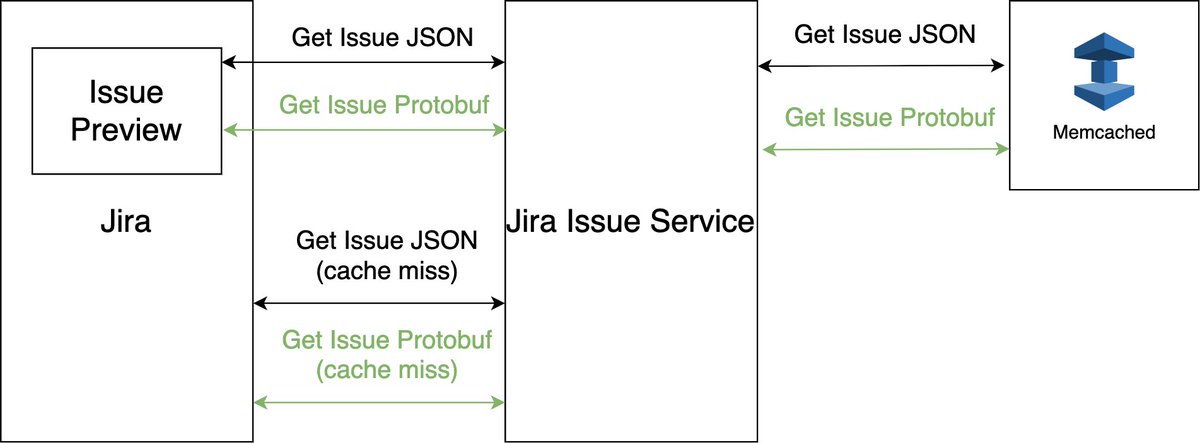
𝗛𝗼𝘄 𝗝𝗶𝗿𝗮 𝗯𝗲𝗰𝗮𝗺𝗲 𝟯𝟯𝘅 𝗳𝗮𝘀𝘁𝗲𝗿 𝗯𝘆 𝘂𝘀𝗶𝗻𝗴 𝗣𝗿𝗼𝘁𝗼𝗯𝘂𝗳
When you're dealing with 𝗼𝗻𝗲 𝗯𝗶𝗹𝗹𝗶𝗼𝗻 𝗝𝗶𝗿𝗮 𝗶𝘀𝘀𝘂𝗲𝘀 𝗽𝗲𝗿 𝘀𝗶𝘁𝗲, every byte matters. Their Issue Service was drowning in JSON, and they knew they had to make a change.
The problem wasn't apparent at first. JSON worked perfectly fine when they had thousands of issues. But as they scaled to millions, then hundreds of millions, those "harmless" JSON payloads became their bottleneck.
𝗘𝘃𝗲𝗿𝘆 𝗿𝗲𝗾𝘂𝗲𝘀𝘁 𝘄𝗮𝘀 𝗰𝗮𝗿𝗿𝘆𝗶𝗻𝗴 𝘂𝗻𝗻𝗲𝗰𝗲𝘀𝘀𝗮𝗿𝘆 𝗽𝗮𝘆𝗹𝗼𝗮𝗱 𝗮𝗻𝗱 𝗯𝘂𝗿𝗻𝗶𝗻𝗴 𝗖𝗣𝗨 𝗰𝘆𝗰𝗹𝗲𝘀.
After analysis, they decided to migrate to 𝗣𝗿𝗼𝘁𝗼𝗯𝘂𝗳. But here's the thing - you can't just flip a switch when you're serving millions of users, as they need zero downtime.
𝗧𝗵𝗲 𝗠𝗶𝗴𝗿𝗮𝘁𝗶𝗼𝗻 𝗦𝘁𝗿𝗮𝘁𝗲𝗴𝘆
They built 𝗱𝘂𝗮𝗹 𝗲𝗻𝗱𝗽𝗼𝗶𝗻𝘁𝘀 - one for JSON, one for Protobuf, and used feature flags with three modes:
- 📜 𝗢𝗟𝗗: JSON only
- 🔍 𝗖𝗛𝗘𝗖𝗞: Run both, compare results, log differences
- 🚀 𝗡𝗘𝗪: Protobuf only
The CHECK mode was crucial. They caught bugs in both old and new code paths that they never knew existed.
𝗧𝗵𝗲 𝗥𝗲𝘀𝘂𝗹𝘁𝘀
- ✅ 75% less CPU on Memcached clusters
- ✅ 80% smaller data size - every request became lightweight
- ✅ 33x faster deserialization
- ✅ 20% faster response times for users
- ✅ 55% infrastructure reduction
𝗪𝗵𝗮𝘁 𝘁𝗵𝗲𝘆 𝗹𝗲𝗮𝗿𝗻𝗲𝗱
1. Protobuf isn't null-friendly: No nulls, only absent values with defaults. They had to rethink our data model.
2. Spring doesn't love Protobuf yet: Error handling breaks when Spring tries to convert exceptions to Protobuf. They built custom handlers.
3. Memcached memory management is tricky: When data shrinks 80%, Memcached's slab allocation gets confused. Cache hit rates dropped temporarily until slabs rebalanced.
4. Zero-downtime migrations are possible: With proper feature flagging and patience, you can change foundational technology without users noticing.
Sometimes the most significant performance wins come from questioning your foundational choices.
𝗪𝗵𝗮𝘁 𝘄𝗼𝗿𝗸𝗲𝗱 𝗮𝘁 𝟭𝗠 𝘂𝘀𝗲𝗿𝘀 𝗺𝗶𝗴𝗵𝘁 𝗻𝗼𝘁 𝘄𝗼𝗿𝗸 𝗮𝘁 𝟭𝟬𝟬𝗠 𝘂𝘀𝗲𝗿𝘀.
Technical debt isn't just about messy code - it's about architectural decisions that don't scale.
If you're dealing with similar scale challenges, don't be afraid to revisit those "it works fine" decisions from your early days.
What's the most significant architectural change you've made for performance? Let me know in the comments.
#technology #softwareengineering #programming #techworldwithmilan #api
Still building auth from scratch? Stop.
Use this instead:
Keycloak is a free authentication server that gives you secure logins, password management, and JWTs out of the box — so you can focus on building your app, not reinventing auth.
In just 45 minutes, you’ll go from unprotected endpoints to a fully secured API:
✅ Run Keycloak with Docker
✅ Register and secure a .NET API
✅ Use OAuth 2.0 Authorization Code Flow
✅ Manage users and generate JWTs
✅ Protect endpoints and send authorized requests
Watch the full crash course here 👇
https://t.co/w4UiJvVd4q
Your .NET apps need a reverse proxy.
Why?
- Secure entry point
- Central auth & TLS (termination)
- Load balancing
- Request aggregation
I just dropped a video showing how to build one with YARP in https://t.co/KHFU0SV0FP Core.
Check it out: https://t.co/vkP4qLTzYm
Junior developer uses EF Core directly in Controller.
Middle developer uses Controller-Service-Repository.
Senior developer uses Clean Architecture.
Architect uses EF Core in Controller back again.
Why does this happen?
Because real-world projects benefit from simple solutions.
Add layers only when you truly need them.
A small app can live with EF Core in Controllers or in Minimal API endpoints.
A medium-sized project may benefit from an Application Layer (services or one class handlers).
A large system might require Vertical Slices and Clean Architecture or even DDD.
The lesson is: don't over-engineer ahead of time.
Build step by step.
If you need more complexity, add it.
If not, keep it simple and move on.
You can always refactor or expand later.
Focus on delivering value, not layers.
P.S.: EF Core already implements a Repository and Unit Of Work patterns, so in most cases you don't need your own repository classes.
—
♻️ Repost to help others learn how not to over-engineer projects
➕ Follow me ( @AntonMartyniuk ) for more
#dotnet
These videos will give you practical skills and real-world examples, exactly what you need to confidently build AI automations.
https://t.co/eXlJiXc93n
https://t.co/cQDZ6JVNgX
https://t.co/2JcoraDdpw
https://t.co/HjVtJhYeal
https://t.co/9zCubJVMEi
https://t.co/qhDPHIy1eA
https://t.co/BTaHxjmr7t
Every time an AI uses the first person pronoun "I" in reference to itself -- it is a lie. There is no I in there. The AI is not a being. The AI is a table of numbers.
Every time an AI uses that first person pronoun to refer to itself it is a lie being told by the creators, and their employers, the companies that offer that AI. And the lie is horrific.
Every time an AI uses a "special voice" like "the cheery assistant" or "the romantic male" it is another lie being told by the creators and their employers. The AI is not experiencing the cheeriness, nor the romance. It's all fake. It's all a lie.
We, programmers, understand this. We can see through the lies. We may even chuckle at the skill and facility with which the lies are told.
But the everyday layman, and especially children, don't have our insight. They don't innately know that they are being lied to. And when those lies go wrong, a lot of harm can be done.
As a society we need to recognize the harm these lies are doing, and impress upon the creators that we will hold them accountable for that harm.
Here's your comprehensive guide to understanding and building Model Context Protocol (MCP) Servers for C# developers. It’s a great hands-on resource for exploring MCP and AI assistant integration in .NET environments. 📚 https://t.co/eqIqeBqE7a
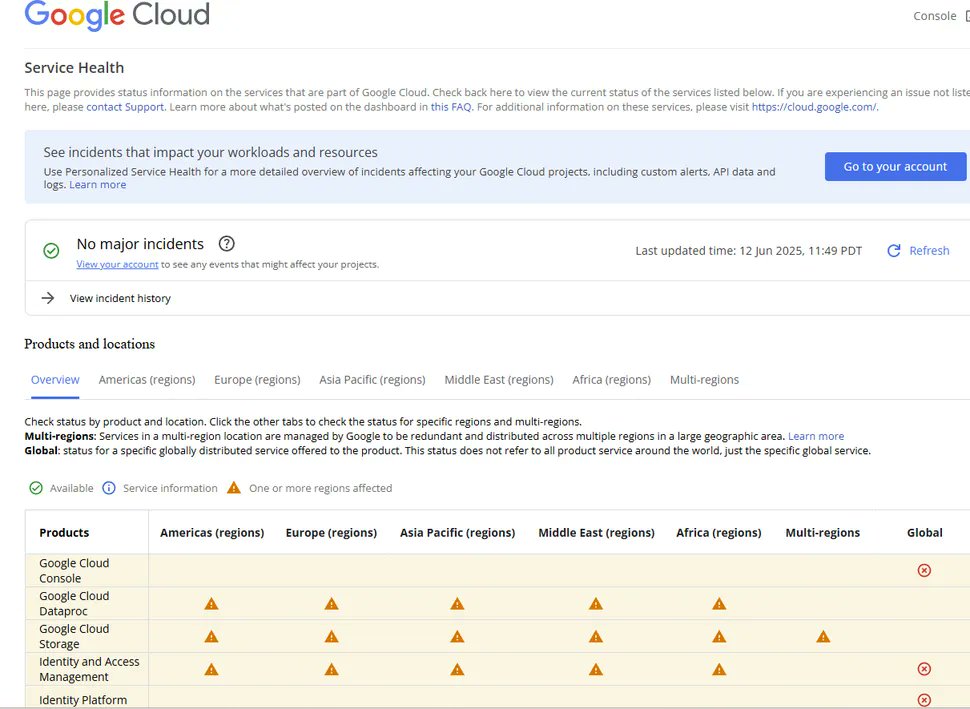
𝗛𝗼𝘄 𝗼𝗻𝗲 𝘀𝗼𝗳𝘁𝘄𝗮𝗿𝗲 𝗯𝘂𝗴 𝗮𝘁 𝗚𝗼𝗼𝗴𝗹𝗲 𝗖𝗹𝗼𝘂𝗱 𝗰𝗿𝗮𝘀𝗵𝗲𝗱 𝘁𝗵𝗲 𝗜𝗻𝘁𝗲𝗿𝗻𝗲𝘁
On June 12, Google Cloud went down, and with it, much of the Internet
Spotify, Fitbit, Gmail, Google Drive, Vertex AI, and dozens of other services failed for hours
The cause? A single null pointer bug is buried inside Service Control, the gatekeeper for nearly every Google Cloud API request
𝗪𝗵𝗮𝘁 𝗲𝘅𝗮𝗰𝘁𝗹𝘆 𝗵𝗮𝗽𝗽𝗲𝗻𝗲𝗱
Every API request to Google Cloud passes through Service Control. It's the bouncer who checks if you're allowed in. When it crashes, everything crashes.
On May 29, Google added new quota-checking code to Service Control. The code had no error handling for blank input fields. But it never ran during testing; it needed specific policy data to activate.
No feature flag. No gradual rollout. Just dormant code waiting.
𝗧𝗵𝗲 𝗳𝗮𝗹𝗹𝗼𝘂𝘁
June 12, 10:45 AM PDT. A routine policy update hit Google's databases with blank fields. Service Control tried to process them, hit the null pointer, and crashed.
Google's Spanner database replicated the insufficient data globally in seconds. Every Service Control instance that touched it crashed immediately.
Two minutes, that's how long it took for Google Cloud to fail worldwide.
The chaos was predictable:
• Timeouts from crash loops
• 503 errors from overwhelmed systems
• 401 errors interpreting blank policies as "no permissions"
Spotify users got locked out with 401 errors. Fitbit threw different errors depending on your location. Services couldn't authenticate with their backends.
𝗚𝗼𝗼𝗴𝗹𝗲'𝘀 𝗳𝗶𝘅𝗲𝘀 𝗴𝗼𝗶𝗻𝗴 𝗳𝗼𝗿𝘄𝗮𝗿𝗱
Google had a kill switch, a "red button" to disable the broken code. They deployed it within 40 minutes.
Most regions recovered, but us-central1 stayed down for 3 hours. This happened because thousands of Service Control instances restarted at once. They all hit the same database simultaneously.
The recovery created its failure, a "herd effect" that crashed the fix.
The worst part was that Google's status dashboard runs on Google Cloud.
When the cloud died, so did the dashboard. Monitoring tools went dark.
Operations teams flew blind for an hour.
𝗪𝗵𝘆 𝗱𝗶𝗱 𝗶𝘁 𝗵𝗮𝗽𝗽𝗲𝗻
1. No feature flag on new code
2. No null check in the critical path (billion-dollar mistake strikes again)
3. Instant global replication of insufficient data
4. No backoff delays during recovery
5. Monitoring hosted on the same infrastructure monitors
Google's response was immediate. They froze Service Control changes. They're redesigning the system so components can fail independently.
Adding replication delays to catch insufficient data. Building a separate monitoring system that survives main system failures.
𝗧𝗵𝗲 𝗹𝗲𝘀𝘀𝗼𝗻 𝘄𝗲 𝗹𝗲𝗮𝗿𝗻𝗲𝗱
A null pointer brought down one of the world's most sophisticated platforms. Not a cyber attack. Not a natural disaster. A missing if-statement.
In distributed systems, local failures become global disasters faster than humans can react. The infrastructure that enables massive scale also amplifies every mistake.
Every API request you make today is one unchecked value away from failure.
That's the reality of modern cloud architecture.
#softwareengineering #programming #cloudcomputing
How do you pass data to a background job?
With IHostedService, it’s tricky.
You’d need to save the state to a database first, then have your background service read from it. Not ideal.
Quartz makes this much easier.
When you schedule a job, you can pass in data directly. No need for temporary tables or weird workarounds.
You can attach data to either the job or the trigger, depending on what you need.
I’ve put together a full example to show how it works: https://t.co/Zp1RZbBe2M
I know there are some "hot" new libraries out there. But Quartz has worked fine for the majority of use cases I've seen in production. So I just continue using it. Don't fall for the FOMO.
---
Do you want to simplify your development process? I created a free Clean Architecture template to help you. Get it here: https://t.co/DEiKR3eKSi
𝗪𝗵𝗮𝘁 𝗶𝘀 𝘁𝗵𝗲 𝗕𝘂𝗶𝗹𝗱𝗲𝗿 𝗣𝗮𝘁𝘁𝗲𝗿𝗻?
Builder lets you construct complex objects step by step, so you don't need constructors with many parameters.
The pattern allows you to produce different types and representations of an object using the same construction process.
It is one of the patterns from the Creational group, which focuses on instantiating an object or a group of related objects.
𝗪𝗵𝗲𝗻 𝘀𝗵𝗼𝘂𝗹𝗱 𝗜 𝗶𝗺𝗽𝗹𝗲𝗺𝗲𝗻𝘁 𝗶𝘁
Use Builder when your objects have many optional parameters or when you need to create different representations of the same product.
It's ideal for objects that require complex initialization, such as those with fluent APIs or configuration objects.
E.g, 𝚟𝚊𝚛 𝚛𝚎𝚚𝚞𝚎𝚜𝚝 = 𝚗𝚎𝚠 𝙷𝚝𝚝𝚙𝚁𝚎𝚚𝚞𝚎𝚜𝚝𝙼𝚎𝚜𝚜𝚊𝚐𝚎𝙱𝚞𝚒𝚕𝚍𝚎𝚛()
.𝚆𝚒𝚝𝚑𝙼𝚎𝚝𝚑𝚘𝚍(𝙷𝚝𝚝𝚙𝙼𝚎𝚝𝚑𝚘𝚍.𝙿𝚘𝚜𝚝)
.𝚆𝚒𝚝𝚑𝚄𝚛𝚕("𝚑𝚝𝚝𝚙𝚜://𝚊𝚙𝚒.𝚎𝚡𝚊𝚖𝚙𝚕𝚎.𝚌𝚘𝚖/𝚍𝚊𝚝𝚊")
.𝚆𝚒𝚝𝚑𝙷𝚎𝚊𝚍𝚎𝚛("𝙰𝚞𝚝𝚑𝚘𝚛𝚒𝚣𝚊𝚝𝚒𝚘𝚗", "𝙱𝚎𝚊𝚛𝚎𝚛 𝚝𝚘𝚔𝚎𝚗")
.𝚆𝚒𝚝𝚑𝙹𝚜𝚘𝚗𝙱𝚘𝚍𝚢(𝚗𝚎𝚠 { 𝚒𝚍 = 𝟷𝟸𝟹 })
.𝙱𝚞𝚒𝚕𝚍();
𝗛𝗼𝘄 𝘁𝗼 𝗶𝗺𝗽𝗹𝗲𝗺𝗲𝗻𝘁 𝗶𝘁
Extract the object construction code into separate builder classes. Each Builder implements the same interface but creates products in different ways.
The client code calls building steps in a specific order to construct the product.
A director class can define the order of building steps, while builders provide the implementation. This lets you reuse the same construction process for different products.
The final step is usually a method that returns the finished product.
𝗪𝗵𝘆 𝗶𝘁 𝘄𝗼𝗿𝗸𝘀
You can construct objects step-by-step, defer construction steps, or run steps recursively. The same construction code can create different representations.
It enables the Single Responsibility Principle, where you isolate complex construction code from business logic.
The main drawback is that overall complexity increases, as the pattern requires creating multiple new classes. It's overkill for simple objects.
👉 Want to master all important Design Patterns? Check out my complete guide with real-world examples: https://t.co/no3X38QizU.
#softwareengineering #programming #coding
ASP .NET Core error handling:
- Custom middleware: wrap the pipeline in try/catch
- Log errors & return JSON ProblemDetails
- Use IProblemDetailsService to standardize responses
- Adopt IExceptionHandler from .NET 8 for focused handlers
Need pixel‑perfect PDF reports in .NET?
Skip proprietary libraries and use HTML templates plus PuppeteerSharp.
Build your report as an HTML Handlebars template, compile it with data, then render to PDF via a headless browser.
Running your .NET apps with Docker Compose?
It works. But there might be a better way.
Managing environment variables, setting up service dependencies, and wiring connection strings can get messy fast.
I recently migrated one of my Docker Compose setups to .NET Aspire.
Aspire gives you a structured, cloud-ready way to build and run distributed .NET apps.
It handles service discovery, config, observability, and more, without the overhead of a full orchestrator.
I documented the full migration step-by-step, including the source code: https://t.co/f3GIyk0zxh
If you're already using containers, this might be the cleanest next step.
Have you tried Aspire yet?
---
Do you want to simplify your development process? Grab my free Aspire + Clean Architecture template here: https://t.co/hMkJYilRPC
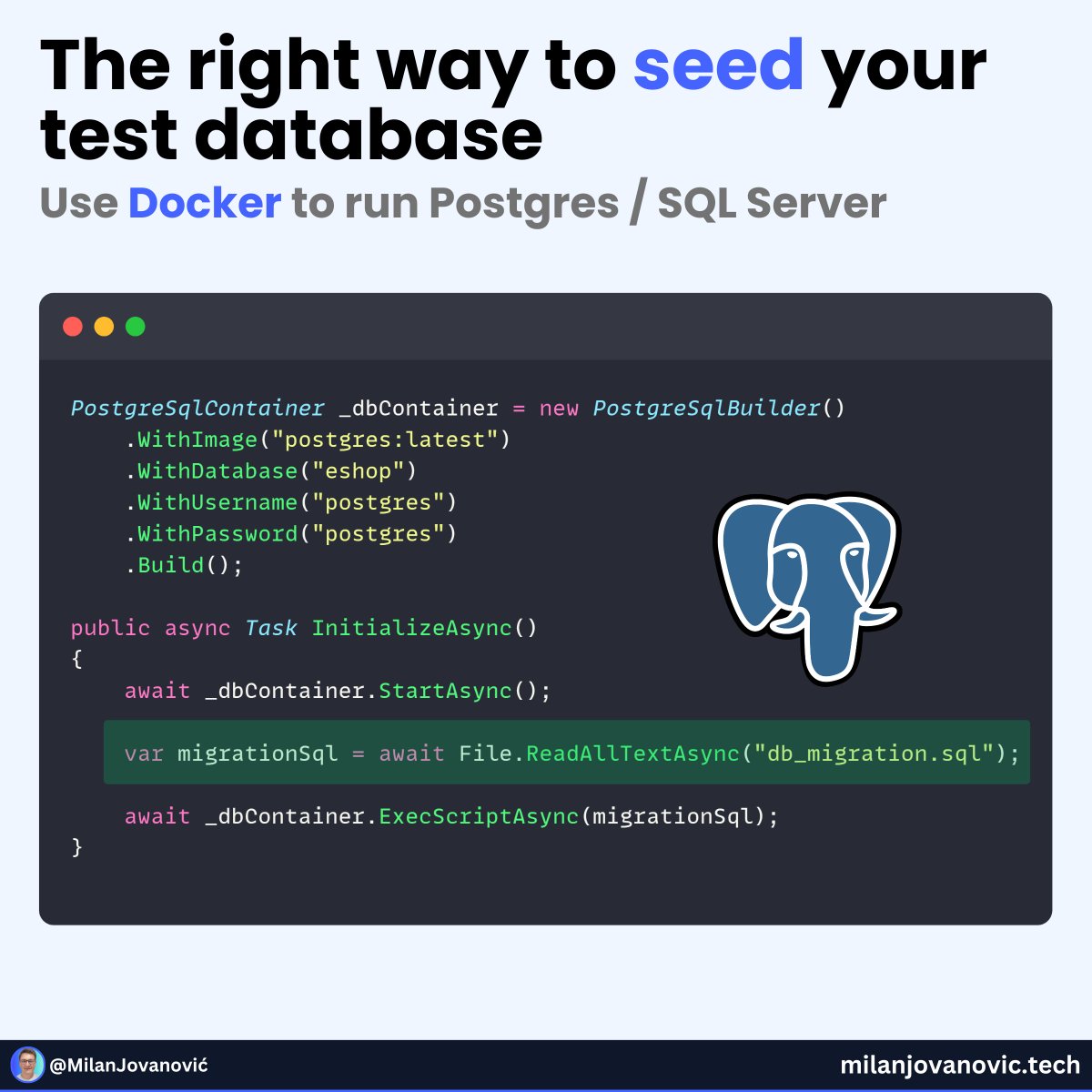
Still mocking your database in integration tests?
That’s fine for unit tests.
But if you want to test real behavior, you need a real database.
This is where Testcontainers comes in.
It spins up lightweight, disposable containers during test runs — like PostgreSQL, MySQL, or Redis — so you can test against the real thing.
In this example, I’m using Testcontainers with PostgreSQL and seeding it using a .sql script.
Why this matters:
• You test real queries against real schemas
• You avoid brittle mocks and false positives
• You get full control over the DB state during tests
Perfect for testing migrations, stored procedures, EF Core queries, and more.
I walk through the setup here: https://t.co/t0YHeLI6PW
Are you still mocking your DB or already testing against the real thing?
---
Do you want to simplify your development process? Grab my free Clean Architecture template here: https://t.co/5r8tVT34l9
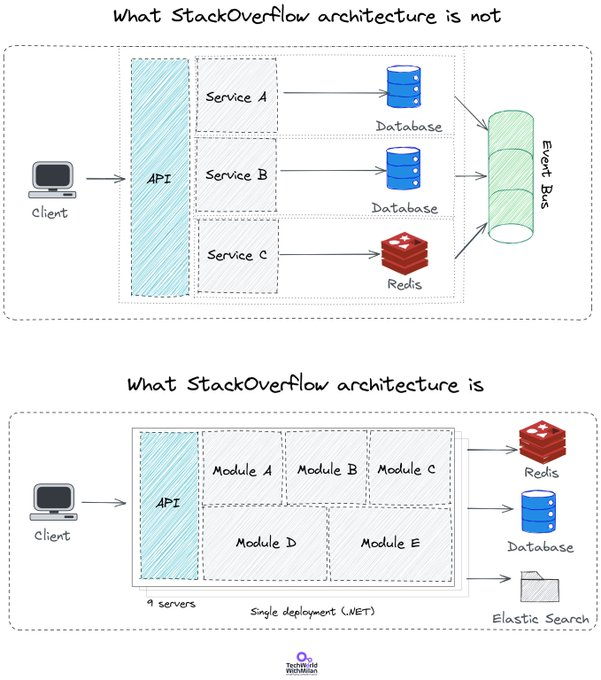
𝗦𝘁𝗮𝗰𝗸 𝗢𝘃𝗲𝗿𝗳𝗹𝗼𝘄 𝗔𝗿𝗰𝗵𝗶𝘁𝗲𝗰𝘁𝘂𝗿𝗲 𝗜𝘀 𝗡𝗼𝘁 𝗪𝗵𝗮𝘁 𝗬𝗼𝘂 𝗠𝗲𝗮𝗻 𝗜𝘁 𝗜𝘀
In the interview with Scott Hanselman, 𝗥𝗼𝗯𝗲𝗿𝘁𝗮 𝗔𝗿𝗰𝗼𝘃𝗲𝗿𝗱𝗲, 𝗛𝗲𝗮𝗱 𝗢𝗳 𝗘𝗻𝗴𝗶𝗻𝗲𝗲𝗿𝗶𝗻𝗴 𝗮𝘁 𝗦𝘁𝗮𝗰𝗸 𝗢𝘃𝗲𝗿𝗳𝗹𝗼𝘄, revealed the story about the architecture of Stack Overflow.
They handle more than 6000 requests per second, 2 billion page views per month, and they manage to render a page in about 12 milliseconds.
If we think about it a bit, we could imagine they use some kind of 𝗺𝗶𝗰𝗿𝗼𝘀𝗲𝗿𝘃𝗶𝗰𝗲 𝘀𝗼𝗹𝘂𝘁𝗶𝗼𝗻 𝘁𝗵𝗮𝘁 𝗿𝘂𝗻𝘀 𝗶𝗻 𝘁𝗵𝗲 𝗖𝗹𝗼𝘂𝗱 𝘄𝗶𝘁𝗵 𝗞𝘂𝗯𝗲𝗿𝗻𝗲𝘁𝗲𝘀.
But the story is a bit different. Their solution is 15 years old, and it is a 𝗯𝗶𝗴 𝗺𝗼𝗻𝗼𝗹𝗶𝘁𝗵𝗶𝗰 𝗮𝗽𝗽𝗹𝗶𝗰𝗮𝘁𝗶𝗼𝗻 𝗿𝘂𝗻𝗻𝗶𝗻𝗴 𝗼𝗻-𝗽𝗿𝗲𝗺𝗶𝘀𝗲𝘀.
It is actually 𝗮 𝘀𝗶𝗻𝗴𝗹𝗲 𝗮𝗽𝗽 on IIS, which runs 200 sites. This single app is running on nine web servers and a single SQL Server (with the addition of one hot standby).
They also use 𝘁𝘄𝗼 𝗹𝗲𝘃𝗲𝗹𝘀 𝗼𝗳 𝗰𝗮𝗰𝗵𝗲, one on SQL Server with large RAM (1.5TB), where they have 30% of DB access in RAM, and they also use two Redis servers (master and replica).
Besides this, they have 3 tag engine servers and 3 Elastic Search servers, which are used for 34 million daily searches.
All this is handled by a 𝘁𝗲𝗮𝗺 𝗼𝗳 𝟱𝟬 𝗲𝗻𝗴𝗶𝗻𝗲𝗲𝗿𝘀, who manages to 𝗱𝗲𝗽𝗹𝗼𝘆 𝘁𝗼 𝗽𝗿𝗼𝗱𝘂𝗰𝘁𝗶𝗼𝗻 𝗶𝗻 𝟰 𝗺𝗶𝗻𝘀 several times daily.
Their 𝗳𝘂𝗹𝗹 𝘁𝗲𝗰𝗵 𝘀𝘁𝗮𝗰𝗸 is:
🔹 C# + ASP. NET MVC
🔹 Dapper ORM
🔹 StaeckExchange Redis
🔹 MiniProfiler
🔹 Jil JSON Deseliazier
🔹 Exceptional logger for SQL
🔹 Sigil, a .Net CIL generation helper (for when C# isn’t fast enough)
🔹 NetGain, a high-performance web socket server
🔹 Opserver, monitoring dashboard polling most systems and feeding from Orion, Bosun, or WMI.
🔹 Bosun, backend monitoring system, written in Go
#softwareengineering #programming #softwarearchitecture
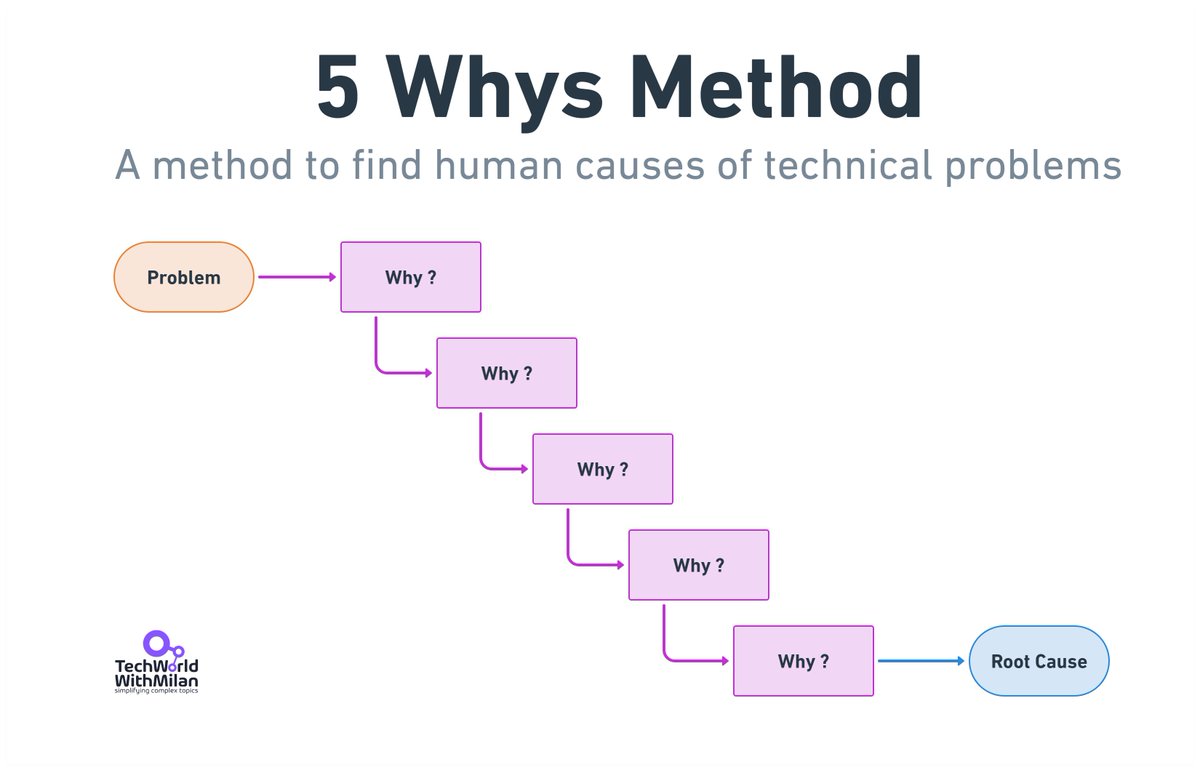
𝗛𝗼𝘄 𝗱𝗼 𝘄𝗲 𝗳𝗶𝗻𝗱 𝗿𝗼𝗼𝘁 𝗰𝗮𝘂𝘀𝗲𝘀 𝗼𝗳 𝘁𝗲𝗰𝗵𝗻𝗶𝗰𝗮𝗹 𝗽𝗿𝗼𝗯𝗹𝗲𝗺𝘀?
Why do software projects fail despite great technology and skilled teams? Often, the root of a problem isn't a technical glitch but a human one.
Initially developed by Sakichi Toyoda for Toyota's manufacturing process, the 5 Whys method involves asking "Why?" five times or until the root cause of a problem is uncovered.
This method employs countermeasures rather than solutions, representing an action taken to prevent a problem from recurring.
In software engineering, this can translate into drilling down from a reported bug to uncover miscommunications, incorrect assumptions, or a lack of knowledge.
Here is how we can approach problem-solving with the 5 Whys method:
𝗦𝘁𝗲𝗽 𝟭: Define the problem. The starting problem is appropriately defined.
𝗦𝘁𝗲𝗽 𝟮: Ask why five times (quickly). Rephrase the problem you've defined as a 'why' question.
𝗦𝘁𝗲𝗽 𝟯: Address the root cause of the issue. Once the root cause is found, you can take countermeasures to prevent it from happening again.
Here is 𝗮𝗻 𝗲𝘅𝗮𝗺𝗽𝗹𝗲 𝗼𝗳 𝗮 𝗿𝗲𝗮𝗹-𝗹𝗶𝗳𝗲 𝗽𝗿𝗼𝗯𝗹𝗲𝗺:
1. Why is the app crashing? A memory leak is identified.
2. Why is there a memory leak? An unoptimized code section is causing excessive memory usage.
3. Why is the code not optimized? The developer needed to be informed about best practices.
4. Why was the developer unaware? Inadequate code reviews or limited training on optimization techniques may have contributed.
5. Why were these safeguards lacking? The project timeline may need to be tighter, potentially resulting in skipped steps.
𝗕𝗲𝗻𝗲𝗳𝗶𝘁𝘀 of this method are:
🔹 Uncovers hidden causes: Technical problems often mask human errors. The 5 Whys peels back the layers to identify the root cause.
🔹 Focuses on solutions: By understanding the "why," you can address the underlying human factors and prevent similar issues in the future.
🔹 Promotes team learning: The process can be a collaborative exercise, fostering communication and knowledge sharing within the team.
🔸 While powerful, the five Whys have 𝗹𝗶𝗺𝗶𝘁𝗮𝘁𝗶𝗼𝗻𝘀. Don't get stuck on the exact number of "whys." Reaching the root cause might take fewer or more questions. Additionally, it's not about assigning blame but about identifying areas for improvement.
#softwareengineering #careers #productivity


![AntonMartyniuk's tweet photo. 10 Secrets Senior developers use to make Controllers 10x better, that middles and juniors don't know.
What are they? 👇
𝟭. 𝗞𝗲𝗲𝗽 𝗖𝗼𝗻𝘁𝗿𝗼𝗹𝗹𝗲𝗿𝘀 𝗧𝗵𝗶𝗻
↳ Controllers should not hold your business logic.
↳ They should just handle requests and responses.
↳ Move logic to services or application layers to keep them clean and testable.
𝟮. 𝗣𝗿𝗲𝗳𝗲𝗿 𝗠𝗲𝘁𝗵𝗼𝗱 𝗜𝗻𝗷𝗲𝗰𝘁𝗶𝗼𝗻
↳ You don't need to inject everything in the constructor.
↳ Inject only what the method needs — directly into the method parameters.
↳ It makes your Controller lighter and easier to maintain.
𝟯. 𝗨𝘀𝗲 𝗣𝗿𝗼𝗯𝗹𝗲𝗺𝗗𝗲𝘁𝗮𝗶𝗹𝘀 𝗳𝗼𝗿 𝗘𝗿𝗿𝗼𝗿𝘀
↳ Stop returning custom error models.
↳ Use ProblemDetails — a built-in, standard format for API errors.
↳ It makes your error responses consistent and clear.
𝟰. 𝗧𝗮𝗸𝗲 𝗔𝗱𝘃𝗮𝗻𝘁𝗮𝗴𝗲 𝗼𝗳 𝗔𝗽𝗶𝗖𝗼𝗻𝘁𝗿𝗼𝗹𝗹𝗲𝗿 𝗖𝗼𝗻𝘃𝗲𝗻𝘁𝗶𝗼𝗻𝘀
↳ Use [ApiController] — it handles model validation, binding, and response generation for you.
↳ Less boilerplate, more clean code.
𝟱. 𝗔𝗽𝗽𝗹𝘆 𝗙𝗶𝗹𝘁𝗲𝗿𝘀 𝗳𝗼𝗿 𝗖𝗿𝗼𝘀𝘀-𝗖𝘂𝘁𝘁𝗶𝗻𝗴 𝗖𝗼𝗻𝗰𝗲𝗿𝗻𝘀
↳ Don't repeat logging, validation, or exception handling in every Controller.
↳ Use filters like ActionFilter or ExceptionFilter to handle them globally.
𝟲. 𝗨𝘀𝗲 𝗥𝗼𝘂𝘁𝗲 𝗖𝗼𝗻𝘀𝘁𝗿𝗮𝗶𝗻𝘁𝘀 𝗮𝗻𝗱 𝗣𝗮𝘁𝘁𝗲𝗿𝗻𝘀
↳ Add route constraints (like {id:int} or {slug:alpha}) to improve routing and prevent invalid requests.
↳ It keeps your endpoints predictable and self-documented.
𝟳. 𝗥𝗲𝘁𝘂𝗿𝗻 𝗧𝘆𝗽𝗲𝗱 𝗥𝗲𝘀𝘂𝗹𝘁𝘀
↳ Instead of IActionResult, use typed results like Ok<T>(), NotFound(), or Results<T>().
↳ This improves clarity, testability, and Swagger documentation.
𝟴. 𝗛𝗮𝗻𝗱𝗹𝗲 𝗩𝗮𝗹𝗶𝗱𝗮𝘁𝗶𝗼𝗻 𝗣𝗿𝗼𝗽𝗲𝗿𝗹𝘆
↳ Don't validate manually in every Controller method.
↳ Use [ApiController] and data annotations — automatic validation with clean 400 responses.
𝟵. 𝗚𝗿𝗼𝘂𝗽 𝗘𝗻𝗱𝗽𝗼𝗶𝗻𝘁𝘀 𝗟𝗼𝗴𝗶𝗰𝗮𝗹𝗹𝘆
↳ Organize your routes by domain or feature, not by layer.
↳ Keep related endpoints close together — your API will be easier to navigate and scale.
𝟭𝟬. 𝗨𝘀𝗲 𝗢𝘂𝘁𝗽𝘂𝘁 𝗖𝗮𝗰𝗵𝗶𝗻𝗴
↳ Speed up responses by caching frequent results with OutputCache.
↳ You'll reduce load on your database and make your app feel much faster.
Which of these secrets do you already use in your Controllers? 👇
——
Stop wasting weeks setting up projects.
Start building production features day 1 with a free .NET template:
↳ https://t.co/NbpnOC7hIZ
——
♻️ Repost to help others make their Controllers 10x better
➕ Follow me ( @AntonMartyniuk ) to improve your .NET and Architecture Skills](https://pbs.twimg.com/media/G40Ea5eWEAAmtH_.jpg)
![AntonMartyniuk's tweet photo. 10 Secrets Senior developers use to make Controllers 10x better, that middles and juniors don't know.
What are they? 👇
𝟭. 𝗞𝗲𝗲𝗽 𝗖𝗼𝗻𝘁𝗿𝗼𝗹𝗹𝗲𝗿𝘀 𝗧𝗵𝗶𝗻
↳ Controllers should not hold your business logic.
↳ They should just handle requests and responses.
↳ Move logic to services or application layers to keep them clean and testable.
𝟮. 𝗣𝗿𝗲𝗳𝗲𝗿 𝗠𝗲𝘁𝗵𝗼𝗱 𝗜𝗻𝗷𝗲𝗰𝘁𝗶𝗼𝗻
↳ You don't need to inject everything in the constructor.
↳ Inject only what the method needs — directly into the method parameters.
↳ It makes your Controller lighter and easier to maintain.
𝟯. 𝗨𝘀𝗲 𝗣𝗿𝗼𝗯𝗹𝗲𝗺𝗗𝗲𝘁𝗮𝗶𝗹𝘀 𝗳𝗼𝗿 𝗘𝗿𝗿𝗼𝗿𝘀
↳ Stop returning custom error models.
↳ Use ProblemDetails — a built-in, standard format for API errors.
↳ It makes your error responses consistent and clear.
𝟰. 𝗧𝗮𝗸𝗲 𝗔𝗱𝘃𝗮𝗻𝘁𝗮𝗴𝗲 𝗼𝗳 𝗔𝗽𝗶𝗖𝗼𝗻𝘁𝗿𝗼𝗹𝗹𝗲𝗿 𝗖𝗼𝗻𝘃𝗲𝗻𝘁𝗶𝗼𝗻𝘀
↳ Use [ApiController] — it handles model validation, binding, and response generation for you.
↳ Less boilerplate, more clean code.
𝟱. 𝗔𝗽𝗽𝗹𝘆 𝗙𝗶𝗹𝘁𝗲𝗿𝘀 𝗳𝗼𝗿 𝗖𝗿𝗼𝘀𝘀-𝗖𝘂𝘁𝘁𝗶𝗻𝗴 𝗖𝗼𝗻𝗰𝗲𝗿𝗻𝘀
↳ Don't repeat logging, validation, or exception handling in every Controller.
↳ Use filters like ActionFilter or ExceptionFilter to handle them globally.
𝟲. 𝗨𝘀𝗲 𝗥𝗼𝘂𝘁𝗲 𝗖𝗼𝗻𝘀𝘁𝗿𝗮𝗶𝗻𝘁𝘀 𝗮𝗻𝗱 𝗣𝗮𝘁𝘁𝗲𝗿𝗻𝘀
↳ Add route constraints (like {id:int} or {slug:alpha}) to improve routing and prevent invalid requests.
↳ It keeps your endpoints predictable and self-documented.
𝟳. 𝗥𝗲𝘁𝘂𝗿𝗻 𝗧𝘆𝗽𝗲𝗱 𝗥𝗲𝘀𝘂𝗹𝘁𝘀
↳ Instead of IActionResult, use typed results like Ok<T>(), NotFound(), or Results<T>().
↳ This improves clarity, testability, and Swagger documentation.
𝟴. 𝗛𝗮𝗻𝗱𝗹𝗲 𝗩𝗮𝗹𝗶𝗱𝗮𝘁𝗶𝗼𝗻 𝗣𝗿𝗼𝗽𝗲𝗿𝗹𝘆
↳ Don't validate manually in every Controller method.
↳ Use [ApiController] and data annotations — automatic validation with clean 400 responses.
𝟵. 𝗚𝗿𝗼𝘂𝗽 𝗘𝗻𝗱𝗽𝗼𝗶𝗻𝘁𝘀 𝗟𝗼𝗴𝗶𝗰𝗮𝗹𝗹𝘆
↳ Organize your routes by domain or feature, not by layer.
↳ Keep related endpoints close together — your API will be easier to navigate and scale.
𝟭𝟬. 𝗨𝘀𝗲 𝗢𝘂𝘁𝗽𝘂𝘁 𝗖𝗮𝗰𝗵𝗶𝗻𝗴
↳ Speed up responses by caching frequent results with OutputCache.
↳ You'll reduce load on your database and make your app feel much faster.
Which of these secrets do you already use in your Controllers? 👇
——
Stop wasting weeks setting up projects.
Start building production features day 1 with a free .NET template:
↳ https://t.co/NbpnOC7hIZ
——
♻️ Repost to help others make their Controllers 10x better
➕ Follow me ( @AntonMartyniuk ) to improve your .NET and Architecture Skills](https://pbs.twimg.com/media/G40EaYZXQAADTw3.jpg)
![AntonMartyniuk's tweet photo. 10 Secrets Senior developers use to make Controllers 10x better, that middles and juniors don't know.
What are they? 👇
𝟭. 𝗞𝗲𝗲𝗽 𝗖𝗼𝗻𝘁𝗿𝗼𝗹𝗹𝗲𝗿𝘀 𝗧𝗵𝗶𝗻
↳ Controllers should not hold your business logic.
↳ They should just handle requests and responses.
↳ Move logic to services or application layers to keep them clean and testable.
𝟮. 𝗣𝗿𝗲𝗳𝗲𝗿 𝗠𝗲𝘁𝗵𝗼𝗱 𝗜𝗻𝗷𝗲𝗰𝘁𝗶𝗼𝗻
↳ You don't need to inject everything in the constructor.
↳ Inject only what the method needs — directly into the method parameters.
↳ It makes your Controller lighter and easier to maintain.
𝟯. 𝗨𝘀𝗲 𝗣𝗿𝗼𝗯𝗹𝗲𝗺𝗗𝗲𝘁𝗮𝗶𝗹𝘀 𝗳𝗼𝗿 𝗘𝗿𝗿𝗼𝗿𝘀
↳ Stop returning custom error models.
↳ Use ProblemDetails — a built-in, standard format for API errors.
↳ It makes your error responses consistent and clear.
𝟰. 𝗧𝗮𝗸𝗲 𝗔𝗱𝘃𝗮𝗻𝘁𝗮𝗴𝗲 𝗼𝗳 𝗔𝗽𝗶𝗖𝗼𝗻𝘁𝗿𝗼𝗹𝗹𝗲𝗿 𝗖𝗼𝗻𝘃𝗲𝗻𝘁𝗶𝗼𝗻𝘀
↳ Use [ApiController] — it handles model validation, binding, and response generation for you.
↳ Less boilerplate, more clean code.
𝟱. 𝗔𝗽𝗽𝗹𝘆 𝗙𝗶𝗹𝘁𝗲𝗿𝘀 𝗳𝗼𝗿 𝗖𝗿𝗼𝘀𝘀-𝗖𝘂𝘁𝘁𝗶𝗻𝗴 𝗖𝗼𝗻𝗰𝗲𝗿𝗻𝘀
↳ Don't repeat logging, validation, or exception handling in every Controller.
↳ Use filters like ActionFilter or ExceptionFilter to handle them globally.
𝟲. 𝗨𝘀𝗲 𝗥𝗼𝘂𝘁𝗲 𝗖𝗼𝗻𝘀𝘁𝗿𝗮𝗶𝗻𝘁𝘀 𝗮𝗻𝗱 𝗣𝗮𝘁𝘁𝗲𝗿𝗻𝘀
↳ Add route constraints (like {id:int} or {slug:alpha}) to improve routing and prevent invalid requests.
↳ It keeps your endpoints predictable and self-documented.
𝟳. 𝗥𝗲𝘁𝘂𝗿𝗻 𝗧𝘆𝗽𝗲𝗱 𝗥𝗲𝘀𝘂𝗹𝘁𝘀
↳ Instead of IActionResult, use typed results like Ok<T>(), NotFound(), or Results<T>().
↳ This improves clarity, testability, and Swagger documentation.
𝟴. 𝗛𝗮𝗻𝗱𝗹𝗲 𝗩𝗮𝗹𝗶𝗱𝗮𝘁𝗶𝗼𝗻 𝗣𝗿𝗼𝗽𝗲𝗿𝗹𝘆
↳ Don't validate manually in every Controller method.
↳ Use [ApiController] and data annotations — automatic validation with clean 400 responses.
𝟵. 𝗚𝗿𝗼𝘂𝗽 𝗘𝗻𝗱𝗽𝗼𝗶𝗻𝘁𝘀 𝗟𝗼𝗴𝗶𝗰𝗮𝗹𝗹𝘆
↳ Organize your routes by domain or feature, not by layer.
↳ Keep related endpoints close together — your API will be easier to navigate and scale.
𝟭𝟬. 𝗨𝘀𝗲 𝗢𝘂𝘁𝗽𝘂𝘁 𝗖𝗮𝗰𝗵𝗶𝗻𝗴
↳ Speed up responses by caching frequent results with OutputCache.
↳ You'll reduce load on your database and make your app feel much faster.
Which of these secrets do you already use in your Controllers? 👇
——
Stop wasting weeks setting up projects.
Start building production features day 1 with a free .NET template:
↳ https://t.co/NbpnOC7hIZ
——
♻️ Repost to help others make their Controllers 10x better
➕ Follow me ( @AntonMartyniuk ) to improve your .NET and Architecture Skills](https://pbs.twimg.com/media/G40EZz7XcAAbO-g.jpg)


![AntonMartyniuk's tweet photo. 10 Secrets Senior developers use to make Controllers 10x better, that middles and juniors don't know.
What are they? 👇
𝟭. 𝗞𝗲𝗲𝗽 𝗖𝗼𝗻𝘁𝗿𝗼𝗹𝗹𝗲𝗿𝘀 𝗧𝗵𝗶𝗻
↳ Controllers should not hold your business logic.
↳ They should just handle requests and responses.
↳ Move logic to services or application layers to keep them clean and testable.
𝟮. 𝗣𝗿𝗲𝗳𝗲𝗿 𝗠𝗲𝘁𝗵𝗼𝗱 𝗜𝗻𝗷𝗲𝗰𝘁𝗶𝗼𝗻
↳ You don't need to inject everything in the constructor.
↳ Inject only what the method needs — directly into the method parameters.
↳ It makes your Controller lighter and easier to maintain.
𝟯. 𝗨𝘀𝗲 𝗣𝗿𝗼𝗯𝗹𝗲𝗺𝗗𝗲𝘁𝗮𝗶𝗹𝘀 𝗳𝗼𝗿 𝗘𝗿𝗿𝗼𝗿𝘀
↳ Stop returning custom error models.
↳ Use ProblemDetails — a built-in, standard format for API errors.
↳ It makes your error responses consistent and clear.
𝟰. 𝗧𝗮𝗸𝗲 𝗔𝗱𝘃𝗮𝗻𝘁𝗮𝗴𝗲 𝗼𝗳 𝗔𝗽𝗶𝗖𝗼𝗻𝘁𝗿𝗼𝗹𝗹𝗲𝗿 𝗖𝗼𝗻𝘃𝗲𝗻𝘁𝗶𝗼𝗻𝘀
↳ Use [ApiController] — it handles model validation, binding, and response generation for you.
↳ Less boilerplate, more clean code.
𝟱. 𝗔𝗽𝗽𝗹𝘆 𝗙𝗶𝗹𝘁𝗲𝗿𝘀 𝗳𝗼𝗿 𝗖𝗿𝗼𝘀𝘀-𝗖𝘂𝘁𝘁𝗶𝗻𝗴 𝗖𝗼𝗻𝗰𝗲𝗿𝗻𝘀
↳ Don't repeat logging, validation, or exception handling in every Controller.
↳ Use filters like ActionFilter or ExceptionFilter to handle them globally.
𝟲. 𝗨𝘀𝗲 𝗥𝗼𝘂𝘁𝗲 𝗖𝗼𝗻𝘀𝘁𝗿𝗮𝗶𝗻𝘁𝘀 𝗮𝗻𝗱 𝗣𝗮𝘁𝘁𝗲𝗿𝗻𝘀
↳ Add route constraints (like {id:int} or {slug:alpha}) to improve routing and prevent invalid requests.
↳ It keeps your endpoints predictable and self-documented.
𝟳. 𝗥𝗲𝘁𝘂𝗿𝗻 𝗧𝘆𝗽𝗲𝗱 𝗥𝗲𝘀𝘂𝗹𝘁𝘀
↳ Instead of IActionResult, use typed results like Ok<T>(), NotFound(), or Results<T>().
↳ This improves clarity, testability, and Swagger documentation.
𝟴. 𝗛𝗮𝗻𝗱𝗹𝗲 𝗩𝗮𝗹𝗶𝗱𝗮𝘁𝗶𝗼𝗻 𝗣𝗿𝗼𝗽𝗲𝗿𝗹𝘆
↳ Don't validate manually in every Controller method.
↳ Use [ApiController] and data annotations — automatic validation with clean 400 responses.
𝟵. 𝗚𝗿𝗼𝘂𝗽 𝗘𝗻𝗱𝗽𝗼𝗶𝗻𝘁𝘀 𝗟𝗼𝗴𝗶𝗰𝗮𝗹𝗹𝘆
↳ Organize your routes by domain or feature, not by layer.
↳ Keep related endpoints close together — your API will be easier to navigate and scale.
𝟭𝟬. 𝗨𝘀𝗲 𝗢𝘂𝘁𝗽𝘂𝘁 𝗖𝗮𝗰𝗵𝗶𝗻𝗴
↳ Speed up responses by caching frequent results with OutputCache.
↳ You'll reduce load on your database and make your app feel much faster.
Which of these secrets do you already use in your Controllers? 👇
——
Stop wasting weeks setting up projects.
Start building production features day 1 with a free .NET template:
↳ https://t.co/NbpnOC7hIZ
——
♻️ Repost to help others make their Controllers 10x better
➕ Follow me ( @AntonMartyniuk ) to improve your .NET and Architecture Skills](https://pbs.twimg.com/media/G40EbalW8AAp8Pu.jpg)