So I paid for a trading mentorship since March. My birthday gift to myself, I have been learning since then. Interesting journey, I put my head down for the first time to jot down a lot(for the first time too).
Dear Traders,
Claude code can now connect directly to your TradingView charts
It reads your charts, indicators, writes Pine Script for your trading strategies, compiles it and fixes errors.. all automatically
Not a browser extension.. A direct connection to your live charting platform
▫️Here's how it works and how to set this up:
> How it works:
TradingView Desktop runs on Electron (Chromium). Chromium has a built in debug interface called Chrome DevTools Protocol. It's off by default. One flag turns it on.
That's the door. Claude Code connects through it via an MCP server running locally on your machine.
Nothing touches TradingView's servers. No data leaves your machine. Everything runs on localhost.
Here's the setup, give Claude code this prompt and it does everything:
"Install the TradingView MCP server. Clone and explore https://t.co/4NApHd4Lyx, run npm install, add to my MCP config at ~/.claude/.mcp.json, and launch TradingView with the debug port."
Once it's done, verify:
"Use tv_health_check to confirm TradingView is connected."
Then just try:
"What's on my chart right now?"
That's the whole setup. Claude installs it. Claude runs it. You just describe what you want.
▫️What Claude can actually see
What Claude can read from your charts:
> Current symbol and timeframe
> Real-time OHLC and volume
> Up to 500 price bars
> All indicator names, IDs, and values
> Pine Script drawings — lines, labels, tables, boxes
> Data window values
> Order book depth
> Strategy tester results and trade list
> Screenshots of any chart region
The most useful part is it reads protected indicators too.
Pass a filter with the indicator name and you get back every price level, every text annotation, full table contents, every drawn zone.
"What levels is my NY Sessions indicator showing?"
it reads them.
"What does the session stats table say?"
it reads that too.All of this data is already on your screen. This tool just makes it readable to an AI.
▫️ The Pine Script workflow
This is the part that changes everything for traders who code:
You describe what you want → Claude writes the Pine Script → injects it into TradingView → compiles it → reads the errors → fixes them → recompiles That loop runs until the script is clean.
The whole time Claude has full context of your chart and every indicator on it.
No more copy-pasting between VS Code and the Pine editor hunting type mismatches.
You can also:
→ Validate indicators (write it, compile it, read values back, check the math)
→ Loop through input parameters and test each one
→ Run the same indicator across multiple symbols and timeframes
→ Read strategy tester metrics after each compile
The actual workflow of verifying your indicators works instead of just assuming they do.
sharing the usecases of this workflow in my next post.. like & RT
If we are actually going to 10k, then a plunge to 40k doesn't look harsh
People are expecting it to drop to 50k and stop, but I say it will keep on plunging downwards
Why?
We are already having numerous harsh situations. Why can't it get more harsh on stocks and assets?
Why not?
I deposited into @EXNESS with my normal wallet I used to do transaction and you restricted my crypto account, now I can't access the money. Help me look into the issue @EXNESS
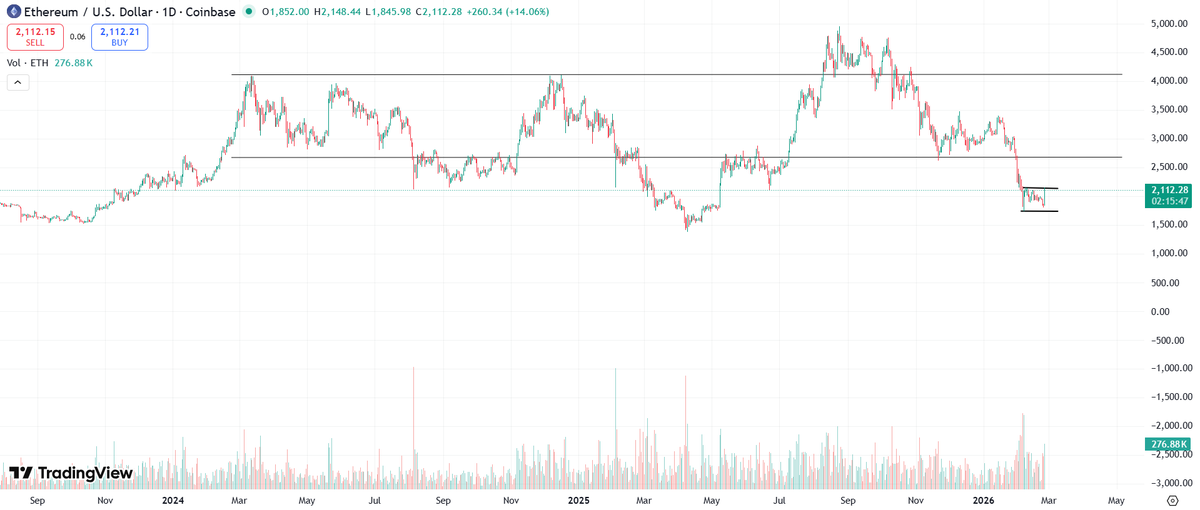
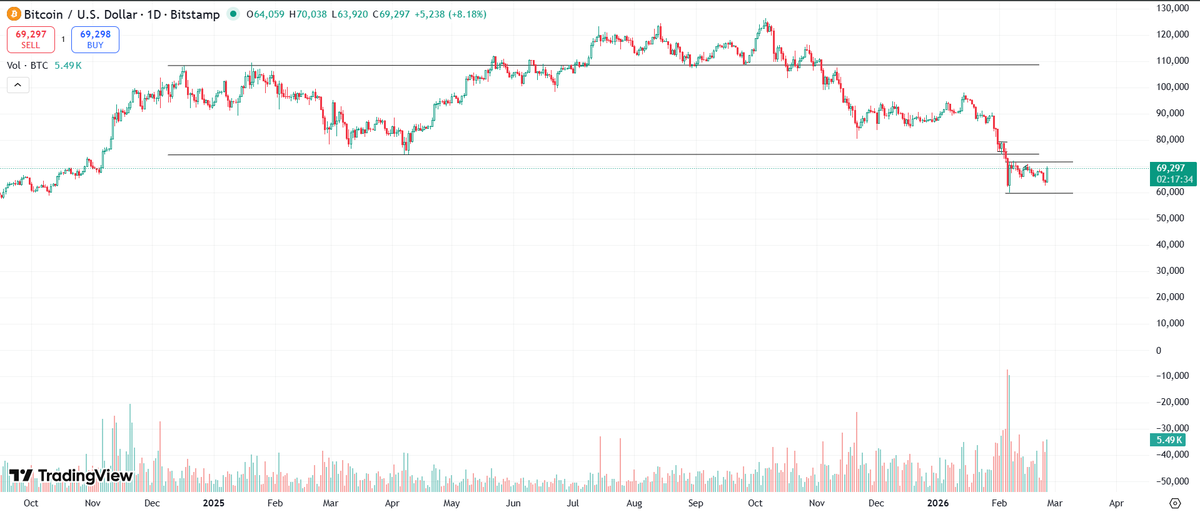
Btc and eth chart
They won't show you this, but I will
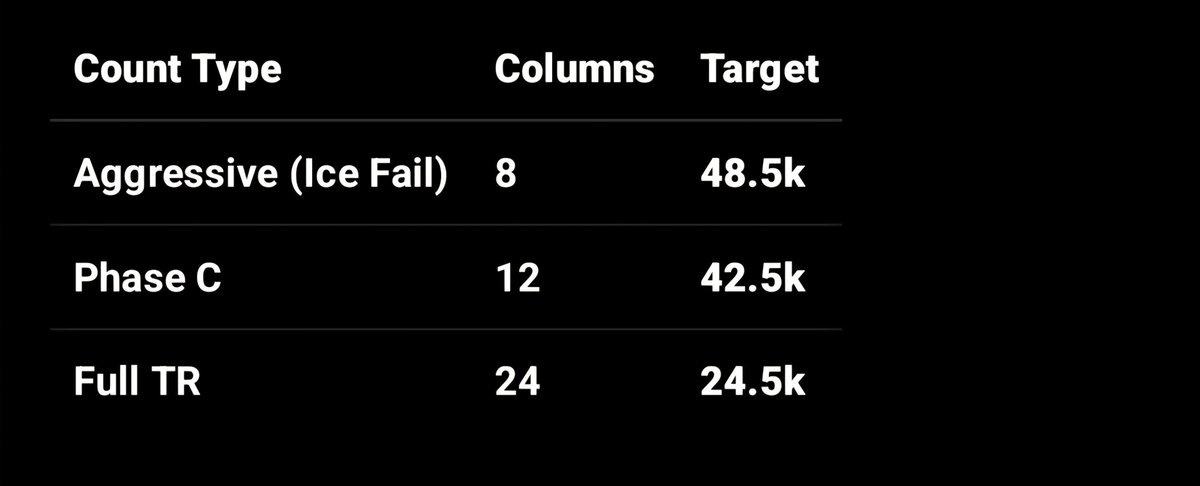
Btc going to $25k should be on your bucket list
Trying to DCA at zones like $50k, $40k, is bad. You are trying to catch a knife that is not falling but falling.
Eth will see lower prices ($1k and below)
I got a revelation from space