The future of AI is not full autonomy.
It is bounded autonomy.
As AI moves from giving advice to taking action, the focus has to shift from capability to permission.
AI may be able to route work, update systems, trigger actions, or interact with customers.
It is about review, approval, accountability, and knowing who owns the final decision.
Fact-checking helps.
But it is not enough if nobody owns the review process.
#AI#AIGovernance#ResponsibleAI
The AI answer was wrong.
But that was not the real failure.
The real failure was that nobody knew who should catch it.
A hallucination is a wrong answer.
Unmanaged AI use is a wrong system.
AI risk is not just about mistakes.
Day 1:
“AI built the workflow in 20 minutes.”
Day 180:
“Why did it route there?”
“What data does it use?”
“What happens if it breaks?”
“Can we update it safely?”
Congrats.
You did not just create automation
You created automation debt
#AI#WorkflowAutomation#AIGovernance
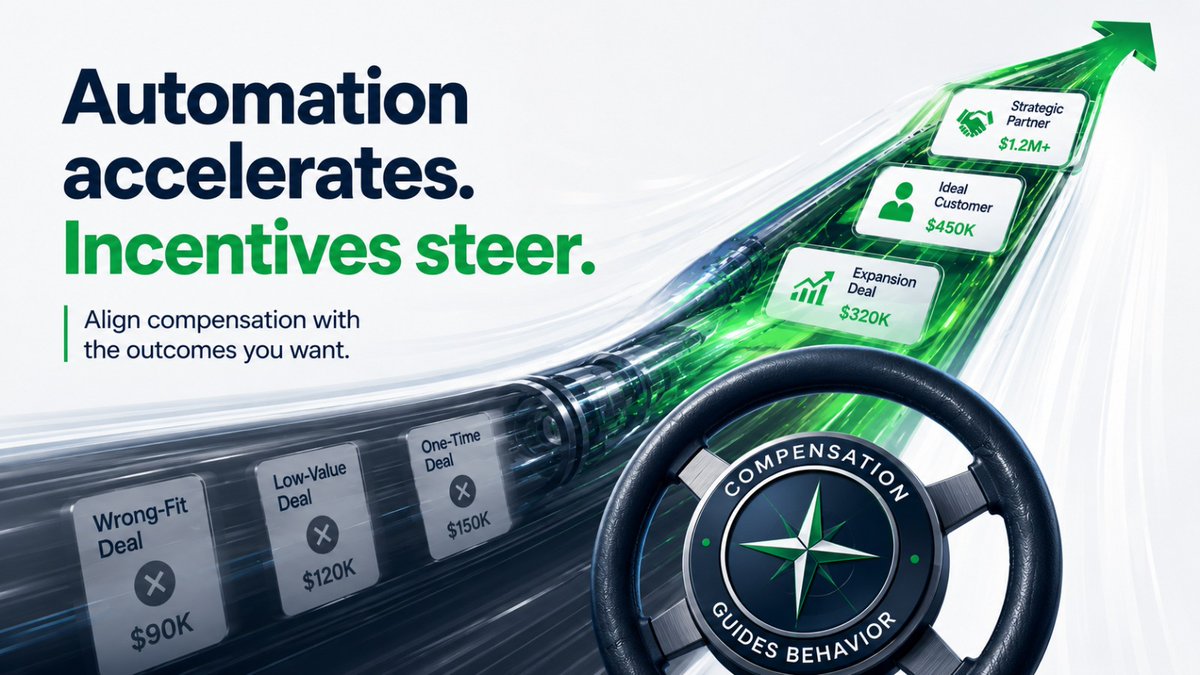
“Close as much as possible, as fast as possible.”
Automation accelerates the system.
Incentives steer it.
Before automating sales, check whether the workflow and comp plan reward the same behaviour.
#RevOps#SalesOps#SalesAutomation
The sales workflow got faster.
Leads moved faster.
Meetings booked faster.
Follow-ups triggered faster.
CRM updates improved.
But the team still chased the wrong deals.
Why?
The workflow said:
“Prioritize better-fit opportunities.”
The comp plan rewarded:
summarize context
route requests
check missing info
draft next steps
flag approvals
But people still need to own judgment, permissions, accountability, and customer impact.
#AI#WorkflowAutomation#Operations
The task is not always the bottleneck. Sometimes, the real delay is the handoff.
The moment work leaves one person, team, system, or queue and waits for the next action.
That is where AI can help as operational glue:
notify the right person, and flag issues before the meeting happens. That is the shift from revenue reporting to revenue operations
The better question is not:
“What should we report on?”
It is:
“What should happen when the report reveals a problem?”
#RevOps#WorkflowAutomation
If your sales report shows the same problem every week, the report has done its job.
Now you need a workflow.
Reporting gives visibility.
But visibility without follow-through does not fix the process.
A report shows the gap.
A workflow closes it.
A dashboard can show that leads are sitting too long.
A workflow can alert the owner, create a follow-up task, and remind the team before the lead goes cold.
A report can show that quotes are delayed or CRM data is missing.
A workflow can prepare the next step,
AI will not just change who does the work. It will change where human judgement is needed.
The real question for businesses is not: How do we automate everything?
It is: What should AI prepare, and what should a human approve?
That's how you use AI without losing control.
10 Terms Every AI Engineer Should Know in 2026:
1. LLM
Large Language Models are massive neural networks trained on enormous datasets to predict, generate, and reason with text, code, and other sequences at human-level fluency.
2. RAG
Retrieval Augmented Generation means fetching relevant external documents or data at inference time and feeding them into the LLM so responses are grounded, up-to-date, and less prone to hallucination.
3. AI Agents
AI Agents are autonomous systems that can plan, use tools, call APIs, remember context across steps, and execute multi-step workflows with minimal human intervention.
4. Multimodal Models
Multimodal models process and generate across multiple data types - text, images, audio, video - within a single unified architecture, enabling richer understanding and creation.
5. Fine-Tuning
Fine-Tuning is the process of further training a pre-trained LLM on domain-specific data to specialize its behavior, improve accuracy, or adapt it to custom tasks and styles.
6. Vector Databases
Vector databases store and query high-dimensional embeddings at scale, powering fast semantic search, similarity matching, and memory systems for RAG and agent applications.
7. Prompt Engineering
Prompt Engineering is the craft of designing precise, structured inputs, instructions, and examples to reliably steer LLMs toward desired outputs without changing model weights.
8. Quantization Quantization reduces model precision (e.g., from 32-bit to 4-bit or 8-bit) to cut memory usage and speed up inference while preserving most of the original performance.
9. MLOps MLOps brings DevOps practices to machine learning - covering versioning of models and data, automated pipelines, monitoring drift, and continuous deployment of AI systems in production.
10. Chain-of-Thought Reasoning Chain-of-Thought Reasoning prompts models to break problems into explicit intermediate steps, dramatically improving performance on complex logic, math, and multi-hop tasks.
The plan was always to make AI free and cheap, get you dependent on it, and then increase the prices for token use.
If you can't think and code, then you must pay heavily to use AI.
Maybe fine-tuning a model for certain specific boilerplate tasks can keep you free from control.
🔵10. REST (Representational State Transfer) 🔵
➤ REST is an architectural style built on top of HTTP.
➤ It relies on specific principles for efficient communication. They include;
🔷 Client-Server Architecture:
➤ Separates the front end from the back end.
➤ To allow them to be developed, maintained, and scaled independently.
🔷 Statelessness:
➤ Each request contains all the information needed for the server to process it.
➤ The server does not store session data between requests.
🔷Layered System:
➤ Allows for the organization of services into distinct layers (e.g., security, business logic, or database access) to improve scalability.
🔷Cacheability:
➤ Encourages temporarily storing frequently accessed data in memory to reduce server load and improve response times.
🔷Uniform Interface:
➤ Promotes a consistent way of interacting with resources.
➤ Best practices include:
⬩Thinking of everything as a resource.
⬩Using plural nouns for endpoints (e.g., /users instead of /user or verbs like /add).
⬩Utilizing appropriate HTTP status codes (e.g., 201 for creation, 200 for success).
⬩Implementing versioning to prevent breaking changes for existing clients.
⬩Using pagination to break large datasets into manageable chunks.
🔷Restfulness: An API is considered truly "restful" when it adheres strictly to these principles and best practices.
🔵 8. Protocols - TCP & UDP 🔵
🟢 TCP, an abbreviation for Transmission Control Protocol.
➤ It ensures that a dedicated and reliable network session is established between a client and a server.
➤ This happens before data is sent.
➤ The term used is "connection-oriented."
➤ It performs error checking.
➤ Retransmission of lost or corrupted packets is done.
➤ A packet is a small piece of an entire message sent.
➤ With TCP, the order in which packets are sent is maintained.
🟢 UDP, an abbreviation for User Datagram Protocol
➤ Data is sent without ensuring that a connection is established.
➤ It is faster than TCP.
➤ Not dedicated recovery of packets and error checking.
📌Use TCP when data integrity is a must. UDP when speed is more important than integrity.
To master system design, the first topic I recommend you should understand is networking and communication.
To understand it, start to learn the following order of concepts below.
From today and going onwards, I'll share everything I know about system design from the basics to advanced topics.
1. IP addresses
2. How DNS works
3. Client-Server Model
4. Forward Proxy vs Reverse Proxy
5. Load balancers
6. API Gateway
7. CDNs
2. How DNS works. It's easy. Let me explain.
- A user types the domain name in their browser.
- The browser cache is checked. For the first time, it won't exist.
- Then the O.S (operating system) cache is also checked. For the first timeit won't exist.
- Your ISP's DNS resolver is then checked. For the first time it will be as the os and browser cache.
- The request then goes to the Root DNS server (RDS).
- RDS redirects the request to the appropriate Top level domain(TLD) server.
- A .com goes to a .com TLD server and a .org is redirected to a .ord TLD server.
- TLD server redirects to the Authoritative name server(ANS) which stores the mappings of domain names to their IPs.
- ANS returns the IP address and the user can see what they want in the browser.
- The next time, the record is picked from the browser caches, if you clear your browser, then os cache, if os if reset, then ISP's resolver is checked, otherwise the whole process is repeated.