Why is Kafka fast?
There are many design decisions that contributed to Kafka’s performance. In this post, we’ll focus on two. We think these two carried the most weight.
1️. The first one is Kafka’s reliance on Sequential I/O.
2️. The second design choice that gives Kafka its performance advantage is its focus on efficiency: zero copy principle.
The diagram below illustrates how the data is transmitted between producer and consumer, and what zero-copy means.
🔹Step 1.1 - 1.3: Producer writes data to the disk
🔹Step 2: Consumer reads data without zero-copy
2.1: The data is loaded from disk to OS cache
2.2 The data is copied from OS cache to Kafka application
2.3 Kafka application copies the data into the socket buffer
2.4 The data is copied from socket buffer to network card
2.5 The network card sends data out to the consumer
🔹Step 3: Consumer reads data with zero-copy
3.1: The data is loaded from disk to OS cache
3.2 OS cache directly copies the data to the network card via sendfile() command
3.3 The network card sends data out to the consumer
Zero copy is a shortcut to save multiple data copies between the application context and kernel context.
--
Subscribe to our weekly newsletter to get a Free System Design PDF (158 pages): https://t.co/FIzCeaWsZV
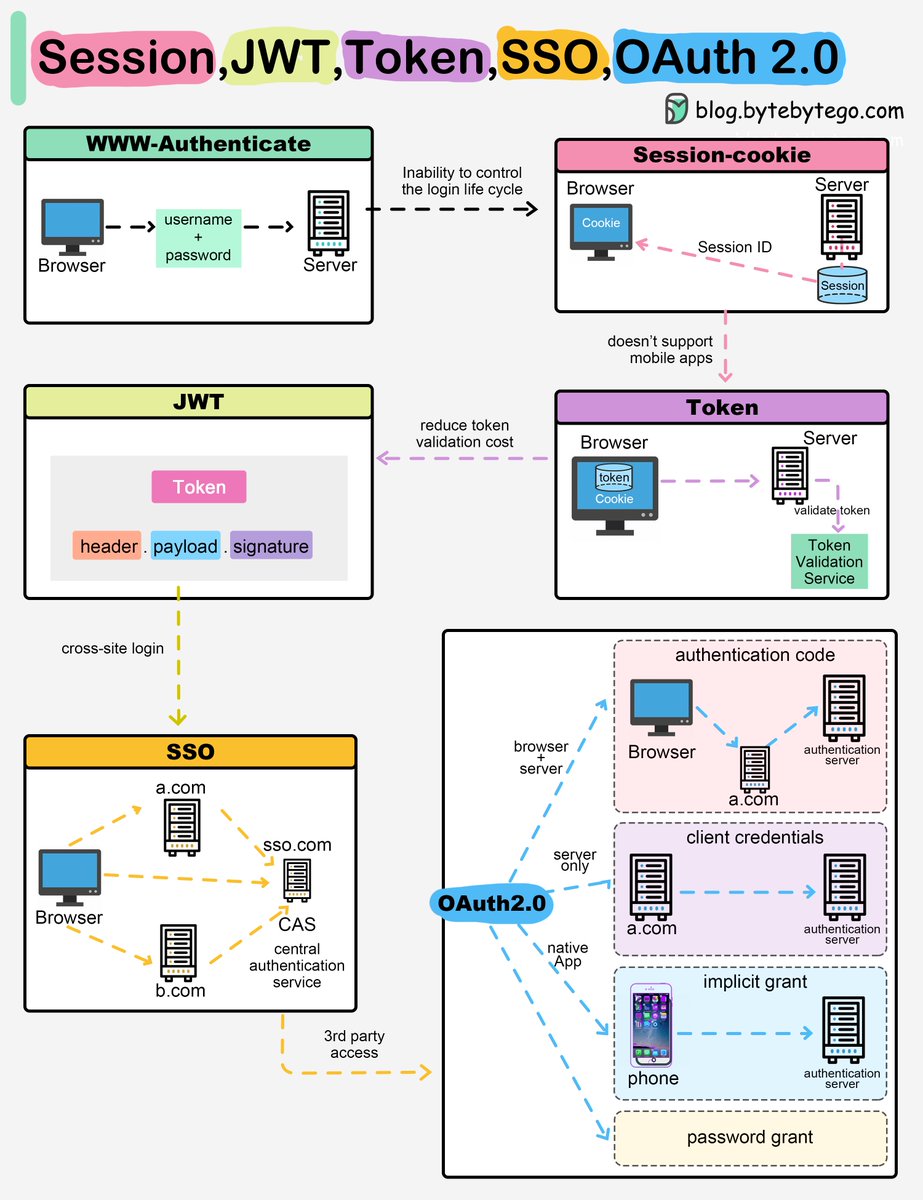
Session, Cookie, JWT, Token, SSO, and OAuth 2.0 Explained in One Diagram
When you login to a website, your identity needs to be managed. Here is how different solutions work:
- Session - The server stores your identity and gives the browser a session ID cookie. This allows the server to track login state. But cookies don't work well across devices.
- Token - Your identity is encoded into a token sent to the browser. The browser sends this token on future requests for authentication. No server session storage is required. But tokens need encryption/decryption.
- JWT - JSON Web Tokens standardize identity tokens using digital signatures for trust. The signature is contained in the token so no server session is needed.
- SSO - Single Sign On uses a central authentication service. This allows a single login to work across multiple sites.
- OAuth2 - Allows limited access to your data on one site by another site, without giving away passwords.
- QR Code - Encodes a random token into a QR code for mobile login. Scanning the code logs you in without typing a password.
Over to you: QR code logins are gaining popularity. Do you know how it works?
–
Subscribe to our weekly newsletter to get a Free System Design PDF (158 pages): https://t.co/FIzCeaWsZV
A glowing review of my book (@mitpress) from one of my science communication heroes! (I went to one of @stevenstrogatz 's book events on the notion of infinity and he encouraged me to write a book, and I did!)
Playing with small knapsack problems, GPT4 and Gemini. It works well (though python code generation) until it does not :). The CLAIRE code works better ...
https://t.co/ARD6jKkypR
Thanks to GitHub copilot, I was able to complete the "CLAIRE to javascript" compiler in a few January sessions (soon on github)
The ability of copilot to generate CLAIRE code that itself generates Javascript without ever being confused between the two is pretty amazing 📷
We lost a titan of programming languages, programming methodology, software engineering and hardware design. Niklaus Wirth passed away on the first of January. We mourn a pioneer, colleague, mentor and friend.
This week we will cover:
— Event-driven Architecture
— Principles of object-oriented programming
— Data processing systems
— How the ETL process works
Don’t want to miss out? Subscribe to our free newsletter for a weekly deep dive & content roundup: https://t.co/nLXHusgTsh
Data Pipelines Overview. The method to download the GIF is available at the end.
Data pipelines are a fundamental component of managing and processing data efficiently within modern systems. These pipelines typically encompass 5 predominant phases: Collect, Ingest, Store, Compute, and Consume.
1. Collect:
Data is acquired from data stores, data streams, and applications, sourced remotely from devices, applications, or business systems.
2. Ingest:
During the ingestion process, data is loaded into systems and organized within event queues.
3. Store:
Post ingestion, organized data is stored in data warehouses, data lakes, and data lakehouses, along with various systems like databases, ensuring post-ingestion storage.
4. Compute:
Data undergoes aggregation, cleansing, and manipulation to conform to company standards, including tasks such as format conversion, data compression, and partitioning. This phase employs both batch and stream processing techniques.
5. Consume:
Processed data is made available for consumption through analytics and visualization tools, operational data stores, decision engines, user-facing applications, dashboards, data science, machine learning services, business intelligence, and self-service analytics.
The efficiency and effectiveness of each phase contribute to the overall success of data-driven operations within an organization.
Over to you: What's your story with data-driven pipelines? How have they influenced your data management game?
–
Subscribe to our newsletter to 𝐝𝐨𝐰𝐧𝐥𝐨𝐚𝐝 𝐭𝐡𝐞 𝐆𝐈𝐅. After signing up, find the download link on the success page: https://t.co/b1JNtUn26C
Everyone should learn how to fine-tune LLMs! 🔥
Introducing Lit-GPT! ⚡️
- Fully open-source
- Based on NanoGPT
- Supports Llama2, Mistral & Mixtral & more!
- Powered by LightningAI's Lightning Fabric!
Here's the finetuning process in 5️⃣ easy steps...👇
A new CLAIRE sample explained : how to solve a Sudoku problem with inference rules. More complex than asking chatGPT but much faster :)
https://t.co/ARD6jKkypR