Learn how to code faster with AI in 5 mins a day. Get high signal AI software development news, research papers & trending resources. By @superhuman_ai
it's easy to fall into the trap of micromanaging your agents instead of correcting the environment that shapes its behavior.
pstack 0.15.9 now ships a new /correct skill: if you keep correcting agents for the same mistakes, it finds the pattern and fixes it with architecture, types, and checks.
i like to imagine that commits rapidly flowing into the codebase are like a bonsai tree rapidly growing in whatever direction it pleases. what you want to do is not to give in to the chaos, but tame it intentionally with the right constraints
0.15.9 also has improvements to:
• /architect: now includes instructions on designing agent friendly architecture
• a new /benchmark-checklist skill based on @brendangregg's benchmarking checklist
here's a prompt you can give to grok bot to start architecting a better codebase with pstack:
/poteto-mode create a new Project agent to refactor and rearchitect my repo so that our architecture is more agent friendly. it should use both the /correct and /architect skill to look through past commits and find the most common pitfalls that agents fall into, whether its with code quality, performance, or bugs. if relevant you can also use the /recall skill to find past conversations for context. it should make a high level plan for me to review. it should also answer its own open questions by prototyping rather than defer to me. come back to me with a plan backed by real data. once i approve the plan, use either the stack or full autopilot playbook (ask me which i want) to execute
Today, with over 100 industry partners, we introduced the NVIDIA Open Agent Safety Platform, bringing together OpenShell and Sentry.
Artificial intelligence is extraordinary technology that will advance discovery, productivity, security, health, and prosperity for generations to come.
But its full promise can only be realized when people have confidence that AI is being built to be safe and deployed with wisdom and responsibility.
This is bigger than a single product. It's the beginning of an open ecosystem to build the trust layer for safe agent systems.
Together, we are building the foundation of the AI economy.
Trust and innovation are not in conflict. Safety is how trust is earned. We must build not only the most capable AI, but the most trusted AI, so that this extraordinary technology can realize its enormous promise for the world. https://t.co/ugYWQ1MyRi
here's how i shipped 2,500 PRs last month to production
this was originally supposed to be for Cursor Compile in London. i couldn't make it since i was livestreaming for Grok @Bot Galaxy so i'm making it available for free here on X! watch it on 2x speed, i talk slowly
How to stop Claude Code from overbuilding simple tasks
You ask Claude Code for a date field. The agent installs a picker library, writes a wrapper component, and starts a debate about timezones
Ponytail, an open-source skill shared by @Voxyz_ai, kills this overbuilding reflex:
How to do implement:
Learn harness engineering using Pi Agent, DeepSeek, and Gemini
Inside the tutorial:
1. How to design structured agentic environments
2. Overcome LLM performance bottlenecks to create reliable
3. Autonomous coding workflows capable of executing complex
4. Multi-step software development tasks
Recruiters from top tech teams pay AI native engineers millions of dollars
Becoming AI native is THE way to win as an engineer in 2026
We mapped the entire path in one guide: The Ultimate Guide to Agentic Engineering
Subscribe now to access: https://t.co/ZNzsqHpaNW
OpenWorker -- an open source agent that doesn't just chat but completes tasks on your laptop -- just released a new version with many features for security workflows.
After our initial release, many users found it especially useful for cybersecurity. Attackers are already using AI; OpenWorker is committed to giving defenders the same leverage. Running an agent requires both (i) A model and (ii) A harness (the software around the model). Because the OpenWorker harness is fully open source, security teams can audit it to make sure we haven't built any backdoors that exfiltrate your code and data to some company or even a foreign adversary.
OpenWorker now comes with built-in cybersecurity agents for (i) Scanning your code for vulnerabilities. (ii) Scanning dependencies for supply chain injections. (iii) Checking your cloud security configuration for attack surfaces. This enables developers to do much more security work before deployment (part of what's called the "shift left" movement).
You choose the model: you can run open weight models fully locally so sensitive code never leaves your machine. This helps with legitimate security work (like reproducing a known exploit to defend against it) that can trigger refusals in leading closed models. Or use your ChatGPT subscription, or stealth preview models like Ox Alpha, or any model via API key.
Thanks also to all the open source contributors!
Join work with @rohitcprasad so please follow him too to get more frequent updates.
Try it out: https://t.co/QPZLudn7ug
Code: https://t.co/NYCiTD6hSq
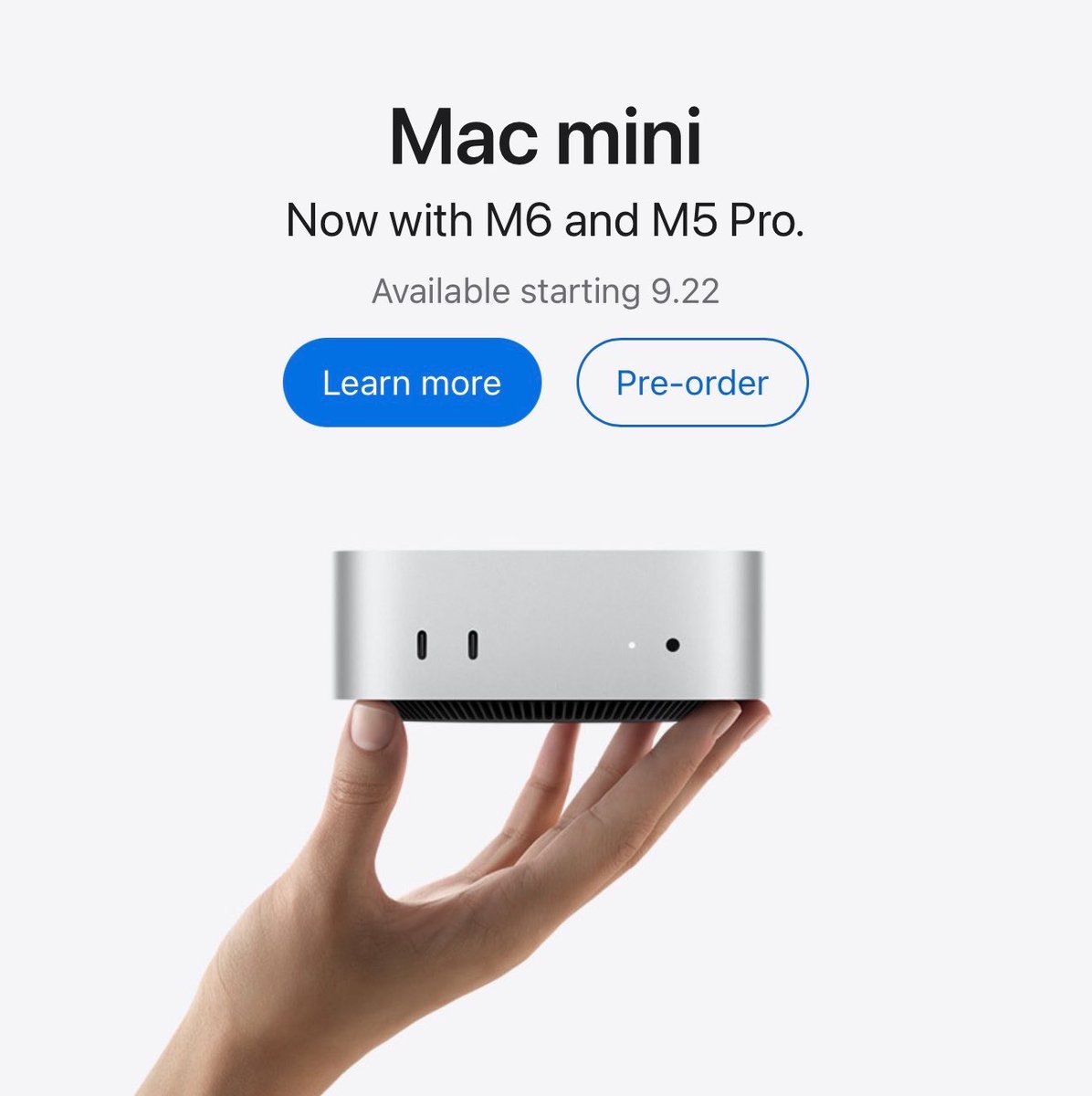
Apple just released new Macs, and they’re a huge leap for local AI:
M6 Mac mini
• 12-core CPU / 12-core GPU
• 32GB unified memory
• 170GB/s bandwidth
• Up to 13.5× faster LLM prompt processing vs M1, 4.8× vs M4
M5 Ultra Mac Studio
• 36-core CPU / 80-core GPU
• 512GB unified memory
• 1.2TB/s bandwidth
• Up to 9.8× faster LLM prompt processing vs M1 Ultra, 4× vs M3 Ultra
Introducing terminal-code: VS Code inside the terminal
- VS Code compatible CLI
- works over ssh
- syncs with your terminal theme
https://t.co/j3HThPdVPw
I've been a backend Engineer for 12+ years. Today, I'm a Principal Engineer at Atlassian.
I've designed systems that handle millions of requests. Sat on both sides of system design interviews.
Reviewed more architecture docs than I can count.
Starting today, I'm breaking down the fundamentals of scaling for the next 25 days.
If you're learning system design bookmark this thread, you're going to get a lot of learning from this.
how to build anything rn:
- get a hetzner, do, or hostinger vps
- host hermes on it
- add gbrain or implement your own memory vault using qmd + sql
- set up hermes with codex auth -> gpt-5.5 / no reasoning / fast mode
- install orca on your macbook and phone with tailscale to have a nice ide to work on both
- before starting any work, ask hermes to conduct deep research on the subject and save it to gbrain as source material for the project
- use the `/grill-me` skill or a similar prompt to uncover as many unknowns as possible. save results to memory too
- define/write clear evals for every project to determine whether a run was successful
- have hermes iterate over the project until all evals pass, saving all learnings to the vault along the way
- whenever it gets stuck, use memory + a new research or `/grill-me` session to unblock it
rinse and repeat until the work is done. pay attention to the process. develop a feeling for how long tasks should take and do not be afraid to stop a model mid session to ask for status and why it's taking so long.
Design Engineering Tip
Consider letting textareas grow with the content instead of introducing nested scrolling. It often creates a smoother writing experience and keeps forms easier to scan.
CSS:
textarea {
field-sizing: content;
}
To get good animations from an AI you need to get good at telling it what you want:
- "stagger this list of items"
- "make this animation direction-aware"
- "spacial consistency", "crossfade", "layout animation",
I made a motion vocabulary for this:
https://t.co/ExAxpr31no
Some tips to help agents understand your codebase:
1. The source code either needs to be the source of truth, or have something legible as a path to the source. For example, if marketing site content is actually stored in a CMS, you need to either delete the CMS and move that content into code, or make the CMS legible through and MCP, CLI, or skill: https://t.co/zhObygzELv
2. Agents need to be able to verify their work. This includes but is not limited to: using a typed language, having high-quality and fast tests, having a well-configured linter: https://t.co/AL3eY6TBXr
3. You need to have a concise and effective AGENTS.md file, which is included in every message to your agent. Models are quite good now, so some things you can omit as the models know them. You don’t need to say the tests live inside /tests for example. It’s worth asking the models to find things in your codebase and making sure they’re named what the models might expect, otherwise consider refactoring: https://t.co/2FlVQr84nO
4. Set up automations which give you suggestions for refactoring code, catching security issues which may have slipped through code review, and optionally continuous documentation of the codebase. You can effectively create a self-driving codebase which gets better while you sleep: https://t.co/UuYL3KNTZc
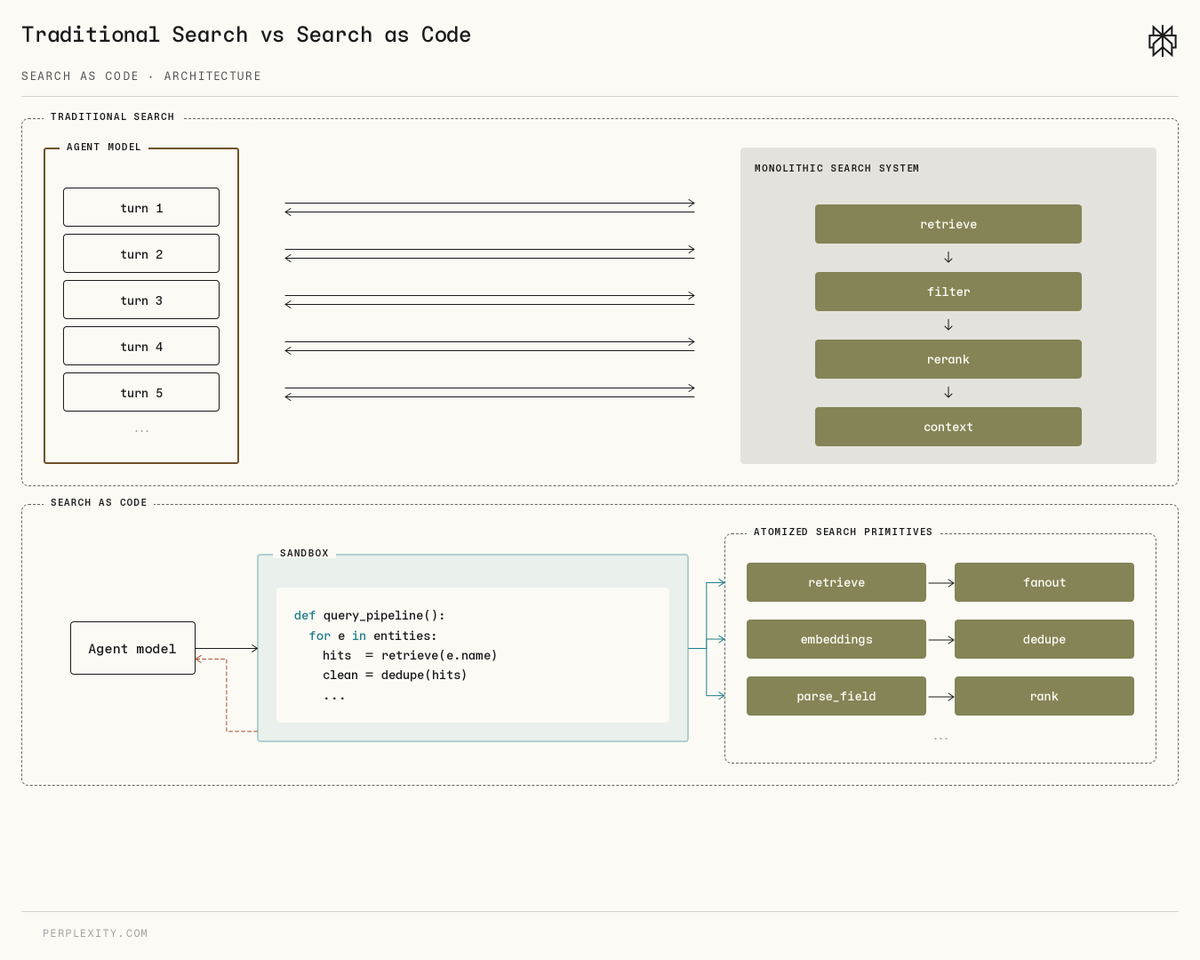
Introducing Search as Code, our new search architecture for AI agents.
It writes Python that calls our search stack directly, instead of looping through function calls one at a time.
Available in the Perplexity Agent API, and now default in Computer.
https://t.co/ut6GGWQTVO
This 30-min workshop by the creator of Claude Code Boris Cherny will teach you more about vibe-coding than 100 YouTube video guides.
10 quick hands on insights👇