You want a consent signal from the visitors who refuse tracking as well. There are three main reasons your data has gaps and you can only control one of them.
According to online studies about 37% of desktop users are running an ad blocker, so for those visitors the scripts you use for tracking never load on the page at all, and that breaks your attribution.
The second one comes from browsers like Safari, which limit how long a cookie lives, so a returning visitor can't be matched against their previous sessions, and that makes them harder to target and it makes their attribution wrong.
The third one is the consent signal from your own website. For the visitors who aren't behind either of the other two limits you want to get as much data as possible, because the ad platforms will try to model the gaps and fill them in. That is, if they have enough data to model from, which means every visitor needs to send a signal, even the ones who haven't approved tracking.
🛡️ @ConsentLayerAI Brings Consent Management to ChatGPT: Now works inside ChatGPT (already available in Claude and Cursor).
Ask your AI to install it, and the agent scans your site for trackers, sorts them into consent categories, and applies GDPR/CCPA/LGPD rules by region.
Free to get started, no credit card required.
https://t.co/blLCZgNpYB
You can now start making your @Replit-built website compliant with just one click.
Connect ConsentLayer and just ask the Replit agent to configure it for you.
Get started here: https://t.co/VN35ilVH2N
Some of your visitors only use a keyboard. If your cookie banner blocks the page and the keyboard can't reach its buttons, they're stuck, they can't answer it, and they can't get to the site they came for, so they leave. I learned this when I was making the first cookie banner I built accessible. Of course you want your banner to look good and match your site, and it should be accessible too, and that starts with making sure it can be used with a keyboard. The piece that does the work is called a focus trap. When the banner is blocking the rest of the screen, it pulls the keyboard focus into the banner first, so anybody navigating the page can make their decision and reach the underlying page after, without having to tab through the whole page to get there. And if you want to see how your own banner does, load your site, keep your hands off the mouse, and press Tab. Focus should land in the banner, and decline should be one of the things you can reach, if that's what you're aiming for.
@consentlayerai is now an app inside ChatGPT, so you can set consent up on a site without opening our dashboard at all. Go to ChatGPT Plugins to get started.
Showing the same cookie banner in the same way to every visitor is potentially costing you valuable data. One thing I've noticed is that a lot of our users are surprised at how much their analytics or their ads data gets affected by the cookie banner, and that just means the banner is working as intended. So if it's an option for you, it's worth only showing it where you actually have to. The type of banner matters as well, because in an opt-out model you still get more data from most of your users than you do in an opt-in model like the GDPR has.
When I started building cookie consent solutions, I set out to find how banners are actually blocking cookies. And one thing I found was that many of them actually don't (sometimes it's intentional, not that the tool can't but the website owner doesn't want to).
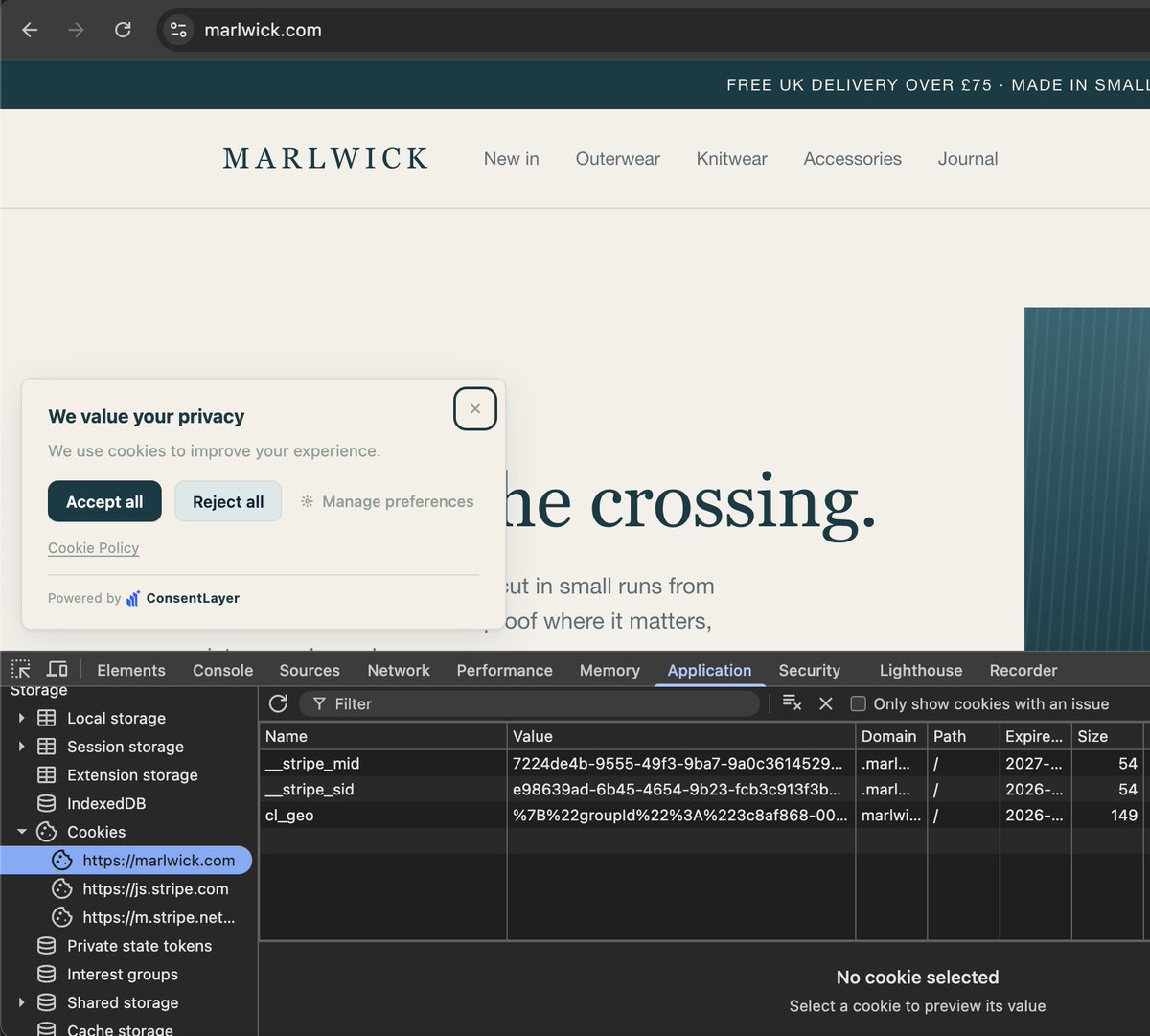
So if you want to check that on your own website, you can open the Chrome DevTools and find the list of cookies for the current domain under the applications tab, and you do that before you click anything in the banner.
The screenshot below is how things should look if you want to block cookies before consent. Stripe is loaded in this case because those cookies are essential for a store, and there's one cookie from the banner itself, but no tracking cookies should show up here if that's what you're aiming for.
No terminal, no dashboard. @consentlayerai runs from @claudeai or any other agent. Make a change to your site, ask Claude to scan it, and anything new is categorized and held until consent. Give it a try!
Your cookie banner should look like it belongs on your site. @consentlayerai is a consent management platform driven by your coding agent, just ask it to match your site.
"Add a Do Not Sell link to my site." → That's the whole setup.
Your AI agent installs a CCPA/CPRA "Do Not Sell or Share My Personal Information" link in one prompt. Picks the label, wires the snippet, and turns on request alerts. No dashboard is needed.