@masumparvej_ I think it could be polished a bit further with clearer hierarchy as some have already pointed out, right now it's hard know where to start because things feel a bit flat.
Review and send btn does attract my attention because of the blue though.
Thanks for sharing! :)
Very unlikely, from my experience it still needs input from someone to make the better decisions.
I use AI everyday for work and personal projects, the limitations and shortcomings become more evident as you build and iterate.
People producing the best content with AI have some type of knowledge, vocabulary, workflow that allow them to squeeze more value out.
That said the default quality is improving which will push designers to raise the bar even more :)
one piece of feedback using annotate is that it took a few steps back. previously design mode allowed you to specify inline what component you are referencing directly inside the prompt.
i.e:
Style {button A}{button B} like {button C}
instead we get this ⬇️
{button} {button}{button}
Prompt here
Could we get back inline context please?
@cursor_ai@jennywen what happened to design mode. the new annotation seem to be in some aspect a regression of what was there before in term of mechanism with inline mentions.
I loved that I could prompt the ai to look at A to style B. Now the experience is too similar to codex and claude, which has introduced a lot of frictions to me as a user. I would always come back to cursor to do precision edits because of that but now that is gone instead of improved upon.
See original -> https://t.co/eSforaZkZr
Also cmd+L to bring annotations to chat is not working. not sure if it's not longer a feature either.
Here's a step by step:
1. Open the in-app browser to select, scribble, and describe changes to any component in design mode.
2. Type /multitask or queue changes to run them in parallel — great for touching several unrelated components at once.
3. Get your steps in, grab a coffee, text mom to just say hi.
@lobanovskiy I think that we are looking at this from the wrong angle, it’s not Figma versus Ai but rather what tool is best fit for the stage of design I am at. As great as AI has become I find myself always going back to Figma to nail in the details and sometime make quick changes that don’t warrant prompting the AI or that the AI that just get the way i want it.
Sometimes AI is faster, sometimes Figma is faster 🤷🏿♂️
All that being said it’s also about ownership and how much of the pixels on screen you want to own! 😃
🌿 Plant care, redesigned for iPhone.
A little 3D mockup of OFPlants running on the new iPhone Duo.
Identify plants. Track care. Diagnose problems. Keep your plants thriving.
Building in public → @OFPlants 🌱
Before typing a single prompt into @claudeai or @ChatGPT or @cursor_ai , I map the entire product experience out in @ConceptsApp
Why? Because the AI era demands more intentionality, not less. Sketching on an infinite canvas slows me down just enough to explore different angles and solve the core problem first.
Instead of delegating my thinking to the AI, I bring a hyper-specific vision to it. The result? Better prompts, faster builds, and a much tighter final product.
How are you planning your builds before you prompt?
@amirmxt Aesthetics are alright, but I think the UX is bad in my opinion. The workflow page showcased here has 4 levels of filters which gives very inception vibes.
I think that it’s important when judging these designs to actually ask ourselves what is the user hiring this page to do and how well is said screen doing at fulfilling that job.
They are other minor things in sidebar like 2 items appearing to be selected at once or operate only having one items under it called operations.
This definitely needs more prompting to reach a higher level or craft and user empathy.
@cursor_ai@ryolu_@ericzakariasson
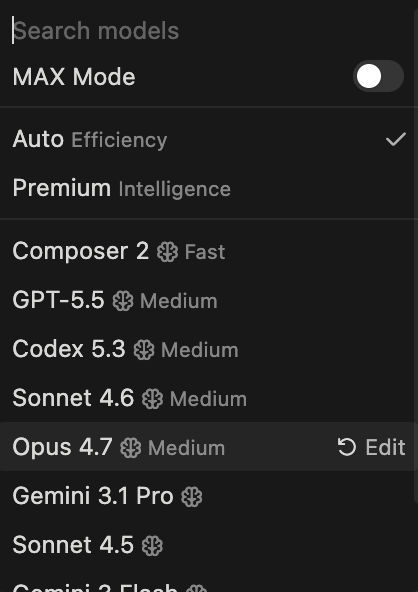
could we potentially had a customer option for users where they can decide what model to use when.
Say if I am asking cursor to move somethings, changing radius, color, ideally in that use case, I would love to use auto, but for more complex use cases I may want to use GPT-5.5 or Opus.
I tend to switch models manually a lot based on what I am doing, but I would love to cement that workflow so that I don't have to change manually every single time.
If this is already possible would love how to do that. Thanks a lot for the amazing work always!