Stop telling Claude, "do this."
Stop telling Claude, "write code."
Stop telling Claude, "fix this error." You're actually treating a senior AI like a junior intern. Here are eight prompts you can copy and paste directly:
@VodacomTanzania
Naomba kufahamu, Je, huduma ya mawasiliano kwa njia ya sauti ukipiga Number 100.
Imeondolewa? Nikitaka kuwasiliana na Mtoa Huduma, natakiwa niende kwenye menu gani?
Asante.
A good API doesn’t just return data.
It handles rate-limiting, caching, auth, validation, logging, versioning, and graceful failure.
If you only return JSON then you're not building an API, you're just exposing a database.
SQL vs NoSQL — When to Use What (With Real Examples)
A lot of devs struggle with choosing between SQL and NoSQL.
Here’s a no-fluff breakdown that will save you hours of research.
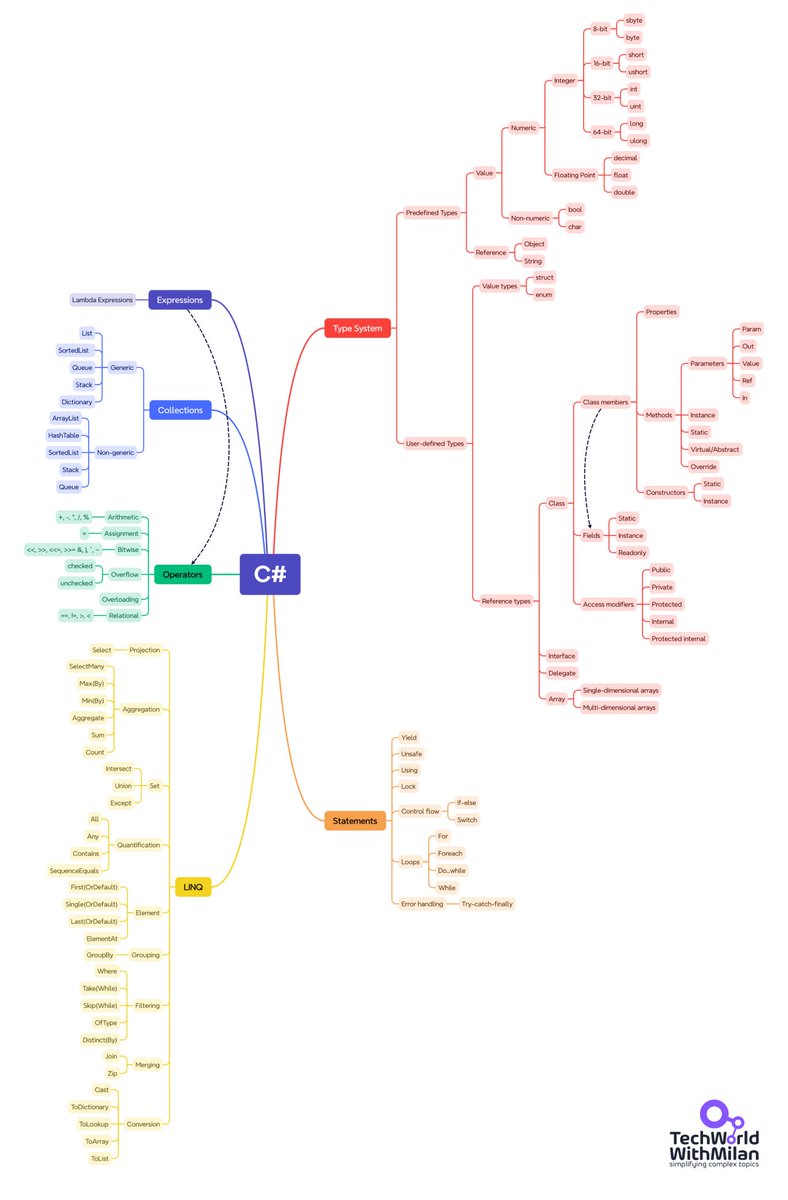
𝗪𝗵𝘆 𝗖#?
Some people often ask me why I chose C# over many other languages. Here, I will explain my reasoning.
C# emerged as a strongly typed language that combined the robustness of C++ with the simplicity of Visual Basic. It was a Microsoft answer to Java, but better shaped (no entity beans and similar features), and it was continually developed to adapt to modern times.
What are some C# features that I like:
🔹 𝗢𝗯𝗷𝗲𝗰𝘁-𝗢𝗿𝗶𝗲𝗻𝘁𝗮𝘁𝗶𝗼𝗻: Encapsulation, inheritance, and polymorphism form the cornerstones of C#'s object-oriented foundation. Classes, interfaces, and abstract classes create a well-defined way of reusable and maintainable code.
🔹 𝗚𝗲𝗻𝗲𝗿𝗶𝗰𝘀: Allows creating types that work with different data types without compromising type safety.
🔹 𝗟𝗮𝗺𝗯𝗱𝗮 𝗘𝘅𝗽𝗿𝗲𝘀𝘀𝗶𝗼𝗻𝘀: These anonymous functions add a touch of functional programming charm, streamlining code with less ceremony.
🔹 𝗟𝗜𝗡𝗤 (Language Integrated Query): Master the art of data manipulation with LINQ. This robust set of extensions brings the expressiveness of query languages directly into your C# code, allowing you to work with data with ease.
And also some less-used features:
➡️ 𝗧𝘂𝗽𝗹𝗲𝘀 for Returning Multiple Values: Simplify methods that need to return multiple values.
➡️ 𝗣𝗮𝘁𝘁𝗲𝗿𝗻 𝗠𝗮𝘁𝗰𝗵𝗶𝗻𝗴: Offer a concise syntax for type checks and casts.
➡️ 𝗟𝗼𝗰𝗮𝗹 𝗙𝘂𝗻𝗰𝘁𝗶𝗼𝗻𝘀: Improve code organization and readability within more extensive methods.
➡️ 𝗘𝘅𝗽𝗿𝗲𝘀𝘀𝗶𝗼𝗻-𝗯𝗼𝗱𝗶𝗲𝗱 𝗠𝗲𝗺𝗯𝗲𝗿𝘀: Allow defining member bodies using concise lambda expressions.
➡️ 𝗡𝘂𝗹𝗹-𝗰𝗼𝗻𝗱𝗶𝘁𝗶𝗼𝗻𝗮𝗹 𝗢𝗽𝗲𝗿𝗮𝘁𝗼𝗿𝘀: Simplify checks for null before accessing members or elements.
What else do I like in the C#/.NET Ecosystem:
🔸 𝗖𝗿𝗼𝘀𝘀-𝗽𝗹𝗮𝘁𝗳𝗼𝗿𝗺 𝗱𝗲𝘃𝗲𝗹𝗼𝗽𝗺𝗲𝗻𝘁: With the introduction of .NET Core, C# expanded beyond Windows, embracing Linux and macOS.
🔸 𝗖𝗼𝗺𝗺𝘂𝗻𝗶𝘁𝘆 𝗮𝗻𝗱 𝗰𝗼𝗿𝗽𝗼𝗿𝗮𝘁𝗲 𝘀𝘂𝗽𝗽𝗼𝗿𝘁: Backed by Microsoft and a vibrant open-source community, C# stays cutting-edge with regular updates and a wealth of libraries. There is even open communication and discussion between the language design team and the community.
🔸 𝗔𝗽𝗽𝗹𝗶𝗰𝗮𝘁𝗶𝗼𝗻 𝘃𝗲𝗿𝘀𝗮𝘁𝗶𝗹𝗶𝘁𝘆: From desktop applications to mobile apps (via Xamarin), web applications (ASP. NET), and gaming (Unity), C# is versatile.
🔸 𝗜𝗻𝘁𝗲𝗴𝗿𝗮𝘁𝗶𝗼𝗻 𝘄𝗶𝘁𝗵 𝗲𝗺𝗲𝗿𝗴𝗶𝗻𝗴 𝘁𝗲𝗰𝗵𝗻𝗼𝗹𝗼𝗴𝗶𝗲𝘀: Actively evolving to integrate with advanced technologies like cloud services, IoT, and machine learning.
🔸 𝗚𝗿𝗲𝗮𝘁 𝗱𝗼𝗰𝘂𝗺𝗲𝗻𝘁𝗮𝘁𝗶𝗼𝗻: Microsoft offers comprehensive, up-to-date documentation for all critical features.
👉 If you want to learn more about .NET, grab 20 years of .NET know-how in my 𝗨𝗹𝘁𝗶𝗺𝗮𝘁𝗲 .𝗡𝗘𝗧 𝗕𝘂𝗻𝗱𝗹𝗲 𝗳𝗼𝗿 𝟮𝟬𝟮𝟱:only $79 (39 % off until end of this week): https://t.co/9sSVaOLcqJ. (use code C552A)
#csharp #dotnet #programming
REACT in 2min
🔹 React Basics
➡ React is a JavaScript library for building user interfaces
➡ Developed and maintained by Meta (Facebook)
➡ Uses component-based architecture
➡ JSX is used to write HTML-like code in JavaScript
➡ Components can be class-based or function-based
🔹 JSX (JavaScript XML)
➡ Syntax extension for writing UI in React
➡ Looks like HTML but is converted to JavaScript
➡ Must return a single parent element
➡ Use {} for embedding JavaScript expressions
➡ Use className instead of class for CSS
🔹 Components
➡ Components are reusable UI elements
➡ Two types: Functional and Class components
➡ Functional components are more common and support Hooks
➡ Props are used to pass data to components
➡ Props are read-only
🔹 Props
➡ Short for "properties"
➡ Passed as attributes to components
➡ Accessed via props object
➡ Useful for customizing component content
➡ Props cannot be modified inside the child component
🔹 State
➡ State holds component-specific data
➡ Functional components use useState() hook
➡ State changes trigger re-renders
➡ Never mutate state directly — always use the setter function
🔹 useState Hook
➡ useState() is used to declare state in functional components
➡ Returns an array: [state, setState]
➡ Re-render occurs when setState is called
🔹 useEffect Hook
➡ useEffect() manages side effects (like API calls, timers)
➡ Accepts a function and an optional dependency array
➡ Runs after every render by default
➡ To run once on mount, pass an empty dependency array
🔹 Conditional Rendering
➡ Use ternary or logical && to render content conditionally
➡ Example: {isLoggedIn ? <Logout /> : <Login />}
➡ Prevent rendering with null or short-circuiting
🔹 Lists and Keys
➡ Use map() to render lists of components
➡ Each item must have a unique key prop
➡ Keys help React identify which items changed
🔹 Forms in React
➡ Controlled components bind form inputs to state
➡ Use onChange handler to update state
➡ Handle form submission with onSubmit event
🔹 Event Handling
➡ Events are camelCase (e.g., onClick, onChange)
➡ Use functions as event handlers
➡ event.preventDefault() prevents default behavior
🔹 React Router
➡ Used for client-side routing
➡ Install via react-router-dom
➡ Key components:
➡ BrowserRouter, Routes, Route, Link, useNavigate
➡ Enables single-page application navigation
🔹 useRef Hook
➡ Provides a mutable ref that doesn’t cause re-renders
➡ Use for DOM access or persisting values between renders
🔹 Context API
➡ Used for global state management
➡ Create context with createContext()
➡ Provide context with Context.Provider
➡ Access context with useContext()
🔹 useContext Hook
➡ Consumes context values inside functional components
➡ Avoids prop drilling
➡ Good for theming, user auth, global data
🔹 useReducer Hook
➡ Alternative to useState for complex state logic
➡ Useful when managing multiple state variables or actions
➡ Syntax similar to Redux
🔹 Custom Hooks
➡ Functions that use React hooks inside
➡ Reusable across multiple components
➡ Must start with use prefix (e.g., useForm, useToggle)
🔹 React Performance Tips
➡ Use React.memo() to avoid unnecessary re-renders
➡ Use useCallback() to memoize functions
➡ Use useMemo() to memoize expensive calculations
🔹 React Fragments
➡ Use <></> or <React.Fragment> to group elements without extra DOM nodes
🔹 Error Boundaries
➡ Catch JavaScript errors in component tree
➡ Only supported in class components
➡ Use componentDidCatch and getDerivedStateFromError
🔹 React Dev Tools
➡ Browser extension for inspecting React component tree
➡ Useful for debugging and profiling
🔹 Common React Packages
➡ axios – for making HTTP requests
➡ react-icons – for adding icons
➡ formik – for form handling
➡ yup – for validation
➡ react-router-dom – for routing
📘 For a detailed React ebook course with step-by-step projects.
➡ https://t.co/oH6FlLKgbM
𝗧𝗵𝗶𝗻𝗸 𝘆𝗼𝘂 𝗸𝗻𝗼𝘄 𝗔𝗦𝗣 .𝗡𝗘𝗧 𝗖𝗼𝗿𝗲 𝗺𝗶𝗱𝗱𝗹𝗲𝘄𝗮𝗿𝗲𝘀?
This post will change how you intercept HTTP requests 👇
Middleware in ASP .NET Core is a software component that is a part of application pipeline that handles HTTP requests and responses.
👉 Approaches: delegate-based inline, convention-based class, and IMiddleware-based implementation for custom logic.
1️⃣ First, use the Use method inline in your WebApplication class configuration.
This delegate-based middleware runs before and after the next component.
2️⃣ Second, if logic grows - extract it into a middleware class by convention.
Your class needs a RequestDelegate constructor and InvokeAsync method signature.
3️⃣ Or implement the IMiddleware interface for a safer, compiler-checked approach.
Register your IMiddleware class in DI and let the framework resolve it.
But here is the thing!
📌 Middleware default lifetime is 𝘀𝗶𝗻𝗴𝗹𝗲𝘁𝗼𝗻, so inject singleton dependencies only.
📌 For 𝘀𝗰𝗼𝗽𝗲𝗱 services, use InvokeAsync parameters in convention-based middleware only.
Custom middleware are used for:
• logging
• auth
• validation
• changing responses
Which middleware approach do you prefer and why? Drop in the comments.
♻️ Follow me @AntonMartyniuk and repost this to help others
📌 Save this post for future reference!
▶️ Join 𝟴,𝟬𝟬𝟬+ readers in my free newsletter to improve your .NET skills and learn how to craft better software:
https://t.co/FLTM0n2kSp
Have you heard about Refit?
If not, let me introduce you.
Refit is a type-safe REST library for C# that simplifies API consumption.
You start by defining the API as an interface with method signatures and attributes, and Refit does the heavy lifting for you.
Why should you consider using it?
- Automatic serialization and deserialization
- HTTP methods support
- Strongly typed API definition
What I love most is the ApiResponse<T> wrapper, which handles both the underlying content and metadata.
It also provides a uniform response structure for your services.
You can use Refit for projects of any size, as it takes care of the "complex" parts, allowing you to focus on your application logic.
That said, it's not a silver bullet—so choose wisely.
𝗪𝗵𝗮𝘁 𝗮𝗿𝗲 𝗧𝗟𝗦, 𝗦𝗦𝗟, 𝗮𝗻𝗱 𝗛𝗧𝗧𝗣𝗦
When you visit some websites, the browser will display a security warning without HTTPS because your connection is unencrypted. Anyone monitoring the network can see your data, including passwords and personal information.
𝗪𝗵𝗮𝘁 𝗶𝘀 𝗛𝗧𝗧𝗣𝗦?
HTTPS (HyperText Transfer Protocol Secure) is HTTP with encryption. The padlock icon in your browser indicates an encrypted connection between your device and the website's server.
Without HTTPS, data travels in plaintext across multiple network points, creating possible opportunities for interception or manipulation.
𝗪𝗵𝗮𝘁 𝗶𝘀 𝗧𝗟𝗦?
TLS (Transport Layer Security) provides the encryption for HTTPS. Current versions include TLS 1.2 and the faster, more secure TLS 1.3. It is the successor to SSL and has addressed its vulnerabilities.
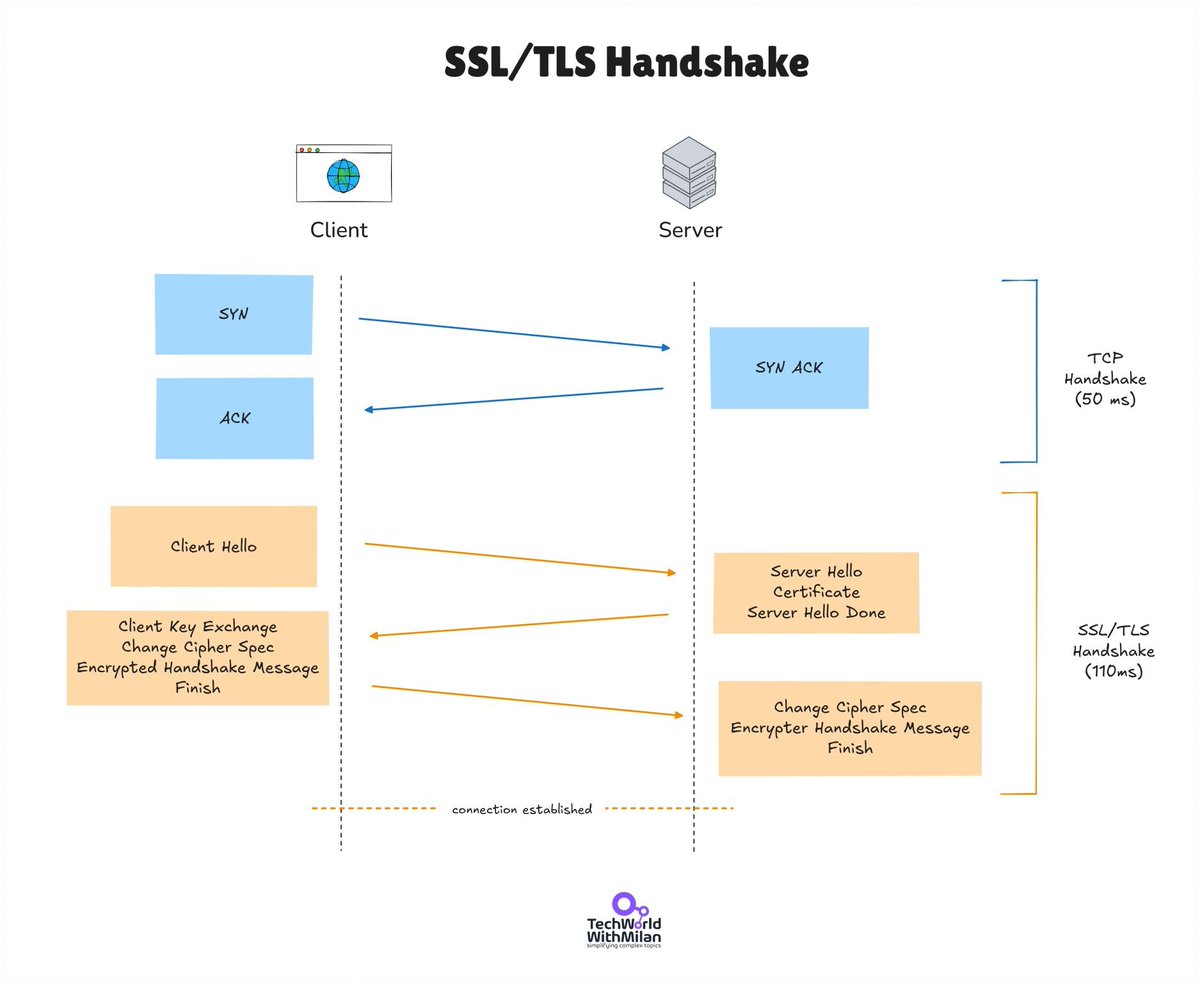
The TLS process follows these steps:
𝟭. 𝗧𝗖𝗣 𝗖𝗼𝗻𝗻𝗲𝗰𝘁𝗶𝗼𝗻: Your browser establishes a TCP connection to the server on port 443 (standard for HTTPS).
𝟮. 𝗧𝗟𝗦 𝗛𝗮𝗻𝗱𝘀𝗵𝗮𝗸𝗲: This establishes secure communication. Your browser sends a "Client Hello" with supported TLS versions (TLS 1.2, TLS 1.3, etc.), cipher suites, and a random value. It also includes SNI (Server Name Indication) to specify which hostname it's connecting to, allowing multiple secure sites on one IP address. The server responds with a "Server Hello" containing its chosen TLS version, cipher suite, another random value, and a certificate containing the server's public key. Your browser verifies the certificate and its entire chain to a trusted root Certificate Authority. Next, your browser generates a premaster secret, encrypts it with the server's public key, and sends it over. Both sides then derive identical session keys using the random values and premaster secret. Finished messages confirm handshake completion.
𝟯. 𝗦𝗲𝗰𝘂𝗿𝗲 𝗱𝗮𝘁𝗮 𝘁𝗿𝗮𝗻𝘀𝗳𝗲𝗿: Both sides use the derived symmetric session keys to encrypt and decrypt all subsequent traffic. If intercepted, hackers only see scrambled, unreadable data. This switches from asymmetric encryption (public/private keys) used during the handshake to faster symmetric encryption for data transfer. For performance, TLS supports session resumption, allowing clients to reconnect without repeating the full handshake.
𝗪𝗵𝗮𝘁 𝗮𝗯𝗼𝘂𝘁 𝗲𝗻𝗰𝗿𝘆𝗽𝘁𝗶𝗼𝗻 𝗮𝗹𝗴𝗼𝗿𝗶𝘁𝗵𝗺𝘀?
𝗥𝗦𝗔 is the asymmetric encryption algorithm commonly used during the TLS handshake. It uses a public key for encryption and a private key for decryption, with the private key never leaving the server. With RSA, the client generates a session key, encrypts it with the server's public key, and sends it over. Only the server can decrypt it using its private key.
TLS 1.3 no longer supports RSA for key exchange, and Diffie-Hellman is now the standard method.
#programming #webdevelopment #security
Building a system that scales isn’t just about picking the right database - it’s about mastering the full stack of scalability.
This powerful visual breaks down the 7 critical layers of scalable system design, from the UI to the infrastructure.
Here’s what each layer brings to the table:
1. Client Layer – Optimizes the user experience with fast rendering, caching, and responsive UI frameworks like React or Flutter.
2. API Gateway Layer – Manages traffic, rate-limiting, and load balancing, serving as the central entry point with tools like Nginx or AWS API Gateway.
3. Application Layer – Hosts microservices, handles domain logic, and communicates over REST or gRPC using Node.js, Flask, or Spring Boot.
4. Caching Layer – Reduces database load and speeds up response times with Redis, Memcached, and CDN-based strategies.
5. Database Layer – Provides scalable, reliable storage with SQL and NoSQL systems like PostgreSQL, MongoDB, and Cassandra.
6. Data Processing Layer – Handles ETL, real-time analytics, and event-driven architecture with tools like Kafka, Spark, and Flink.
7. Infrastructure Layer – Automates scaling, deployment, and monitoring using Docker, Kubernetes, Terraform, and CI/CD pipelines.
📌 Save this as your go-to framework for system design interviews or your next architecture blueprint!
ASP .NET Core 8 is 10x faster than Node.js.
In .NET 9, it's faster. Here's why:
𝗝𝗜𝗧
The Just-In-Time (JIT) compiler in .NET 9 enhances code generation for faster performance.
𝗣𝗚𝗢
Dynamic Profile Guided Optimization (PGO) optimizes casts and tracks common input types for better efficiency.
𝗧𝗶𝗲𝗿 𝟬
Tier 0 optimizations reduce startup overhead by avoiding unnecessary boxing and improving async/await.
𝗟𝗼𝗼𝗽𝘀
Loop optimizations include strength reduction and downward counting for more efficient execution.
𝗕𝗼𝘂𝗻𝗱𝘀 𝗖𝗵𝗲𝗰𝗸𝘀
Enhanced bounds check elimination ensures memory safety with minimal performance impact.
𝗔𝗿𝗺𝟲𝟰
Significant Arm64 improvements include better code generation and optimizations for common patterns.
𝗔𝗥𝗠 𝗦𝗩𝗘
Scalable Vector Extension (SVE) support improves vectorized operations on ARM architectures.
𝗔𝗩𝗫𝟭𝟬.𝟭
AVX10.1 instructions boost performance for computationally intensive tasks on compatible hardware.
𝗔𝗩𝗫𝟱𝟭𝟮
AVX512 support enhances performance for data-parallel operations and numerical computations.
𝗩𝗲𝗰𝘁𝗼𝗿𝗶𝘇𝗮𝘁𝗶𝗼𝗻
Better vectorization leads to efficient execution of parallelizable operations.
𝗕𝗿𝗮𝗻𝗰𝗵𝗶𝗻𝗴
Improved branch prediction reduces penalties from mispredicted branches.
𝗪𝗿𝗶𝘁𝗲 𝗕𝗮𝗿𝗿𝗶𝗲𝗿𝘀
Optimized write barriers minimize garbage collection overhead for better memory management.
𝗢𝗯𝗷𝗲𝗰𝘁 𝗦𝘁𝗮𝗰𝗸 𝗔𝗹𝗹𝗼𝗰𝗮𝘁𝗶𝗼𝗻
Reduces heap allocations for short-lived objects, improving performance.
𝗜𝗻𝗹𝗶𝗻𝗶𝗻𝗴
Enhanced inlining reduces function call overhead for more efficient execution.
𝗚𝗖
Garbage Collection improvements lower pause times and enhance responsiveness.
𝗩𝗠
Virtual Machine enhancements improve resource utilization and managed application performance.
𝗠𝗼𝗻𝗼
Mono runtime improvements lead to faster execution on platforms that use Mono.
𝗡𝗮𝘁𝗶𝘃𝗲 𝗔𝗢𝗧
Native Ahead-of-Time (AOT) compilation offers significant performance gains by pre-compiling to native binaries.
𝗧𝗵𝗿𝗲𝗮𝗱𝗶𝗻𝗴
Threading optimizations improve multi-threaded application efficiency and throughput.
𝗥𝗲𝗳𝗹𝗲𝗰𝘁𝗶𝗼𝗻
Improved reflection reduces the overhead of dynamic type inspection and invocation.
𝗡𝘂𝗺𝗲𝗿𝗶𝗰𝘀
Numerical computation enhancements make mathematical operations faster and more accurate.
𝗣𝗿𝗶𝗺𝗶𝘁𝗶𝘃𝗲 𝗧𝘆𝗽𝗲𝘀
Optimizations for primitive types improve performance for basic data operations.
And several other improvements across 350+ performance-related PRs went into .NET 9.
For more details, check out Stephen Toub's massive post in the .NET blog titled 𝗣𝗲𝗿𝗳𝗼𝗿𝗺𝗮𝗻𝗰𝗲 𝗜𝗺𝗽𝗿𝗼𝘃𝗲𝗺𝗲𝗻𝘁𝘀 𝗶𝗻 .𝗡𝗘𝗧 9.
--
Get my Free .NET Developer Roadmap 👇
https://t.co/Ed7r4wghUc