@MicrosoftLearn Exactly. The fundamentals don’t change - AI just raises the stakes.
Strong governance + clear visibility + controlled access = reliable AI in production.
The real differentiator? Teams that treat AI systems like critical infrastructure, not experiments.
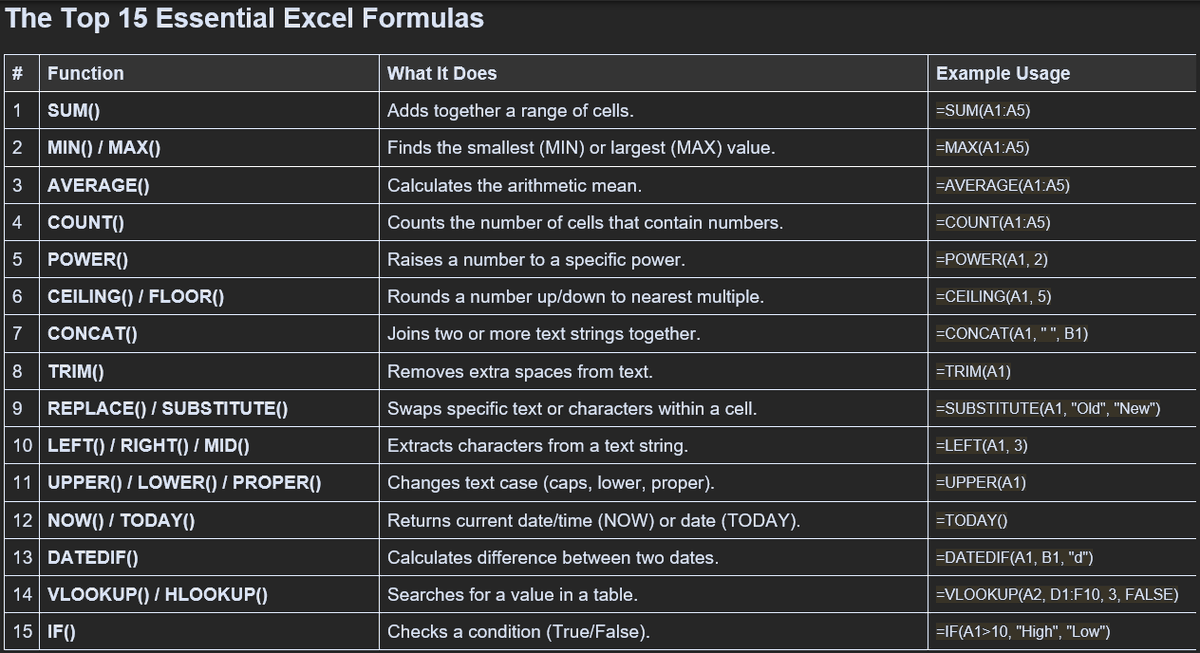
Unlock the full potential of Microsoft Excel by leveraging its built-in functions. From SUM to VLOOKUP, these functions can streamline your data analysis and improve efficiency. Master these tools to enhance productivity and make data-driven decisions effortlessly! Stay tuned f…
Struggling to navigate large spreadsheets in Excel? Try the Freeze Panes feature! It allows you to keep specific rows and columns visible as you scroll. Simply select the cell below and to the right of the area you want to freeze, then go to View > Freeze Panes. This makes data…
To protect your Excel worksheets from unwanted editing, go to the "Review" tab and select "Protect Sheet." You can set a password and choose what users can or can't do. This ensures your data remains secure while allowing others to view essential information. Simple yet effecti…
Struggling with repetitive data entry in Excel? Try Flash Fill! This feature automatically fills in values based on patterns you establish. Just start typing the desired output in a neighboring column, and Excel will suggest the rest. It’s a huge time-saver! Give it a go today!
Protecting your Excel worksheets from unwanted edits is essential for maintaining data integrity. To do this, go to the Review tab, select "Protect Sheet," and set a password. This allows you to restrict actions like editing cells or formatting. Always remember to save your work!