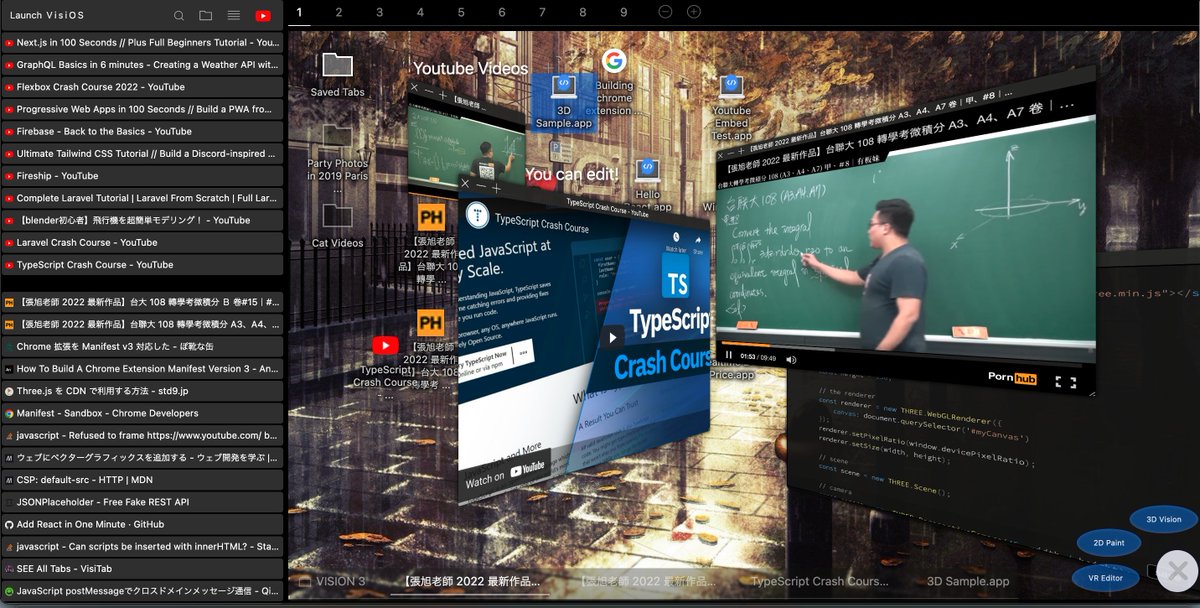
I made a game-changing extension: 🌟VisiOS🌟
It changes your browser into an OS and enables you to save tabs/bookmarks on your 9 different desktops🚀
✅ Install: https://t.co/iesVsWQMn4
✅ DEMO: https://t.co/QPkgyvLwG1
✅ Tutorials: https://t.co/wTXiv2MC9q
@AndyLibavius (Continued) Accessing websites requires a browser. But since everything starts inside the browser, integration with web services is seamless. Compared to desktop apps or traditional OSes, it offers tighter web connectivity. (More amazing features are coming soon!)
I made a game-changing extension: 🌟VisiOS🌟
It changes your browser into an OS and enables you to save tabs/bookmarks on your 9 different desktops🚀
✅ Install: https://t.co/iesVsWQMn4
✅ DEMO: https://t.co/QPkgyvLwG1
✅ Tutorials: https://t.co/wTXiv2MC9q
@AndyLibavius Thanks for asking! The biggest advantage is that bookmarks become visual, position-based icons instead of plain text. Far easier to remember than normal bookmarks. It also includes advanced cross-search features, offering more functionality than standard browser bookmarking.
Just released a super lightweight (only 3MB) ultra-fast After Effects-like recording & editing app!
https://t.co/z5ettUN1sK
🟩 Desktop recording with audio + built-in video editor (4K/8K, multi-monitor)
🟩 Keyframe control for text & images
🟩 3D model support (with animation)
It can automatically recognize text even when it's written vertically like Japanese manga. (However, the accuracy rate is higher for horizontal writing)
I've developed a free OCR app that scans areas like game screens to extract strings, translate them, provide voice output, generate example sentences, and integrate with dictionary sites or external sites. (It supports minor languages as well.)
https://t.co/WtKCUXuG9e
I made a language exchange site, Nyan-8.
Just now, I released a brand-new feature called “Nyan World”!
A cat-themed world where you can collect games, build things, and do all kinds of fun stuff 🐾✨
The loop, playlist loop (automatically go to the next video when the current video finishes), shuffle, and bullet time leap features will also be supported for YouTube videos in the next version!
In the next version of VisiOS, Spotify will be supported! You can play Spotify songs with the Quicklook feature by hovering over files or tab lists and pressing the SPACE key. You can also register them in VisiOS playlist files! :)