Most people think AI runs on GPUs.
That's like saying the internet runs on browsers.
Modern AI is powered by an entire ecosystem of processors:
🧠 CPU → Coordinates everything
⚡ GPU → Trains massive models
🔷 TPU → Accelerates tensor operations
📱 NPU → Brings AI to phones & laptops
🚀 LPU → Delivers ultra-fast LLM responses
🌐 DPU → Handles networking, security & data movement
The interesting part?
Every AI breakthrough depends on ALL of them working together.
A trillion-parameter model is useless if:
• Data can't reach it fast enough
• Inference is too expensive
• Edge devices can't run it
• Infrastructure can't scale
The next AI race won't be won by the best model.
It'll be won by whoever builds the best compute stack.
Models get the headlines.
Chips run the world.
Which processor category do you think will see the biggest growth over the next 5 years? 👇
🔖 Claude Cookbook is worth bookmarking.
81 practical guides across 15 categories, covering agents, tools, RAG, evals, multimodal apps, Skills, integrations, and production workflows by @AnthropicAI
https://t.co/lgkTL6Av8F
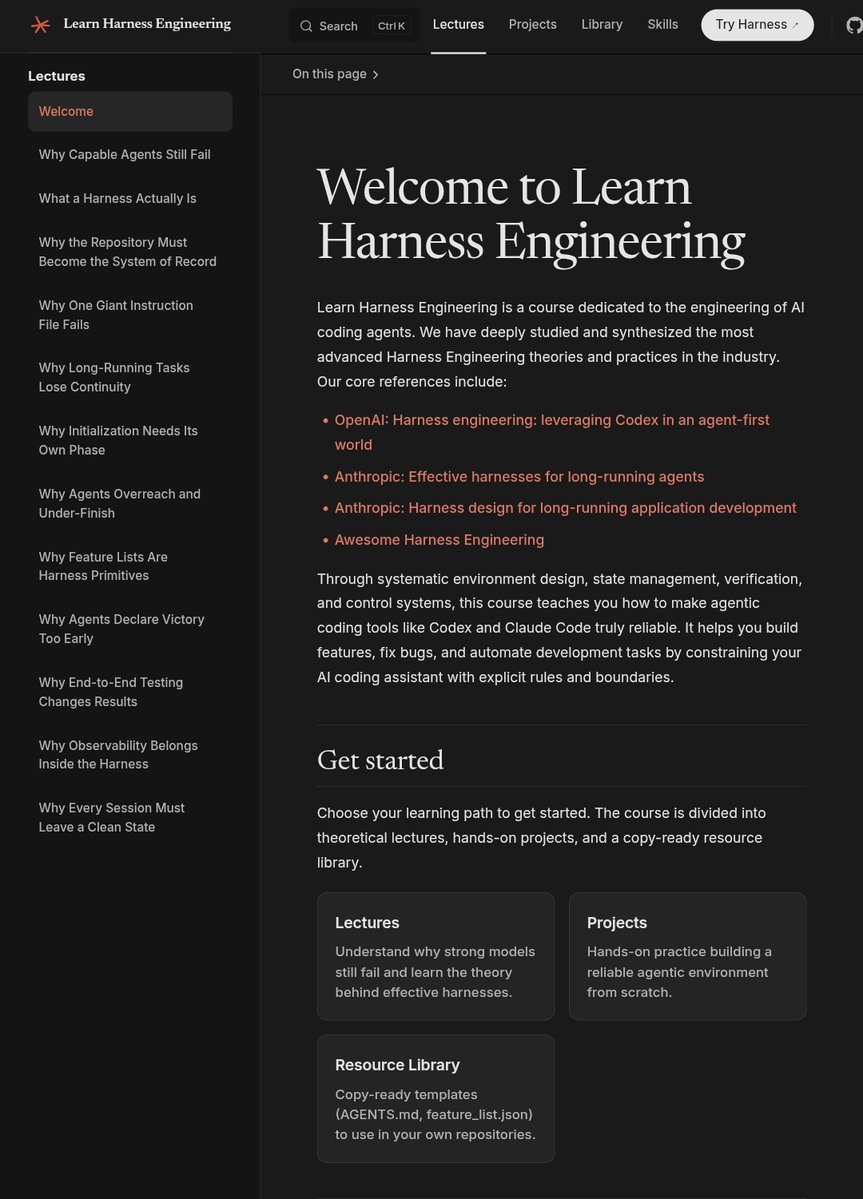
The AI-Native Developer [paper]
https://t.co/13SllgEl10
Which parts of the software development are still worth doing? What to keep, what to delegate, and what is no longer recognized as primary responsibility
Kalo belajar biasanya aku selalu gambar gambar dan pake mindmap!!
Cuma sekarang ada tools mantep cuy! INI POST GA DIBAYAR SUMPAHHHHH.
Share karena emang bagus. Cobain aja.
https://t.co/YiAGs48M3g
How we prompt AI is very different in 2026 than 2022 when ChatGPT came out.
I'm teaching a new course, AI Prompting for Everyone, to help you become an AI power user — whatever your current skill level.
It covers skills that apply across ChatGPT, Gemini, Claude, and other AI tools. How to use deep research mode for well-researched reports on complex questions. How to give AI the right context, including more documents and images than most people realize you can provide. When to ask AI to think hard for several minutes on important decisions like what car to buy, what to study, or what job to take. And how to use AI to generate images, analyze data, and build simple games and websites.
I also cover intuitions about how these models work under the hood, so you know when to trust an answer and when not to.
Along the way, you'll see flying squirrels, a creativity test, some of my old family photos, and fireworks.
Join me at https://t.co/tcQc4iJAJG
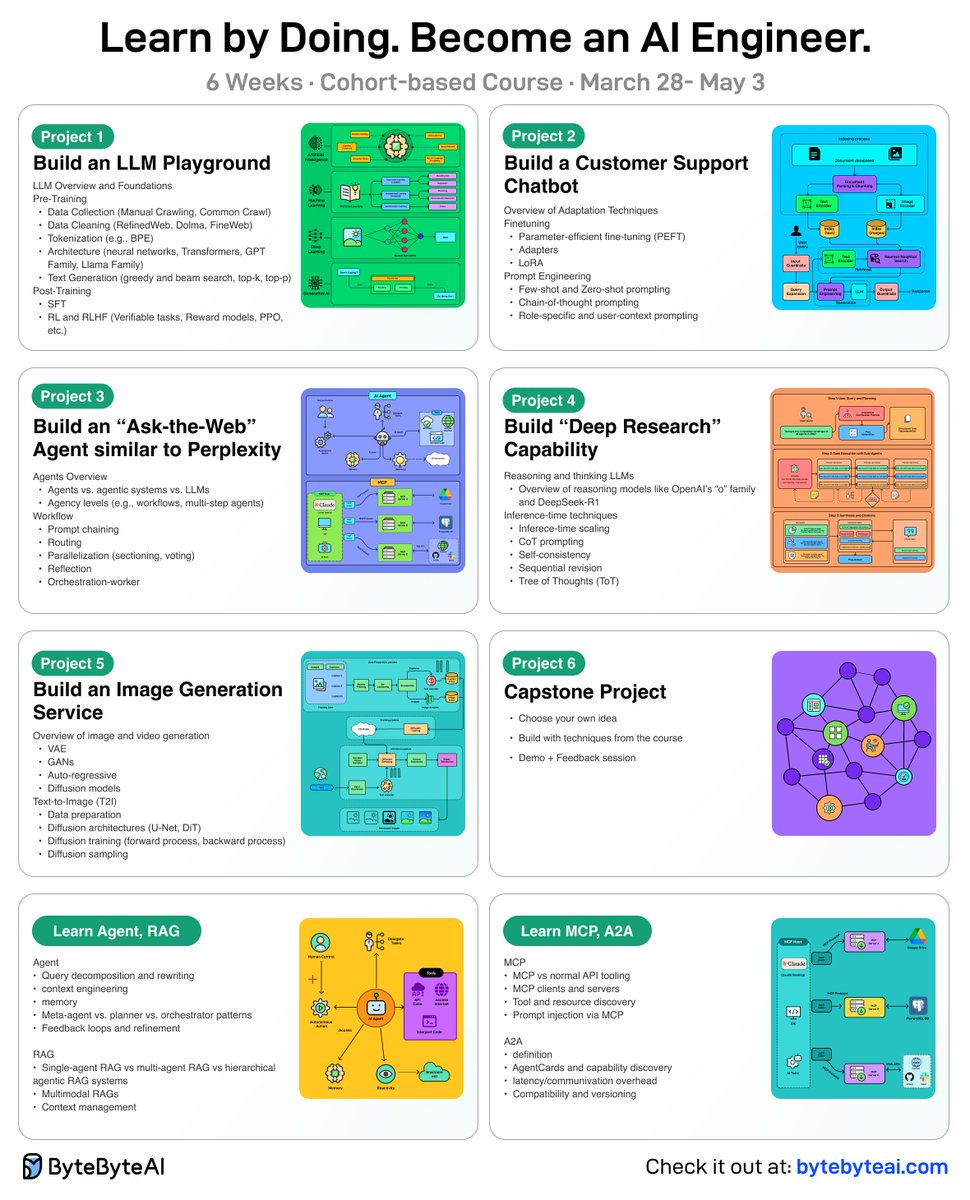
🚀 Last Week to Enroll: Become an AI Engineer | By building, not just watching | Cohort 5!
This is a live, cohort-based course created in collaboration with best-selling author Ali Aminian and published by ByteByteGo.
Here’s what makes this cohort special:
- Learn by doing: Build real world AI applications, not just by watching videos.
- Structured, systematic learning path: Follow a carefully designed curriculum that takes you step by step, from fundamentals to advanced topics.
- Live feedback and mentorship: Get direct feedback from instructors and peers.
- Community driven: Learning alone is hard. Learning with a community is easy!
We are focused on skill building, not just theory or passive learning. Our goal is for every participant to walk away with a strong foundation for building AI systems.
If you want to start learning AI from scratch, this is the perfect platform for you to begin.
Check it out here: https://t.co/LLhtAZsP1Z
Damnn 😱
Most developers are using Claude Code wrong.
They open the terminal...
write a prompt...
and expect magic.
That’s not where the real power is.
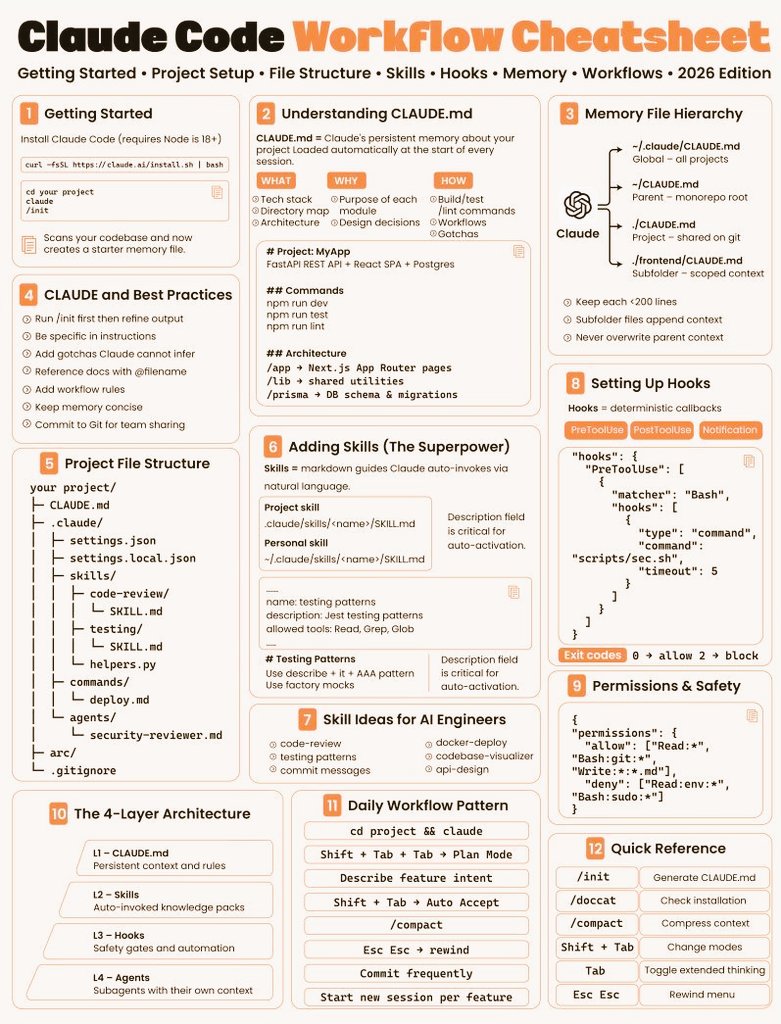
Claude Code is actually a 4-layer AI engineering system:
1️⃣ CLAUDE.md → project memory
Architecture, rules, commands, conventions
2️⃣ Skills → reusable knowledge packs
Testing workflows, code review guides, deploy patterns
3️⃣ Hooks → deterministic guardrails
Security checks, enforced rules, automation
4️⃣ Agents → specialized sub-agents
Break complex tasks into parallel workflows
Once you structure these properly, something interesting happens:
Claude stops behaving like a chatbot.
It starts behaving like a real AI dev system.
Most engineers miss this because they jump straight to prompting.
But the difference between average output and production-level results usually comes down to setup.
If you're building with AI agents in 2026, learn the system — not just the prompt.
I made a Claude Code Starter Pack explaining everything.
If you want it:
Follow
Like + RT
Comment CLAUDE
I'll DM it to a few people.
Future AI dev workflows won't be prompt-first.
They’ll be system-first. 🚀
#AI #Claude #AIAgents #LLM #GenAI
Most people think using Claude Code is about writing better prompts.
It’s not.
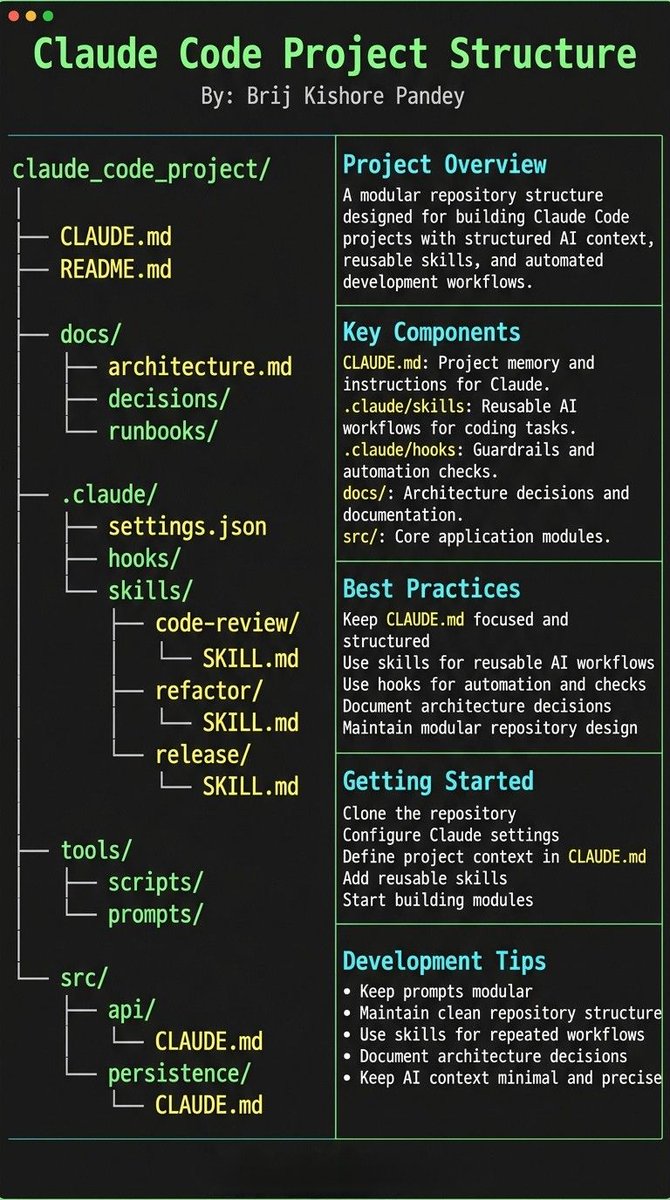
The real unlock is structuring your repository so Claude can think like an engineer.
If your repo is messy, Claude behaves like a chatbot.
If your repo is structured, Claude behaves like a developer living inside your codebase.
Your project only needs 4 things:
• the why → what the system does
• the map → where things live
• the rules → what’s allowed / forbidden
• the workflows → how work gets done
I call this:
The Anatomy of a Claude Code Project 👇
━━━━━━━━━━━━━━━
1️⃣ CLAUDE.md = Repo Memory (Keep it Short)
This file is the north star for Claude.
Not a massive document.
Just three things:
• Purpose → why the system exists
• Repo map → how the project is structured
• Rules + commands → how Claude should operate
If CLAUDE.md becomes too long, the model starts missing critical signals.
Clarity beats size.
━━━━━━━━━━━━━━━
2️⃣ .claude/skills/ = Reusable Expert Modes
Stop repeating instructions in prompts.
Turn common workflows into reusable skills.
Examples:
• code review checklist
• refactoring playbook
• debugging workflow
• release procedures
Now Claude can switch into specialized modes instantly.
Result:
More consistent outputs across sessions and teammates.
━━━━━━━━━━━━━━━
3️⃣ .claude/hooks/ = Guardrails
Models forget.
Hooks don’t.
Use hooks for things that must always happen automatically.
Examples:
• run formatters after edits
• trigger tests after core changes
• block sensitive directories (auth, billing, migrations)
Hooks turn AI workflows into reliable engineering systems.
━━━━━━━━━━━━━━━
4️⃣ docs/ = Progressive Context
Don’t overload prompts with information.
Instead, let Claude navigate your documentation.
Examples:
• architecture overview
• ADRs (engineering decisions)
• operational runbooks
Claude doesn’t need everything in memory.
It just needs to know where truth lives.
━━━━━━━━━━━━━━━
5️⃣ Local CLAUDE.md for Critical Modules
Some areas of your system have hidden complexity.
Add local context files there.
Example:
src/auth/CLAUDE.md
src/persistence/CLAUDE.md
infra/CLAUDE.md
Now Claude understands the danger zones exactly when it works in them.
This dramatically reduces mistakes.
━━━━━━━━━━━━━━━
Here’s the shift most people miss:
Prompting is temporary.
Structure is permanent.
Once your repository is designed for AI:
Claude stops acting like a chatbot...
…and starts behaving like a project-native engineer. 🚀
Researchers built a new RAG approach that:
- does not need a vector DB.
- does not embed data.
- involves no chunking.
- performs no similarity search.
And it hit 98.7% accuracy on a financial benchmark (SOTA).
Here's the core problem with RAG that this new approach solves:
Traditional RAG chunks documents, embeds them into vectors, and retrieves based on semantic similarity.
But similarity ≠ relevance.
When you ask "What were the debt trends in 2023?", a vector search returns chunks that look similar.
But the actual answer might be buried in some Appendix, referenced on some page, in a section that shares zero semantic overlap with your query.
Traditional RAG would likely never find it.
PageIndex (open-source) solves this.
Instead of chunking and embedding, PageIndex builds a hierarchical tree structure from your documents, like an intelligent table of contents.
Then it uses reasoning to traverse that tree.
For instance, the model doesn't ask: "What text looks similar to this query?"
Instead, it asks: "Based on this document's structure, where would a human expert look for this answer?"
That's a fundamentally different approach with:
- No arbitrary chunking that breaks context.
- No vector DB infrastructure to maintain.
- Traceable retrieval to see exactly why it chose a specific section.
- The ability to see in-document references ("see Table 5.3") the way a human would.
But here's the deeper issue that it solves.
Vector search treats every query as independent.
But documents have structure and logic, like sections that reference other sections and context that builds across pages.
PageIndex respects that structure instead of flattening it into embeddings.
Do note that this approach may not make sense in every use case since traditional vector search is still fast, simple, and works well for many applications.
But for professional documents that require domain expertise and multi-step reasoning, this tree-based, reasoning-first approach shines.
For instance, PageIndex achieved 98.7% accuracy on FinanceBench, significantly outperforming traditional vector-based RAG systems on complex financial document analysis.
Everything is fully open-source, so you can see the full implementation in GitHub and try it yourself.
I have shared the GitHub repo in the replies!
This 𝗖𝗟𝗔𝗨𝗗𝗘.𝗺𝗱 file will make you 10x engineer 👇
It combines all the best practices shared by Claude Code creator:
Boris Cherny (creator of Claude Code at Anthropic) shared on X internal best practices and workflows he and his team actually use with Claude Code daily. Someone turned those threads into a structured 𝗖𝗟𝗔𝗨𝗗𝗘.𝗺𝗱 you can drop into any project.
It includes:
• Workflow orchestration
• Subagent strategy
• Self-improvement loop
• Verification before done
• Autonomous bug fixing
• Core principles
This is a compounding system. Every correction you make gets captured as a rule. Over time, Claude's mistake rate drops because it learns from your feedback.
If you build with AI daily, this will save you a lot of time.
Google launched a brand new AI tool.
It's called CodeWiki, and it might be the biggest upgrade GitHub has had in years.
And all you do is paste your GitHub repo in, and it turns your entire project into an interactive guide.
It also generates diagrams, explanations, walkthroughs, everything you could ever want, and even a chatbot that knows the code better than anyone else.
So you never have to dig through a giant repo again wondering what does this do
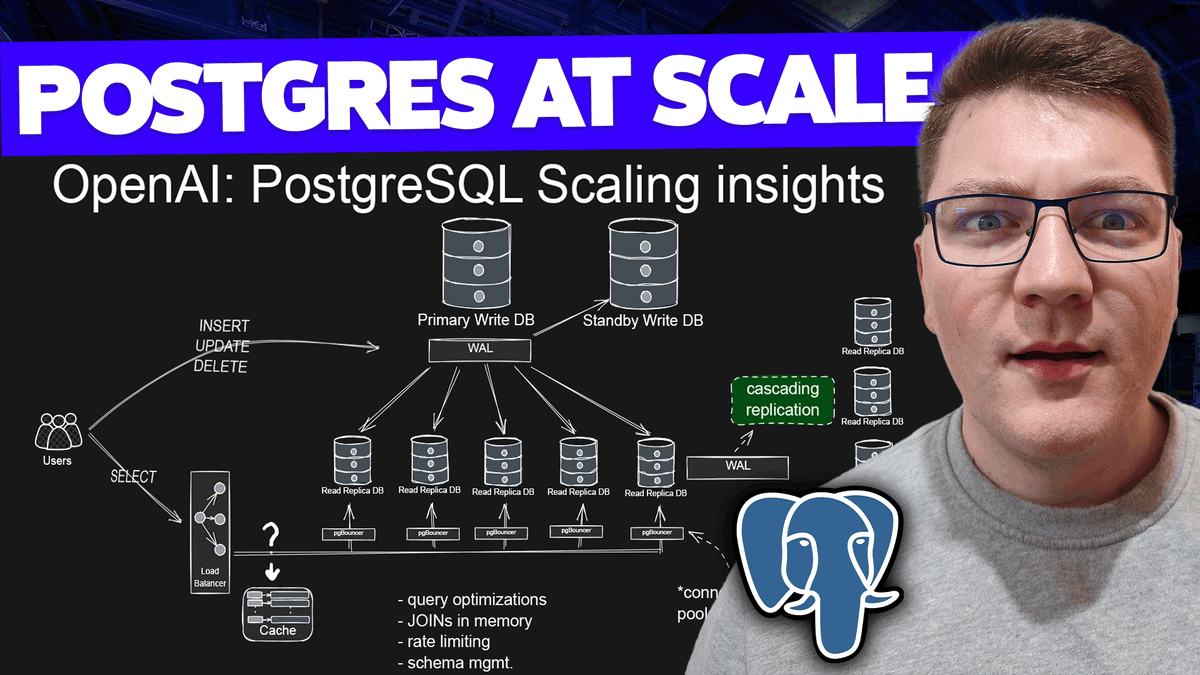
800 Million Users. Millions of queries per second. 1 Primary Write Node.
OpenAI just revealed their database architecture.
The stack is simpler than you think:
- Single primary write DB
- 50 read replicas
- PgBouncer
I drew out the entire architecture: https://t.co/eRdEhC4U98










![bibryam's tweet photo. The AI-Native Developer [paper]
https://t.co/13SllgEl10
Which parts of the software development are still worth doing? What to keep, what to delegate, and what is no longer recognized as primary responsibility](https://pbs.twimg.com/media/HIc2CPgWoAAwq3i.png)