NTLM is being phased out in Windows 11. Learn the risks of legacy authentication, how to audit NTLM dependencies, and how Kerberos options like IAKerb and Local KDC prepare you for what’s next. #TechTakeoff https://t.co/hvtyLlDTr8
Υπολογιστές μας θα παίξουν στην ταινία The riders, που γυρίζετε αυτές τις ημέρες στην χώρα μας.
Ο Μπραντ Πιττ θα μάθει ms-dos για να εκτυπώσει σε έναν εκτυπωτή dot matrix!
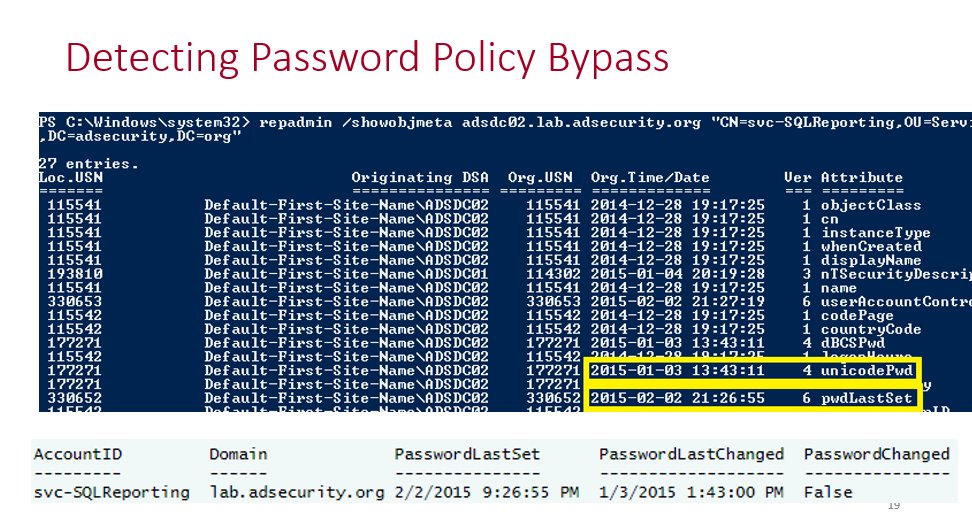
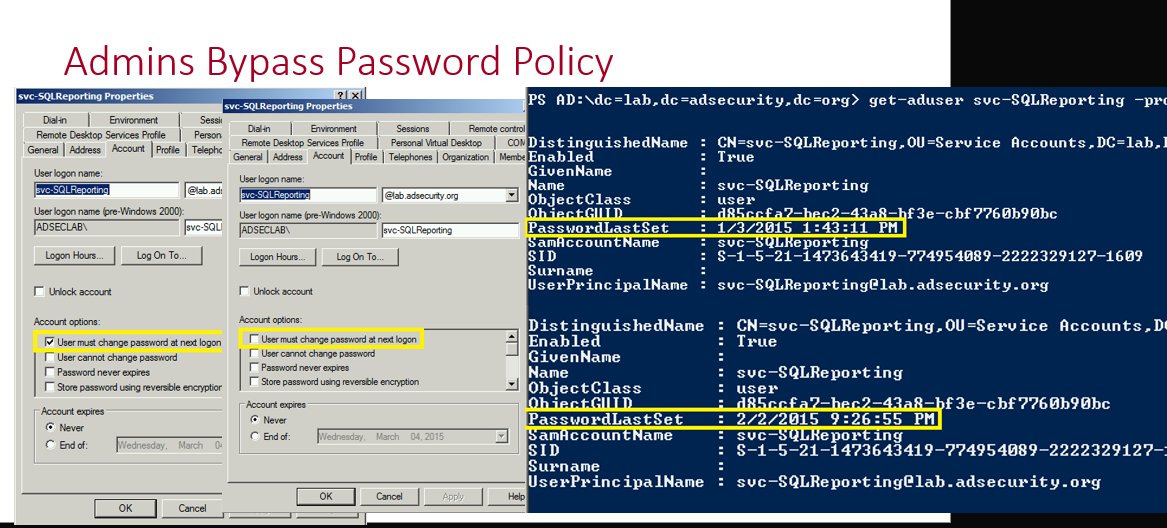
In Active Directory, there is a method that’s been around for many years which changes the password last set date but not the actual password. This is what I call a “fake password change” since the account appears to have a recent password when scanning for old passwords based on password last set, but the underlying password hasn’t actually changed.
I spoke about this in my 2015 @BSidesCharm talk which was my first conference talk.
More details including step-by-step screenshots are here: https://t.co/cxoAOvmVbt
Why does this happen?
There are times where service account (or admin accounts) need to have password changes, but someone doesn’t want to do the work to change them. The ability to fake a password change requires modify rights on the pwdLastSet attribute which provides the ability to check/uncheck the setting “User must change password at next logon”. This setting is enabled when you want the user to change their own password when they logon.
How does this work?
This is simple to do when you have rights on the target account (in this example the password last changed in August 2025).
We open up Active Directory Users and Computers (ADUC), double-click on the target account to open up the account properties and then click on the Account tab. From here we check the box for “User must change password at next logon” and click Apply.
The PasswordLastSet date is now blank. Which makes it seem like the account has never had a password set.
We continue with our process where we uncheck the box for “User must change password at next logon” we checked and then click Apply.
After performing this action, the password change date has now been set to the current date and time even though the password itself hasn’t been changed since August 2025. We have successfully faked a password change!
Why does this happen?
This happens because the “User must change password at next logon” option is used to force a user to change their password at next logon. With it checked, Active Directory is waiting for the user to attempt to logon which is when the user is directed to change their password. During this time the PasswordLastSet value is blank since it is waiting for a new password. Once the user changes their password, the checkbox is effectively removed and the current date and time are set for the user’s passwordlastset property (technically this is the “pwdlastset” attribute, but the AD PowerShell cmdlets use that property).
An attacker could use this technique for an account with an old password they discover and have control of the account (with the ability to flip this bit). This would show that the password changed without it actually changing.
Detect fake Active Directory password changes at scale
I wrote a PowerShell script that will scan either the Active Directory Admins or All Users in the domain to see if there’s a fake password change that has been performed on them.
https://t.co/FZ2gjUFurd
@jsnover Thank you for everything, not just PowerShell but the inspiring presentations and speaking engagements/keynotes. Enjoy retirement and keep us posted about things you will be tinkering with!
Windows 11 23H2 Home and Pro editions, have reached end of life / support today, upgrade to 24H2 to remain supported. If you're a Windows 11 23H2 Education/Enterprise edition customer, these editions will be supported for another 12 months until 11/10/2026. #Microsoft#Windows11
We all started somewhere, help someone else do the same. Share this free community course with a new tech who’s ready to jump into Microsoft IT (or that just started).
@driving_croonr @miketerrill@bdam555@jarwidmark@gwblok@mniehaus The Win11 24/25H2 October updates issues are affecting Windows Server 2025 also, Server 2022 is immune https://t.co/8jY0mrwmYx
@Glen_A_Cook@bdam555@bytenerd The Win11 24/25H2 October updates issues are affecting Windows Server 2025 also, Server 2022 is immune https://t.co/8jY0mrvP8Z