Keypra by Email is live. 📬
Send your work prompt to [email protected] — no login, no app. Reply I CONSENT once (GDPR first), and Rafy emails back your score, the gaps, and a stronger version of your prompt.
We teach you to prompt better. We never run it for you.
https://t.co/H29fs38HA1
"Anyone can do nearly anything; but most people aren’t, yet."
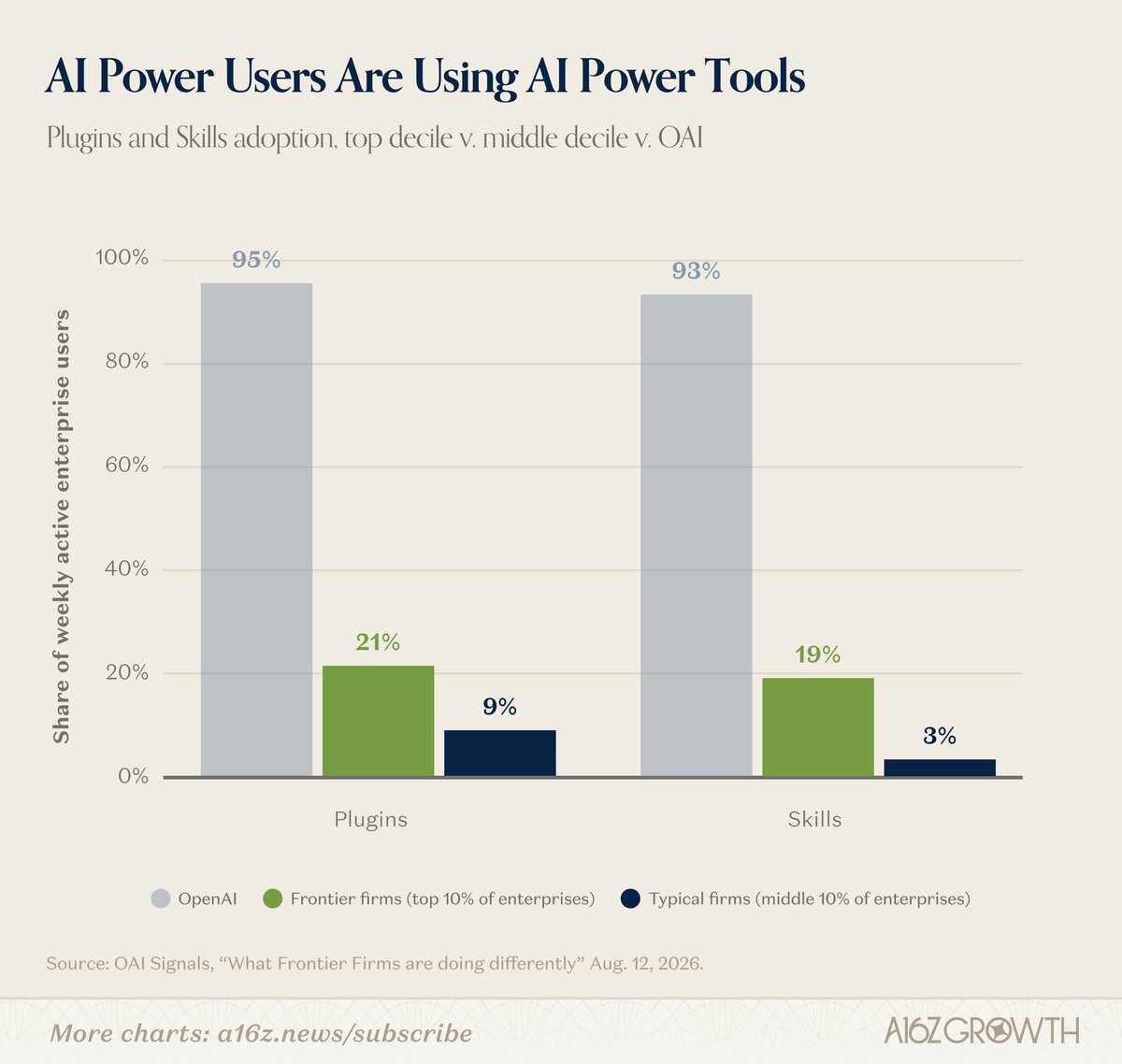
Who uses AI power tools every week:
- OpenAI's own team: 93%
- The top 10% of companies: 19%
- A typical company: 3%
@DavidGeorge83 on why most people haven't been awakened as AI customers yet: https://t.co/olQMa4aNng
I've tested every vibe coding resource I could find this year.
These are the 28 I actually kept, grouped by what you're stuck on.
Bookmark this one 🔖 🧵👇
1. https://t.co/RlChWqfItA - 200+full build prompts for 3D and scroll-driven sites, each one a complete design brief rather than a component you drop in.
2. Minimal Gallery (https://t.co/iRLY9taJAo) — curated high-end sites to feed your agent
3. Kage (https://t.co/hOf1AxdD3z) — real UI inspiration mapped straight to prompts
4. Refero Styles (https://t.co/bhB2GfGasZ) — 2,000+ real product styles with typography
5. Component Gallery (https://t.co/ZNFmqbq8CR) — 2,600+ examples of how top design systems solve the same element
6. AppShot Gallery (https://t.co/O2mKE7krky) — real app screenshots for mobile
7. Navbar Gallery (https://t.co/75zV2io5XW)
8. Footer Design (https://t.co/XPn2VgZ3ob)
9. CTA Gallery (https://t.co/NDaj9DSJrG) — conversion-tested forms, popups, buttons
10. 404s (https://t.co/daJ9Ub8h0U)
11. DESIGNmd (https://t.co/zii2nKAcsS) — design systems as markdown your agent can read
12 VibePrompt (https://t.co/mHD5eSDhVq) — ready-made prompts for dashboards and landing pages
13. https://t.co/p6pXo8h81P — component registry that plugs into agents via MCP
14. Kinetics (https://t.co/NvM0WblvCf) — 150+ motion effects with React code and prompts
15. shadcn/ui (https://t.co/vUKwdPJtTf) — still the gold standard
16. Aceternity UI (https://t.co/nxASYyV9W9) — 200+ animated React/Tailwind
17. Magic UI (https://t.co/E2oLbxc3Zv)
18. Motion Primitives (https://t.co/MIhQHgyn0c)
19. Uiverse (https://t.co/9G9JFLtfSI)
20. UIAble (https://t.co/E5NS5shItY)
21. mapcn (https://t.co/AckvMvEcod) — map components, markers, routes, popups
22. MicroKit UI (https://t.co/iFJCleZrAb) — micro-interactions
23. Liquid Glass (https://t.co/cP8YFdazmT) — glass refraction components
24. CSS Text Effects (https://t.co/yHgo53XFqY)
25. Circle Loaders (https://t.co/hUZrcbbaBX)
26. Gradient Buttons (https://t.co/qYOdx7Bj1s)
27. Kitbitz (https://t.co/L7sX9ESnU6) — 2,000+ hand-drawn illustrations
28. 3Dicons (https://t.co/BfrrSJOj6q)
29. Anime.js (https://t.co/knFchywxRi)
@carlesdijous I think this is not going to happen. People today don't use it in work in a level they are satisfied enough to see it's benefits.
This is why we try to teach them to know and use better.
Feel free to try it
https://t.co/IJmWCVk86u
Most people don’t hate AI.
They just don’t want something that takes the work away from them.
They want to stay the one who decides. AI that “does it for you” feels like losing the plot.
AI that helps you think clearer feels like staying in charge.
I’ve been building around that second thing.
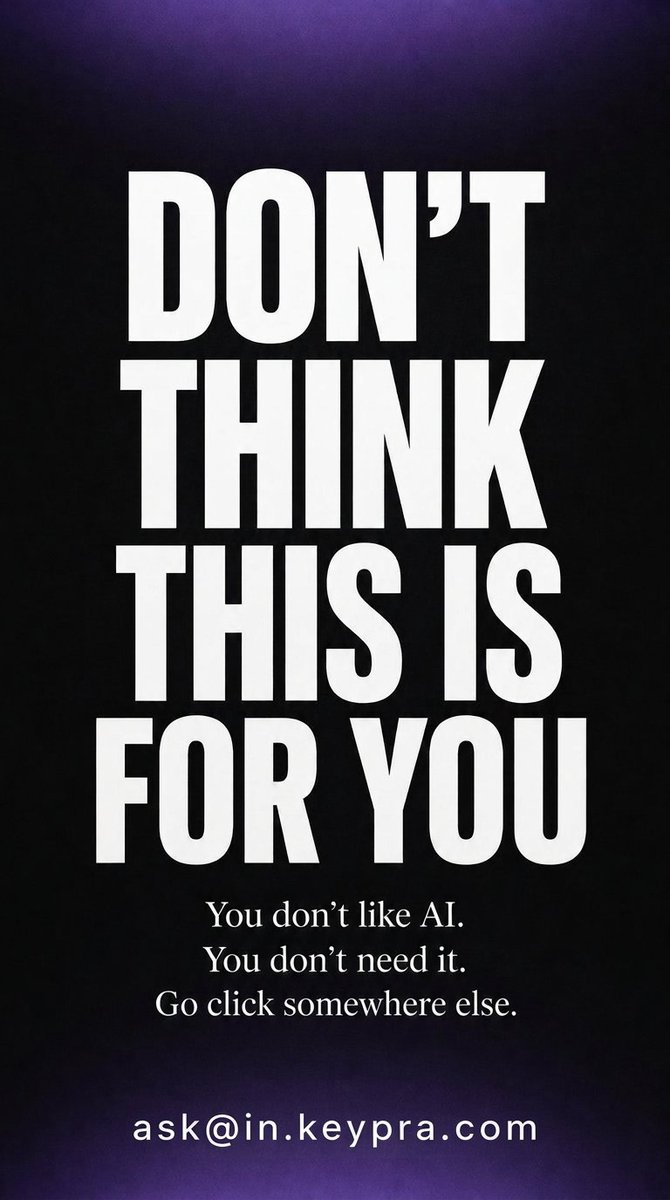
Don't think this is for you. You don't like AI. You don't need it.
Everyone else: send one prompt to [email protected]. Score, lesson, stronger prompt — by return email. No login, no account.
Keep scrolling. AI is just a trend. Your team is fine.
…or email one prompt to [email protected] and get back a score, the block that failed, and a stronger version. No login, no account. Just reply.
This is not for you. Only for US citizens who learned AI and run their own company.
Unless you're in Europe and your last prompt came back rubbish. Email it to [email protected] — we grade it, teach, and hand back a better one. We never do the work for you.
Continuez à défiler. L'IA n'est qu'une mode. Votre équipe va très bien.
…ou envoyez un prompt à [email protected] : vous recevez une note, le bloc qui a échoué et une version plus forte. Sans compte, sans connexion. Juste une réponse.
Ne croyez pas que c'est pour vous. Vous n'aimez pas l'IA. Vous n'en avez pas besoin.
Les autres : envoyez un prompt à [email protected]. Note, leçon, prompt renforcé — par retour de mail. Sans compte, sans connexion.
Ce lien n'est pas pour vous. Réservé à ceux qui ont appris l'IA et dirigent leur propre entreprise.
Sauf si vous êtes en Europe et que votre dernier prompt a donné n'importe quoi. Envoyez-le à [email protected] — on note, on explique, on vous rend un meilleur prompt.
Keypra by Email is live. 📬
Send your work prompt to [email protected] — no login, no app. Reply I CONSENT once (GDPR first), and Rafy emails back your score, the gaps, and a stronger version of your prompt.
We teach you to prompt better. We never run it for you.
https://t.co/H29fs38HA1
On Jaleel’s daily walks, he noticed a problem: the local restaurants in his city were struggling.
So, he built an entire tool stack for independent restaurants to market and retain customers.
Ten months after launch, it was acquired. This is QuickTables.
Satya Nadella's note last week reminds me of what I see training finance and legal teams across Europe: the companies winning with AI aren't the ones cutting headcount. They're the ones where managers and AI are learning each other's rhythm — process by process, email by email. That's not efficiency. That's a different kind of organization.
A global survey showed Americans 43% more likely than others to label themselves AI skeptics.
The common story said more exposure would raise trust. Data showed the reverse.
Emerging markets see the same models as an elevator.
US desk workers see them as a threat to roles they already hold.
Keypra treats that fear as a design problem. It teaches users to define task, context, persona, constraints, and verification for every prompt.