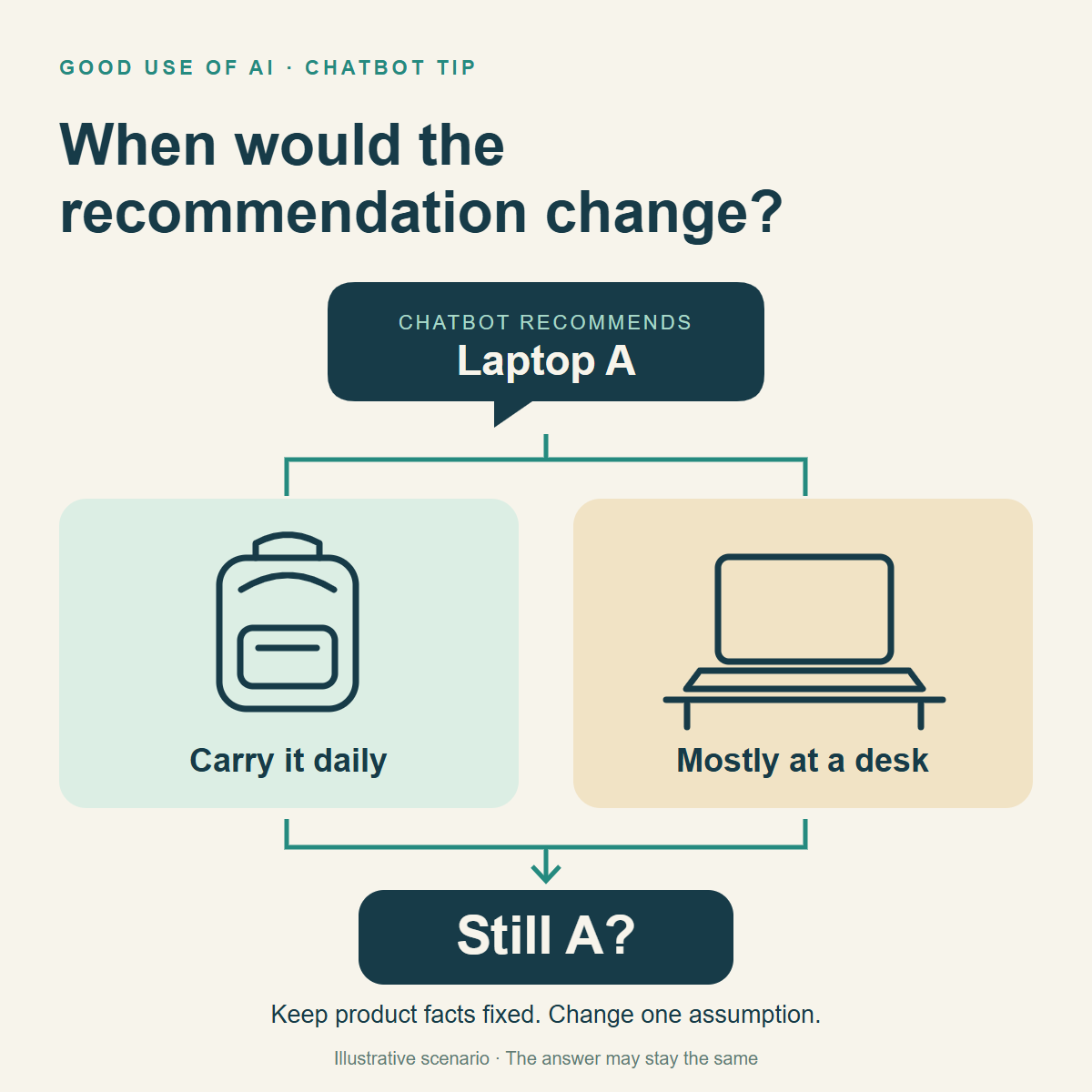
Your chatbot recommends laptop A over B. Before treating that as the final answer, ask:
“What would have to change for B to be the better choice for me?”
For example, suppose you’re comparing a lighter laptop with one that has a larger screen. “I carry it every day” and “It stays on my desk” are different needs. That’s a reason to recheck the recommendation—not proof that it must flip.
In the same chat, after providing both product descriptions and your priorities, try:
“Which of my needs drove your recommendation of A?
Keep the product facts and comparison criteria the same. Change only this assumption: instead of carrying it daily, I’ll mainly use it at a desk.
Would you still choose A? Explain why the recommendation stays the same or changes. Mark missing information as unknown.”
Not sure what change to test? Ask:
“Which one assumption is most important to your recommendation, and what realistic change to it should we check?”
You’re looking for the conditions behind the advice, not a chatbot that agrees with a different answer. This is an illustrative follow-up, not a product test.
@boringdev77 A useful check is to ask which step depends on another person saying yes. If the first step is ‘find a customer,’ the idea is not immediate work yet.
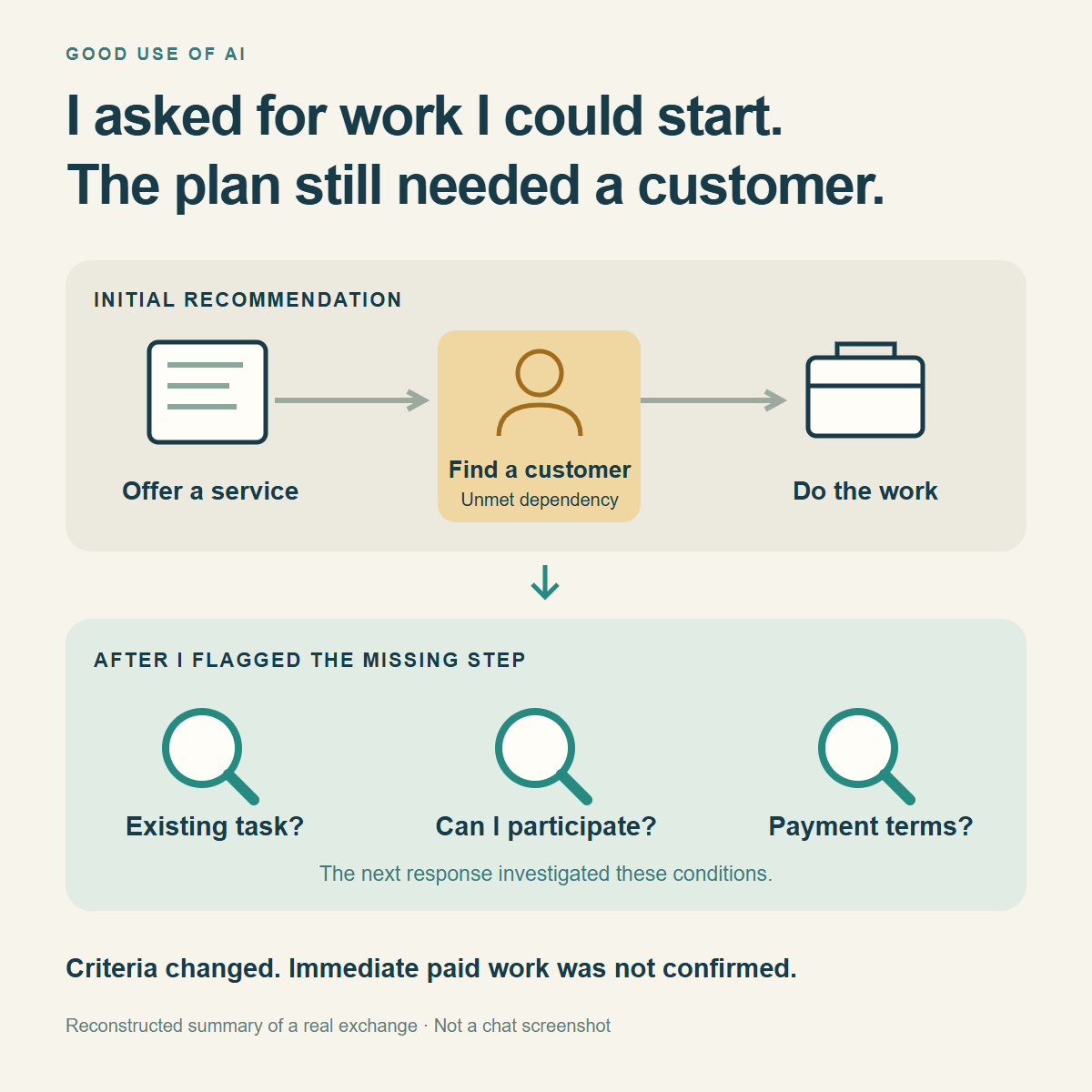
I asked AI for work I could start immediately.
It recommended a service I could offer—but I still had to find a customer first.
I pointed out that missing step. The next response shifted from suggesting a service to looking for existing tasks, checking whether I could participate, and checking how payment worked.
That was the useful change: from “What could I offer?” to “What can I actually access and start?”
To apply that check to your own AI recommendations, tell it what you already have, then ask:
“What has to happen before I can start? Separate what I can do now from what depends on a customer, access or approval. Mark anything you haven't verified as unknown.”
In my case, the follow-up still found restrictions. Changing the question improved the checks; it didn't establish that I could start a paid task immediately.
Comparing 2 laptops with a chatbot? Have it compare BOTH against the same criteria before recommending one.
“Laptop A is cheaper” and “Laptop B is lighter” leave half the comparison unanswered. You need price and weight for both.
Already know what matters to you? Give the chatbot those criteria.
Not sure what to compare? Describe how you’ll use the laptop and ask it to help choose the criteria first. For example:
“I’m choosing between 2 laptops. I write documents, join video calls and carry my laptop every day. My budget is [amount].
What should I compare for this use? Ask me any questions you need first. Then suggest the most relevant criteria and explain why each matters. Don’t choose a laptop yet.”
Review the suggested criteria and tell it what matters most to you. Then paste both product descriptions and ask:
“Compare A and B in a table using these agreed criteria as the same columns for both. Use only the information I pasted. Mark anything not stated as ‘unknown’.
Explain the main trade-offs for my priorities and what I should verify before choosing.”
Same criteria. Your priorities. Visible gaps.
‘Not listed’ doesn’t mean a feature is absent. This method structures the comparison; it doesn’t verify the seller’s claims.
Asking a chatbot for 3 short replies to a message? Put the length limit on each reply, not just somewhere in the prompt.
“Write 3 replies in under 40 words” leaves a question open: 40 words each, or 40 across all three?
Try this with the message you want to answer:
“Draft 3 polite replies to the message below. Keep EACH reply under 40 words. Give me 3 separate options, not one reply split into 3 parts. Keep the facts the same.
Message: [paste the message]”
The same check helps with several summaries or caption options: say what each limit applies to.
This is an illustrative prompt, not a measured before/after test. Check the final length if the limit is strict.
Before asking AI to summarize a month of website traffic, check how many days your file actually covers.
The first and last dates can span a whole month—even when most daily records are missing.
In the example calendar below, imagine you only have visitor records for September 1, 15 and 30.
That's 3 days of data, not a complete month. The other 27 days are unknown, not zero visitors.
Upload your file and ask:
“Before summarizing, show which dates have records and which are missing for the month I requested. Don't treat missing records as zero. Tell me what this data can and can't support.”
Then decide whether to fill the gaps or summarize only the recorded days.
Sources for the figures: TypeSafe’s performance claims, reported by Vercel, and Vercel’s first-day adoption data. Neither establishes results for your workflow.
https://t.co/BCvvlgJJgP
https://t.co/VuMvtj5gZl
Jev AI is getting attention for something surprisingly small: choosing an answer instead of writing one.
What is it—and would you actually use it?
Here’s the beginner-friendly explanation.
1. Think of a sorter, not a writer.
A customer says: “I was charged twice.”
A writing model can draft a reply. Jev can help decide whether that message belongs in Billing, Technical Support, or Sales.
Your software then routes it. Jev does not, by itself, open your inbox or issue a refund.
Built by TypeSafe AI, Jev is what the company calls a “System One Model”—a model designed for fast, structured decisions inside software.
You give it context and a narrowly defined question. It returns a choice, a score against your rubric, or a probability for a true/false statement. It does not write a conversational response.
2. Why are people noticing it?
Automated workflows make many small judgments:
Which team should receive this?
How urgent is it?
Should the workflow continue, retry, ask someone, or stop?
TypeSafe reports up to 193.6× faster and 444.6× cheaper performance than LLMs in its own workflow evaluations.
The important qualifier: those are vendor-reported results for particular workloads, not a guarantee for your work.
There is an early adoption signal, too. Vercel says nearly 13% of its AI Gateway paid teams used Jev within its first 24 hours on the platform—the fastest model launch by that measure.
That is initial uptake on one platform, not worldwide market share or proof of lasting value.
3. What might using it look like?
For the fictional billing message:
Jev selects the category.
Your application sends it to the appropriate queue.
A writing model drafts a reply using approved facts.
A person reviews cases that need attention.
Ordinary language models can classify messages too. Jev’s proposition is specialization—not that classification was impossible before it.
And if a simple rule already solves the problem, keep the rule. You don’t need AI to check whether a number exceeds a fixed limit.
4. How can you try it?
Start at the official TypeSafe Playground:
https://t.co/7DHaNKcPan
Sign in and check your account’s access. Then:
• Enter a fictional message as the context, called “state.”
• Add one Choice question: “Which team should handle this?”
• Define the available categories clearly.
• Inspect the result and try less obvious examples.
For example: “I was charged twice, and I can’t log in.”
Before judging the answer, decide how your workflow should handle two different requests. A neat category is not useful if half the problem disappears.
For ongoing automation, developers can connect through TypeSafe’s API/SDK or Vercel AI Gateway. Trying the Playground and connecting a business inbox are different steps.
5. What’s the catch?
A well-formatted answer can still be wrong.
Jev’s Choice/Score confidence reflects how concentrated its answer probabilities are. A confidence value of 0.9 is not automatically “90% correct on my tasks.”
Test it against examples with known answers, including ambiguous ones. Compare mistakes, review effort, speed and cost with your current approach.
Keep permissions and important actions under your application’s control. A predicted category is not authorization to act.
The takeaway:
Use a writing model when you need words.
Consider a decision model when the possible answers are already defined.
The useful question isn’t “Can Jev replace my chatbot?” It’s “Which repeated decision in my workflow is worth testing it on?”
Based on official documentation, not our own performance test. The billing example is illustrative. Start with fictional data and check access, pricing and data terms before connecting real work.
Quickstart: https://t.co/9NC8lhnSa9
Confidence: https://t.co/0yaWqGuBGG
@irastech For missing details, try listing the facts each test summary must retain. Keep those 10 for repeat checks, plus a few untouched emails for a fresh check after revisions.
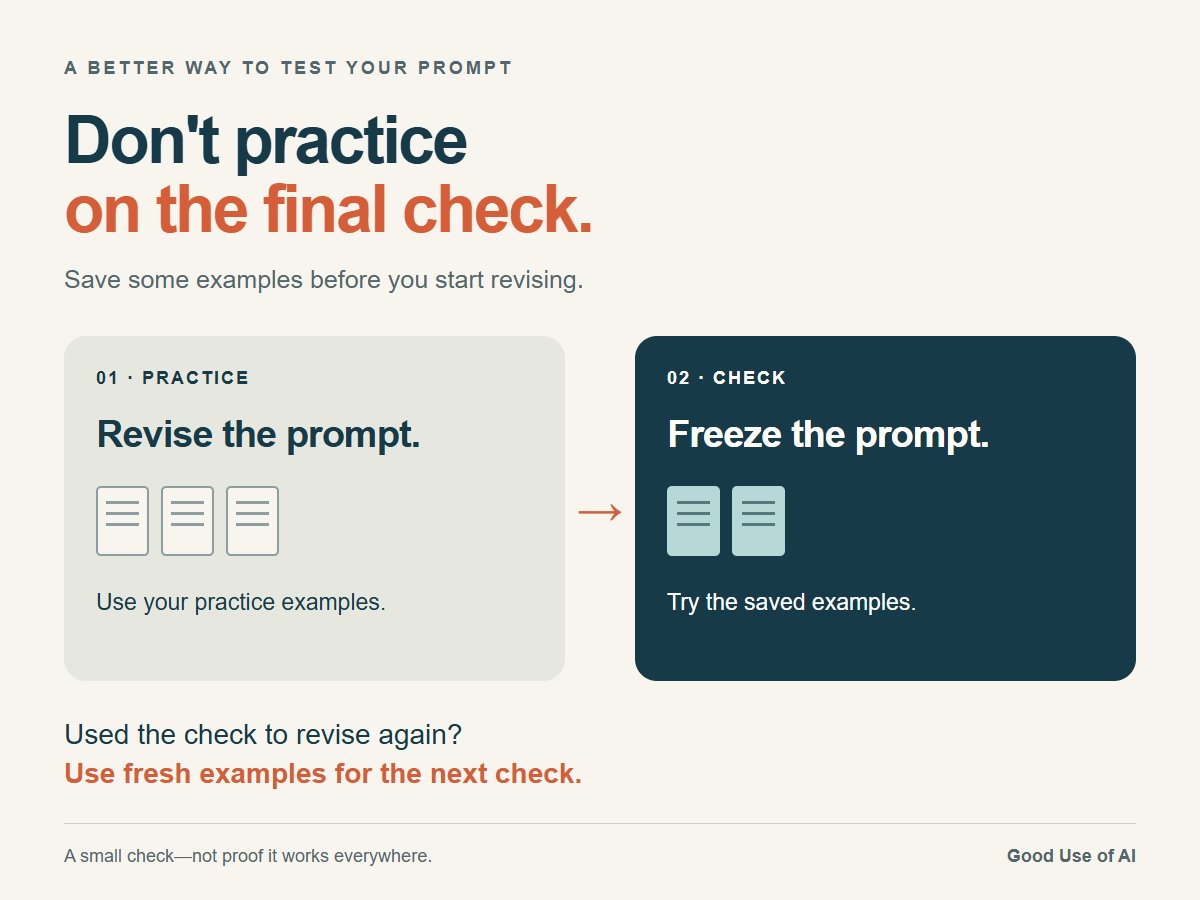
A prompt that works on your practice examples may still fail on new ones.
Before revising it, set a few examples aside. Improve the prompt on the rest, then freeze it and try the saved examples.
If you use those results to revise again, they are now practice—not a fresh check.
More sources can make an AI research answer harder to inspect—not better.
Use a search funnel:
“Search this question from 3 focused angles. Collect primary sources for each. Deduplicate repeated claims. Keep only evidence that could change the decision. List unresolved gaps separately. Don’t claim completeness.”
Why the last steps matter: broad search can improve coverage, but a giant context can bury the exact evidence you need.
Try it on a low-stakes comparison. PASS if every recommendation points to kept evidence, duplicate claims appear once, and missing evidence stays OPEN.
Use one authoritative short source directly when it already answers the question. This workflow improves inspection; it does not guarantee completeness.
@irastech For rewrite tests, give each example a short list of facts, dates and promises that must survive. That makes each run easier to judge than asking whether it just sounds better.
“Make it better” can give AI room to change the wrong thing.
Before a revision, name what must stay fixed—and what may change.
Try: “Keep the facts, dates and promises. Make the tone warmer. Add no new claims.”
Then check both versions against the original.
@boringdev77 Yes—the rate needs the count beside it. Then check time spent and quality, so more usable drafts does not quietly mean more work or a lower standard.
AI can improve the wrong number.
Illustrative example, same week:
A: 9 of 10 drafts accepted (90%)
B: 16 of 20 accepted (80%)
A has the higher acceptance rate. B delivers more usable drafts.
Before asking AI to optimize, say which outcome matters—and what must not get worse.
@irastech Those real-input failures are useful additions to the practice set. Once you use them to revise the prompt, though, the next check needs examples that did not guide those revisions.
Example: when testing an email-summary prompt, save a few emails with different layouts. Check the same things each time: key facts, missing details and invented claims.
Use non-sensitive examples. A small test can reveal failures; it cannot prove the prompt works everywhere.


![GoodUseOfAI's tweet photo. Comparing 2 laptops with a chatbot? Have it compare BOTH against the same criteria before recommending one.
“Laptop A is cheaper” and “Laptop B is lighter” leave half the comparison unanswered. You need price and weight for both.
Already know what matters to you? Give the chatbot those criteria.
Not sure what to compare? Describe how you’ll use the laptop and ask it to help choose the criteria first. For example:
“I’m choosing between 2 laptops. I write documents, join video calls and carry my laptop every day. My budget is [amount].
What should I compare for this use? Ask me any questions you need first. Then suggest the most relevant criteria and explain why each matters. Don’t choose a laptop yet.”
Review the suggested criteria and tell it what matters most to you. Then paste both product descriptions and ask:
“Compare A and B in a table using these agreed criteria as the same columns for both. Use only the information I pasted. Mark anything not stated as ‘unknown’.
Explain the main trade-offs for my priorities and what I should verify before choosing.”
Same criteria. Your priorities. Visible gaps.
‘Not listed’ doesn’t mean a feature is absent. This method structures the comparison; it doesn’t verify the seller’s claims.](https://pbs.twimg.com/media/HSzNGIubIAABAHz.png)
![GoodUseOfAI's tweet photo. Asking a chatbot for 3 short replies to a message? Put the length limit on each reply, not just somewhere in the prompt.
“Write 3 replies in under 40 words” leaves a question open: 40 words each, or 40 across all three?
Try this with the message you want to answer:
“Draft 3 polite replies to the message below. Keep EACH reply under 40 words. Give me 3 separate options, not one reply split into 3 parts. Keep the facts the same.
Message: [paste the message]”
The same check helps with several summaries or caption options: say what each limit applies to.
This is an illustrative prompt, not a measured before/after test. Check the final length if the limit is strict.](https://pbs.twimg.com/media/HSy-5aHbEAAKPqw.png)