Software engineer specialising in cybersecurity platforms, logistics systems, custom management software & AI automation | 10+ years shipping production SaaS
@Biggestbughere Good addition. Watching p99 against the timebox budget makes that production check much more useful. Easy to miss the drift if you only measure once after deployment.
Your login page can tell attackers which email addresses have accounts without ever saying so.
Most teams know to show the same error message for every failed login. Fewer check the timing. Verifying a password is slow by design, often 100 to 300 milliseconds, to make cracking expensive. Paths that reject a login before the password check, like unknown, locked or unverified accounts, answer in a few milliseconds. With a script and a list of emails, that gap is easy to measure, and the result is a list of real accounts ready for phishing or password guessing.
The fix is to make every failure take the same time. Many frameworks offer a "timebox" helper that waits until a fixed duration has passed before responding. Wrap the whole login in it.
Two details matter. The fixed time must be longer than your slowest real path on production hardware, or the slow path still stands out. And it needs measuring after deployment, because a number that looks safe on a laptop may not be on a busy server.
#AppSec #CyberSecurity #SaaS #Authentication
Because writing code was never the hardest part of being a developer.
AI can generate a significant portion of code, especially for well-defined tasks. But how much it can reliably handle depends on the complexity, context, and requirements.
Understanding the problem, designing the architecture, evaluating trade-offs, catching subtle bugs, and taking responsibility for the outcome — that's engineering.
AI can generate the code. Engineering is knowing what should exist, why it should exist, and whether it deserves to ship.
Every generation has had people declaring that something is dead. We've heard the same predictions with every major technological shift.
What's really dying is the old way of doing things.
Businesses still have problems to solve, customers still need solutions, and someone still has to build them.
The tools are changing. The demand for real value isn't.
The future doesn't kill opportunity. It kills the assumption that opportunity will always look the same.
Passing a penetration test is good news. It's also a smaller claim than most people think.
A typical web application pentest is a few skilled people with a fixed number of days. They prioritise, and they can't try everything. Good testers say so in the report: which areas they covered in depth, which they sampled, which they ran out of time for. The forms that change data, the less-used roles and the admin corners are the usual casualties. Many reports end by recommending a code review for that reason.
So treat a pentest report as strong evidence about a sample of your app. Fix what it finds, get the retest, and then ask what wasn't covered.
Coverage of the whole application has to come from your own engineering. Tests generated from the full list of routes and user roles, asking the same security questions of every one, will find classes of bugs a time-boxed test can't reach. Then the next pentest starts from a stronger base and digs deeper.
Whether you commission a pentest or rely on someone else's, ask what it didn't cover, and plan for the coverage it can't give you.
#PenTesting #CyberSecurity
The most common serious bug in multi-tenant software comes from an ID in a request.
In a SaaS product, every customer's data lives in the same database, separated by IDs. When a page loads report 4041, the browser asks for report 4041. Change that number to 4042 and, if the server only checks that you're allowed to see reports in general, you get someone else's report. The industry name for it is IDOR, and it sits near the top of every web security risk list year after year.
What makes it persistent is that the code looks protected. There's a permission check on every page. It just answers the wrong question.
The fix is a habit. Load the record first, then check the caller against that specific record. Do it for every ID in the request, including the second and third ones, which are the ones that get missed. Return the same "not found" for "not yours" and "doesn't exist", so nobody can probe for valid IDs.
Whether you build software, test it or buy it, the question is the same: where do we check that the record belongs to the person asking?
#CyberSecurity #IDOR
The most dangerous page in a web app is often a dashboard the team forgot it shipped.
Most frameworks come with admin tools: a queue monitor, a log viewer, a performance profiler, a health panel. They're built for developers, so they show everything. A queue monitor shows every pending job in full, and pending jobs include outgoing emails. Outgoing emails include password-reset links and 2FA-reset links. If that page is reachable without signing in, anyone who finds it can reset any account and bypass MFA.
Many of these tools only lock themselves outside "local" or "development" mode. Servers end up with the wrong mode set far more often than anyone expects, usually a staging or test server holding real data.
The fix is simple and worth doing this week. Give every admin tool its own explicit permission check, tied to an admin role rather than a list of email addresses. Require 2FA. Make it closed on every environment, whatever the mode flag says.
As a quick test, list every third-party dashboard the app you work on includes, then try opening each one in a private browser window.
#AppSec #SaaS #CyberSecurity #DevOps
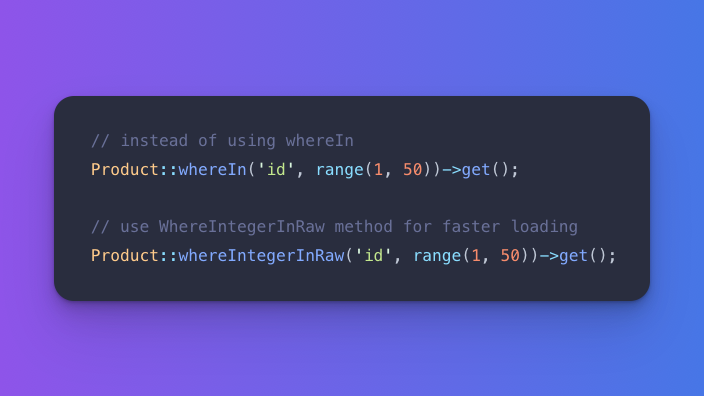
#Laravel Tip
Load data faster when the targeted value is an integer.
Use 𝘄𝗵𝗲𝗿𝗲𝗜𝗻𝘁𝗲𝗴𝗲𝗿𝗜𝗻𝗥𝗮𝘄() instead of the 𝘄𝗵𝗲𝗿𝗲𝗜𝗻() method to load data faster when the targeted value is an integer.