Introducing Daybreak: frontier AI for cyber defenders.
Daybreak brings together the most capable OpenAI models, Codex, and our security partners to accelerate cyber defense and continuously secure software.
A step toward a future where security teams can move at the speed defense demands.
Introducing Euphony, an open-source tool for visualizing chat data and Codex session logs.
Paste in a public URL or upload a local file, and Euphony turns the raw data into an easy-to-browse view. It supports translation, filtering, editing, and more.
The Codex Super-App (Full Beginners Guide)
The All Purpose Interface for AI Agents
Part 1: Codex Basics
Install Codex, Projects, Chats, Documents, Plugins, Custom Skills, Automations
Part 2: Multitasking with Codex
- iOS App Designs
- Build an iOS App
- Landing Page
- Launch Video
- Investor Deck
- Social Media Automation
TIMESTAMPS:
Part 1: Codex Basics
00:00 Intro
02:54 Downloading Codex
03:20 Overview of Codex interface
03:56 Chats, Prompting, & Built in Search
04:53 Creating Projects
07:37 Creating Spreadsheet
09:43 How Files are stored and mentioned within projects
10:42 Quick Codex Overview
12:47 Search (CMD G) and Folder Organization
14:29 Skills and Plugins
16:29 Using Calendar Plugin
18:07 Creating Automations on Codex
19:18 Learn about Plugins (Figma)
21:37 Built in Image Gen
22:37 MCP Example (Paper for Design)
24:17 Opening Chats in mini-window
25:26 Steering vs Queueing the Agent
27:35 Creating Own Skill with API's
31:34 Using YouTube Researcher Skill (That we created)
33:24 Creating Automation with your custom skill
Part 2: Multitasking (More chaotic and fun)
35:27 Part 2 Multitasking: Building iOS App, Web App, Investor Deck, Launch Video, Mobile Designs, and Automated X Posts
37:54 Creating Project
38:31 Planning my 6 Projects
40:25 Mobile Design Skill
41:47 Setting up iOS App
45:08 Implementing Desings into Mobile app
46:13 Creating a landing page that collects user info
46:45 Tally for form submission (Great for lead magnets)
49:43 Organizing and Renaming Chats for multitasking
52:12 Database for Mobile App (Supabase)
53:19 Generating app icons
54:08 Launch Video (Remotion)
59:32 Remotion Video Timeline and Seeing the Video Editor
01:05:37 Editing instructions for Remotion (Gridlines)
01:07:11 Editing Web App
01:09:46 Using CLAUDE CODE Inside Codex for Design (Terminal)
01:17:20 Forking a Chat to create investor deck
01:19:09 Using Claude 4.7 Opus for Designing Deck
01:20:22 Testing Canva Export (It's good)
01:22:33 Running Mobile App on Actual Phone (Not Simulator)
01:28:58 Finishing up All Projects (Mobile App, Landing Page Launch Video)
01:31:56 Exporting Deck and making changes in Canva
01:33:13 Deploy to Vercel using the Vercel Plugin
01:33:44 Adding Song to Remotion Video
01:35:26 Setting up x Post automations (Typefully)
01:37:57 Our App is on Testflight!
01:39:58 Final Remotion Video
01:41:04 Final Thoughts, Reflections, Summary
The Codex app is now on Windows.
Get the full Codex app experience on Windows with a native agent sandbox and support for Windows developer environments in PowerShell.
https://t.co/Vw0pezFctG
Today we’re adding 7,000 free credits for World API users.
New signups get them automatically. So do existing API accounts.
Take a look at what people have built so far 🌎👇
i built an app that converts any space into a digital clone in minutes
as the founder of Teleport - the only iphone app that can capture high-quality 360° panoramas - i already had the perfect input when @theworldlabs released their 3d reconstruction api
📍 first test - a co-working space in chiang mai 🇹🇭
the flow:
1. capture 16 ultra-wide photos
2. stitch into a 360° equirectangular image
3. reconstruct a fully navigable 3d environment via @theworldlabs api
there’s something profound about exploring these 3d worlds. it brings you back in a way photos never could.
We love stepping inside the worlds you’ve created with Genie 3.
Here’s a thread of some community favorites. Keep building and share your creations below!🧵
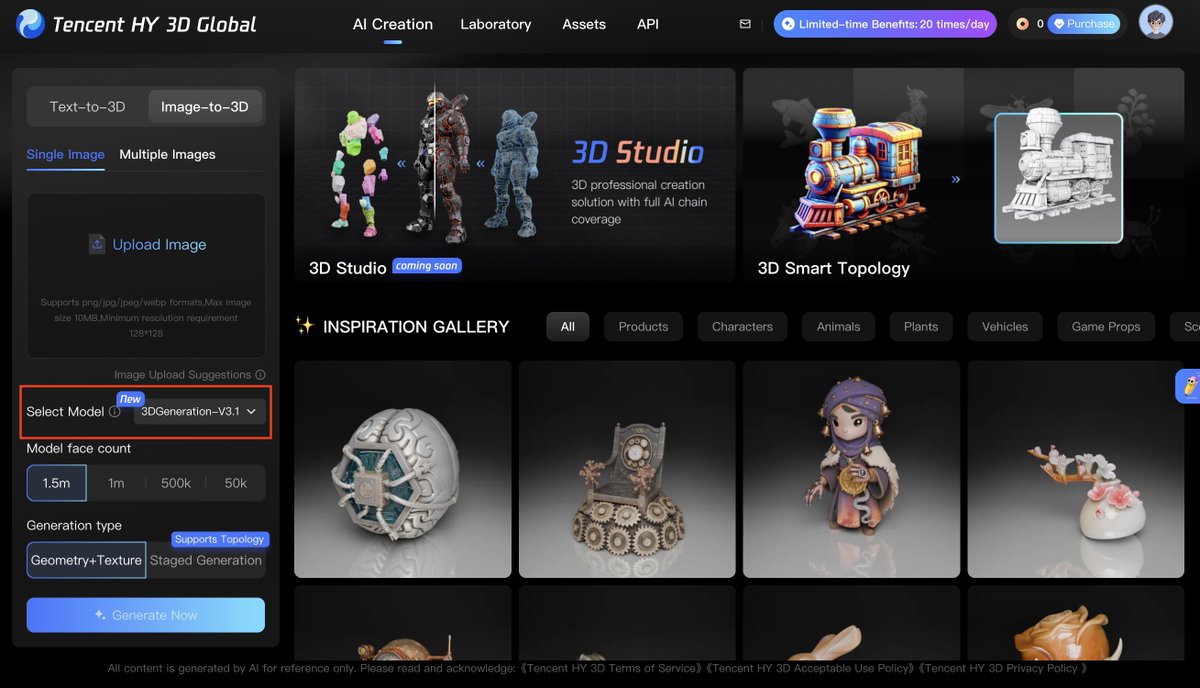
Tencent HY 3D 3.1 is now available on our global platform!
This update delivers a massive leap in texture fidelity and geometry precision. It also supports up to 8 input views for ultimate reconstruction accuracy and sculpt-level detail. 💎
New creators can now access 20 free generations daily on the platform.
🎨Try it at: https://t.co/B4C4MImOkS
🔗Access the API: https://t.co/8kI9XoSKyG
Here's a short video from our founder, Zhilin Yang.
(It's his first time speaking on camera like this, and he really wanted to share Kimi K2.5 with you!)
Flat maps hide risk. 3D imagery reveals reality.
https://t.co/mCTWTd5ql3
Don't wait for a site visit to discover the grade is too steep. Use Google Earth's 3D basemap to validate and de-risk your projects before you commit capital.