Explaining 9 types of API testing.
🔹 Smoke Testing
This is done after API development is complete. Simply validate if the APIs are working and nothing breaks.
🔹 Functional Testing
This creates a test plan based on the functional requirements and compares the results with the expected results.
🔹 Integration Testing
This test combines several API calls to perform end-to-end tests. The intra-service communications and data transmissions are tested.
🔹 Regression Testing
This test ensures that bug fixes or new features shouldn’t break the existing behaviors of APIs.
🔹 Load Testing
This tests applications’ performance by simulating different loads. Then we can calculate the capacity of the application.
🔹 Stress Testing
We deliberately create high loads to the APIs and test if the APIs are able to function normally.
🔹 Security Testing
This tests the APIs against all possible external threats.
🔹 UI Testing
This tests the UI interactions with the APIs to make sure the data can be displayed properly.
🔹 Fuzz Testing
This injects invalid or unexpected input data into the API and tries to crash the API. In this way, it identifies the API vulnerabilities.
--
Subscribe to our newsletter to download the 𝐡𝐢𝐠𝐡-𝐫𝐞𝐬𝐨𝐥𝐮𝐭𝐢𝐨𝐧 𝐜𝐡𝐞𝐚𝐭 𝐬𝐡𝐞𝐞𝐭. After signing up, find the download link on the success page: https://t.co/Wl7p8j1p8e
Cloud Disaster Recovery Strategies
An effective Disaster Recovery (DR) plan is not just a precaution; it's a necessity.
The key to any robust DR strategy lies in understanding and setting two pivotal benchmarks: Recovery Time Objective (RTO) and Recovery Point Objective (RPO).
- Recovery Time Objective (RTO) refers to the maximum acceptable length of time that your application or network can be offline after a disaster.
- Recovery Point Objective (RPO), on the other hand, indicates the maximum acceptable amount of data loss measured in time.
Let's explore four widely adopted DR strategies:
1. Backup and Restore Strategy:
This method involves regular backups of data and systems to facilitate post-disaster recovery.
- Typical RTO: From several hours to a few days.
- Typical RPO: From a few hours up to the time of the last successful backup.
2. Pilot Light Approach:
Maintains crucial components in a ready-to-activate mode, enabling rapid scaling in response to a disaster.
- Typical RTO: From a few minutes to several hours.
- Typical RPO: Depends on how often data is synchronized.
3. Warm Standby Solution:
Establishes a semi-active environment with current data to reduce recovery time.
- Typical RTO: Generally within a few minutes to hours.
- Typical RPO: Up to the last few minutes or hours.
4. Hot Site / Multi-Site Configuration:
Ensures a fully operational, duplicate environment that runs parallel to the primary system, enabling uninterrupted functionality.
- Typical RTO: Almost immediate, often just a few minutes.
- Typical RPO: Extremely minimal, usually only a few seconds old.
Over to you: What factors would influence your decision to choose a DR strategy?
--
Subscribe to our weekly newsletter to get a Free System Design PDF (158 pages): https://t.co/uc5M7CdXXC
A cheat sheet for system designs.
The diagram below lists 15 core concepts when we design systems. The cheat sheet is straightforward to go through one by one. Save it for future reference!
🔹 Requirement gathering
🔹 System architecture
🔹 Data design
🔹 Domain design
🔹 Scalability
🔹 Reliability
🔹 Availability
🔹 Performance
🔹 Security
🔹 Maintainability
🔹 Testing
🔹 User experience design
🔹 Cost estimation
🔹 Documentation
🔹 Migration plan
–
Subscribe to our weekly newsletter to get a Free System Design PDF (158 pages): https://t.co/uc5M7CdXXC
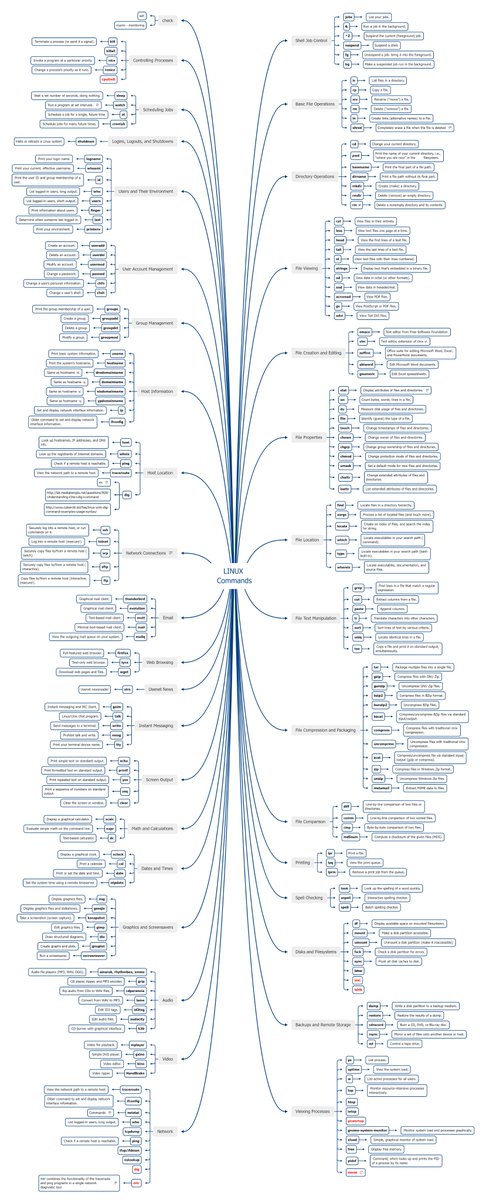
Log Parsing Cheat Sheet
The diagram below lists the top 6 log parsing commands.
1. GREP
GREP searches any given input files, selecting lines that match one or more patterns.
2. CUT
CUT cuts out selected portions of each line from each file and writes them to the standard output.
3. SED
SED reads the specified files, modifying the input as specified by a list of commands.
4. AWK
AWK scans each input file for lines that match any of a set of patterns.
5. SORT
SORT sorts text and binary files by lines.
6. UNIQ
UNIQ reads the specified input file comparing adjacent lines and writes a copy of each unique input line to the output file.
Let’s walk through an example.
To count the number of hits from the top 10 IP addresses requesting the path "/api/payments" from the access log in this common log format:
216.67.1.91 - leon [01/Jul/2002:12:11:52 +0000] "GET /index.html HTTP/1.1" 200 431
We can use a combination of grep, cut, sort, and uniq commands. Here is a sample command:
grep '/api/payments' access.log | cut -d ' ' -f 1 | sort | uniq -c | sort -rn | head -10
Here's what each part of the command does:
- grep '/api/payments' access.log: This filters the lines containing "/api/payments" from the access.log file.
- cut -d ' ' -f 1: This extracts the first field (the IP address) from each line. The -d ' ' option specifies space as the field delimiter.
- sort: This sorts the IP addresses.
- uniq -c: This removes duplicate lines and prefixes lines by the number of occurrences.
- sort -rn: This sorts the lines in reverse order (highest first) numerically.
- head -10: This shows only the first 10 lines of the output, which correspond to the top 10 IP addresses.
Over to you: Please share your top log parsing tips and tricks.
–
Subscribe to our weekly newsletter to get a Free System Design PDF (158 pages): https://t.co/kNfv0DV5nH
𝗛𝗼𝘄 𝘁𝗼 𝘀𝘁𝗮𝘆 𝘂𝗽-𝘁𝗼-𝗱𝗮𝘁𝗲 𝘄𝗶𝘁𝗵 𝗠𝗶𝗰𝗿𝗼𝘀𝗼𝗳𝘁 𝗔𝘇𝘂𝗿𝗲
Microsoft Azure is huge and changes fast! There are more than 200 services in Azure, with many features—𝗧𝗵𝗲 𝗿𝗮𝘁𝗲 𝗮𝘁 𝘄𝗵𝗶𝗰𝗵 𝘀𝗲𝗿𝘃𝗶𝗰𝗲𝘀 𝗲𝘃𝗼𝗹𝘃𝗲 𝗶𝘀 𝗮𝗺𝗮𝘇𝗶𝗻𝗴. New services always come out and are constantly being improved with new features. Microsoft can do this because most services are owned by separate teams that develop functionality.
This high rate of change is great because it provides new ways to solve problems. However, 𝗶𝘁 𝘁𝗮𝗸𝗲𝘀 𝗮 𝗹𝗼𝘁 𝗼𝗳 𝘄𝗼𝗿𝗸 𝘁𝗼 𝘀𝘁𝗮𝘆 𝘂𝗽-𝘁𝗼-𝗱𝗮𝘁𝗲. It takes much work to keep track of new services and their purpose in the Azure world.
So the question is how to stay up-to-date. Here are some essential information sources:
🔹 𝗔𝘇𝘂𝗿𝗲 𝗙𝗿𝗶𝗱𝗮𝘆: https://t.co/m4rH3YvHqF.
🔹 𝗔𝘇𝘂𝗿𝗲 𝗧𝗵𝗶𝘀 𝗪𝗲𝗲𝗸: https://t.co/GYYVWp7Lhb.
🔹 𝗔𝘇𝘂𝗿𝗲 𝗨𝗽𝗱𝗮𝘁𝗲𝘀: https://t.co/sPa2gHSoQh.
🔹 𝗔𝘇𝘂𝗿𝗲 𝗔𝗻𝗻𝗼𝘂𝗻𝗰𝗲𝗺𝗲𝗻𝘁𝘀: https://t.co/IlRzkBNlQa.
🔹 𝗔𝘇𝘂𝗿𝗲 𝗕𝗹𝗼𝗴: https://t.co/8S6kTB87g3.
🔹 𝗔𝘇𝘂𝗿𝗲 𝗔𝗽𝗽 𝗦𝗲𝗿𝘃𝗶𝗰𝗲 𝗧𝗲𝗮𝗺 𝗕𝗹𝗼𝗴: https://t.co/2uIHtXbrKd.
Also, check my 𝗔𝘇𝘂𝗿𝗲 𝗗𝗲𝘃𝗲𝗹𝗼𝗽𝗲𝗿'𝘀 𝗖𝗵𝗲𝗮𝘁 𝗦𝗵𝗲𝗲𝘁 📄: https://t.co/6OB8EvPFPm.
#microsoft #cloudcomputing #azure #softwareengineering #programming
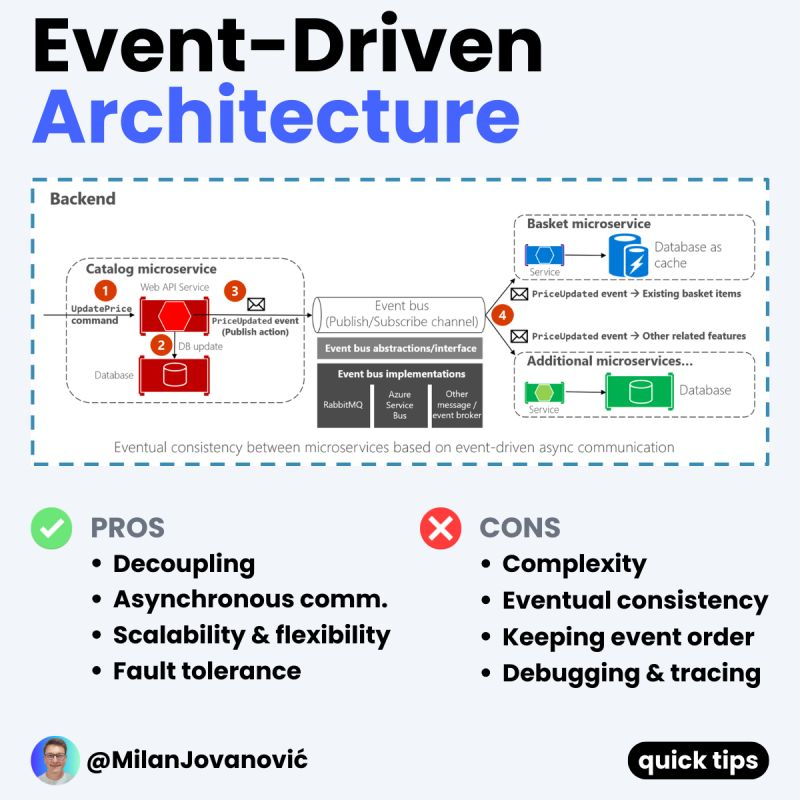
What is Event-driven Architecture?
An event-driven architecture uses events to communicate between decoupled services.
It's common in modern applications built with microservices.
An event is a state change or an update, like an item placed in a cart.
Events can either carry the state, or events can be notifications.
Event-driven architectures have three key components:
- Producer
- Routers
- Consumers
Producers publish events to the router. The router filters and pushes the events to consumers.
Producers and consumers are decoupled. This allows them to scale, evolve, and be deployed independently.
When should you use an event-driven architecture?
Integrating systems running on different stacks is an excellent use case.
You can use an event-driven architecture to share information between them without coupling. The event router allows the systems to exchange messages and data while remaining agnostic.
Do you have to go full-blown EDA for it to make sense?
Not necessarily. There's always room for a compromise.
Being event driven has a significant impact on your system.
It fundamentally changes how you think about designing an application.
What do you think about Event-Driven Architecture?
---
P.S. Want to become a better software engineer? Each week, I send one piece of practical advice about .NET and software architecture.
Join 37,000+ engineers: https://t.co/yceHK3bO35
Git Merge vs. Rebase vs. Squash Commit
What are the differences and when should you use each? As I explain in more detail in the video, there are some key distinctions.
Git Merge
This creates a new commit in the target branch. The new commit ties the histories of both main and feature branches together.
Git merge is non-destructive - it introduces a new commit without altering existing ones.
Git Rebase
Rebase transplants commits to the tip of another branch. It creates new commits for each one moved over.
The benefit is linear history. But be cautious with shared branches to avoid confusing collaborators.
Squash Commit
Squashing condenses multiple commits into one, streamlining the commit history.
Watch the video to see when to use merge vs rebase vs squash when incorporating changes between main and feature branches.
–
Subscribe to our weekly newsletter to get a Free System Design PDF (158 pages): https://t.co/kNfv0DVDdf
What is API Observability?
There are 4 pillars of API observability:
- Metrics
- Events
- Logs
- Traces
Metrics measure values that determine API health. A few interesting metrics are throughput, latency, CPU usage, and memory usage.
Events capture significant changes in the system. They also include contextual information about what happened.
Logs capture important activity in the application and record the system actions.
Traces represent a record of a request's path through a distributed system.
To make your API observable, you must instrument it with event listeners, agents, or libraries, which can collect metrics, events, logs, and traces.
If you want to learn more about API observability and how Postman can help, check out this article: https://t.co/NZsrpk6Izk
You can use telemetry data to create alerts to notify your team about potential issues.
Another use case is visualization. Some services can ingest telemetry data and present them in a dashboard.
API observability plays a crucial role in helping your team monitor APIs. Telemetry can track performance, troubleshoot issues, and identify optimization opportunities.
How are you implementing API Observability in .NET?
P.S. If you got value from this post and want to improve your software architecture skills, subscribe to The .NET Weekly - my newsletter with 36,000+ engineers.
Subscribe here → https://t.co/zeSWQFMIk8
DevSecOps is not a security trend in and of itself but, rather, an aspect of the ongoing DevOps revolution that Tech Trends has chronicled in past issues.
By @DeloitteInsight https://t.co/FghtFsCYNX rt @antgrasso#DevOps#DevSecOps#CyberSecurity


![sahnlam's tweet photo. Log Parsing Cheat Sheet
The diagram below lists the top 6 log parsing commands.
1. GREP
GREP searches any given input files, selecting lines that match one or more patterns.
2. CUT
CUT cuts out selected portions of each line from each file and writes them to the standard output.
3. SED
SED reads the specified files, modifying the input as specified by a list of commands.
4. AWK
AWK scans each input file for lines that match any of a set of patterns.
5. SORT
SORT sorts text and binary files by lines.
6. UNIQ
UNIQ reads the specified input file comparing adjacent lines and writes a copy of each unique input line to the output file.
Let’s walk through an example.
To count the number of hits from the top 10 IP addresses requesting the path "/api/payments" from the access log in this common log format:
216.67.1.91 - leon [01/Jul/2002:12:11:52 +0000] "GET /index.html HTTP/1.1" 200 431
We can use a combination of grep, cut, sort, and uniq commands. Here is a sample command:
grep '/api/payments' access.log | cut -d ' ' -f 1 | sort | uniq -c | sort -rn | head -10
Here's what each part of the command does:
- grep '/api/payments' access.log: This filters the lines containing "/api/payments" from the access.log file.
- cut -d ' ' -f 1: This extracts the first field (the IP address) from each line. The -d ' ' option specifies space as the field delimiter.
- sort: This sorts the IP addresses.
- uniq -c: This removes duplicate lines and prefixes lines by the number of occurrences.
- sort -rn: This sorts the lines in reverse order (highest first) numerically.
- head -10: This shows only the first 10 lines of the output, which correspond to the top 10 IP addresses.
Over to you: Please share your top log parsing tips and tricks.
–
Subscribe to our weekly newsletter to get a Free System Design PDF (158 pages): https://t.co/kNfv0DV5nH](https://pbs.twimg.com/media/GDs6T0vaYAAtvAr.jpg)