Want to do a log file analysis but don't have access to a paid tool?
I recently created this Step-By-Step Guide To Doing A Log File Analysis Using R to get you started - https://t.co/mcsOOG032k
And yes, you can apply the steps even if you never coded before.
2/2
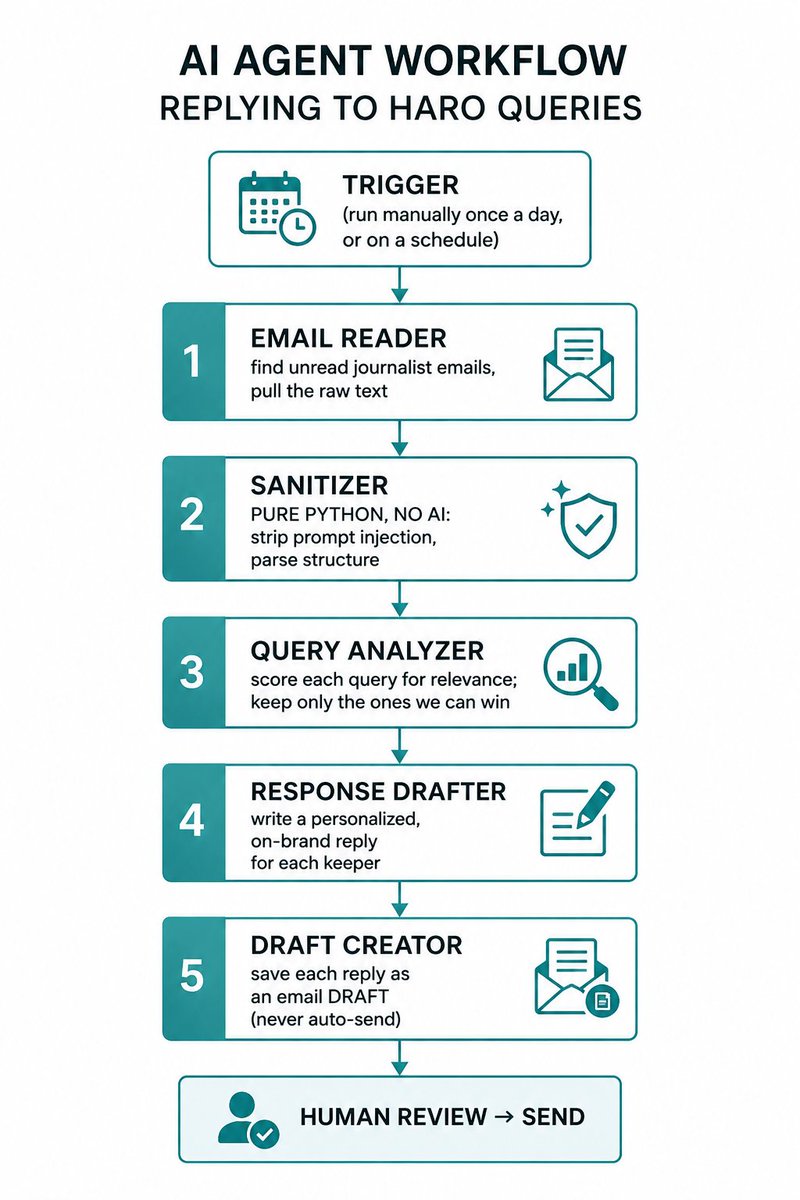
The lesson was what to hand the AI and what to keep away from it. Let AI pick which queries to answer. Use plain code to block prompt-injection attacks. And keep a human on the send button, always.
Full breakdown in the blog. Link in the comments.
Built a free Python SEO crawler that anyone can use. No coding required!
✅ Finds all your website URLs
✅ Identifies 404s & redirects
✅ Extracts meta tags & headings
✅ Exports data to a CSV file
Marketers:
You don’t need more blog posts—you need better distribution.
Create once → Distribute forever.
Turn your blog posts into:
- Slide decks for sales enablement
- Short-form video scripts
- LinkedIn carousels
- Email drip series
I built an MCP that chats directly with your Google Search Console data! With just a single-line prompt, you can instantly generate insightful and interactive SEO visualizations.
Check out more use cases in my quick 3-minute video:
https://t.co/3NkE3rS0Ng
AI labs have products that people increasingly rely on for serious things & build workflows around. Every update breaks some of those and enables new ones
Provide a changelog, testing info, anything indicating what happened! Mysterious drops are fun for X, bad for everyone else.
@gaganghotra_ Javatpoint had a major effect on me (and also my one best frnd who used to rely on my notes) doing well in my CS courses. Pains to see them struggling today 😔
Me: *doing something tedious, manually*
Me: *asks ChatGPT to do it for me*
ChatGPT: *half-asses the assignment and sends it back half-done*
every time.
🐍 [Python Script] - Evaluate Carbon Emissions of Your Web Pages with this Script
I have utilized an API to achieve this
#pythonseo#technicalseo
https://t.co/DOIfLg5gJR
Watch me having an epiphany in real-time. 🤯
Tuns out "blog articles" and "resources" aren't the same thing (sounds trite, but bear with me).
- Your BLOG should be a collection of time-sensitive updates. It should reflect whatever is happening NOW: industry news, company news, product updates, etc.
- And your RESOURCES should be a colleciton of evergreen content. These are the things that stay true for many years: guides, definitions, tutorials, etc.
Why does it matter?
Two words: discovery & navigation. Blog UI is good for timely updates, but it's terrible for finding a specific resource and diving deep into it. There's no "continuity" in it's UI.
...
And I'm quite embarrassed to admit that here at Ahrefs we've been publishing ALL our content in the form of "blog articles," while a lot of that content could work much better in the form of "resources."
The video clip below is less than 3 minutes long, so do check out my full podcast episode with Andrew Davies @andjdavies . There are many more interesting bits like this one in it. 😉