Sharing is caring... except when it comes to passwords. With this new activity in the #BeInternetAwesomeCurriculum, teach students how sharing passwords can impact their digital footprint. Check it out on page 73: https://t.co/CRFrsHFrM5
Here's what you've been waiting for...
The new text tool in Screencastify Edit is live & more flexible!
With the new tool, you can:
🖱️ Drag the text box anywhere on your project
🔠 Add as many text boxes as you like
🎉 and so much more!
Learn more: https://t.co/GIVtTZg4rc
📣 New feature alert: Screencastify Edit now has title clips.
⏸ Break up your videos
🎤 More student creativity
🔤 Your information...in every format
Check it out: https://t.co/IFIFOdinuX
Mr. Rettino and Mrs. Washington’s class enjoyed the sun while creating Yarn Dolls, inspired by their reading of Esperanza Rising. #hfamily@HarborfieldsCSD
Today, the student became the teacher during our morning Creative Computing Club! Thank you to one of our amazing fifth grade students for being our special guest. You did a super job! 💚 #HFamily@HarborfieldsCSD
Coming later this year to #GoogleMeet, you can assign co-hosts to your calls. They can manage settings like mute all and breakout rooms to help you keep your virtual class running smoothly. Check out what else is new to Meet: https://t.co/cJB76xCZKn #LearningWithGoogle
Stop Students from "Unenrolling" from your Google Classroom Now! Thanks @ClayCodes !
Eliminate the excuse that they couldn't do their homework because they didn't get the message 😭
https://t.co/HLT5EkPbyA
#edutech#DistanceLearning#GoogleMeet#GoogleClassroom
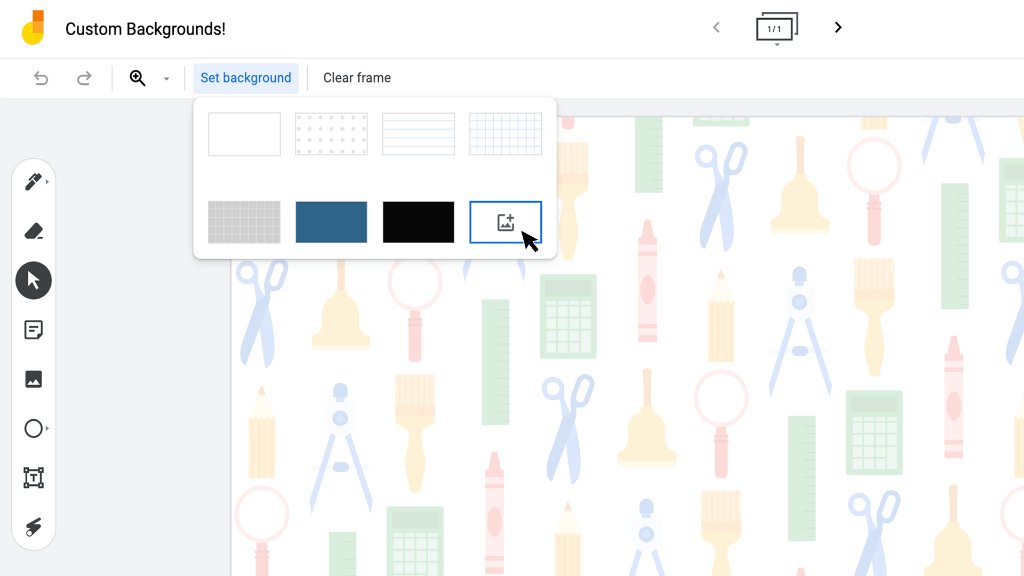
Exciting #Jamboard update 📣: in the coming days, you’ll be able to select a custom background in Jamboard! Share your ideas, templates, and lesson plans using custom backgrounds below ↓