Ex-Intel Fellow; creator of IPEX-LLM, BigDL and Analytics Zoo; committer and PMC of Apache Spark; mentor of Apache MXNet; ASF member. Tweets are my own.
After 20+ years at Intel, it is now time to bid farewell.
It has been an amazing ride, and I’m immensely proud of what our team has accomplished – from parallelizing compiler, to Big Data (e.g., Spark), AI (e.g., BigDL) and LLM (e.g., ipex-llm) technologies.
After 20+ years at Intel, it is now time to bid farewell.
It has been an amazing ride, and I’m immensely proud of what our team has accomplished – from parallelizing compiler, to Big Data (e.g., Spark), AI (e.g., BigDL) and LLM (e.g., ipex-llm) technologies.
Run 671B DeepSeek-R1-Q4_K_M model with 1~2 Arc A770 on Xeon, using the latest IPEX-LLM llama.cpp Portable Zip (https://t.co/AgdvuPt7Sw); it extends llama.cpp to apply fine-grained GPU accelerations for sparse MoE models.
Run Ollama on Intel PC and GPU using IPEX-LLM portable zip
Using the IPEX-LLM portable zip, it’s now extremely easy to run Ollama on Intel PC and GPU: https://t.co/ocqiRM6UIs
1. Download & unzip
2. Run `start-ollama.bat`
3. Run `ollama run deepseek-r1` in a command window
If ur in the market to buy a windows + Linux laptop that runs LLMs and is sexy-ish.
The laptop u should buy is the Lenovo 7i Aura edition.
32gb version fully loaded with 3 yrs on-prem warranty is 1.5 L (vs 2.5L for similar macbook with similar warranty)
Runs ipex-llm pretty well for llama2 workloads.
I struggled to get @ollama running on my Intel Arc GPU until I found the ipex-llm docker container. It still took a bit of tweaking, but I threw together a post that should make it easy to run local LLMs and access them from any Ollama compatible tool.
https://t.co/ky8dPVKjR2
Microsoft’s GraphRAG (https://t.co/Zouz6Jxqsp) combines Graph Analysis and Retrieval Augmented Generation for richly understanding text datasets. By integrating it with IPEX-LLM, you may now run GraphRAG using local LLM on Intel GPU. See quickstart at https://t.co/37tyK8sg8a
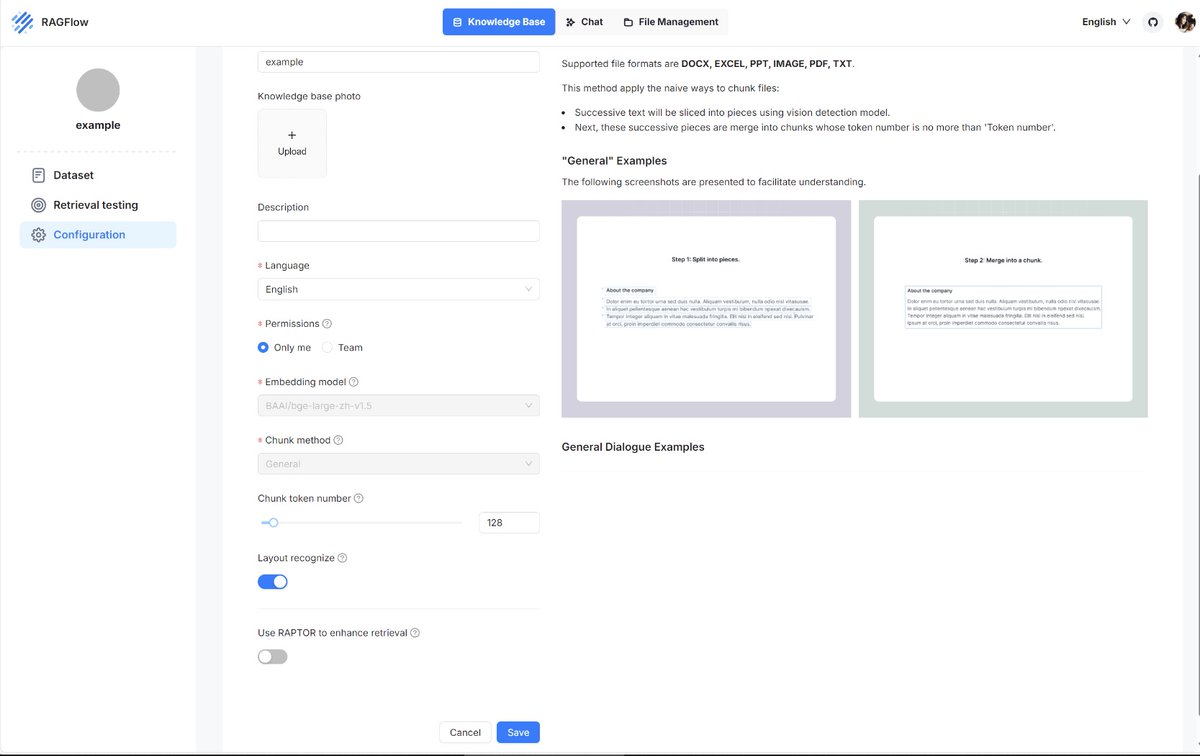
RAGFlow is an open-source RAG engine based on deep document understanding; by integrating it with ipex-llm (https://t.co/asoyjr4jC5), users can easily run RAGFlow using local LLMs on Intel GPU (e.g., local PC with iGPU, or Arc GPU).
Demo & Quickstart: https://t.co/HBnmLPYW28
Open WebUI (https://t.co/VcOsj6Nd99) is a user-friendly WebUI to run powerful LLM applications offline; by integrating IPEX-LLM (https://t.co/asoyjr4jC5), it can now run smoothly on Intel GPU, including low-cost PC (i.e. only with integrated GPU).
See https://t.co/5Szf821Dt5
🆕💡🎧 Machine Unlearning with @kenziyuliu@StanfordAILab:
- Learn techniques for removing unwanted AI data
- Compare unlearning vs. RAG
- Evaluate popular unlearning approaches for LLMs
https://t.co/Vtk9bFVzR7
Interesting - Run phi-3-mini on Intel Iris Xe integrated graphics of your laptop
using ollama with ipex-llm https://t.co/tO8xmGrvs4
Note ipex-llm is for - Accelerating local LLM inference and finetuning (LLaMA, Mistral, ChatGLM, Qwen, Baichuan, Mixtral, Gemma, etc.) on Intel CPU and GPU
(e.g., local PC with iGPU, discrete GPU such as Arc, Flex and Max). A PyTorch LLM library that seamlessly integrates with llama.cpp, Ollama, HuggingFace, LangChain, LlamaIndex, DeepSpeed, vLLM, FastChat, etc.