𝗗𝗼 𝗬𝗼𝘂 𝗡𝗲𝗲𝗱 𝗧𝗼 𝗞𝗻𝗼𝘄 𝗔𝗹𝗹 𝗗𝗲𝘀𝗶𝗴𝗻 𝗣𝗮𝘁𝘁𝗲𝗿𝗻𝘀?
The answer is no. Even though we have 23 design patterns, around 10 are mostly used in everyday development. Knowing which patterns exist overall is good, but you need to know these very well.
Design patterns can be divided into three main types:
𝟭. 𝗖𝗿𝗲𝗮𝘁𝗶𝗼𝗻𝗮𝗹 𝗣𝗮𝘁𝘁𝗲𝗿𝗻𝘀
These design patterns deal with object creation mechanisms, trying to create objects in a manner suitable to the situation.
Important patterns in this group are:
𝗙𝗮𝗰𝘁𝗼𝗿𝘆: This pattern allows delegating the instantiation logic to factory classes. The Factory Method creates objects without exposing the instantiation logic to the client.
𝗦𝗶𝗻𝗴𝗹𝗲𝘁𝗼𝗻: The Singleton pattern ensures that a class has only one instance and provides a global point of access to it. It's useful when exactly one object is needed to coordinate actions across the system.
𝟮. 𝗦𝘁𝗿𝘂𝗰𝘁𝘂𝗿𝗮𝗹 𝗣𝗮𝘁𝘁𝗲𝗿𝗻𝘀
These patterns deal with the composition of classes and objects that form larger structures.
Important patterns in this group are:
𝗔𝗱𝗮𝗽𝘁𝗲𝗿: This pattern works as a bridge between two incompatible interfaces. It wraps an existing class with a new interface to become compatible with the client's interface.
𝗙𝗮𝗰𝗮𝗱𝗲: The Façade pattern provides a unified interface to a set of interfaces in a subsystem. Façade defines a higher-level interface that makes the subsystem easier to use.
𝗗𝗲𝗰𝗼𝗿𝗮𝘁𝗼𝗿: This pattern dynamically adds/overrides behavior in an existing method of an object. This pattern provides a flexible alternative to subclassing for extending functionality.
𝗣𝗿𝗼𝘅𝘆: The Proxy pattern provides a surrogate or placeholder for another object to control access to it. In its most general form, a proxy is a class functioning as an interface to something else.
𝟯. 𝗕𝗲𝗵𝗮𝘃𝗶𝗼𝗿𝗮𝗹 𝗣𝗮𝘁𝘁𝗲𝗿𝗻𝘀
These patterns are specifically concerned with communication between objects and how they interact and distribute work.
Important patterns in this group are:
𝗖𝗼𝗺𝗺𝗮𝗻𝗱: The Command pattern encapsulates a request as an object, thus allowing users to parameterize clients with queues, requests, and operations.
𝗧𝗲𝗺𝗽𝗹𝗮𝘁𝗲 𝗠𝗲𝘁𝗵𝗼𝗱: This pattern defines the program skeleton of an algorithm in a method called template method, which defers some steps to subclasses.
𝗦𝘁𝗿𝗮𝘁𝗲𝗴𝘆: The Strategy pattern defines a family of algorithms, encapsulates each one, and makes them interchangeable. Strategy lets the algorithm vary independently from clients that use it.
𝗢𝗯𝘀𝗲𝗿𝘃𝗲𝗿: This pattern defines a one-to-many dependency between objects so that all its dependents are notified and updated automatically when one object changes state.
Check out this helpful cheat sheet below.
#softwareengineering #programming #developers
𝗪𝗵𝗲𝗻 𝘁𝗼 𝘀𝗲𝗹𝗲𝗰𝘁 𝗗𝗲𝘀𝗶𝗴𝗻 𝗣𝗮𝘁𝘁𝗲𝗿𝗻?
Choosing the correct design pattern in software engineering is critical to practical problem-solving. This guide simplifies the process, helping you decide between patterns based on specific needs.
To select a pattern, we must first go through the problem identification. If the problem is related to:
🔸 Object Creation? → Creational Patterns
🔸 Object Assembly? → Structural Patterns
🔸 Object Interactions? → Behavioral Patterns
𝟭. 𝗖𝗿𝗲𝗮𝘁𝗶𝗼𝗻𝗮𝗹 𝗣𝗮𝘁𝘁𝗲𝗿𝗻𝘀
🔹 Singleton: This is used when a single instance of a class is needed. Some examples are logging and database connections.
🔹 Factory Method: Decouple object creation from usage. For example, you create different types of database connections based on configuration.
🔹 Abstract Factory: Create families of related objects. For example, I build parsers for different file formats (e.g., JSON, XML, CSV).
🔹 Builder: Constructing complex objects step by step. For example, if you need to create a complex domain object.
🔹 Prototype: Creating duplicate objects and reusing cached objects to reduce database calls.
𝟮. 𝗦𝘁𝗿𝘂𝗰𝘁𝘂𝗿𝗮𝗹 𝗣𝗮𝘁𝘁𝗲𝗿𝗻𝘀
🔹 Adapter: Make incompatible interfaces compatible. For example, it integrates a new logging library into an existing system that expects a different interface.
🔹 Composite: Represent part-whole hierarchies. For example, graphic objects in a drawing application can be grouped and treated uniformly
🔹 Proxy: Control access to objects. For example, lazy loading of a high-resolution image in a web application.
🔹 Decorator: Dynamically add/remove behavior. For example, we are implementing compression or encryption on top of file streams.
🔹 Bridge: Decouple abstraction from implementation. For example, I am separating platform-specific code from core logic.
𝟯. 𝗕𝗲𝗵𝗮𝘃𝗶𝗼𝗿𝗮𝗹 𝗣𝗮𝘁𝘁𝗲𝗿𝗻𝘀
🔹 Strategy: Define a family of algorithms. These algorithms allow users to choose different sorting or compression algorithms.
🔹 Observer: Maintain a consistent state by being notified of changes and, for example, notifying subscribers of events in a messaging system.
🔹 Command: Encapsulate a request as an object. For example, I implement undo/redo functionality in text or image editor.
🔹 State: Encapsulate state-specific behavior. For example, we are handling different states of a user interface element (e.g., enabled, disabled, selected).
🔹 Template Method: Define the skeleton of an algorithm in operation, deferring some steps to subclasses and implementing a base class for unit testing with customizable setup and teardown steps.
In the end, we came up with the pattern we needed.
To learn more about it, check out my free book on Design Patterns in the comments.
#softwaredesign
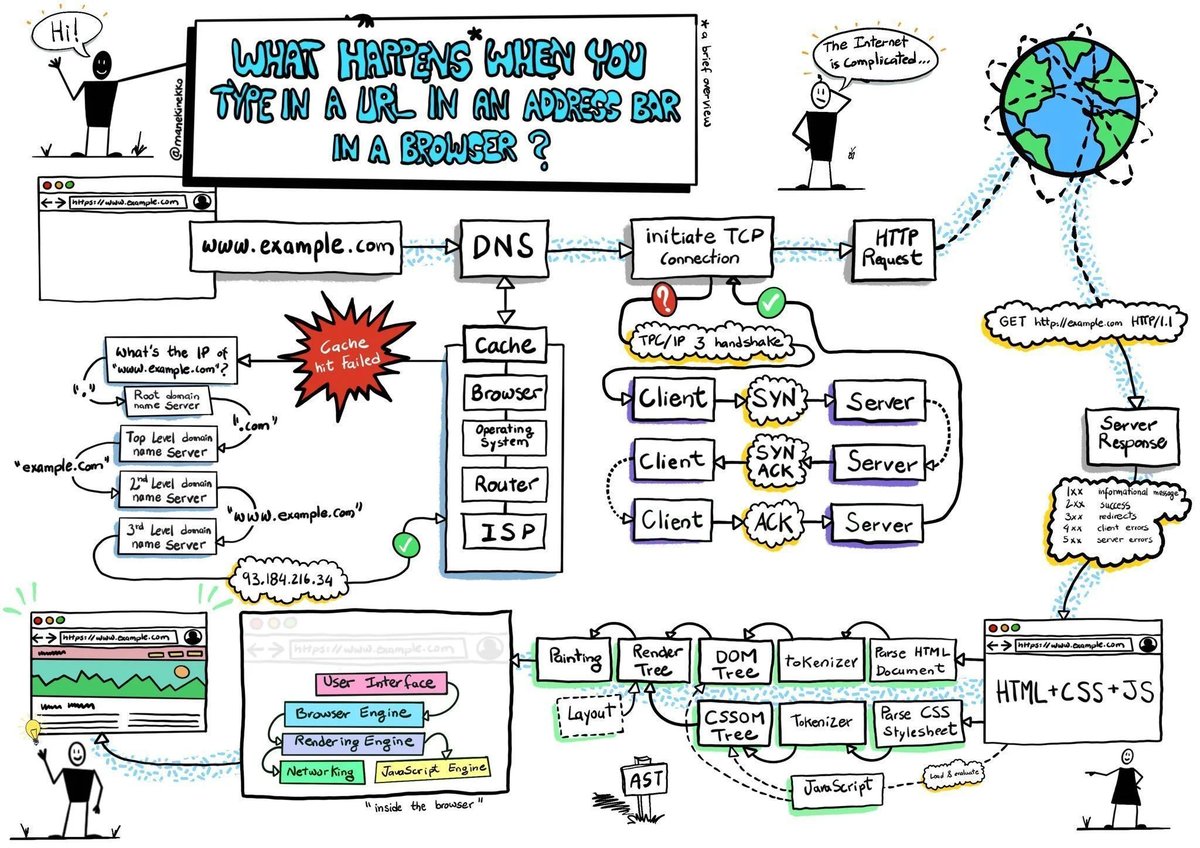
𝗪𝗵𝗮𝘁 𝗵𝗮𝗽𝗽𝗲𝗻𝘀 𝘄𝗵𝗲𝗻 𝘆𝗼𝘂 𝘁𝘆𝗽𝗲 𝗮 𝗨𝗥𝗟 𝗶𝗻𝘁𝗼 𝘆𝗼𝘂𝗿 𝗯𝗿𝗼𝘄𝘀𝗲𝗿?
The process involves the browser, your computer’s operating system, your internet service provider, the server where you host the site, and the services running on that server.
𝟭. 𝗬𝗼𝘂 𝘁𝘆𝗽𝗲 𝗵𝘁𝘁𝗽𝘀://𝘀𝗼𝗺𝗲𝘄𝗲𝗯𝘀𝗶𝘁𝗲.𝗰𝗼𝗺/𝗽𝗮𝗴𝗲 𝗶𝗻 𝘆𝗼𝘂𝗿 𝗯𝗿𝗼𝘄𝘀𝗲𝗿 𝗮𝗻𝗱 𝗽𝗿𝗲𝘀𝘀 𝗘𝗻𝘁𝗲𝗿
Here, https:// is a scheme that tells the browser to connect to the server using TLS. somewebsite. com is the site's domain name pointing to a specific server IP address. And /page is a path to the resource you need.
𝟮. 𝗕𝗿𝗼𝘄𝘀𝗲𝗿 𝗹𝗼𝗼𝗸𝘀 𝘂𝗽 𝗜𝗣 𝗮𝗱𝗱𝗿𝗲𝘀𝘀 𝗳𝗼𝗿 𝘁𝗵𝗲 𝗱𝗼𝗺𝗮𝗶𝗻
After you’ve typed the URL into your browser and pressed enter, the browser needs to figure out which server on the Internet to connect to. It must look for the IP address of the server hosting the website using the domain you typed to accomplish that. DNS lookup is used to do this. Here, it determines whether we can locate it in the cache; if not, DNS must search domain name servers from the root to the third level.
𝟯. 𝗕𝗿𝗼𝘄𝘀𝗲𝗿 𝗶𝗻𝗶𝘁𝗶𝗮𝘁𝗲𝘀 𝗧𝗖𝗣 𝗰𝗼𝗻𝗻𝗲𝗰𝘁𝗶𝗼𝗻 𝘄𝗶𝘁𝗵 𝘁𝗵𝗲 𝘀𝗲𝗿𝘃𝗲𝗿
Transmission control protocol, more formally known as TCP, is used throughout the public Internet routing infrastructure to route packets from a client browser request through the router, the Internet service provider, through an Internet exchange to switch ISPs or networks, and finally to find the server with the IP address to connect to. This is an inefficient route to take to get there. Instead, many websites employ a CDN to cache static and dynamic material closer to the browser.
𝟰. 𝗕𝗿𝗼𝘄𝘀𝗲𝗿 𝘀𝗲𝗻𝗱𝘀 𝘁𝗵𝗲 𝗛𝗧𝗧𝗣 𝗿𝗲𝗾𝘂𝗲𝘀𝘁 𝘁𝗼 𝘁𝗵𝗲 𝘀𝗲𝗿𝘃𝗲𝗿
Now that the browser is connected to the server, it complies with the HTTP(s) protocol's requirements for communication. The browser sends an HTTP request to the server for the page's contents. The body, headers, and request line of an HTTP request are all present. The server can determine what the client wants to do using the information in the request line.
𝟱. 𝗦𝗲𝗿𝘃𝗲𝗿 𝗽𝗿𝗼𝗰𝗲𝘀𝘀𝗲𝘀 𝗿𝗲𝗾𝘂𝗲𝘀𝘁 𝗮𝗻𝗱 𝘀𝗲𝗻𝗱𝘀 𝗯𝗮𝗰𝗸 𝗮 𝗿𝗲𝘀𝗽𝗼𝗻𝘀𝗲
The server accepts the request and determines how to handle it depending on the data in the request line, headers, and body. The server receives the material at this URL for the GET /page/ HTTP/1.1 requests, builds the response, and then delivers it back to the client with an HTTP status code.
𝟲. 𝗕𝗿𝗼𝘄𝘀𝗲𝗿 𝗿𝗲𝗻𝗱𝗲𝗿𝘀 𝘁𝗵𝗲 𝗰𝗼𝗻𝘁𝗲𝗻𝘁
After receiving the server's response, the browser examines the response headers for instructions on rendering the resource. The Content-Type header informs the browser that an HTML resource was received in the response body.
Image credits: manekinekko.
#technology #softwareengineering #programming #techworldwithmilan #web
Single Sign-On (SSO) explained in simple terms.
𝗞𝗲𝘆 𝗣𝗹𝗮𝘆𝗲𝗿𝘀 𝗶𝗻 𝗦𝗦𝗢
1. User - The individual seeking access to applications
2. Identity Provider (IDP) - Authenticates users (e.g. Google, Facebook)
3. Application - The software or service the user wants to access
𝗕𝗲𝗻𝗲𝗳𝗶𝘁𝘀 𝗼𝗳 𝗦𝗦𝗢
- Simplifies access with one set of credentials
- Enhances user experience
- Reduces password fatigue
- Centralizes security and access management
- Improves security
- Streamlines access control
- Simplifies compliance reporting
- Allows seamless integration
𝗛𝗼𝘄 𝗦𝗦𝗢 𝗪𝗼𝗿𝗸𝘀
- User tries to log into an application
- Application redirects user to SSO/IDP
- IDP authenticates user
- IDP issues authenticated token
- Token sent back to browser
- Browser presents token to application
- Application grants access without re-entering credentials
This streamlined process enables single login access to multiple applications, improving convenience and security.
Over to you: With SSO facilitating access across various platforms, what measures do you consider essential to maintain the integrity and security of user identities?
–
Subscribe to our weekly newsletter to get a Free System Design PDF (158 pages):
🌐 Understanding CORS: A Developer's Guide to Cross-Origin Resource Sharing.
Ever hit a CORS error and felt lost?
Cross-origin resource sharing (CORS) is key to SMOOTH & SECURE web app integration.
Let’s break it down for effortless implementation and robust security👇
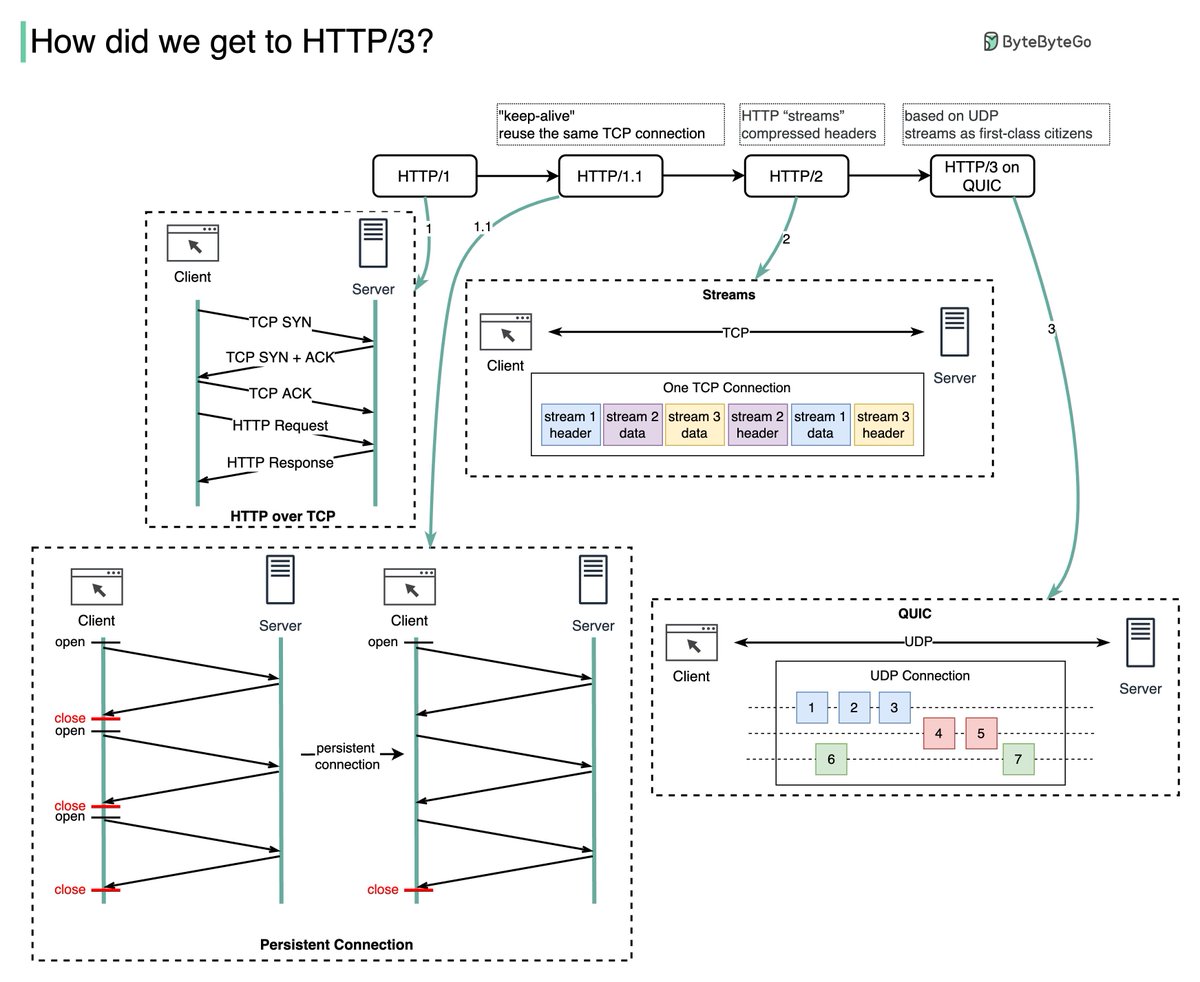
HTTP/1 to HTTP/2 to HTTP/3
HTTP/1.0 was finalized in 1996. Every request to the same server requires a separate TCP connection which is expensive to establish.
HTTP/1.1 (1997) introduced persistent connections, which allow a TCP connection to be reused for multiple requests and responses. This reduces the latency in setting up new connections for each request. But HTTP/1.1 doesn’t solve the head-of-line (HOL) blocking problem.
Although HTTP/1.1 enabled pipelining, where multiple requests could be sent out without waiting for each response, the responses still had to be processed and sent back in the order the requests were received. This ordering requirement caused HOL blocking - if the first request took a long time, all later requests had to wait.
HTTP/2 (2015) introduced HTTP streams - an abstraction that allows multiplexing different HTTP exchanges onto the same TCP connection. Streams don’t need to be sent in order. This eliminates HOL blocking at the application layer. But HOL still exists at the TCP transport layer.
HTTP/3 draft was published in 2020. It uses QUIC instead of TCP as the transport protocol, removing HOL blocking in the transport layer.
QUIC uses UDP. It introduces streams at the transport layer. QUIC streams share one connection, so no new handshakes or slow starts are necessary to create new streams. QUIC streams are delivered independently so packet loss usually doesn’t affect other streams.
–
Subscribe to our weekly newsletter to get a Free System Design PDF (158 pages): https://t.co/kNfv0DVDdf
1/
Here we go - the week 4th of the Linea Voyage! Let’s get ready to have some fun🎊
This week’s campaign holds hidden surprises 👀
As you complete each task, you will be able to claim a mystery box, & you will gain up to 15 points.
But also, we have big news for you…our Linea Voyage NFTs are getting uncovered!⬇️
✨Linea is the zk rollup developed by @ConsenSys for scaling Ethereum dapps.
With full compatibility with EVM and the tools you know and love (@MetaMask@infura_io@trufflesuite), it is developer ready for you to build on!
Check our ongoing Voyage👇
https://t.co/0XCdDu02CK
🔊Welcome to Week 2 of the Linea Voyage!
We are excited to announce the second portion of the Linea Voyage, the Social Campaign🎉
https://t.co/VB21iSJUkh