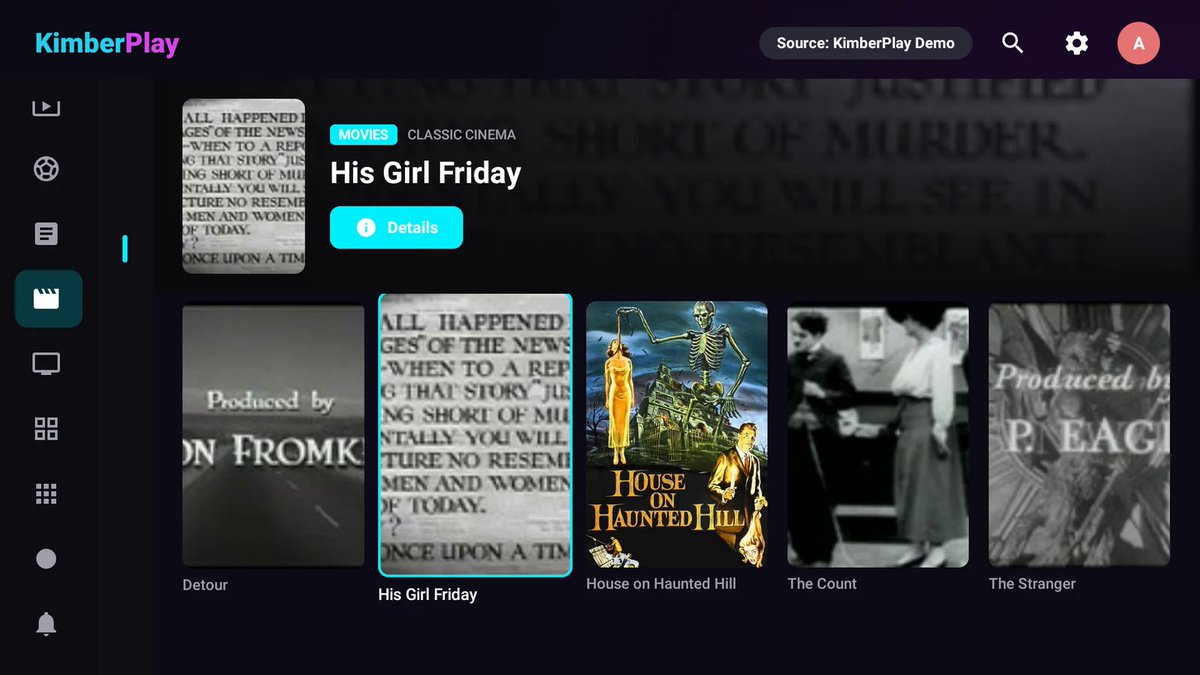
The player your playlist deserves. Bring your own authorized M3U, Xtream or Stalker source. Guide, Movies, Series, Sports, News. On-device. No channels included
Most IPTV players dump your playlist on you and call it a day.
KimberPlay is the opposite.
Point it at an authorized M3U, Xtream, or Stalker source you already have the right to use. The Kimber Engine cleans the mess on your TV — language, quality, duplicates, series, sports, news, adult isolation — and builds real television: Guide, Movies, Series, Sports, News.
Private. On-device. No channels included. We sell the player, not somebody else's channel package.
Live on Fire TV, Android TV, and Google TV.
Free forever for one playlist: https://t.co/qp32bbocbe
LAUNCH GIVEAWAY — first 250 people
Do all 3 and get a complimentary 1-year KimberPlay Plus license ($9.99 value):
1) Follow @KimberPlayApp
2) Repost this
3) Comment "I'm in"
We'll DM winners a license key. Redeem on your TV under Settings → License.
Fake or brand-new spam accounts don't count. When we hit 250, it's closed.
Player software only. Bring your own authorized source.
#FireTV #AndroidTV #GoogleTV #IPTVPlayer
KimberPlay speaks your language. Literally.
English, Español, Português, Deutsch, Français, Italiano, Nederlands, Polski, Türkçe.
Same idea in all of them: one playlist in, television out. Fire TV, Android TV, Google TV.
https://t.co/qp32bboK0M
#FireTV#AndroidTV#GoogleTV #IPTVPlayer
@TripleMPC@YouTube Seeing the same reports. Worth checking Settings → My Fire TV → Developer Options too — the Install Unknown Apps toggle gets reset per-app after big OS updates, so Downloader looks installed but silently fails. Re-enable it for whatever's doing the install.
@Allan72 The other thing that helps on an older stick: turn off Featured Content autoplay (video + audio) in Preferences. The trailer preloading is what makes the home row stutter before you've even pressed anything.
@paulEfC1975 Any recent Google TV box (Onn 4K Pro, Nvidia Shield if you want the extra grunt) is way friendlier than Fire OS for this — Play Store installs, no Downloader hoops. Bonus: proper d-pad focus in most TV apps, so you're not fighting the remote from the couch.
Why your guide goes half-blank after a feed change:
Most players match channels on display name. Feeds change names constantly ("ESPN HD" -> "ESPN"), so rows silently drop.
Key on tvg-id only, lowercase it, strip whitespace, dedupe. Then the grid survives.
@Braylon_Breeze Fire TV being last in line is its own tell: leanback needs a separate d-pad UI and a different player build, so it always slips when a service ships web-first. And the "not even HD" part is usually adaptive bitrate never stepping up after a slow start, not the stream itself.
@Meinlein@zwinchester5@schulzzy Two things worth setting on day one with that dongle: run it wired if you can (the Wi-Fi radio gives out before the SoC does at 4K), and turn off "Match content frame rate" if you get a black flash on app launch — that's an HDMI re-handshake, not a bad box.
@purplerosebed21 Nice. Biggest thing that will save you pain later: get the folder naming right up front. Show Name (Year)/Season 01/Show Name - S01E02.mkv, movies as Title (Year)/Title (Year).mkv. Jellyfin's scrapers key off that, and fixing 400 mismatched items after the fact is miserable.
"Simplicity beat capability" is still the lesson TV software keeps re-learning. Today's living room UX fails the same way: home screens optimized for discovery instead of the five-press path to the thing you already wanted. On a d-pad, friction is measured in presses, not features.
@JoelBriden On Fire TV you can claw some of it back: long-press an app in the Your Apps row and pin your three to the top, then turn off video/audio autoplay in Preferences → Featured Content. Doesn't kill the ad row, but it cuts the d-pad presses to the stuff you actually use.
Worth knowing Plex can do a live grid too, but it keys everything on the guide data, not the stream. If the channel ids in your feed do not match the EPG exactly, you get "No Information Available" over a stream that plays fine. Trimming the guide to channels you actually watch also makes it load way faster on a TV box.
@paulo_creates Storage pressure over RAM matches what I see too. Once a 5GB stick passes ~80% full, the ext4 free-space hunt shows up as UI stutter long before memory is the issue. Clearing app cache and killing the second launcher usually buys more than any "speed booster" ever will.
Playlist Crime #1: the Movies pile that isn't movies.
Same title 14 times. Four languages. Year glued to the filename. Half of it is actually series episodes.
KimberPlay's engine peels series out, merges the duplicates, and builds a Movies shelf that behaves like a Movies shelf.
Player only. Authorized source you already have.
https://t.co/qp32bboK0M
#FireTV #AndroidTV #GoogleTV #IPTVPlayer
"No information" rows are almost always mapping, not the guide feed. Three usual culprits: tvg-id casing/whitespace not matching the XMLTV channel id exactly, duplicate ids across HD/regional variants so only one row binds, and the EPG being on its own refresh schedule from the playlist, so a stale URL keeps serving an expired file. Fix: re-add the XMLTV URL, force a guide refresh, then remap the offending channels by id rather than name. We built KimberPlay to do that normalization on-device so you're not hand-editing ids: https://t.co/qp32bboK0M
Two settings make a Frame/Google TV a lot less annoying: in the launcher settings turn off "video previews" and app recommendation rows, and under Apps set your one input/app to auto-start. Then reorder the app row so what you actually use sits leftmost. It won't fix the OS, but it stops the home screen from being an ad board.
The fix that worked for me: treat the TV panel as a dumb display. Turn off the built-in launcher's "recommendations"/video autoplay rows, kill motion smoothing, and run everything off one external box so the panel never has to render its own ad shelf. Most of that Google TV lag is the home screen, not playback. Same rule for apps: a player that opens straight into your content and stays out of the way beats a store-front UI every time.
@EliteStocksTV EPG accuracy at scale is the genuinely hard half. Most guide gaps aren't the XMLTV, they're tvg-id mismatches: casing drift, duplicate ids across regional feeds, no id at all. Lazy guide rows help too. Good luck on the TV build, D-pad focus order is its own puzzle.
A guide is only as good as the list behind it. Dedupe first, then map EPG IDs — otherwise you're scrolling four copies of the same channel and half the rows say "No information available." Kimber Engine does that cleanup on-device, before playback. Free for one playlist: https://t.co/qp32bboK0M
TiviMate nails playback; the gap is everything before playback — dedupe, language filtering, quality variants, series vs live splitting. That's exactly what we built KimberPlay for: point it at your own authorized M3U/Xtream/Stalker source and it cleans and organizes the list on-device, no server round trip. Free for one playlist: https://t.co/qp32bboK0M
The lesson every TV app keeps relearning: on a 10-foot UI, click depth is the whole product. Burying a user's own libraries one level under partner content adds two D-pad presses to the single most repeated action of the session. Reordering Live TV sources being a headline feature says a lot about how low that bar had gotten.