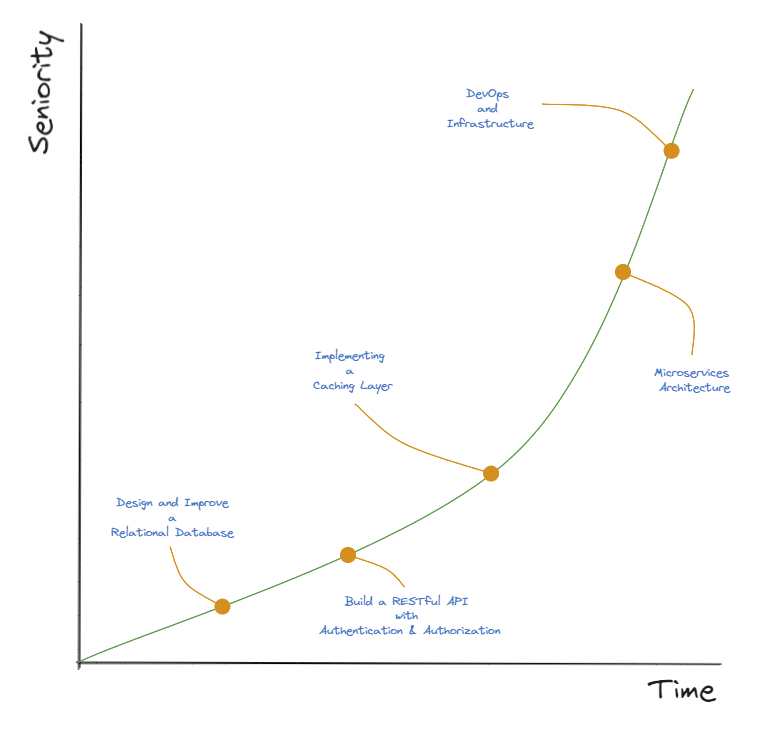
Backend projects will take you to a Senior position.
Design and Improve a Relational Database
- Design a Database
- Apply Normalization
- Improve Indexing
- Do Query optimization
Build a RESTful API with Authentication & Authorization
- HTTP Methods (GET, POST, PUT, and DELETE)
- System modeling and design
- Data Protection
- User management
- Tests with Postman
Implement a Caching Layer
Caching helps reduce the load on databases and improves response times.
The cache will show how you optimize performance and handle high-traffic loads.
Microservices Architecture
If you land in a large company, you have to deal with Microservices.
- Design a Distributed System
- Handle communication between services
- Learn about Fault Tolerance
DevOps and Infrastructure
Understanding how to deploy applications:
- CI/CD
- Docker
- Kubernetes
- IaC tools like Terraform or CloudFormation, ARM
Also, technical expertise is only part of the equation.
A Senior role demands:
- Leadership
- Mentorship
- Effective communication
The theory will help, but what will make the difference is the hands-on experience.
Build a zero cost MVP with these tools:
- @nuxt_js (front & backend code)
- @MongoDB (database in the cloud)
- @stripe (payments or subscriptions)
- @render (hosting for your website)
Can't code? Try @Codecademy (also free).
Learn these 13 Git commands because you'll be using them 99% of the time:
1. `git init`
Initialize a new Git repository.
This creates a new subdirectory named ".git" in the current directory, where Git stores all the metadata for the repository.
2. `git clone`
Clone an existing repository.
This creates a local copy of the repository, including all of its history and branches.
`git clone <repo-link>`
3. `git add`
Stage changes for the next commit.
This adds the specified file(s) to the staging area, where they will be included in the next commit.
`git add file1.txt file2.txt`
4. `git commit`
Create a new commit.
This records the staged changes and any additional changes made since the last commit, along with a commit message describing the changes.
`git commit -m "Add new feature"`
5. `git push`
Push commits to a remote repository.
This sends the local commits to the specified remote repository, updating the branch on the remote with the new commits.
`git push origin main`
6. `git pull`
Fetch and merge changes from a remote repository.
This retrieves the latest commits from the specified remote repository and merges them into the current branch.
`git pull origin main`
7. `git branch`
List, create, or delete branches.
This command can be used to list the available branches in a repository, create a new branch, or delete an existing branch.
`git branch new-branch`
8. `git checkout`
Switch to a different branch.
This command allows you to switch to a different branch in the repository and make it the current working branch.
`git checkout main`
9. `git merge`
Merge one branch into another.
This command combines the changes from one branch into another branch, creating a new commit that reflects the merged changes.
`git merge new-branch`
10. `git status`
Show the status of the repository.
This command displays the current branch, any staged or unstaged changes, and any untracked files.
`git status`
11. `git rebase`
Incorporate changes from one branch into another branch.
Let's say you have made some changes on an "XYZ" branch that you want to incorporate into the "main" branch. You can use git rebase to reapply your changes on top of the main branch.
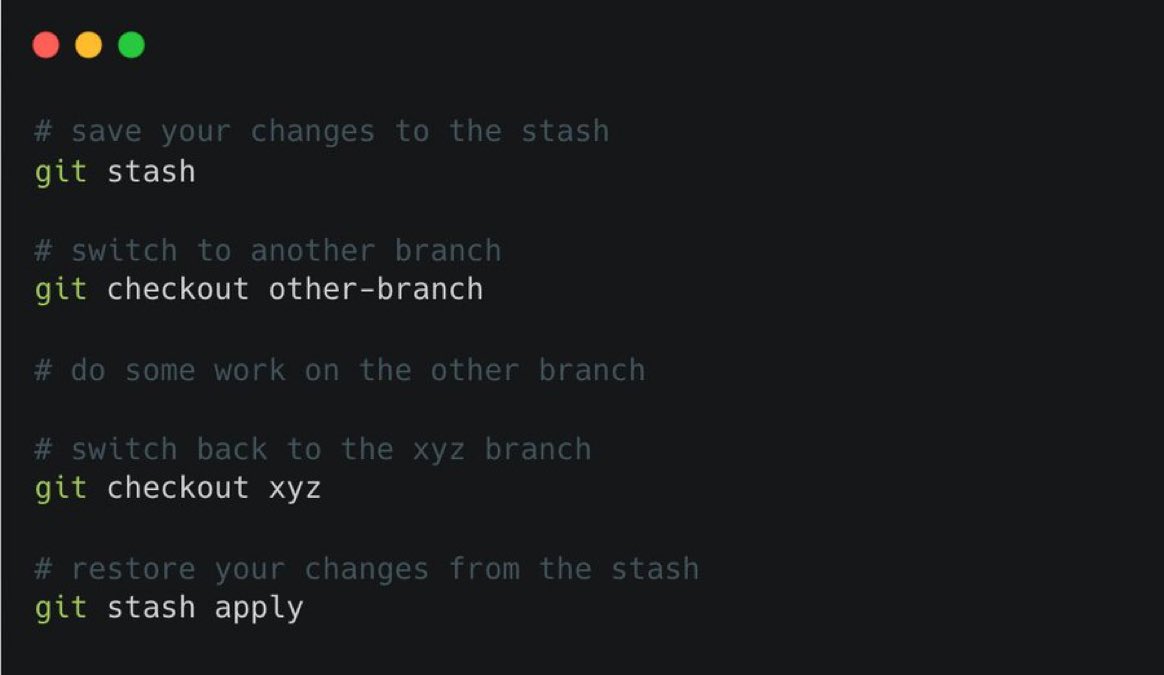
12. `git stash`
Temporarily save changes that you are not yet ready to commit.
If your changes are not ready to commit but you want to work on a different branch, you can temporarily save your changes for later use and switch branches without losing your progress.
13. `git revert`
Let's say you have made a mistake in a previous commit and you need to undo it. You can use git revert to create a new commit that undoes the changes introduced by the previous commit.
`git revert <commit1>..<commit2>`
US denied GPS access to India during Kargil war in 1999.
Then, India decided to develop its own GPS and ISRO developed NavIC.
Lesson we need to learn from Russia-Ukraine war is that India needs an Indian alternative to SWIFT payment system.
Piyush's Son - Harvard University
Javedkar's Son- Boston University
Rajnath's Son -Leeds University
Prasad's Son -Cornell University
Jitendra's Son-Oxford University
Nirmala's Daughter -NW University
Meanwhile Modiji - Students should study in India
Please spread the word.
A Control Room has been set up at the Ministry of External Affairs to provide information and assistance to our people in Ukraine. Contact:
1800118797 (Toll free)
Phones:
+91 11 23012113
+91 11 23014104
+91 11 23017905
Email:
[email protected]