Fully inspired by @karpathy's 1-hour talk 'The Busy Person’s Intro to Large Language Models', I’ve created a transcription-like blog for those who prefer reading to watching.
Dive into the world of LLMs at your own pace!
👉 https://t.co/vWbBIIo4CU
The @KyberApp app, a no-code workflow builder that lets people automate common workflows based on Stripe events. You could use it to automatically send a slack message each time a new customer is created. https://t.co/ID8mliTalA
@cyanhex@SiVola We have already been approved as official vendors at Twitter - going through the security process now. Let us know if interested in a demo. The more interest we got, the faster the process will be :-)! Drop us an email or a DM!
Kyber is now completely /command free 👋
Click the ⚡️ in the #Slack message composer to:
• Create a task
• Organize a team sync-up
• Schedule a message
• Start a poll
• View your to-do lists
Never been so simple! 😎
@BenHolliday So much true. The biggest mistake is to recreate the office interactions in a remote virtual environment.
We designed several workflow to enable a more asynchronous, written set of interactions on Slack: https://t.co/d1OMcbjq8r
The daily morning agenda is now optional.
Use the "To-do list review" micro-app to schedule a message reminder to check it in the morning.
Send it to an entire #Slack channel, to specific employees, or just to yourself.
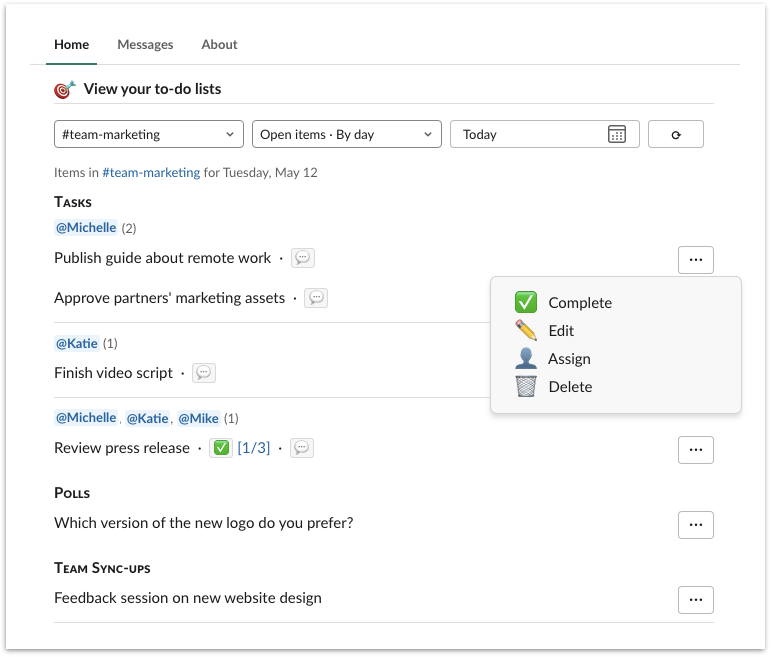
4. Review all action items in the 🎯 𝗩𝗶𝗲𝘄 𝘆𝗼𝘂𝗿 𝘁𝗼-𝗱𝗼 𝗹𝗶𝘀𝘁𝘀 section:
• Pick a project list from the first menu
• Filter the selected list with second menu
5. Work on each action item:
• Assign, Edit, Comment, Complete
• Vote
• Answer
The new shiny Kyber App Home is ready for everyone!
All your tasks, polls, asynchronous meetings, scheduled messages and more are available inside @SlackHQ!
Your team has never worked so well together 🎉
1. Find Kyber under ▾ Apps in the sidebar
2. Click on Home tab at the top
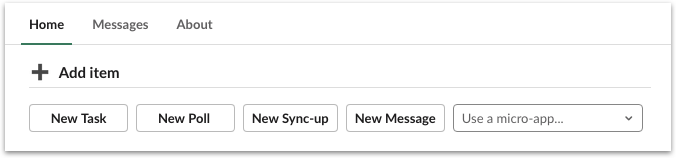
3. Start creating new items from ➕ Add item section:
��� New Task
• New Poll
• New Sync-up
• New Message
• Tens of micro-apps ready for you


![KyberApp's tweet photo. @SlackHQ @SlackAPI Click the [⋮] next to any message to turn it into:
• A task (for your team)
• A personal task (that only you can see)
• A poll https://t.co/PsqaKSWCH4](https://pbs.twimg.com/media/EfqSMw2UMAARmQa.png)