Whaaaaaat!!!???
I was today years old when I learned that #PowerPoint slides can be a background in Zoom *and* you can move thru the slides.
Note - you can download #GoogleSlides as PPT files to do this!
#RemoteTeaching#RemoteLearning
📏 Check out this chart that lists the recommended header sizes for sites and services you might use. #ClassyGraphics
When creating custom headers, change the page or canvas size to the recommended dimensions in pixels. (In Google Slides go to File → Page Setup → Custom)
My virtual classroom is ready to welcome my #newcomers! Replaced my #bitmoji w/ my REAL self b/c they need to know how I look like in real life!😂
I used https://t.co/38gbEKKC9f to remove background & added the video to G Slides
Thanks for the inspiration @luciashelleym
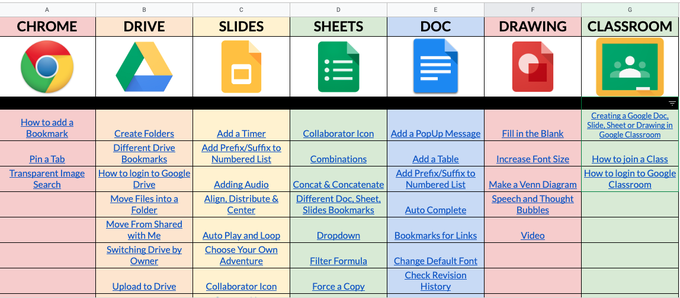
A valuable resource for educators AND families. You want to make a copy of this now💯 @GoogleForEdu Tutorials created by so many talented people! Thank you for sharing ❤️
Check it out 👇
https://t.co/RpaBFJxnt2
It looks like more and more schools will start the year with some sort of hybrid learning model. Here are some ideas and strategies to make it work https://t.co/PTYFQyAD0G #edchat#suptchat#cpchat#edutwitter#covidedu
30+ digital escape rooms (plus a step by step guide for creating your own)
🔐30+ FREE digital escape rooms you can use TOMORROW!
👣Step-by-step instructions for creating your own
🗂A planning template to get you started
https://t.co/q3Ie2uv2hQ #ditchbook
🎙 https://t.co/hzBpFe9r0q is a free online teleprompter. Your text is presented in a large font on your screen. It uses your computer’s microphone to listen to you speak and scrolls as it recognizes the words you’re saying. #remoteteaching#classyvideos
✂️ Upload a photo to https://t.co/VIyeAo5xLT. Mark what to keep with green and what to remove with red. See the results instantly, and download as a PNG with a transparent background.