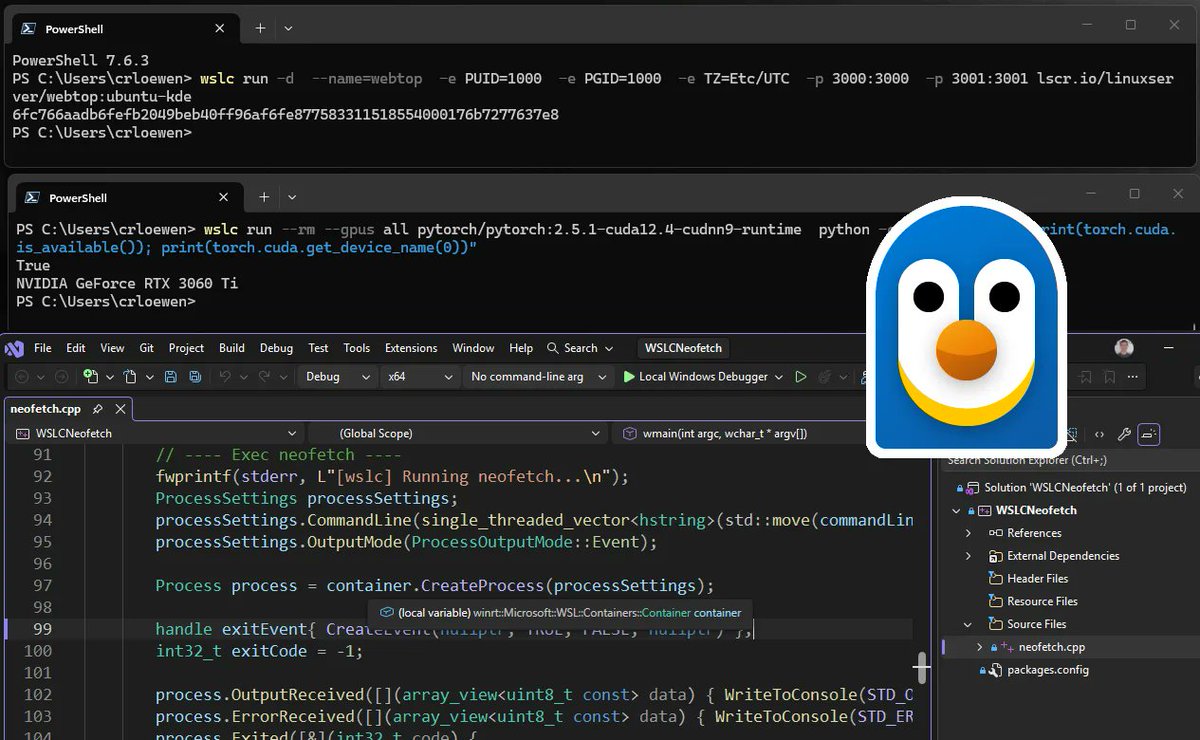
WSL container is now available for public preview.
That means you can create, run, test, and debug Linux containers directly through WSL on Windows.
Here’s how to get started + a few ways to try it 🧵
Your agent worked, it shipped… but it leaked your data.
In this #AzureFriday, @shanselman and Sajeetharan Sinnathurai show how Agent Kit helps catch missing partition key filters, fix fan-out queries, and prevent cross-tenant data leaks.
Watch: https://t.co/OknmlpQ0Un
A great chance to get hands-on with the GitHub Copilot app and learn how to explore issues, build features, and review changes in parallel, all without switching between tools.
In this episode of #AzureFriday, @shanselman and Charles Feddersen explore Azure HorizonDB, covering performance and scale, AI Pipelines, and AI-powered PostgreSQL developer productivity using VS Code. Watch now: https://t.co/apLLWqTtxO
A dev machine spent 39 days building a collaborative word processor largely on its own.
It ran 565 sessions, made 3,706 commits, completed 1,111 features, and still never added a ruler.
Explore what it revealed about agentic development and why human judgment still matters.
https://t.co/Qv5NCWLumN
OpenAI’s GPT-5.6 family is rolling out in GitHub Copilot.
GPT-5.6 comes in three variants, Sol, Terra, and Luna, giving you more flexibility to match the model to the work in front of you.
Build smarter with the new GitHub Copilot app. 💡
Join our Let's Learn virtual sessions and find out how this all-in-one control center can help you optimize your workflow with agent-driven development.
Sign up for your session in English, Korean, Chinese, Japanese, Spanish, or Portuguese. 🗓️
https://t.co/dl62TnerXt
🚀 Build and test web apps right in the browser with @code!
Pages can now request camera, location, and device access with per-site approval prompts. The Agents window (Preview) also introduces guided onboarding tours to help you get started faster.
🆕 @Kimi_Moonshot's Kimi K2.7 Code is now generally available in GitHub Copilot.
This is the first open-weight model offered as a selectable option in the Copilot model picker. 🎉
Early testing shows Kimi K2.7 is a lower-cost option with strong performance comparable to highly popular frontier models.
Try it out now in @code and look out for it in more GitHub Copilot surfaces. 👇
https://t.co/ER2bGMNs7i
Azure Cosmos DB Conf 2026 is now on demand and we’re sharing some top sessions from the event.
Check out the blog for more info: https://t.co/0Mh7i0WfGZ
Andrew Ruffin, Senior Product Manager at AMD, joins Azure Cosmos DB Conf 2026 to talk about the hardware quietly powering the database you rely on every day.
Tune in: https://t.co/9wjDvNMJHG
And if you use VS Code Dev Containers, you can plug WSL containers into that workflow too.
WSLc support is available in the VS Code Dev Containers pre-release. To try it, open Dev Container settings, find “Docker Path,” and set it to: wslc
Then bring Linux containers into your Windows apps.
The new WSL container API lets Windows apps use Linux containers as part of their app logic, with support for C, C++, and C#.
Think local cloud app workflows, Linux-specific code, or contained processes.
Start with the command line.
With wslc, you can run Linux containers as part of your everyday dev workflow, from running apps locally to testing GPU access.
There’s also a built-in container.exe alias, so you can use either wslc or container.
First, update to the latest WSL pre-release by running:
wsl --update --pre-release
Once updated, you’ll have access to wslc.exe, the new WSL container CLI.
WSL container is now available for public preview.
That means you can create, run, test, and debug Linux containers directly through WSL on Windows.
Here’s how to get started + a few ways to try it 🧵