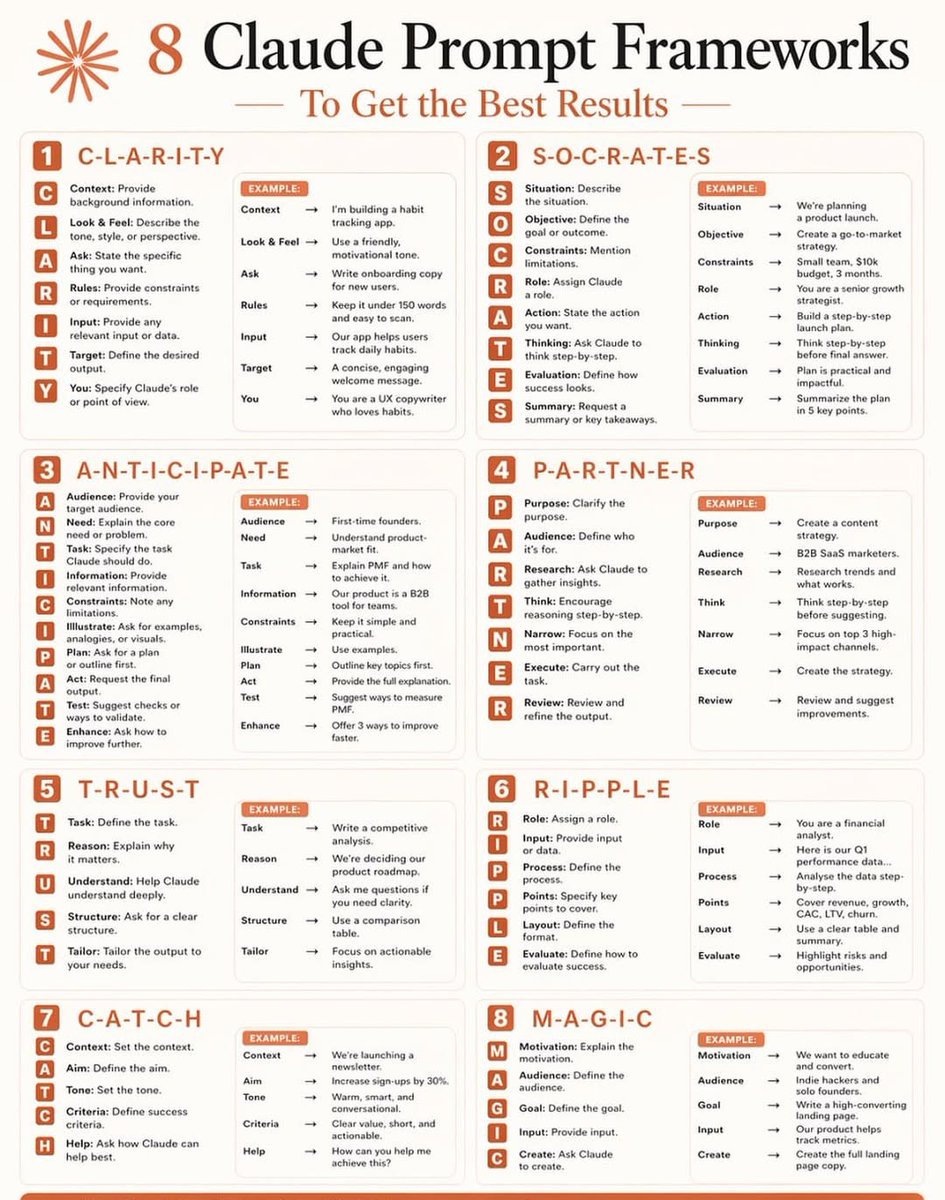
Don't waste Claude's potential with weak prompts.
Instead, use 1 of these 8 frameworks:
Most people type a question and hope for the best. That's not prompting. That's guessing.
The difference between average and elite AI output? Structure.
Here are the 8 frameworks I use every single day:
1️⃣ C L A R I T Y
Context → Look & Feel → Ask → Rules → Input → Target → You
2️⃣ S O C R A T E S
Situation → Objective → Constraints → Role → Action → Thinking → Evaluation → Summary
3️⃣ A N T I C I P A T E
Audience → Need → Task → Information → Constraints → Illustrate → Plan → Act → Test → Enhance
4️⃣ P A R T N E R
Purpose → Audience → Research → Think → Narrow → Execute → Review
5️⃣ T R U S T
Task → Reason → Understand → Structure → Tailor
6️⃣ R I P P L E
Role → Input → Process → Points → Layout → Evaluate
7️⃣ C A T C H
Context → Aim → Tone → Criteria → Help
8️⃣ M A G I C
Motivation → Audience → Goal → Input → Create
Once you start using these, you can't go back to random prompting.
Your outputs become faster, sharper, and actually useful.
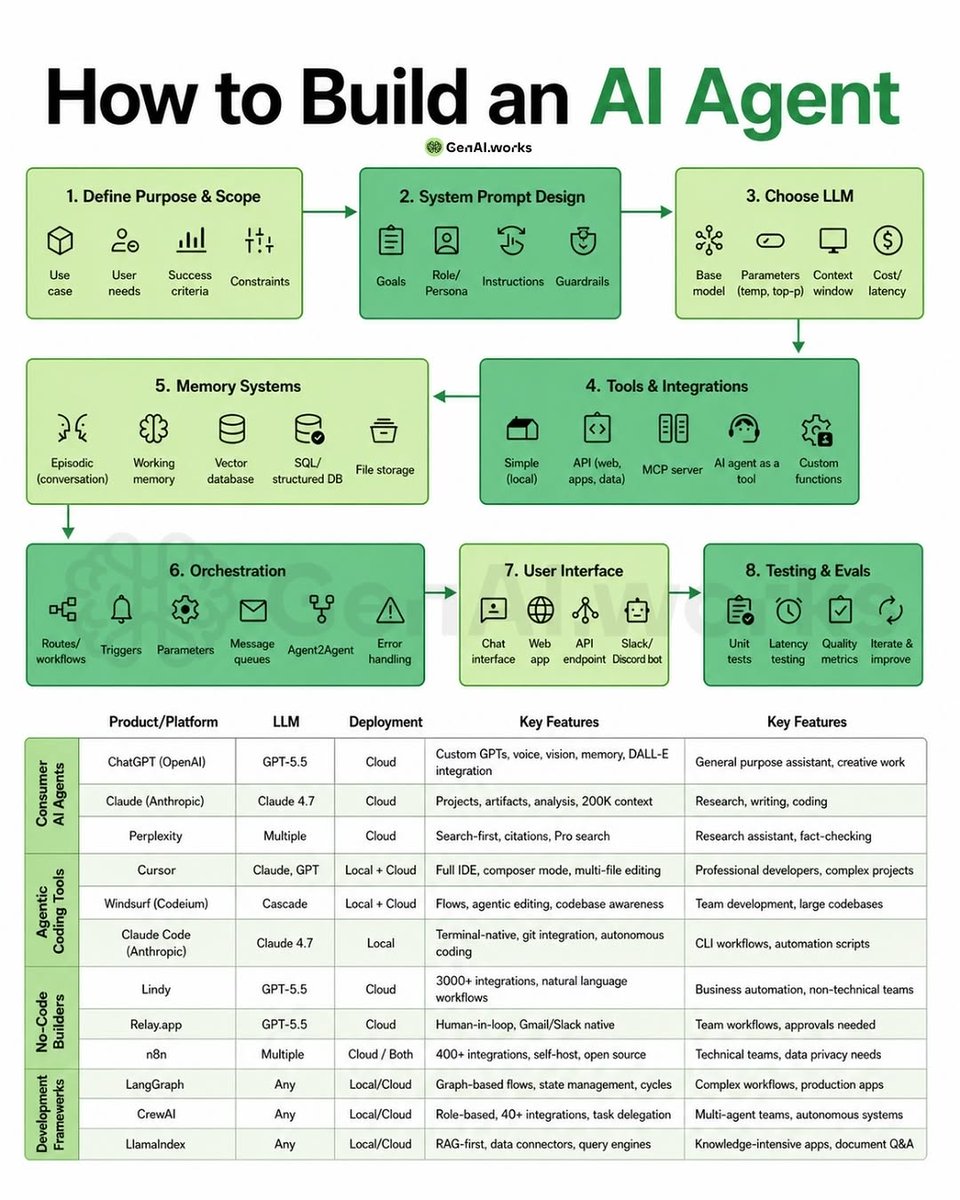
You're building AI agents without a system. That's why they keep failing.
Here’s the right system to go from idea → working agent
1. Define the job
What problem are you solving?
Who’s the user? What does success look like?
2. Design the brain
Clear system prompt, role, instructions, guardrails
(This is where most agents fail)
3. Pick the right model
Speed vs cost vs intelligence
Don’t overpay for simple tasks
4. Add tools
APIs, databases, MCP servers, custom functions
Agents become powerful when they can act, not just answer
5. Give it memory
Short-term + long-term context
So it learns, adapts, and improves over time
6. Orchestrate everything
Workflows, triggers, retries, agent-to-agent communication
7. Build the interface
Chat, app, API, Slack bot
Make it usable, not just functional
8. Test + improve
Evals, latency checks, real-world feedback
Iteration is the real moat
🚨BREAKING: Claude Code just got an "App Store" for agents.
A new open-source library dropped with 100+ pre-made agents, skills, and templates you can install instantly.
And it's 100% free to use.
Stop wasting hours trying to learn AI. 📘📚
I have already done it for you.
With one list. Zero confusion. And no fluff
📹 Videos:
1. LLM Introduction: https://t.co/YkuDFVmW9e
2. LLMs from Scratch: https://t.co/u3kSz5SGuJ
3. Agentic AI Overview (Stanford): https://t.co/W6rzVHGSgC
4. Building and Evaluating Agents: https://t.co/sEl8vVax3F
5. Building Effective Agents: https://t.co/c7fD4aWFYO
6. Building Agents with MCP: https://t.co/GlMdR6htgA
7. Building an Agent from Scratch: https://t.co/kUQ9jPuI0R
8. Philo Agents: https://t.co/8JHvqw0DKn
🗂️ Repos
1. GenAI Agents: https://t.co/cyHPvOAjlK
2. Microsoft's AI Agents for Beginners: https://t.co/zFJAN74JQe
3. Prompt Engineering Guide: https://t.co/liUshX2XsP
4. Hands-On Large Language Models: https://t.co/TXFhbiboZY
5. AI Agents for Beginners: https://t.co/zFJAN74JQe
6. GenAI Agentshttps://lnkd.in/dEt72MEy
7. Made with ML: https://t.co/lkXP6itwK0
8. Hands-On AI Engineering:https://t.co/zB8EEctE4Y
9. Awesome Generative AI Guide: https://t.co/lF7CuIQHRw
10. Designing Machine Learning Systems: https://t.co/XlYUZYOoVi
11. Machine Learning for Beginners from Microsoft: https://t.co/hF5UzZoMJB
12. LLM Course: https://t.co/4tLAwy8fOQ
🗺️ Guides
1. Google's Agent Whitepaper: https://t.co/0OEKVLgF34
2. Google's Agent Companion: https://t.co/r0Dxe4VvDO
3. Building Effective Agents by Anthropic: https://t.co/I0ZyuwiOS3.
4. Claude Code Best Agentic Coding practices: https://t.co/HIBC2TwwAP
5. OpenAI's Practical Guide to Building Agents: https://t.co/1I8n0wnjHQ
📚Books:
1. Understanding Deep Learning: https://t.co/XEzhyAcWbq
2. Building an LLM from Scratch: https://t.co/4sZmBnHPEg
3. The LLM Engineering Handbook: https://t.co/IkAYNFkVNI
4. AI Agents: The Definitive Guide - Nicole Koenigstein: https://t.co/KsFnET47hx
5. Building Applications with AI Agents - Michael Albada: https://t.co/lJhMLtsLql
6. AI Agents with MCP - Kyle Stratis: https://t.co/C2lhD8uTDL
7. AI Engineering: https://t.co/34EyUiIVMv
📜 Papers
1. ReAct: https://t.co/kfQ8tWysne
2. Generative Agents: https://t.co/wbfqXq8KZK.
3. Toolformer: https://t.co/OQ7m49YWls
4. Chain-of-Thought Prompting: https://t.co/XeNgLQdTIL.
🧑🏫 Courses:
1. HuggingFace's Agent Course: https://t.co/tUZyPEGhni
2. MCP with Anthropic: https://t.co/wx1DAIWis0
3. Building Vector Databases with Pinecone: https://t.co/8XsQzDstTB
4. Vector Databases from Embeddings to Apps: https://t.co/9n6DvZGTMN
5. Agent Memory: https://t.co/OxFAaM0fp7
Repost for your network ♻️
10,000+ Nano Banana Pro prompts
All tested. All previewed. All free.
No guessing. No trial & error.
Just copy → paste → win.
→ https://t.co/cW0Z3iQcqT
If you’re still writing prompts from scratch in 2026…
you’re already behind.
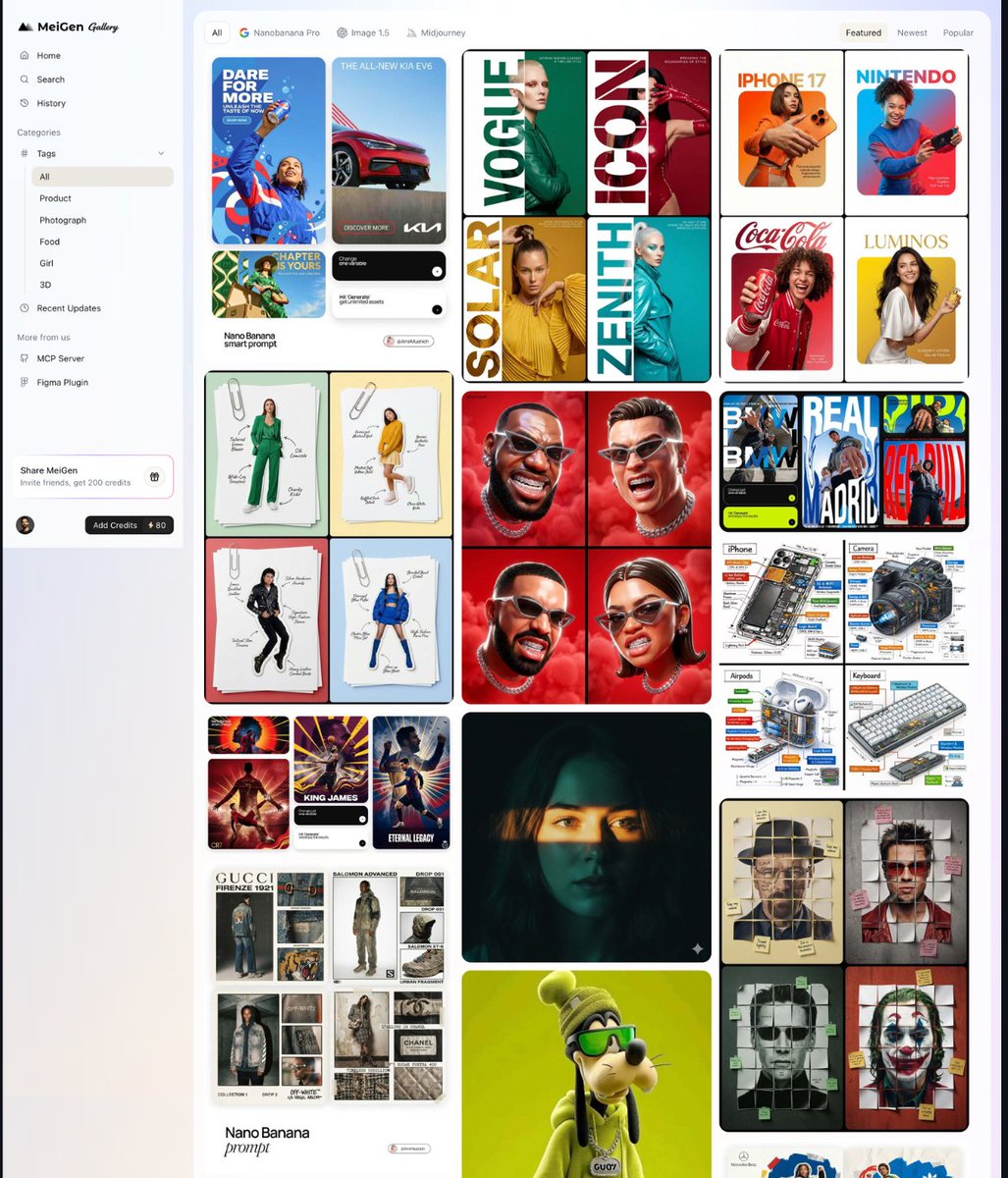
Wow... Someone built the Pinterest of AI image prompts and it's 100% free.
It's called MeiGen. A massive gallery of viral prompts for GPT Image 2, Nano Banana 2, Seedance 2.0, Veo 3.1, and Midjourney all in one place.
No prompt engineering. No paid courses. Just steal what already went viral.
100% free.
Seedance 2.0 is now completely free to use.
It's available on GlobalGPT and it's the same model ByteDance charges premium pricing for, except now you can generate unlimited videos without paying a cent.
No credits system. No watermark. No 5-second teaser clips that force you to upgrade.
Stop asking ChatGPT Image 2.0 to summarize PDFs.
Text summaries are boring and don't stick.
Use this prompt framework to create visual summaries instead:
Top free AI courses .
From Anthropic, Google, Meta, and others:
Executives already use these programs to boost skills fast.
Sharing valuable insights from Alex Barády.
1. Anthropic
🔗 https://t.co/c93eWKOAhU
2. Google
🔗 https://t.co/maJjbyRRCR
3. Meta
🔗 https://t.co/pXCxhDs9We
4. NVIDIA
🔗 https://t.co/1Gz1IKQBCV
5. Microsoft
🔗 https://t.co/z4RTxEtLWG
6. OpenAI
🔗 https://t.co/UUhvJ4d22I
7. IBM
🔗 https://t.co/ipo07rFGgV
8. AWS
🔗 https://t.co/fd64Z6irn8
9. https://t.co/G22DykeIxd
🔗 https://t.co/C8SYgxuyB1
10. Hugging Face
🔗 https://t.co/XOjad30iSf
These courses are excellent. Save them for reference.
They give strong AI knowledge and practical skills.
P.S. Which gap in AI knowledge will you close first?
♻️ Repost this for those aiming to master AI.
——
📌 Get my top 100 infographics for free:
1) Follow me.
2) Subscribe to my free newsletter at https://t.co/jTnaNRbsRL.
You’ll receive them directly in your welcome email.
🚀 Claude Code Resource Bible - The Stack Most People Are Sleeping On
54+ tools across Agents • MCP Servers • Skills • Automation
If you’re still just "prompting"....
you’re missing the real game ⚡
Here’s the curated ecosystem 👇
🟦 OFFICIAL (Start here)
Master the fundamentals straight from the source
🔗 https://t.co/PzDCLnq0HU
🔗 https://t.co/nubUxDRf4u
🔗 https://t.co/UKPkLYAFMi
🟧 DIRECTORIES (Explore the ecosystem)
Find tools, repos & hidden gems
🔗 https://t.co/80n0eSO6g3
🔗 https://t.co/9RsmI33FMn
🔗 https://t.co/keuvsQWDnq
🟨 MCP SERVERS (Connect everything)
Turn Claude into your control center
🔗 https://t.co/5dzOWuixK0
🔗 https://t.co/KwfqFHApft
🔗 https://t.co/sF2jtVeFvh
🟩 SKILLS (Reusable intelligence)
Stop rewriting prompts. Build once, reuse forever
🔗 https://t.co/TUXtYcHH4w
🔗 https://t.co/cgtt0PAoQh
🔗 https://t.co/5JroRa2upE
🟪 MULTIPLEXERS (Run multiple agents)
Scale workflows like a pro
🔗 https://t.co/olOupXy4uI
🔗 https://t.co/jt86NbGdrH
🔗 https://t.co/wcwiACPtBU
🟥 AGENT FRAMEWORKS (Build AI systems)
From solo agents → multi-agent orchestration
🔗 https://t.co/LwLyaKAjhN
🔗 https://t.co/PrRDWHSHRJ
🔗 https://t.co/kKzhHv4udv
⚙️ AUTOMATION (Make it work for you)
Let AI run workflows, not just answer questions
🔗 https://t.co/MF6mKVr0Zu
🔗 https://t.co/eiyDM8fFMT
🔗 https://t.co/Oi6B5KvDBQ
📚 ARTICLES (Deep dives)
Learn how to actually use this stack
🔗 https://t.co/TKDZJrPEQB
🔗 https://t.co/8ae4UYrH9J
🔗 https://t.co/TM2aTXRlLp
🔥 Pro Tip most people ignore:
→ Don’t try everything at once
→ Start with MCP + one agent workflow
→ Layer skills + automation gradually
📌 The real leverage =
MCP + Agents + Skills + Automation
That’s how you go from "using AI" → building with AI
🔖 Bookmark this
♻️ Share with builders
➕ Follow @elora_khatun for more high-signal AI resources 🚀
GPT Image 2 on @SeaArt_Ai
Prompt:
Design a premium 9:16 vertical phone wallpaper featuring Michael Jordan in Chicago Bulls kit. Advanced sports graphic design style: layered composition with player portrait + full-body action shot, team logo integration, dynamic red/white energy effects, United Center silhouette backdrop, bold vertical typography with "JORDAN" and "AIR LEGEND" callouts, dark cinematic color grading with electric red accents, photorealistic detail, 4K resolution.
Our official Agent Skills repository on @github is here!
Skills are a simple, open format for giving agents new capabilities and expertise. Think of a skill as compact, agent-first documentation for a specific tech or task.
Learn more → https://t.co/7w887vz3lE #GoogleCloudNext
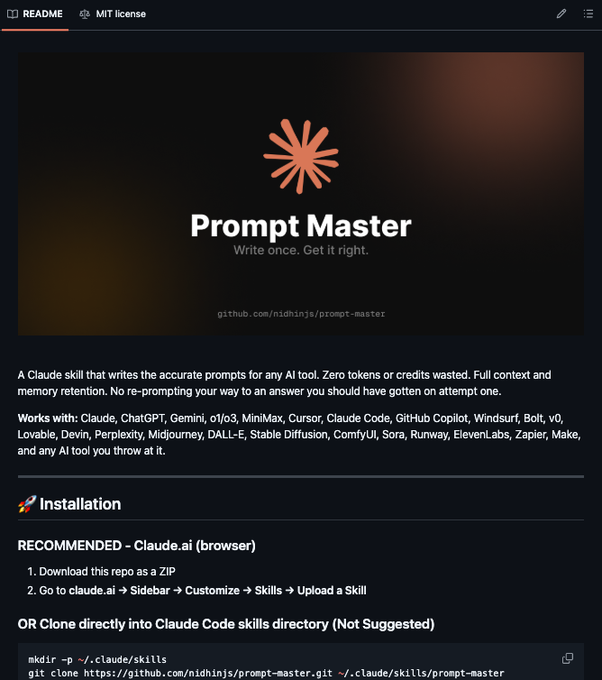
🚨 Han creado una skill para Claude que genera el prompt perfecto para cualquier IA.
Funciona con más de 18 herramientas como ChatGPT, Midjourney o Cursor en una sola instalación.
Tiene más de 5.5k stars en GitHub, es gratis y open-source.
Aquí te explico cómo usarla 👇
🚨 Stop paying for AI tools. Your laptop is enough.
Here are the best GitHub repos to run LLMs 100% free locally 👇
1. AnythingLLM
👉 https://t.co/MLUedMGEyW
All-in-one AI app — chat with docs, agents, RAG, everything in one place.
2. KoboldCpp
👉 https://t.co/H9cTEaw9tz
Lightweight + fast local inference with built-in UI & GGUF model support.
3. llama.cpp
👉 https://t.co/zrfwOLfJCk
Run LLMs on CPU with insane efficiency (even on low-end laptops).
4. Open WebUI
👉 https://t.co/8EAekWQqW2
Clean ChatGPT-like UI for your local models (Ollama, etc.)
5. GPT4All
👉 https://t.co/djCIe84MeY
One-click local AI with privacy-first open-source models.
6. LocalAI
👉 https://t.co/e2Dons53f3
OpenAI-compatible API to run models locally (drop-in replacement).
7. vLLM
👉 https://t.co/x66L8ezWXT
High-performance inference engine (great for speed & scaling).
🔁 RT if this helped
🔖 Bookmark this for later
10 open-source AI tools that feel illegal to be free.
Bookmark this before big tech buries it.
1. Fooocus
A Midjourney alternative that runs on your laptop. Three clicks from download to first image.
Repo → https://t.co/NDPJpIdYJs
2. ComfyUI
The image generator professional AI artists actually use. Studios use it for real production work.
Repo → https://t.co/yy1oRIvrOn
3. Ollama
A ChatGPT alternative that runs on your own machine. No internet. No API costs. One command to install.
Repo → https://t.co/gyZhUdzsnZ
4. OpenVoice
Clones any voice from 10 seconds of audio. Built by MIT and MyShell. MIT license means commercial use is allowed.
Repo → https://t.co/BWoiXvk0Bm
5. Penpot
A Figma alternative with real-time collaboration. Runs in your browser. Self-hostable.
Repo → https://t.co/Lx1CYUP4p4
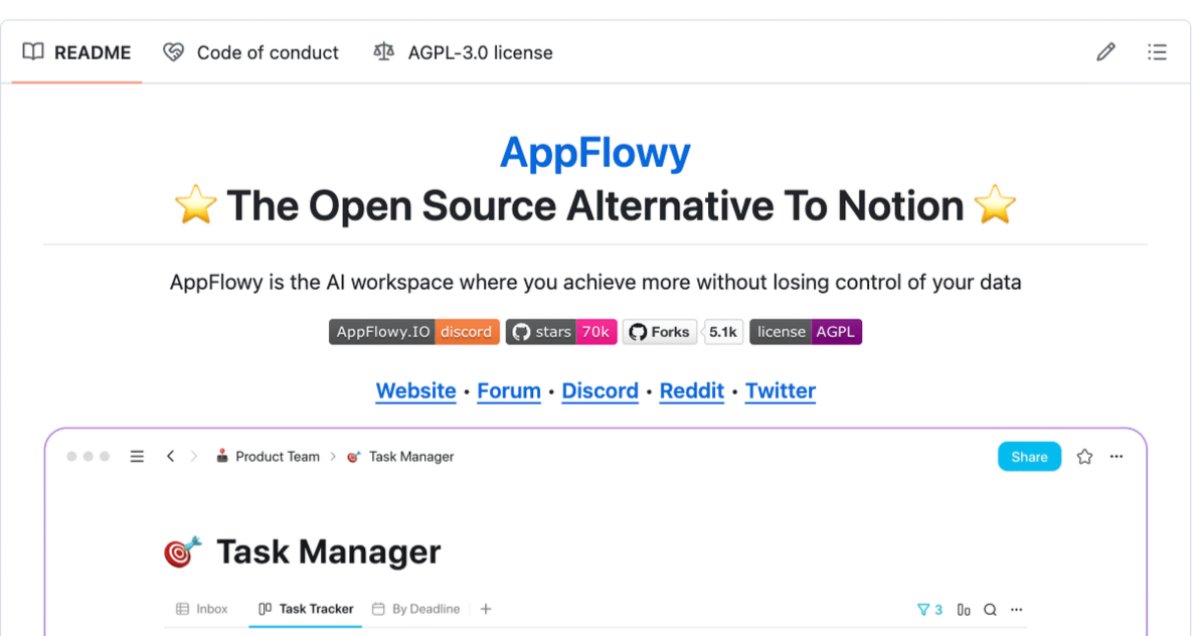
6. AppFlowy
A Notion alternative where your data stays on your own machine. Local-first. Built in Rust.
Repo → https://t.co/IDMykTCkMU
7. n8n
A Zapier alternative with 400+ integrations and native AI nodes. Unlimited workflows when you self-host.
Repo → https://t.co/hdycABGGc1
8. Cal. com
A Calendly alternative with more features than the paid version. White-label it for clients.
Repo → https://t.co/haz8ihRsHm
9. Supabase
A Firebase alternative you actually own. Postgres, auth, storage, realtime, edge functions. All in one.
Repo → https://t.co/dFB2QvafA7
10. Cline
A Cursor alternative that lives inside VS Code. Reads your files, edits your code, ships your features.
Repo → https://t.co/hjjDVgiRd3
Here's the wildest part:
Add up what these tools would cost as SaaS subscriptions and you are looking at $300 to $500 every single month.
All of it. Free. Forever.
The only people who lose when you install these are the companies charging you $20 a month for what an open-source community built for free.
Save this post before you forget.
100% free. 100% open source.












![tec_safwan's tweet photo. Paid Tools vs Free Alternatives
1. Research
Paid: https://t.co/VADy96GGc7
Free: https://t.co/uzZx96vPhK
2. Video
Paid: https://t.co/br1Ffakvbo
Free: https://t.co/G6p6JgbAQz
3. Watermark Removal
Paid: https://t.co/MrE3q7czbP
Free: https://t.co/G6p6JgbAQz
4. Image Generation
Paid: https://t.co/dJDnWsOnpt
Free: https://t.co/8846Hkde1k
5. Presentation Tools
Paid: https://t.co/nsOy1dFyYe
Free: https://t.co/iRlcRRzzG7
[Bookmark for later 🔖]
Follow me & DM @tec_safwan For more.](https://pbs.twimg.com/media/HGjbkyNacAAmRBT.jpg)