Someone very dear to me needs a simple journaling #iOS app, so I'm experimenting with building one backed by #emacs#orgmode markup.
Want to try it out?
DM/email me at https://t.co/VACSL2nGHD with an email address for a TestFlight invite.
Need feedback. Please retweet 🙏
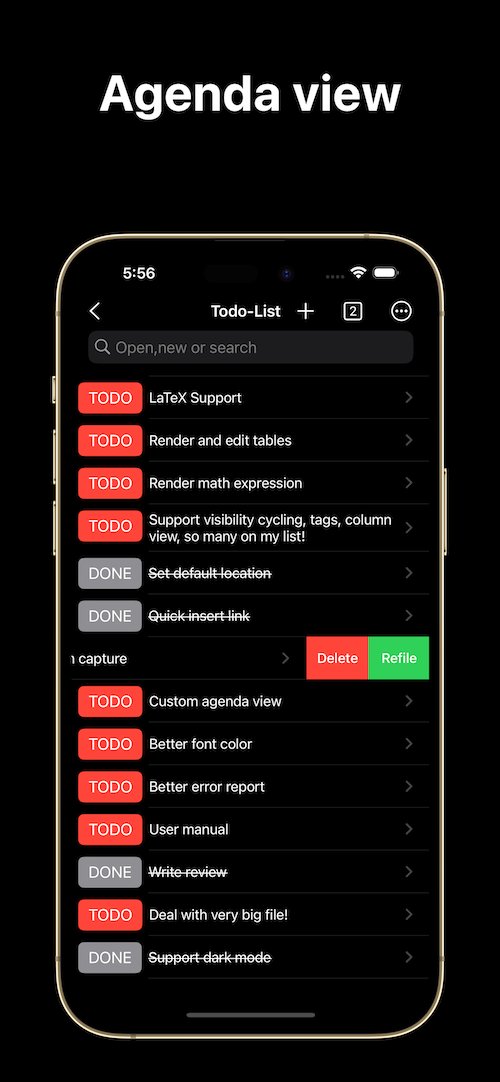
✅ View to-do items by day, week, month, or year
✅ Save custom agenda views for easy access
✅ Focus on the present with incomplete to-do items by default
✅ Access Capture and Agenda View from the More menu
🧑🤝🧑 https://t.co/cEnrSnNmD0
#productivity#timemanagement#obsidian
#Metanote IOS 0.7.0 is here! 🎉
🚀 Organize your tasks like never before with enhanced custom agenda view in #Orgmode and #emacs 📱Upgrade now and enjoy various detail and UX improvements!
Next stop: custom capture! Stay tuned! ✨
See 👇️👇️👇️ for details!
4. Support for InBufferSettings, refer to the documentation. Currently supported settings include TITLE, DATE, CATEGORY, PROPERTY, TODO, SEQ_TODO, TYP_TODO, FILETAGS, TAGS.
5. Window switching effects optimized, along with multiple user experience enhancements.
Metanote iOS version 0.6.0 released! Now supporting custom agenda views! You can customize your to-do lists based on CATEGORY, TAG, PROPERTY, TODO keywords, etc., and save them for easy access and review.
1. Customizable agenda views supported
3. Support for Properties, including custom Properties and Special Properties. Currently supported Special Properties include PRIORITY, LEVEL, TODO, ITEM, CATEGORY. Refer to the help documentation for details.
3. Added support for moving and renaming files or folders, making it easier for you to manage your drafts and flashes.
4. Multiple user experience improvements and refinements.
Metanote iOS 0.5.0 released!
1. In this version, we have introduced the option to make a one-time purchase for permanent access to all Metanote premium features!
2. Added support for iPad!
4. To adjust the hierarchy of an entire list tree or move it up and down, use the "⌘" key to open the function panel, and employ the arrow keys for navigation.
3. Utilize the indentation buttons on the keyboard toolbar to increase or decrease the indentation of your list items, allowing you to adjust the hierarchy of your columns effortlessly.
2. Indentation Shortcut: To indent a list item, press the "TAB" key on the keyboard toolbar. This helps you add a new line within the list, maintaining the proper indentation.
1. Inserting Lists: Tap the "Insert" panel on the keyboard toolbar. Choose "Ordered List" for numbered lists or "Unordered List" for bullet points. While editing, press "Enter" to create a new list item. Press "Enter" twice to exit the list.
Metanote iOS version is now released! It's a pure-text editor that supports org mode, local-first, and developed natively, providing a seamless editing experience. In Metanote, you can use org mode just like in Emacs.