Learn How to Solve your Business Problems & Questions Using Excel Making you awesome in excel,data analytics & charting.
follow me on Instagram
@mnkexceltips
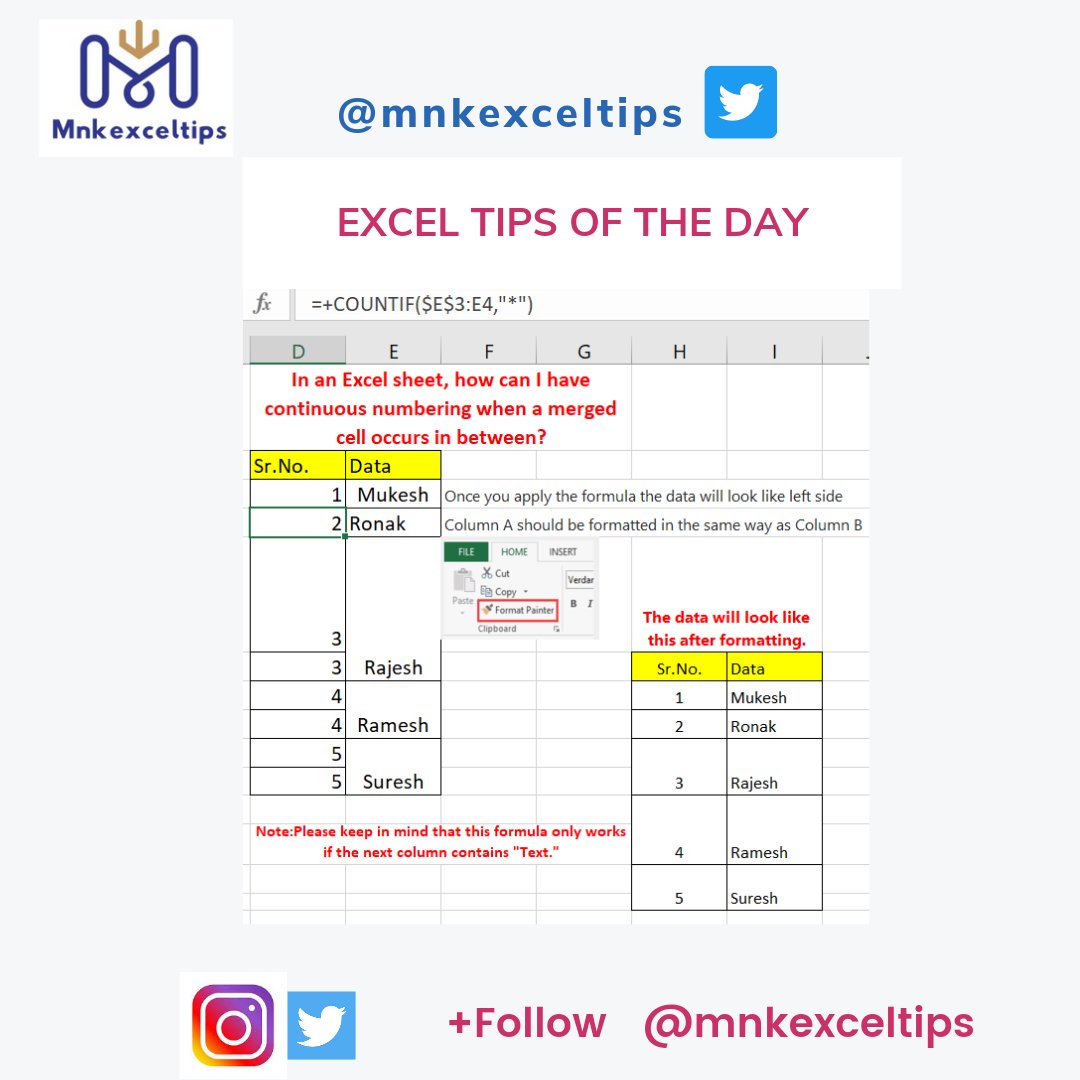
how can I have continuous numbering when a merged cell occurs in between?
Once you apply the formula the data will look like left side
Column A should be formatted in the same way as Column B
Please keep in mind that this formula only works if the next column contains "Text."
Fill in the black cells in Excel with the value from above
Choose the cells that include blank cells > Ctrl + G > Select > Select Blanks > from the Go To Special dialogue. Click OK > Enter = > Choose the cell above
In this example, insert your starting dates in column B.
In column C, enter the number of months to add or delete. You can enter a minus sign (-) before the number to indicate that a month should be deducted (e.g. -1).
In cell D4, enter =EDATE(B4,C4) and copy down as needed.
Hello buddies, this formula will be quite beneficial to you. Some activities are really tough to complete, so this function simplifies them.
Try that and see what happens.
Save this for the future.