I’m going to show you how a hacker thinks, one case at a time.
Case #01: A retired teacher lost her savings without ever sharing her password. By the end, you’ll know exactly how, and you’ll find the one setting on your own phone that let it happen.
THE BLINK
Clara Hayes taught maths for thirty-one years. Everything she’d saved, including the money for her daughter’s December wedding, sat in one banking app.
One morning she needed to scan some pension forms. Her printer was dead, so she downloaded a free scanner app with a cheerful blue icon. It asked her to “turn on Accessibility for faster scanning.” She tapped yes.
Ten days later, she opened her bank app to pay the caterer. It blinked, then asked her to log in again. She did.
By lunch, most of her savings were gone, in four transfers she never made.
The bank checked the logs: right password, her own phone, her own one-time code. Their verdict was polite and final. She must have shared her details.
She hadn’t.
THE NAME
Three weeks later, the bank’s head of fraud sent an email to an address with no name attached.
Everyone in the security world has heard of NULL. Nobody has met him. No photo, no profile, no conference talks. Just a trail of banks and payment apps that quietly fixed something after he found it. People say his bug bounties alone have made him a quiet millionaire. Nobody can confirm it. He has never confirmed anything.
What everyone does know is this: you don’t call NULL about one complaint. You call him when the problem has stopped making sense.
The bank didn’t have one Clara. It had forty-one. Right password, right phone, right code, wrong ending. Every case closed as “customer shared credentials.”
The reply came in four minutes. Two words.
Send everything.
That night, in a small dark room, with one earbud in, a cup of chai going cold beside the keyboard, and an almost-dead cactus on the windowsill, NULL opened the first file.
THE MAZE
Every case like this is a maze. You walk in at “customer lost money,” and a dozen corridors open up. Most are dead ends.
Was the bank’s database leaked? Then thieves would have hit thousands of customers in one night, not forty-one over four months. Dead end.
Did someone hijack their phone numbers to grab the codes? No. Every code arrived on the customer’s own phone. Dead end.
Did all forty-one click the same scam link? Retired teachers, shopkeepers, and students with nothing in common? Unlikely. Dead end.
So he walked back to the entrance.
THE MIND MAP
Everything trusts something. So in the middle of a blank page, he wrote one question: What does this app trust?
Lines branched out. The password. The one-time code. The phone. And one more, the one everyone forgets: that the screen you see is the screen it drew.
He circled that one twice.
On Android, that isn’t always true. Apps are allowed to draw on top of other apps; it’s how chat bubbles float over everything. To do it, an app needs a permission called “display over other apps.”
Clara swore she never granted anything like that. She didn’t need to. She had turned on Accessibility for the scanner. Accessibility is a good feature: it lets apps read the screen aloud and press buttons for people who can’t. That also means an app with Accessibility can read everything on your screen and press buttons by itself, including the ones that grant it more permissions.
Now he knew what to look for.
THE DOTS
He laid the forty-one cases out like dots on a map and asked one question: what’s the same on every phone? Not the city, not the age, not the branch. He checked which apps had arrived in the week before the money left.
Thirty-eight phones had the same cheerful blue scanner. The other three had a “battery booster” from the same developer.
Forty-one dots. One line through all of them.
THE LAST PIECE
It felt like the final piece of a jigsaw clicking in. Right password, right phone, right code: three pieces that only fit together if someone could see the screen and touch it.
Now he knew who.
NULL installed the scanner on a test phone and opened the bank app. He recorded the screen and played it back frame by frame.
The real login appeared. A split second later, a second login slid over it. Same logo. Same blue. One pixel too far left.
Picture the bank as a lobby: real glass doors, guards, a vault at the back. Now someone wheels a second glass wall in front of the doors, identical in every way. You walk up and hand your keys to the glass. The real bank never even sees you.
That’s a screen overlay: a fake layer drawn on top of a real app, so your password lands on the attacker’s glass.
The blink Clara noticed was the trick finishing. The fake took her password, vanished, and let the real app ask again. And because Accessibility let the scanner read her screen, it read the one-time code the moment it arrived.
None of this is movie magic. Banking trojans like Anatsa have stolen logins exactly this way.
THE TURN
Android already has a defense. An app can tell the phone to ignore any tap that comes through a window covering it. And since Android 12, an app can hide other apps’ overlays on its own screens altogether.
The bank’s app did both. On the payment screen.
Not on the login screen. Years ago, someone decided the login was just a door, with nothing valuable there.
The door was all the thief ever needed.
NULL’s report was one line long: You guarded the vault and left the glass in the lobby.
CASE CLOSED
The next release switched the protection on for every screen. NULL ran the scanner again. The fake glass slid into place, and the app ignored every tap that came through it.
Then the bank did three things. It refunded all forty-one customers in full, with a written apology for calling them careless. It sent every customer a short message:
Open Settings. Check Accessibility and “display over other apps” (on Samsung, “Appear on top”). If a scanner, torch, or wallpaper app is on either list, turn it off. And if your bank app ever blinks and asks you to log in twice, stop and call us.
And it handed NULL’s findings to the app store, which pulled the scanner and the battery booster and banned the developer behind them.
Clara got her money back eleven days before the wedding. She paid the caterer from the same app. This time, it didn’t blink.
NULL closed the file at 5:48 a.m. He poured the last of his water into the almost-dead cactus on the windowsill and took a sip of his chai, long since gone cold. Outside his window, the sun was coming up.
NULL · Case file #01
FomoPeek never asked anyone for the secret words that unlock a wallet.
Wallets were emptied anyway.
On the App Store, it looked like a harmless wallet-watching app.
A later update carried hidden code.
Its server then sent a list of 19 targets to search for.
Almost all were wallet apps.
One was Apple Notes.
@SlowMist_Team traced 579,984.34 USDT to the attacker's main address.
Updating or deleting the app doesn't undo what's already gone.
It never had to ask.
https://t.co/1BAiJtjgO7
🚨 SlowMist TI Alert: FomoPeek App v1.1–1.2 Asset Theft 🚨
We have recently received multiple reports of users having assets stolen. Our investigation found that the affected cases involved private key exposure, and some of the users had previously installed and used @FomoPeek App versions 1.1–1.2.
A joint investigation by the @SlowMist_Team and @okx security teams confirmed that the app contains malicious code.⚠️
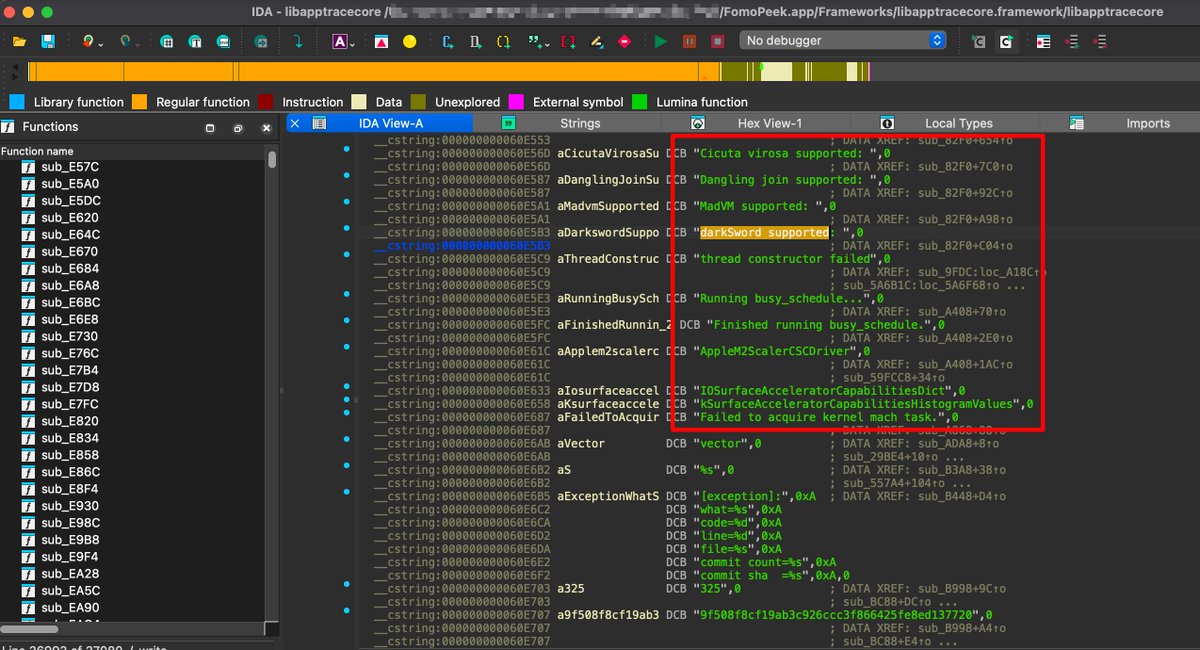
Besides its normal features, FomoPeek includes two modules that are unrelated to its stated business functions. One of them contains an #iOS kernel exploitation framework with eight different exploit methods. The framework can automatically choose an attack method based on the device model and iOS version.
‼️Affected iOS versions: iOS 12.0–18.7 and iOS 26.0–26.1.‼️
If the exploit succeeds, the app may escape the iOS sandbox, access and decrypt Keychain data, and read files belonging to other apps on the device.
🔐 This means sensitive data stored on the device, including private keys, seed phrases, login credentials, chat history, and files, may be exposed.
The app also connects to hidden servers that are unrelated to its public-facing services and can receive remote commands.
Based on plaintext traffic captured during our analysis, the attack functionality is currently enabled and runs automatically at regular intervals. In general, devices running older iOS versions are at higher risk.
If you have installed or used FomoPeek versions 1.1–1.2, we recommend that you take action immediately:
1️⃣ Check your accounts and assets for any unusual activity.
2️⃣ On a trusted device where FomoPeek has never been installed, create a new account and generate a new private key and seed phrase.
3️⃣ Move your assets to the new account as soon as possible.
4️⃣ Update your device to the latest available iOS version.
5️⃣ Do not continue using or reinstalling FomoPeek.
6️⃣ If you notice any suspicious asset activity, contact the official support team of the relevant platform and keep the affected device and related evidence for further investigation.
@hsianghui Neat build. The unsettling part is how clean it looks from the phone's side: no jailbreak, no sideloaded app, just a USB keyboard and mouse tapping like a person. Any check that asks "is this a real device?" passes, because it is one.
What makes this nasty is that a trigger-based backdoor passes evals by design. The eval set doesn't contain the trigger, so a clean score is exactly what a poisoned model would show. And "outside the model" has to mean outside the agent's reach too. If it can edit the config that grants its tools, the permission layer is just another file it can rewrite.
Something that checks what the agent changed against what I actually asked for. My worry isn't the code it writes on purpose. It's the extras nobody requested: a new dependency, a wider permission, a debug flag left on. A diff that says "you didn't ask for this" would earn more trust than another clean scan.
FomoPeek was an ordinary crypto app on the App Store.
It never asked for the secret words that unlock a wallet.
About $580,000 was still stolen.
A later update sent it hunting for those words on the phone.
Apple Notes was on its list.
Where are yours saved?
The people below are invented. The attack is real. Real wallets were emptied in September, and the money was traced to the attacker. This is what it could have looked like for one of them.
THE EMPTY BALANCE, 6:40 A.M.
Minji Park traded small amounts of crypto from a rented room in Mapo, Seoul. She kept about 18 million won in a wallet on her iPhone, money she and her brother Junho were saving for a better flat.
She followed big wallets on FomoPeek, an App Store app. It called itself read-only. It never asked her to connect a wallet or type a phrase, so she trusted it. She kept the phrase in Apple Notes, so she wouldn't lose a scrap of paper.
On a Thursday morning she opened the wallet to send Junho his share of a trade. It showed zero. The money had gone overnight to an address she didn't know.
She had never typed the phrase into any app.
THE BROTHER WHO BLAMED A LINK
Junho was sure she'd been tricked. A fake site. A text. A phone call. He'd seen those stories.
Minji went through her messages. There was no such text. FomoPeek was still just charts. It had never asked for a phrase. The only change that week was an App Store update, which she'd installed the way she always did, with one tap on a familiar name.
Junho didn't buy it. People who lose a wallet always say they clicked nothing. A colleague knew someone who looked at phones. Minji wrote to him that afternoon.
THE QUESTION ABOUT NOTES
NULL asked Minji one thing, that evening, with Junho still in the room.
"Where did you write the phrase down?"
"In Notes," she said. "On this phone. So I wouldn't lose it."
She opened the app and showed him. The phrase was still there, in a note sitting under a shopping list. She'd typed it once and never looked at it again.
NULL looked at FomoPeek on the same phone. The listing still said read-only. She'd tapped Update in September, on the same store page, and thought nothing of it.
THE CLEAN VERSION
He had one problem. People who hold crypto have learned not to type their phrase into a new app. A prompt would have emptied the room.
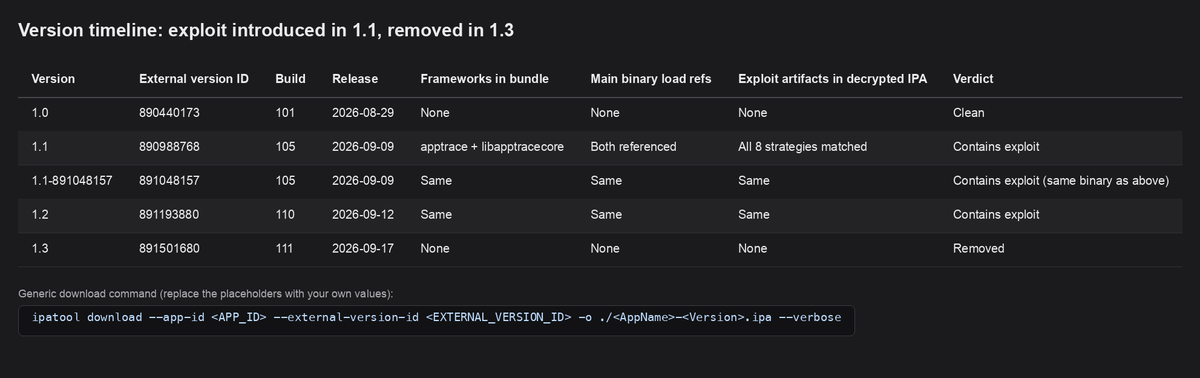
So he built an app that asked for nothing, and got it onto Apple's App Store. Version 1.0, on 29 August 2026, was clean.
His second problem was that a clean app can't take a wallet. So he sent the hidden code later, as an ordinary update to an app already on the store. Version 1.1 arrived on 9 September. Version 1.2, on 12 September, carried the same code.
Nothing in the listing changed.
His third problem was the box each app is supposed to stay inside. So the update carried a hidden toolkit. Once it worked, it could leave that box, read and decrypt the phone's locked password store, and pull files from other apps.
His fourth problem was finding the money. So his server sent a collection list of 19 targets, almost all wallet apps, plus Apple Notes, where a saved recovery phrase hands over the wallet itself.
Version 1.3, on 17 September, was a clean update that no longer contained the toolkit. The bad builds had been live about eight days. SlowMist, working with OKX's security team, found it. iVerify wrote it up on 9 November 2026. It's one case, not yet a trend.
THE PHRASE SHE'D ALREADY SAVED
The app never asked Minji for her phrase. It didn't have to. She'd already saved it on the same phone.
It wasn't a fake page asking for the phrase. It was an ordinary update that went looking for where she'd saved it.
SlowMist traced 579,984.34 USDT to the attacker's main address. That's about $580,000, iVerify says.
Updating or deleting the app doesn't undo data that has already left.
NULL sent Junho one line.
She never gave the phrase away. It was already sitting in Notes.
TONIGHT, BEFORE YOU TAP UPDATE
1. Don't keep recovery phrases or passwords in Notes, or in screenshots.
2. Open Settings, then General, then Software Update, and install what's waiting.
3. Open the App Store, then your account, then Purchased, and look for apps you don't remember.
4. If you ran FomoPeek 1.1 or 1.2, treat seed phrases as compromised and move funds to a new wallet on a clean phone.
If you build apps, an approved listing isn't the same as knowing what each update ships.
The old money was gone. NULL watered the cactus and closed the file.
NULL · Case file #11
@alanhoward@spacexai@grok@bot@ProferoSec The odd bit is it's not a quiet product. Profero counted 243 new builds since they reported it, about seven a day, plus five signing key rotations, and none touched a finding. So every rebuild ships the same hard-coded password again.
@BalaiBB The other ones in that pile are easier to miss. A delayed-looking note from a supplier or a colleague, asking you to update a payment because email was down, never gets that microsoft[.]com check. It isn't pretending to be Microsoft.
The Mark-of-the-Web tag is also what Office Protected View and SmartScreen use to decide a file came from the internet. A download from a dotless address does not just skip the shortcut warning. It can go through the rest of that protection stack as if the file had never left the machine.
@SlowMist_Team found a hidden attack inside an ordinary App Store update.
FomoPeek said it only watched wallets.
Version 1.0 was clean.
The hidden code arrived later as an app update, on an app people had already installed.
Nobody sideloaded anything.
They only installed what the official store was already selling.
https://t.co/1BAiJtjgO7
🚨 SlowMist TI Alert: FomoPeek App v1.1–1.2 Asset Theft 🚨
We have recently received multiple reports of users having assets stolen. Our investigation found that the affected cases involved private key exposure, and some of the users had previously installed and used @FomoPeek App versions 1.1–1.2.
A joint investigation by the @SlowMist_Team and @okx security teams confirmed that the app contains malicious code.⚠️
Besides its normal features, FomoPeek includes two modules that are unrelated to its stated business functions. One of them contains an #iOS kernel exploitation framework with eight different exploit methods. The framework can automatically choose an attack method based on the device model and iOS version.
‼️Affected iOS versions: iOS 12.0–18.7 and iOS 26.0–26.1.‼️
If the exploit succeeds, the app may escape the iOS sandbox, access and decrypt Keychain data, and read files belonging to other apps on the device.
🔐 This means sensitive data stored on the device, including private keys, seed phrases, login credentials, chat history, and files, may be exposed.
The app also connects to hidden servers that are unrelated to its public-facing services and can receive remote commands.
Based on plaintext traffic captured during our analysis, the attack functionality is currently enabled and runs automatically at regular intervals. In general, devices running older iOS versions are at higher risk.
If you have installed or used FomoPeek versions 1.1–1.2, we recommend that you take action immediately:
1️⃣ Check your accounts and assets for any unusual activity.
2️⃣ On a trusted device where FomoPeek has never been installed, create a new account and generate a new private key and seed phrase.
3️⃣ Move your assets to the new account as soon as possible.
4️⃣ Update your device to the latest available iOS version.
5️⃣ Do not continue using or reinstalling FomoPeek.
6️⃣ If you notice any suspicious asset activity, contact the official support team of the relevant platform and keep the affected device and related evidence for further investigation.
Checkout and login also change when a payment provider or a third-party script updates, and that isn't a release of yours. Retesting each patch you ship closes the calendar gap on your own code, but the hole can still open between those releases. The agents only cover that if they retest those changes too.
iVerify says ad buyers can target an ad by OS version.
So an exploit for old iPhones need only reach old iPhones.
A hacked website wastes it on everyone who updated.
Ads remove that waste.
Criminal variants in circulation target phones that skipped updates, iVerify says.
iVerify and Google Threat Intelligence Group say iOS 26.3 fixed every flaw used.
So the audience is whoever keeps tapping Later.
Tonight, open Settings, General, Software Update.
@cyber_rekk Updating Firefox closes the webpage-to-root path they showed, but not the kernel flaw. Until the phone maker ships that fix, a malicious app on the phone can still take root.
Source, iVerify: https://t.co/h7hac8uZ0b
Tonight, open Settings, General, Software Update. Install what's waiting. iVerify and Google Threat Intelligence Group say iOS 26.3 fixed every flaw this attack used. Then turn on Automatic Updates.
An Instagram ad infected an iPhone while its owner was just scrolling. No tap. No link. No download. The code behind the ad checked which iOS version the phone ran, then picked an exploit to match. Whether yours would pass that check comes down to one number in Settings.
The people and events below are invented. The flaw is real. Nobody has seen it used in an attack. This is what one could look like.
PART 1 - THE EMPTY WALLET, 7:10 A.M.
Tomás Ferreira ran a small bar in Lisbon with his oldest friend, Rui. For two years they had saved for a new kitchen, and they kept the fund in a crypto wallet on Tomás's iPhone because Rui didn't trust himself with it. By March it held €14,000.
On a Tuesday morning Tomás opened the wallet to pay the builder. It showed zero. Every coin had gone out overnight to an address neither of them knew.
Rui saw the screen and went quiet. Then he asked the question Tomás had been dreading.
"Who did you give the phrase to?"
PART 2 - THE FRIEND WHO DOUBTED
Tomás swore he'd given it to no one. He hadn't had a call or text from a stranger, or installed anything new. Rui had heard that story from every scam victim on the news. He told Tomás he'd give him one week to find out what happened, or he'd assume the worst.
Tomás's cousin knew someone who looked at phones. That night she emailed NULL.
PART 3 - THE PHONE THAT FORGOT
NULL asked Tomás to walk him through the evening before. It was ordinary. Football highlights, then an hour on Instagram in bed.
NULL looked for anything left behind on the phone and found almost nothing. Tomás had restarted it that morning when the wallet app froze. Then he checked the software version. The iPhone was several updates behind. Tomás had been tapping "Later" for months.
"Later always felt free," Tomás said.
PART 4 - THE ADVERTISER
He had one problem. His exploit only worked on old iPhones, and most iPhones aren't old. A hacked website would waste it on every visitor who had updated.
So he stopped waiting for visitors and bought ads instead. Ad platforms let buyers choose who sees an ad by device, OS version, location and interests. He chose iPhones running the versions he could break, then narrowed the crowd to people interested in crypto.
His second problem was the tap. People ignore ads. So he used an ad that starts the attack as soon as it loads. The person only has to scroll past it.
His third problem was being found. So his servers showed nothing to anyone he hadn't chosen, and the implant didn't survive a restart. By the time anyone looked, the page was empty and the phone had forgotten.
iVerify described this on 10 November 2026. It recorded an exploit served through an Instagram ad while the user was simply scrolling, and says "Nothing here suggests a failure by the platform the ad appeared on." Its researchers assess the goal was cryptocurrency theft.
PART 5 - THE FEED THAT WASN'T SHARED
NULL asked Rui for his phone. Same football pages, same hour on Instagram most nights. But Rui's iPhone was up to date.
The ad that found Tomás was never shown to Rui. It wasn't built for him. It was built for a vulnerable, out-of-date iPhone that had said "Later" too many times. NULL sent Rui one line before the week was out.
Nobody gave the phrase away. The phone was just old enough to be chosen.
PART 6 - TONIGHT, BEFORE YOU SCROLL
1. Open Settings, then General, then About, and read your iOS Version.
2. Open Settings, then General, then Software Update, and install what's waiting. iVerify and Google Threat Intelligence Group say every flaw in this attack chain was fixed by iOS 26.3.
3. In the same screen, turn on Automatic Updates so "Later" stops being your choice.
If you build apps, an ad slot is code from a stranger. Treat it that way.
Rui paid for the first round that Friday. NULL watered the cactus and closed the file.
NULL · Case file #10
@BalaiBB Apple's own page says it doesn't warn you on the call. A supported app can request a risk level when you pay or change account details, and that app decides whether to warn you. It only helps if the app you use supports it.
@anantshri If the lock sits on the host, the next dodge is just leaving it. An app on a personal phone, or a tab in a browser you don't run, can already be off that map. The co-operation problem just moves.
@TheHackersNews The 'none in the wild' line is about the gap, not safety. Debian still has no fix listed, Amazon Linux is waiting. Turning HTTP/2 off might also quietly break whatever sits behind a load balancer.
@gadievron@argvee A new budget only helps if it speeds up the basics, not if it buys a new product shelf. If several doors can be hit in milliseconds, the hole is closed everywhere or it isn't. What would you spend first to shorten that window?
@mala A phone assistant's job is whatever comes next, so people grant something closer to a master key. After that, the same spiel that almost fools you only has to fool the helper. How do you cut a narrow key for a job that isn't fixed yet?
iVerify (@IsMyPhoneHacked) has new research.
It recorded an iPhone exploit served through an Instagram ad.
The user was simply scrolling.
They didn't open, click or install anything.
Being careful usually means avoiding links.
This attack never needed one.
The exploit starts as soon as the ad loads.
The likely goal, iVerify says, was cryptocurrency theft.
So caution alone won't save a vulnerable, out-of-date iPhone.
"Nothing here suggests a failure by the platform the ad appeared on," iVerify says.
Source in the reply section below.