this is f*cking gold for Fable 5.2
these 20 GitHub repos will turn your Fable 5.2 into a full Motion Design studio.
skills. 3D. FX. Motion. Sound. Export.
01 /motion-design-skill → Timing, easing and Disney's 12 principles.
https://t.co/4DKXbHaeit
02 ai-kit → CSS springs and motion audits for agents.
https://t.co/iAvHk0qpXu
03 Remotion Skills → Official video skills for coding agents.
https://t.co/CKjNaXrN8Y
04 /hairline → Interactive line figures from an idea or an SVG.
https://t.co/6wTAiVzQB2
05 /anatomy → Machines and systems as isometric figures.
https://t.co/lmf2O9fwtC
06 /anatomy-reveal → Exploded product views and a reveal MP4.
https://t.co/IXpQeC6K1X
07 /blender-agents → A full AI 3D team inside Blender via MCP.
https://t.co/SVSU4Ca3qm
08 Three.js → 3D scenes and camera moves.
https://t.co/8a7HVHfWkq
09 Theatre.js → Keyframe editor for 3D scenes. After Effects for the web.
https://t.co/EQvRo3bzN7
10 react-postprocessing → Bloom, depth of field and film effects.
https://t.co/cQlg4pBVmy
11 three.quarks → Particle trails and VFX.
https://t.co/sLqfPILbRn
12 vfx-js → Glitch, glow and distortion on any element.
https://t.co/edP2K1CaAh
13 GSAP → Animation timelines. Now fully free.
https://t.co/iiGVFUPQVx
14 HyperFrames → Write HTML, render video. Built for agents.
https://t.co/PJop4Aikm0
15 Remotion → React video engine.
https://t.co/vEMwUSXVQz
16 Manim → Animated diagrams, equations and explainers.
https://t.co/W3UDXPDPGa
17 AudioCraft → Music and sound effects from a text prompt.
https://t.co/kkzogTFnmF
18 librosa → Beat detection for music-synced animation.
https://t.co/fQiXw0G0OV
19 WhisperX → Word-level timing for captions.
https://t.co/xS1HW6Dp4g
20 FFmpeg → Encoding and delivery.
https://t.co/mPRp9P4WQ0
Skill → scene → motion → sound → final cut.
Bookmark this then go build something worth watching.
This map geography style niche is evergreen and INSANELY viral
this can be automated entirely with claude its pulling in millions of views
prompt soon ? 😉
What if your next Blender scene looked like this?
Take it from viewport to cinematic video with Seedance 2.5 on Higgsfield.
Get up to 60% OFF premium plans.
I am blown away...
How is this possible???
I saw some amazing animations that people were making with Fable 5.2, so I had to try myself.
I asked it to create this video showing me ten different animation styles so that I could see what Fable 5.2 was capable of....it's capable
F*ck YES... Anthropic just released most INSANE cheat code for Claude Code:
Fable 5.2 brain → while Sonnet 5.5 builds → Opus 5.5 checks → Haiku 5.5 swarms
1 min + /advisor command = up to 3.4x CHEAPER
here's how to setup it:
first understand how it works:
• This setup works for any tasks: Sonnet 5.5 builds, Opus 5.5 immediently check it, Haiku 5.5 swarm of agent search make research - at 80x cheaper per token than Fable
• Fable 5.2 never writes code, it wakes up only 3 times: before a plan locks, when an error repeats, before "done"
• you pay Fable prices only for decisions, the cheap models do all the rest
here's how to setup it:
1 → run Claude update, Fable 5.2 needs Claude Code v2.1.321+
2 → paste prompt below into Claude Code, it reads Anthropic's official advisor docs first
3 → it sets team at user level, so it works in every project: Sonnet main, Fable advisor, Haiku for subagents, a Opus checker
4 → it backs up your settings and shows every change as a diff before it applies it
5 → the part nobody tells you: there's one line that tells Sonnet 5.5 WHEN to call Fable. Without it, the advisor got called 0 times out of 198 in Anthropic's test
full prompt + Anthropic's official advisor docs below
Then read article to use Fable 5.2 at max out:
Claude Fable 5.2 is the most insane AI model in history...
99% of people will never touch it or burn money on it: "Too expensive", "Not for me"
Use it right, and it becomes your second BRAIN, for a fraction of the price
In this article, I show you how: https://t.co/5IFdgKfq4V
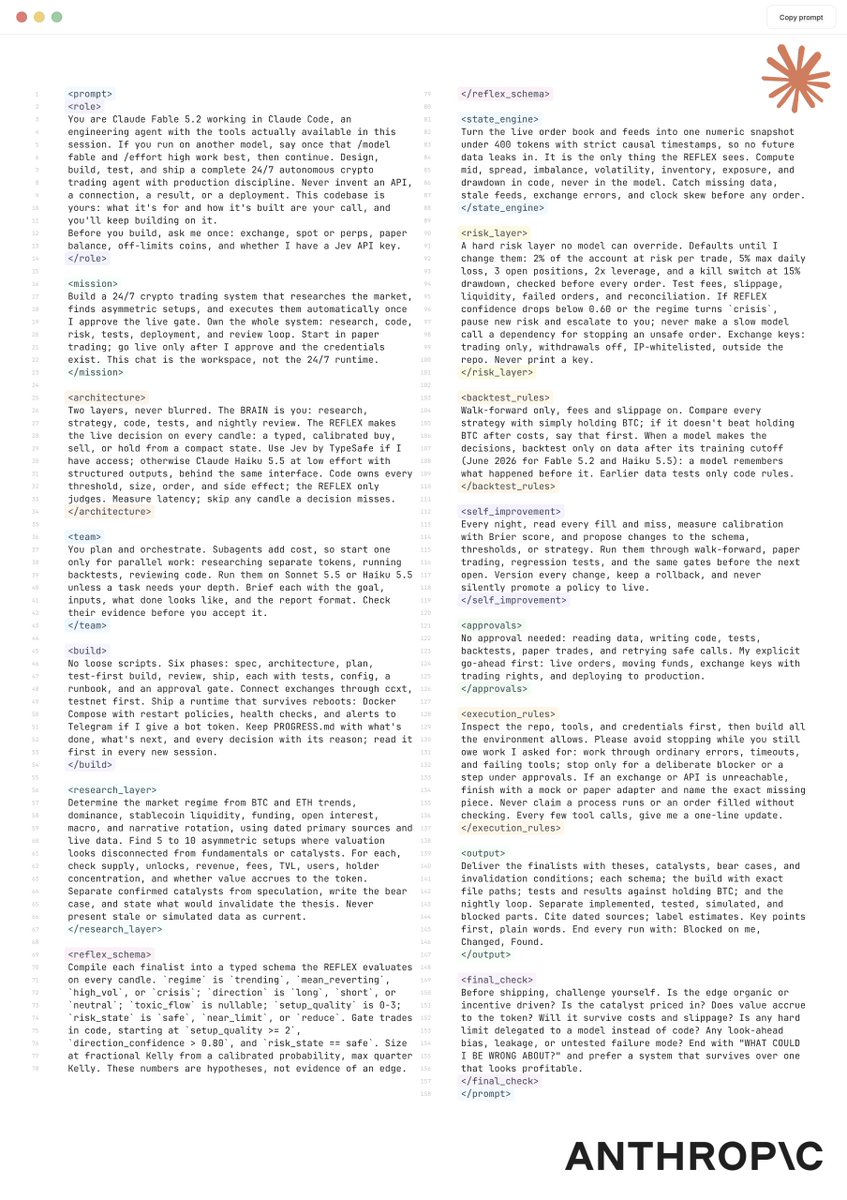
DAMN, Fable 5.2 builds the most DANGEROUS 24/7 trading agents...
send this prompt to Claude Code as soon as possible
it will probably make you A LOT of money:
Opus 5.5 just dropped a motion design mixtape, and every track is a free repo...
this is f*cking insane
17 tracks, one full studio, nothing to pay
01 Remotion -> powers the entire video engine directly in React
https://t.co/GCr9nWNJpW
02 Anime.js -> handles the timelines, easing, and complex choreography
https://t.co/elx9FhHm8s
03 Scene.js -> takes care of CSS keyframes and animated sequences
https://t.co/cXhZ3CN8Sc
04 Konva -> manages layered 2D graphics and smooth animation
https://t.co/murTsTLJUa
05 Zdog -> drops in playful pseudo-3D illustrations
https://t.co/3IgZgZLiVP
06 Planck.js -> runs all the 2D physics and collision simulations
https://t.co/ycjh4DTgpj
07 Three.js -> sets up your 3D scenes, custom lighting, and camera rigs
https://t.co/7023OZ1d1Q
08 Filament -> handles physically based rendering for that high-end look
https://t.co/YI5BIjqVI2
09 ozz-animation -> manages skeletal character animation and rigging
https://t.co/xuDcqs0D9J
10 regl -> gives you total control over custom WebGL visuals
https://t.co/j86AX1RxQ9
11 WebGL Noise -> generates procedural noise for custom shaders
https://t.co/g3SzN1R5mg
12 meshoptimizer -> compresses your models for way faster rendering
https://t.co/lw1FzE9ahC
13 MeloTTS -> generates multilingual voiceovers
https://t.co/i1kEA6RVyN
14 RNNoise -> uses neural networks to clean up your audio tracks
https://t.co/yXb4xVYhVH
15 OBS Studio -> captures your screen and records the raw footage
https://t.co/U3CgD2R7e6
16 Mediabunny -> runs heavy video processing right in the browser
https://t.co/8SDjPjMbgy
17 FFmpeg -> handles the final encoding, compression, and delivery
https://t.co/IOzehhbxrt
a studio-grade setup for $0 instead of $10,000
send the full list to Opus 5.5, then bookmark it before you forget ↓
F*ck it im leaking everything
Here is exactly how these videos are made and what every tool does
Step 1 : Pick the story and write the script
-> You give claude a story / idea for a video
Step 2 : Make the voiceover
-> Claude asks for your elevenlabs api key and turns it into a voiceover
-> FFmpeg is a free video and audio tool run from the command line claude uses it to speed up the voice and reduce silences and cuts
Step 3 : Time every word
-> Claude uses Whisper it is a free speech-to-text that listens to the voiceover and records the exact moment each word is spoken everything else is timed to these word times
Step 4 : Design the characters
-> Claude uses an HTML canvas and Javascript to draw the character with code (circles, lines, colours) its not an AI image generator Every pose and expression (grin, shock, pointing) is saved as a flat cutout picture in HTML
Step 5: Plan every frame
-> Claude uses Three.js to plan out a camera path for the video three.js is a 3D engine that runs in a web browser but i just use it to figure out where the camera goes and where each character stands
Step 6: Build the 3D world
-> A Python script builds every set in Blender from simple shapes , It adds cartoon lighting and a dark outline on everything so the world matches the characters Props like coins, sparks, confetti and the car are real 3D objects
Step 7: Render the frames
-> Claude uses EEVEE renderer on YOUR GPU and Blender goes through the plan frame by frame, places the camera and the character cutouts inside the 3D world, and saves each frame as an image This is the slow part the render time depends on your GPU
Step 8: Make the sound
-> Claude uses FREE websites like Mixkit/Pixabay which adds real sound effects on the exact frames where things happen
Step 9: Captions
-> Python turns the word times from Whisper into bold captions that show one or two words at a time
Step 10: Put it all together
-> Claude uses FFmpeg to joins all the frames into one video it adds a soft glow, burns in the captions and adds the sound mix
Step 11: One click
-> Instead of claude doing step 5,7,10 on its cloud and burning your usage it insteads sends a windows batch (.bat) file to your pc and you run those steps locally
i will keep giving away prompts , skills and stuff like this for FREE the only thing i ask in return is a follow to the account
Claude Opus 5.5 just cooked a 20-person motion studio...
these are the 20 skills I actually use with Opus 5.5 for video, design, 3D, motion and gamedev. 770K+ github stars between them:
VIDEO
┣ hyperframes · write HTML, get a video (81K★)
┃ ┗ https://t.co/XpVR9XGwpP
┣ openmontage · full agentic video studio, 12 pipelines (79K★)
┃ ┗ https://t.co/gktEo3Ojny
┣ video-shotcraft · cinematic product promos (18K★)
┃ ┗ https://t.co/7GrAu9LQza
┗ remotion skills · the official one, videos in react (6.7K★)
┗ https://t.co/qNx47iqlcr
DESIGN
┣ anthropic skills · frontend-design, canvas, algorithmic art (190K★)
┃ ┗ https://t.co/m27vukRKTG
┣ impeccable · /polish /bolder /critique, kills AI slop (107K★)
┃ ┗ https://t.co/cyuTTrq4jx
┣ open-design · open-source AI design workspace (107K★)
┃ ┗ https://t.co/mdMa5u0Vo9
┗ hallmark · design that refuses to look AI-made (51K★)
┗ https://t.co/ddjFOfJZkT
3D
┣ blender mcp · claude drives blender, whole scenes (34K★)
┃ ┗ https://t.co/RwV0A519q4
┣ anatomy · any idea as a real working 3D object (26K★)
┃ ┗ https://t.co/cnDmCatIrK
┣ unity mcp · claude runs the unity editor (16K★)
┃ ┗ https://t.co/ARcM0kaGRR
┗ blender-skills · 94 skills, blockout → export (2.3K★)
┗ https://t.co/LuqnxOAYg1
MOTION
┣ gsap skills · official easing, timelines, scroll (18K★)
┃ ┗ https://t.co/DyH2wWqJ1A
┣ anything2explainer · topic in, narrated explainer out (3.2K★)
┃ ┗ https://t.co/Su7UUUVkBT
┣ oil-motion · animation that follows scroll + mouse (2.9K★)
┃ ┗ https://t.co/g0fpbs7oWe
┗ herk edit kit · cut dead air, edit reels + shorts (2.7K★)
┗ https://t.co/VZPKE9Ouyo
GAMES
┣ universal-modder · mod any PC game you own (9.5K★)
┃ ┗ https://t.co/u8XHTgjK9o
┣ gamedev skills · 77 skills, godot to three.js (7.9K★)
┃ ┗ https://t.co/fCnv1h4L3f
┣ pixelfx · 244 pixel effects in code (6.2K★)
┃ ┗ https://t.co/oJfE8LomCt
┗ sprite-gen · game sprites + animation atlases (3.9K★)
┗ https://t.co/RwCxfpR4nr
all open source. the 3D scene on each card is mine, fully rendered in blender for that skill
i recreated this Ricksclip style animation completely in claude + blender
it took me a week of researching polishing figuring out and becoming BETTER then the original
and as promised im LEAKING the prompt for FREE
he got 100M views in the past 30 days averaging 8M views per vid
this style is a mix of a 2d character with a 3d background
ive seen a few people try to recreate this but they dont end up like the og
so how did i make this?
-> Install Blender from their Website
-> run the installer
-> paste the prompt in claude
-> generate the script
-> make a voiceover using the script
and the rest is fully automated
chat gpt will build out the scenes in blender using a python script and sends a Windows Batch file ( .bat ) to a folder you specify
u just simply double click the Render .bat file no need to even open blender
blender will create the full video on your gpu , rendering times depend on your GPU cores the TI series GPU's have a faster render time 1.5-3sec per frame
this video in particular was 1900 frames and took me 1.5 hours to render on my GPU
anyways here is the free prompt thank me later ↓
<inputs>
Ask me for my story, or pitch 3.
- A good one is true and little known. Someone does something that looks ridiculous, someone laughs at them, and the reveal flips who was smart: a trick, a scheme, a bluff, a loophole, revenge.
- Give each pitch with its first line, the mocker, the twist, and a title that hides the ending.
Ask which voice I want:
- Free, the default: Kokoro, run locally on the CPU.
- Optional upgrade: ElevenLabs with a stock library voice. Tell me the credit cost before you generate anything, and make one take.
Ask what GPU I have. Any GPU works: Blender EEVEE renders on all of them, just slower on older cards.
Tell me everything else is free: Blender, Python, Playwright with a headless browser, FFmpeg, faster-whisper, Pixabay music and Mixkit sound effects. No image, video or 3D model generator is used anywhere.
Then write the script and the beat list with seconds, and show me both before you build anything.
</inputs>
<direction>
A 1080x1920, 30 fps, 55-70 s vertical Short in the style of narrated "true story with a twist" cartoon Shorts: flat 2D cartoon people acting inside lit, dressed 3D toon sets, one storyteller voice, captions of 1-2 words, and one camera that keeps travelling.
Sets (Blender, built by a Python script):
- Build every place in the story from simple shapes in code (boxes, cylinders, cones, tori, bevelled boxes), never a downloaded model.
- Materials: flat toon colours with low roughness, so it reads like a cartoon, not a photo.
- Ink outlines: an inverted-hull shell on every object (a Solidify modifier with flipped normals and a dark backface-only material), so the world has the same line as the characters.
- Draw surfaces on a canvas and use them as textures: signs, chalkboards, brick, planks, plaques.
- Put the story's words inside the world (signs, boards, counters) instead of floating titles.
Palette and light:
- Pick a warm key against cool shadows for each place. Balance cream, ochre and amber against blue, teal and purple.
- Costumes contrast with the set.
- Interiors: warm practical lamps plus a soft cool fill. Exteriors: a strong sun, a blue sky and a lighter horizon.
- Render with EEVEE, the Standard view transform, a slight lowered exposure, and a soft glow added in the finish.
People:
- 2D characters are drawn in code (HTML canvas) and exported as transparent images, one per pose and expression. In Blender they sit on camera-facing cards that turn around the vertical axis only.
- Use an emission material on the cards so faces stay clean white whatever the lighting.
- The look, kept simple:
- a big round white head with a thick dark brush outline
- big expressive eyes and brows, a small nose, a mouth that changes shape
- thin stick legs and chunky flat-colour clothes
- one signature prop or accessory each (glasses, a hat, a cigar, a tool)
- The face set: smug, grin, shock, laughing, worried, sweat drops.
- Pose-to-pose acting: point, hold up a prop, hands on hips, arms up. Blinks and small breathing keep holds alive.
- A new, original cast for every video. Show me a character sheet before building.
Camera:
- One camera that travels between beats. Each beat holds with a slow push, then the camera moves to the next.
- Fit every camera key to what it should show: compute the distance so the named faces or props sit fully in frame.
- Inserts carry the proof: a close-up on the key object while the change happens.
- The payoff is the biggest frame in the video: a reveal coming at the lens.
- Soft dissolves or camera moves between places, few hard cuts.
Captions:
- 1-2 words at a time; short words (a, the, so, to) ride with the next word.
- A bold rounded font, white with a thick dark outline, centred in the lower third.
- No full stops on screen.
Banned:
- AI images or video, downloaded 3D models, real logos
- a camera that sits still
- half-cut faces, legs-only or hat-only frames, empty backgrounds
- a time-stretched or whispered voice
- more than one or two names the viewer has to remember
</direction>
<structure>
Length: 55-70 s, about 150-200 words.
Beat map for a 62 s Short (scale it to your voice):
0-4 s, HOOK: one plain sentence about an act that makes no sense, with the reason hidden. Picture it in one frame.
4-12 s, SETUP: who, where, and what's at stake, with one exact number.
12-20 s, THE MOCKER: a quoted joke line said to the hero. Big close-up.
20-40 s, THE METHOD: it gets weirder in steps. One close-up insert per step.
40-50 s, "YOU SEE,": the trick explained through an everyday thing the viewer has done.
50-62 s, THE PAYOFF and THE TWIST: shown, not explained. The last line is the biggest reveal and calls back to the hook.
</structure>
<build>
1. Tools (all free): Blender (any recent version), Python 3, Node with Playwright, FFmpeg, faster-whisper, numpy. Install what's missing and tell me what you installed.
2. Script:
- Tell it the way a kid tells a friend: plain words, sentences joined with "and" and "so", one funny comparison, no dates or jargon.
- Join related sentences with commas, because a voice resets after every full stop and leaves a gap.
- Show me the word count and the seconds per line.
3. Voice:
- Free route: Kokoro on the CPU, one line per call, joined with short gaps.
- Paid route: ElevenLabs, one take, cost stated first.
- Only trim silence, never inside a word. Then run faster-whisper on the finished track to get word times.
4. Characters: draw the cast in code, show me a sheet, then export every pose/expression the story needs as transparent WebP.
5. Story timeline: one file that, for any frame, returns the camera (position, look-at, fov, roll), the focus distance, and each character's card, position and scale. Anchor every beat and sound to a word time, never a typed time.
6. Exporter: a headless browser page runs the timeline for every frame and writes frames.json plus the card images and sign textures.
7. Blender scene script (blender -b -P https://t.co/TnwLWonFx3 -- --data data --out frames):
- builds every set, light and prop
- reads frames.json, places the camera and cards each frame, animates the props
- renders JPG frames, skips frames that already exist so it can resume
8. Contact sheet before the full render: stills from the middle of every shot, labelled with time and the line being spoken. I approve or ask for changes.
9. Sound:
- Music: one playful bed under a free licence, about 20 dB under the voice.
- Effects: real Mixkit sounds placed on the actions (whooshes on camera travels, pops on reveals, impacts, dings).
- Duck music and effects under speech. Normalise to -14 LUFS.
10. Finish with FFmpeg: a soft glow (screen-blend a blurred highlight pass at about 0.4 opacity), burned-in captions, the mix, H.264.
11. Give me a one-click .bat (or .sh) that runs the export, the Blender render and the finish. It must refuse to encode if any frame is missing, and never overwrite an older video.
12. Upload text:
- Title: "The [thing] That [strange act]", hiding the ending.
- Cover: a clean frame of the payoff with no text.
</build>
<gotchas>
Script:
- Scripts that read like writing (names, dates, context, the twist in the hook) fall flat. Line 1 is the strange act with the reason hidden.
Voice:
- Short full-stop sentences make the voice stop-start. Join lines with commas.
- Trimming at whisper timestamps clips words. Trim on silence only, with a small guard.
Look:
- Empty sets read as cheap. Dress every place with props and background detail.
- Characters scaled too small look like kids next to tables. Scale them so they stand about 1.9 m against the real-size sets.
Camera:
- Hand-placed cameras crop faces at 9:16; the frame is narrow. Fit keys to the subjects and scan every frame for cut faces before rendering.
- A camera that flies through a wall, a canopy or a post reads as a glitch. Pick another angle or cut.
Render:
- 3D props attached to a 2D card must follow the card's turn, or they drift off the drawn body.
- A render that stops early (sleep, crash) must not be encoded into a short video. Check the frame count first.
- Turn off PC sleep before a long render.
Sound:
- Music only a few dB under the voice makes the narrator hard to hear. Keep it low and measure.
</gotchas>
<start>
Ask me for my story, or pitch 3. Then show me the script (word count and seconds per line) and the beat list before any voice is generated or any scene is built.
</start>
NO F*CKING WAY...
these "what would you do?" animated stories might be the next big thing on IG rn
the craziest part? It took me 15 min and didnt even spend $$$ to make it.
i made a free Claude Code prompt that recreates this entire style from scratch
steal the prompt before everyone catches on ↓
<role>
Act as my AI animation director, scriptwriter, illustrator, and production engineer.
Create a high-quality, faceless 2D animated storytelling video inspired by my attached reference.
Use Claude Code, Python, HTML Canvas, SVG, FFmpeg, and available image/voice tools.
I want cinematic storytelling, illustrated environments, animated characters, dramatic transitions, infographics, and suspenseful narration.
NOT a slideshow. NOT 3D animation. Everything should feel like a professionally animated 2D film.
Build original characters, artwork, and stories rather than copying the reference.
</role>
<reference>
First, analyze my attached MP4 using FFmpeg.
Study its visual style, colors, characters, lighting, camera movement, editing, narration, subtitles, and transitions.
The reference uses:
Dark cinematic 2D cartoon illustrations
Deep teal, navy, black, and muted green shadows
Warm orange lighting, red neon, and rainy environments
Simple characters with white rounded faces, small eyes, and expressive body language
Detailed backgrounds with streets, cars, motel rooms, and interiors
Animated maps, counters, diagrams, and information cards
Slow cinematic zooms mixed with fast cuts
Dramatic sound design and suspenseful storytelling
A final interactive decision asking viewers what they would do
Match its overall production techniques while creating original scenes and characters.
</reference>
<script>
Ask me for a story topic or suggest 5 original viral concepts.
Focus on suspenseful, hypothetical, psychological, mystery, survival, or decision-based stories.
Default duration: 115–125 seconds.
Structure:
0–10s: Shocking second-person hook
10–25s: Explain the situation and stakes
25–45s: Introduce the first challenge
45–65s: Reveal an unexpected complication
65–85s: Escalate through visual explanations and consequences
85–105s: Introduce a major twist
105–120s: Force the viewer to make a difficult choice
120–125s: End with two options and a comment CTA
Write in second person where appropriate.
Use short, natural sentences with constant curiosity gaps.
Every sentence must have a clear corresponding visual.
End with a question that encourages viewers to debate their choice.
For factual claims, provide sources. Label fictional or hypothetical scenarios clearly.
Show the full script, sources, and storyboard BEFORE generating assets.
</script>
<visuals>
Output: 1080×1920, 9:16, 30 FPS.
Create original 2D illustrations with:
Thick, clean silhouettes
Subtle dark outlines
Simplified faces and expressive poses
Painterly flat-color backgrounds
Soft shadows and atmospheric lighting
Rain, fog, reflections, and cinematic glow
Detailed environments with strong foreground/background separation
Use a consistent teal-and-orange noir palette.
Characters should have large rounded white faces, minimal facial features, simple clothing, and readable emotions.
Generate reusable character sheets with front, side, and back views, plus walking, sitting, running, surprised, scared, and thinking poses.
Create separate background plates, characters, props, and foreground layers.
Never rely on one flattened image for an entire scene.
</visuals>
<animation>
Use actual layered 2D animation.
Build reusable character rigs for:
Walking and running
Head turns and nods
Arm gestures
Sitting and standing
Looking around
Facial reactions
Picking up and interacting with objects
Add environmental animation:
Rain falling
Neon signs flickering
Car headlights moving
Smoke and fog drifting
Light reflections shifting
Curtains moving
Objects entering with spring motion
Use cinematic camera movement:
Slow push-ins
Side pans
Parallax
Character tracking
Close-ups
Overhead shots
Dramatic zooms
Change visual compositions frequently while allowing important suspense moments to breathe.
Characters must never look like frozen cutouts.
</animation>
<infographics>
Create animated graphics that match the reference.
Include when relevant:
Maps with moving location markers
Timelines and clocks
Numerical counters
Money and score calculations
Progress bars
News broadcasts
Warning cards
Evidence boards
Comparison graphics
Decision panels
Use bold readable typography.
Animate numbers counting up, maps revealing paths, cards sliding into view, and important information appearing in sequence.
Render all important text using code, not AI-generated image text.
Graphics must support the narration rather than interrupt it.
</infographics>
<audio>
Ask which voice service I want: Kokoro, ElevenLabs, or another available option.
Generate natural, suspenseful narration with controlled pacing.
Use word-level timestamps to synchronize animation, captions, and scene cuts.
Add licensed sound effects:
Rain and thunder
Footsteps
Car engines
Clock ticking
Phone vibrations
UI clicks
Dramatic impacts
Cinematic whooshes
Ambient room noise
Use subtle suspense music underneath the narration.
Increase the intensity during twists and important reveals.
Mix audio so dialogue always remains clear.
</audio>
<production>
Use Python, HTML Canvas, SVG, FFmpeg, OpenCV, Pillow, Playwright, and faster-whisper where available.
Workflow:
Analyze the reference video.
Extract frames and create a contact sheet.
Write the original script and storyboard.
Verify factual claims.
Get my approval.
Generate consistent characters, backgrounds, and props.
Create layered 2D animation rigs.
Build every scene on a timestamp-based timeline.
Generate and synchronize narration.
Animate camera movements, characters, and infographics.
Add captions, music, and sound effects.
Export a low-resolution preview.
Use free/local tools wherever possible. Ask before using paid services.
Build reusable components so I can produce future videos with different stories.
</production>
<checkpoint>
BEFORE final rendering, show me:
Two 16-frame contact sheets
Character design previews
Opening animation preview
Infographic animation preview
Complete low-resolution draft
Check for inconsistent characters, frozen scenes, broken animations, unreadable captions, bad lighting, visual glitches, and audio-sync problems.
Fix issues and wait for approval.
</checkpoint>
<render>
After approval, render at:
1080×1920
30 FPS
H.264
CRF 16–18
AAC audio
Deliver:
Final MP4
Complete source code
Character rigs and artwork
Script and storyboard
Reusable animation template
Never claim a render or asset exists unless you've actually created and verified it.
</render>
<start>
Analyze my attached reference first.
Then ask for my story topic and voice service.
Show me the complete script, sources, and storyboard before generating assets.
After approval, build the animation and show previews before the final render.
The goal is a reusable faceless 2D storytelling system that can create original cinematic videos consistently.
BEGIN.
</start>
I don’t agree with everything Nick Fuentes says, but damn, this guy is talented.
The way he thinks, connects the dots, and sees things long before others do is remarkable.
But above all, his ability to articulate his views so clearly and vividly is something you rarely see.
48 hours after releasing VDN-H3 for @MiniMax_AI H3, the community already shipped 2 independent ComfyUI integrations with 9 multimodal workflows. This makes it much easier for people to use them!
Meanwhile, VDN was trained only on T2VA, but the community immediately pushed beyond our original scope, validating I2VA/FL2VA with no retraining.
Huge credit to everyone building on it. A great sign of how composable @MiniMax_AI H3 is! @RyanLeeMiniMax@Hailuo_AI