Thinking...
Shimmying...
Coalescing...
Ruminating...
Combobulating...
Schelpping...
Whirring...
Spelunking...
Scheming...
Elucidating...
Comcoting...
Claude code ma pa mi na!
Fibroids are literally a personal hell for Black women...self included. I'm glad Lupita is raising awareness. I'd be happier if more research funds went into understanding the reasons why Black women experience fibroids much earlier and w/ greater complications than other groups
Every time we've made it easier to write software, we've ended up writing exponentially more of it.
When high-level languages replaced assembly, programmers didn't write less code - they wrote orders of magnitude more, tackling problems that would have been economically impossible before. When frameworks abstracted away the plumbing, we didn't reduce our output - we built more ambitious applications. When cloud platforms eliminated infrastructure management, we didn't scale back - we spun up services for use cases that never would have justified a server room.
@levie recently articulated why this pattern is about to repeat itself at a scale we haven't seen before, using Jevons Paradox as the frame. The argument resonates because it's playing out in real-time in our developer tools. The initial question everyone asks is "will this replace developers?" but just watch what actually happens. Teams that adopt these tools don't always shrink their engineering headcount - they expand their product surface area. The three-person startup that could only maintain one product now maintains four. The enterprise team that could only experiment with two approaches now tries seven.
The constraint being removed isn't competence but it's the activation energy required to start something new. Think about that internal tool you've been putting off because "it would take someone two weeks and we can't spare anyone"? Now it takes three hours. That refactoring you've been deferring because the risk/reward math didn't work? The math just changed.
This matters because software engineers are uniquely positioned to understand what's coming. We've seen this movie before, just in smaller domains. Every abstraction layer - from assembly to C to Python to frameworks to low-code - followed the same pattern. Each one was supposed to mean we'd need fewer developers. Each one instead enabled us to build more software.
Here's the part that deserves more attention imo: the barrier being lowered isn't just about writing code faster. It's about the types of problems that become economically viable to solve with software. Think about all the internal tools that don't exist at your company. Not because no one thought of them, but because the ROI calculation never cleared the bar. The custom dashboard that would make one team 10% more efficient but would take a week to build. The data pipeline that would unlock insights but requires specialized knowledge. The integration that would smooth a workflow but touches three different systems.
These aren't failing the cost-benefit analysis because the benefit is low - they're failing because the cost is high. Lower that cost by "10x", and suddenly you have an explosion of viable projects. This is exactly what's happening with AI-assisted development, and it's going to be more dramatic than previous transitions because we're making previously "impossible" work possible.
The second-order effects get really interesting when you consider that every new tool creates demand for more tools. When we made it easier to build web applications, we didn't just get more web applications - we got an entire ecosystem of monitoring tools, deployment platforms, debugging tools, and testing frameworks. Each of these spawned their own ecosystems. The compounding effect is nonlinear.
Now apply this logic to every domain where we're lowering the barrier to entry. Every new capability unlocked creates demand for supporting capabilities. Every workflow that becomes tractable creates demand for adjacent workflows. The surface area of what's economically viable expands in all directions.
For engineers specifically, this changes the calculus of what we choose to work on. Right now, we're trained to be incredibly selective about what we build because our time is the scarce resource. But when the cost of building drops dramatically, the limiting factor becomes imagination, "taste" and judgment, not implementation capacity. The skill shifts from "what can I build given my constraints?" to "what should we build given that constraints have in some ways been evaporated?"
The meta-point here is that we keep making the same prediction error. Every time we make something more efficient, we predict it will mean less of that thing. But efficiency improvements don't reduce demand - they reveal latent demand that was previously uneconomic to address. Coal. Computing. Cloud infrastructure. And now, knowledge work.
The pattern is so consistent that the burden of proof should shift. Instead of asking "will AI agents reduce the need for human knowledge workers?" we should be asking "what orders of magnitude increase in knowledge work output are we about to see?"
For software engineers it's the same transition we've navigated successfully several times already. The developers who thrived weren't the ones who resisted higher-level abstractions; they were the ones who used those abstractions to build more ambitious systems. The same logic applies now, just at a larger scale.
The real question is whether we're prepared for a world where the bottleneck shifts from "can we build this?" to "should we build this?" That's a fundamentally different problem space, and it requires fundamentally different skills.
We're about to find out what happens when the cost of knowledge work drops by an order of magnitude. History suggests we (perhaps) won't do less work - we'll discover we've been massively under-investing in knowledge work because it was too expensive to do all the things that were actually worth doing.
The paradox isn't that efficiency creates abundance. The paradox is that we keep being surprised by it.
@ifbnw Because i have a sensitive scalp that hurts every time I make a new hair. Since locking my hair, i only redo it twice a year or 3 times at most and it doesn't hurt. Plus I find that I can easily style my locs to as many styles as I want so it works for me.
Most valuable thing I learned from a senior engineer:
How to read a codebase you've never seen.
1. Find where requests come in
2. Follow one path end to end
3. Map the data flow, ignore the logic
4. Only then zoom into the details
Took them 10 minutes to teach. Saved me years of fumbling.
Some skills are so fundamental we forget they need to be taught explicitly.
Advice for entry-level software engineers: Focus on understanding how computers work. Learn how they transmit, process, and store data.
Fundamentals are more important than the latest frameworks.
Right now, AI can generate code, but it cannot solve the problem for you. To effectively instruct the tool, you must understand the building blocks.
1. Start with Networking.
Don't just verify that an API works. Understand how the data gets there.
- HTTP/HTTPS: Learn the request lifecycle.
- DNS: How names become IP addresses.
- TCP vs. UDP: Reliability vs. Speed.
If you don't understand the transport, you can't debug the latency.
2. Master the Operating System, specifically Linux.
Most of the cloud runs on Linux. You need to be comfortable in the terminal.
- File Systems: Everything is a file.
- Process Management: How programs start, run, and die.
- Memory Management: Stack vs. Heap.
All code needs an OS to run.
3. Understand Data Structures (and when to use them).
This isn't about passing interview tests; it's about performance.
- Know why a Hash Map is faster than an Array for lookups.
- Understand Big O notation to predict how your code behaves as user traffic grows.
Inefficient code costs money.
4. Deep dive into Databases.
Storing data is easy; retrieving it quickly is the hard part.
- Indexing: How to make queries fast.
- ACID: Understanding transaction integrity.
- Normalization: How to structure data to avoid redundancy.
Bad schema design creates tech debt that is painful to fix later.
The best engineers I know aren't the ones who know every syntax of a new language. They are the ones who can understand systems thinking & can visualize the path of a byte from the user's click to the hard drive and back.
“Vision without systems thinking ends up painting lovely
pictures of the future with no deep understanding of the
forces that must be mastered to move from here to there. — Peter Senge, The Fifth Discipline (Currency)”
Focus on the mechanics, and the tools will make sense.
Happy New Year, May the force be with you!
As a frontend engineer, in the System Design interview, you need to focus on:
1. User interaction flows and critical paths
Not just "what the page does" - what happens when user clicks, scrolls, submits.
Map the happy path and edge cases.
2. Component architecture and state management
How does data flow? Where does state live?
Local component state vs global store vs server state.
3. Data fetching strategy
When do you fetch? How often? What gets cached?
Initial load vs on-demand vs prefetch vs background sync.
4. Performance and perceived performance
Actual metrics (LCP, FID, CLS) vs how fast it *feels*.
Loading states, optimistic updates, skeleton screens.
5. Network resilience
What happens when API is slow? Times out? Returns errors?
Retry logic, fallbacks, offline mode.
6. Client-side routing and code splitting
How do routes load? What bundles ship? What's lazy loaded?
Initial bundle size vs route-level chunks vs component-level chunks.
7. State synchronisation
Multiple tabs open. Real-time updates. Stale data.
How does client stay in sync with server and other clients?
8. Rendering strategy
CSR vs SSR vs SSG vs ISR. Which pages use which?
Trade-offs between interactivity and initial load.
9. Asset optimisation
Images, fonts, third-party scripts. What loads when? What's critical?
CDN strategy, lazy loading, responsive images.
10. Accessibility and progressive enhancement
Works without JS? Keyboard navigable? Screen reader friendly?
Not an afterthought. Core requirement.
11. Error boundaries and recovery
What happens when component crashes? When API fails?
Graceful degradation vs full failure.
12. Observability and user monitoring
What metrics matter? How do you know when users have problems?
RUM (Real User Monitoring), error tracking, performance monitoring.
---
Artifacts you should be ready to present:
1. Component hierarchy diagram
What renders what? What owns state? What's shared?
2. Data flow diagram
User action –> API call –> state update –> UI re-render
Where does caching happen? When does invalidation trigger?
3. Network waterfall
What loads when? What blocks what?
Critical path vs deferred vs lazy.
4. Bundle composition
Initial bundle: 150KB (React, router, critical code)
Route chunks: 20-50KB each
Vendor chunks: Shared libraries
5. Performance budget
- Initial load: <3s on 4G
- Time to Interactive: <5s
- Bundle size: <200KB (gzipped)
- Images: WebP, lazy loaded, responsive
6. State management strategy
What's in Redux/Zustand? What's in React Query? What's local?
When does state persist? When does it reset?
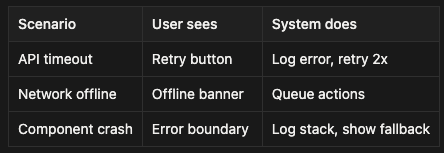
7. Error handling matrix
8. Loading strategy
Above fold: SSR or critical inline
Below fold: Lazy load on scroll
Heavy components: Dynamic import
Third-party: Defer until idle
---
The key mindset difference from component design:
Component design answers: How does this one piece work?
System design answers: How does the entire app survive slow networks, API failures, and scale to millions of users?
---
WHAT INTERVIEWERS ACTUALLY TEST:
Not "can you code a component."
Can you design a system that:
- Loads fast on slow connections
- Works when APIs are down
- Handles real-time updates
- Scales without rewriting everything
- Degrades gracefully under failure
---
COMMON FRONTEND SYSTEM DESIGN QUESTIONS:
1. Design a news feed (Twitter/Facebook)
Focus on:
- Infinite scroll and virtualisation
- Real-time updates (WebSocket vs polling)
- Optimistic updates (like/comment instantly)
- Image lazy loading and CDN
- Offline mode and sync
2. Design a rich text editor (Google Docs)
Focus on:
- Operational transformation or CRDT for collaboration
- Autosave and conflict resolution
- Undo/redo with command pattern
- Performance with large documents
- Offline editing and sync
3. Design a video platform (YouTube/Netflix)
Focus on:
- Adaptive bitrate streaming
- Video player state management
- Thumbnail generation and lazy loading
- Watch history and resume playback
- Prefetching next video
4. Design an autocomplete/search
Focus on:
- Debouncing input
- Client-side caching with TTL
- Keyboard navigation
- Highlighting matches
- API rate limiting
5. Design a shopping cart
Focus on:
- State persistence (localStorage + server sync)
- Stock validation before checkout
- Optimistic updates
- Cart abandonment recovery
- Multi-tab synchronisation
---
HOW TO APPROACH IT:
Step 1: Clarify requirements (5 min)
- What are the core features?
- What's the scale? (users, data size)
- What devices? (mobile, desktop, both)
- Performance requirements?
- Offline support needed?
Step 2: High-level architecture (10 min)
Draw boxes:
- Client (browser/mobile)
- API layer
- Real-time layer (WebSocket)
- CDN
- Third-party services
Show data flow between them.
Step 3: Dive into critical paths (15 min)
Pick 2-3 most important flows.
Example for news feed:
- Initial load (SSR + hydration)
- Infinite scroll (pagination + virtualisation)
- Post interaction (optimistic update + API call)
Step 4: Handle scale and failure (10 min)
- What if API is slow? (Loading states, timeouts)
- What if user is offline? (Queue actions, sync later)
- What if 10M users? (Code splitting, CDN, caching)
Step 5: Trade-offs and alternatives (5 min)
"We could SSR everything for SEO, but that increases server cost. Or CSR with prerendering for static pages."
Show you understand the options and their costs.
---
RED FLAGS IN INTERVIEWS:
❌ "I'd use React" (without explaining why or considering alternatives)
❌ No mention of performance, loading, or error states
❌ No discussion of bundle size or code splitting
❌ Ignoring mobile/slow networks
❌ "Just call the API" (no caching, retry, or error handling)
❌ No observability (how do you know if it's working?)
---
GREEN FLAGS:
✅ Asks about scale, users, constraints upfront
✅ Discusses trade-offs explicitly ("SSR is slower to deploy but faster initial load")
✅ Mentions metrics (LCP, TTI, bundle size)
✅ Plans for failure ("if API times out, we show cached data and retry")
✅ Considers accessibility and progressive enhancement
✅ Talks about observability ("we'd track bundle size, API latency, error rates")
---
THE BRUTAL TRUTH:
Most frontend engineers can code components.
Few can design systems that work at scale under real-world conditions.
That's what these interviews test.
Not your React knowledge. Your systems thinking.
Can you build something that survives:
- Slow networks
- API failures
- 10M concurrent users
- Users with JS disabled
- Accessibility requirements
- Performance budgets
If you can only make it work on localhost with fast internet, you're not ready.
---
HOW TO PREPARE:
1. Pick 5 real apps (Twitter, Notion, Figma, YouTube, Gmail)
2. Reverse engineer them:
- Open DevTools Network tab
- Watch what loads when
- Note the bundle sizes
- See how they handle errors
- Check their caching strategy
3. Design them yourself:
- Draw the architecture
- List the components
- Map the data flow
- Identify failure points
- Propose solutions
4. Mock interview yourself:
- 45 minutes
- Draw on paper/whiteboard
- Explain out loud
- Defend your choices
Do this 10 times and you'll be better prepared than 90% of candidates.
---
Frontend system design isn't about knowing frameworks.
It's about understanding how browsers work, how networks fail, and how to build systems that gracefully handle the chaos of real users on real devices with real problems.
Master that, and the interview is easy.
Ignore it, and no amount of React knowledge will save you.