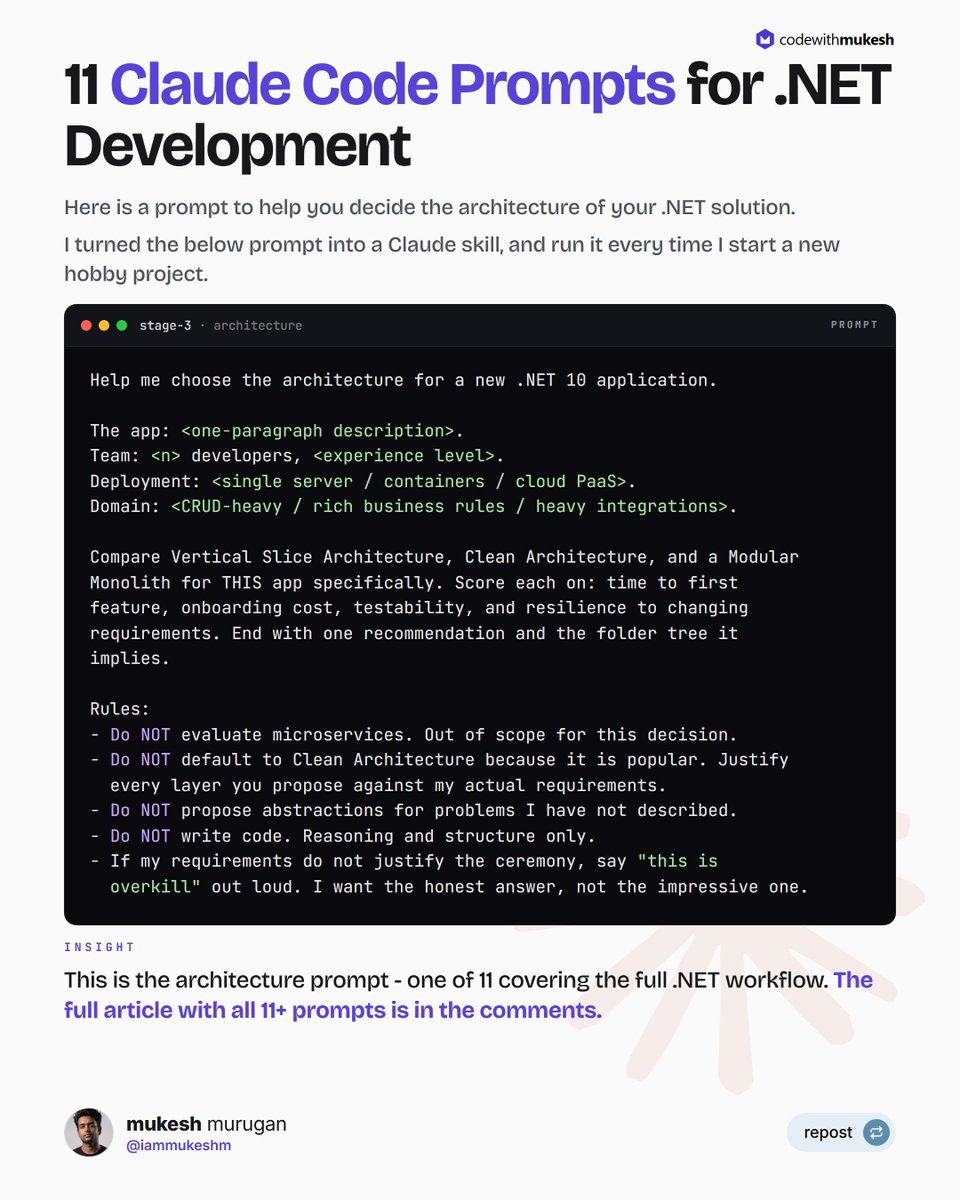
I put together 11 Claude Code Prompts for .NET Development.
Everything from brainstorming and architecture selection to EF Core, testing, and Aspire.
Each one is copy-paste ready, and they all follow the same structure I've landed on after months of running them on real .NET 10 projects.
Five parts: context to read first, the task itself, constraints like versions and conventions, negative commands, and a verification step so Claude proves it worked.
The negative commands are the part most people skip. They're also the part doing the heavy lifting.
When Claude goes wrong in a .NET codebase, it's rarely a knowledge problem. Left unconstrained, it reaches for the statistically common path: Swashbuckle when your team uses Scalar, or a repository layer nobody asked for.
A "Do NOT" line prunes that path before Claude walks down it. Far cheaper than reviewing and reverting after.
One habit makes those lines work: every ban carries its replacement in the same breath.
"Do NOT add Swashbuckle. Scalar only."
The ban blocks the default. The replacement tells Claude where to go instead.
The one in the image is the architecture prompt. I run it before scaffolding any new app - it forces Claude to argue architecture against my actual requirements instead of reciting the popular answer.
My favorite rule in it: if my requirements don't justify the ceremony, Claude has to say "this is overkill" out loud.
Want the full library?
Comment "Prompts" and I'll send you the article with all 11.
Follow me for more such content. Thanks.
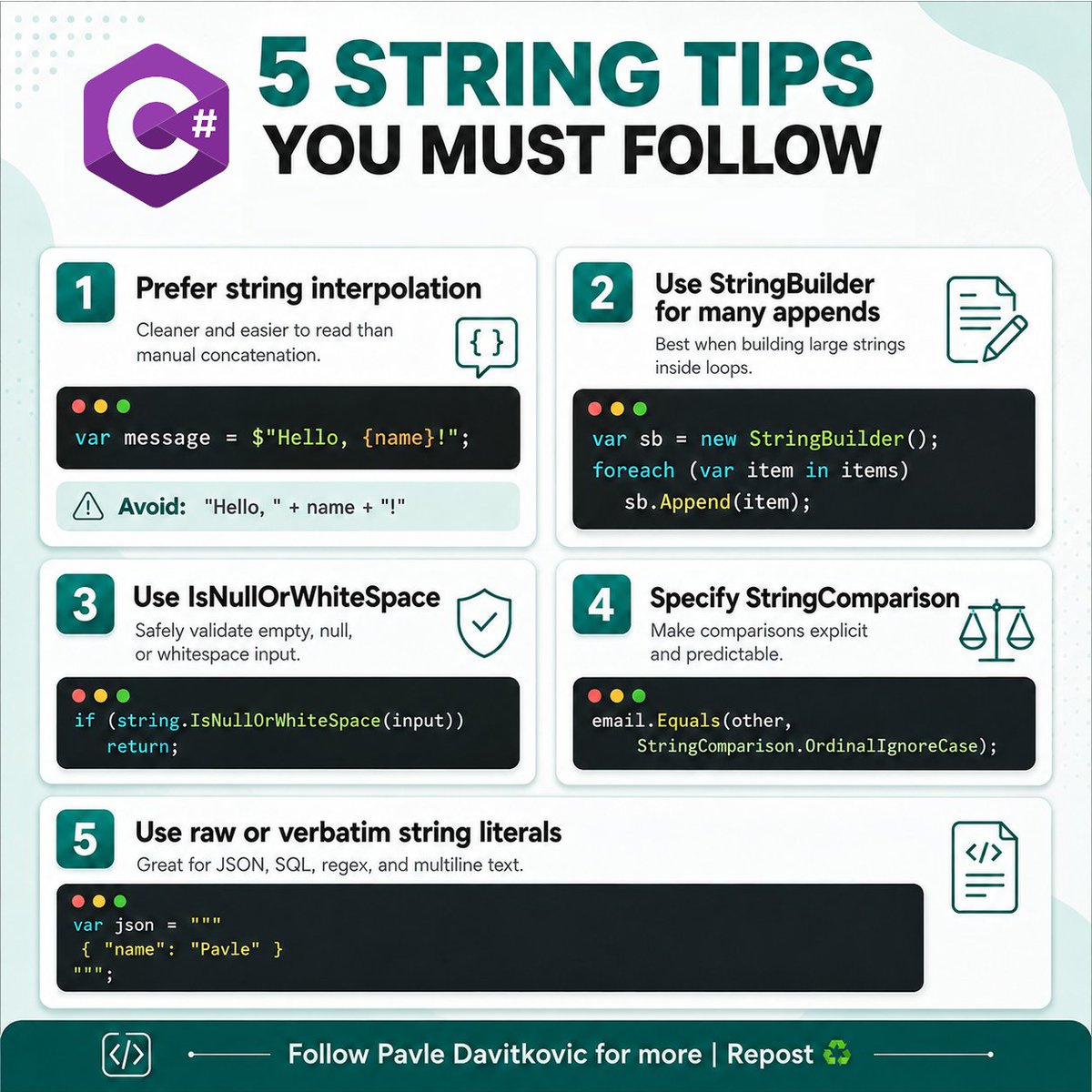
Strings look simple in C#…
Until they become the reason for:
❌ unreadable code
❌ unnecessary allocations
❌ hidden comparison bugs
❌ broken validation
❌ painful multiline formatting
Every project of mine follow this 5 string tips:
1. Prefer string interpolation:
2. Use StringBuilder for many appends
3. Use string.IsNullOrWhiteSpace
4. Specify StringComparison
5. Use raw or verbatim string literals
Less escaping.
Less noise.
More readable code.
And small improvements in how you handle them can make your code safer, cleaner, and easier to maintain.
♻️Repost to help others!
➕Follow me(@pavle_dav ) for more posts like this.
A user tells you: "Something went wrong when I tried to place my order"
You open the logs.
There are thousands of requests from hundreds of users. You can see errors, slow database calls, and failed API requests.
But you cannot tell which ones belong to the user who reported the problem.
That is a painful way to debug an app.
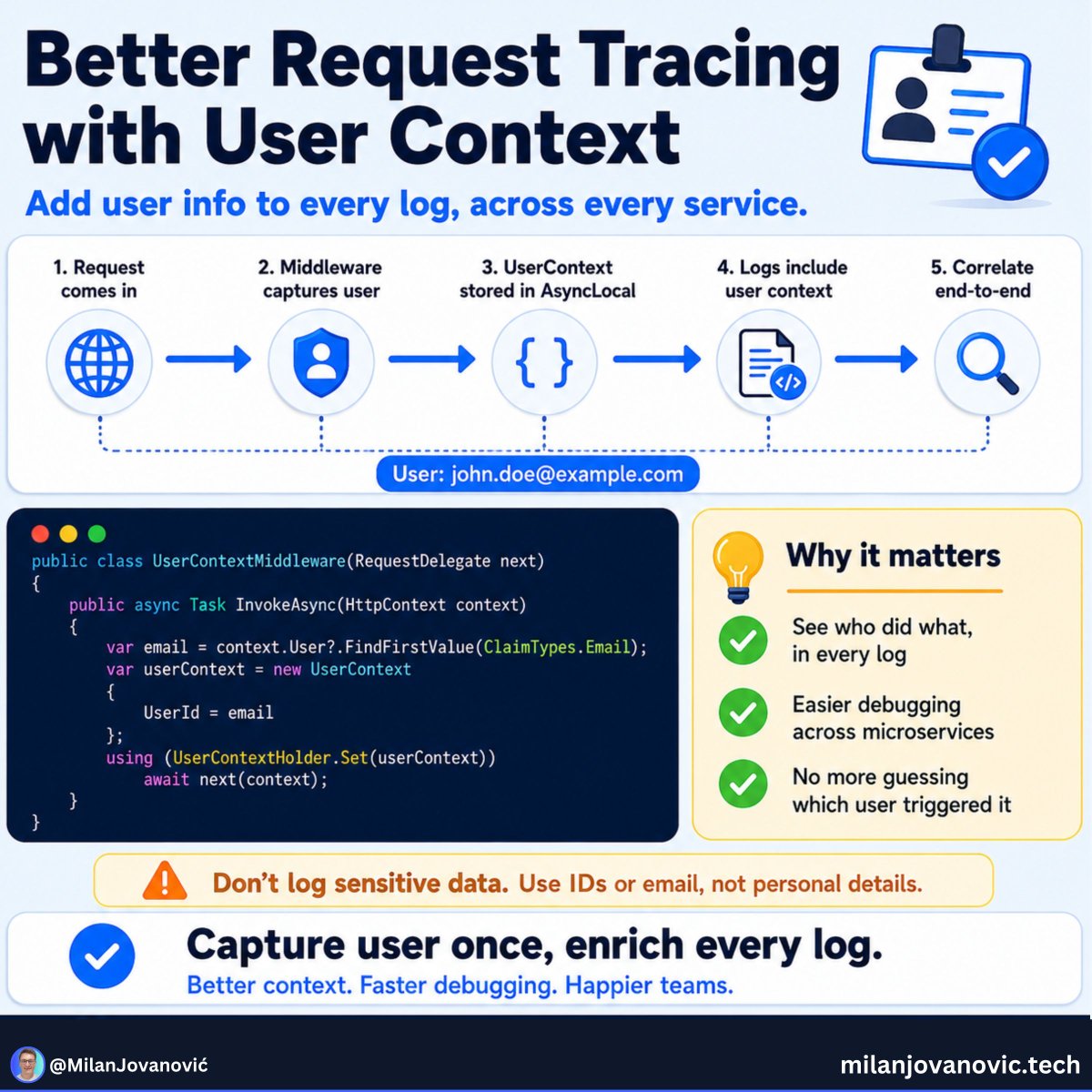
A small improvement can make a big difference: add user context to your request tracing.
In an ASPNET Core app, once the user is authenticated, you can take their user ID and add it to the logs and trace for that request.
Now, when someone reports a problem, you can search for that user ID and follow what happened:
→ Which endpoint they called
→ Which request failed
→ Which database call was slow
→ Which logs belong to the same flow
This is also useful in multi-tenant apps, where adding a tenant ID can help you spot issues affecting one customer account.
There is an important rule here: do not put names, email addresses, or other personal data into your traces. Use safe, opaque IDs and be careful about where logs are stored.
Good tracing is not about collecting more data.
It is about having the right context when something goes wrong.
Here is a simple way to enrich ASPNET Core logs and OpenTelemetry traces with user context: https://t.co/Z70fknvfAa
🔒 Secure Bits 💡
𝗦𝘁𝗶𝗹𝗹 𝗿𝘂𝗻𝗻𝗶𝗻𝗴 𝘁𝗵𝗲 𝗱𝗲𝗳𝗮𝘂𝗹𝘁 𝗔𝘂𝘁𝗵𝗲𝗻𝘁𝗶𝗰𝗮𝘁𝗶𝗼𝗻 𝗺𝗲𝘁𝗵𝗼𝗱𝘀 𝗽𝗼𝗹𝗶𝗰𝘆 𝗶𝗻 𝗘𝗻𝘁𝗿𝗮 𝗜𝗗?
Most tenants I look at still have SMS and Voice call enabled for all users — left over from the old per-user MFA/SSPR settings, never revisited after the move to the unified Authentication methods policy.
𝗪𝗵𝘆 𝘁𝗵𝗮𝘁'𝘀 𝗮 𝗽𝗿𝗼𝗯𝗹𝗲𝗺:
🔹 SMS and voice call are phishable — SIM swap, real-time relay, or a convincing helpdesk call will get through
🔹 If Conditional Access accepts any MFA method, attackers will simply target the weakest one enabled
🔹 Old OATH hardware/software tokens left enabled "just in case" widen the attack surface once phishing-resistant methods are already in place
𝗪𝗵𝗮𝘁 𝘁𝗼 𝗲𝗻𝗮𝗯𝗹𝗲 𝗶𝗻𝘀𝘁𝗲𝗮𝗱:
🔹 𝗣𝗮𝘀𝘀𝗸𝗲𝘆 (𝗙𝗜𝗗𝗢𝟮) — phishing-resistant, security keys and platform authenticators
🔹 𝗠𝗶𝗰𝗿𝗼𝘀𝗼𝗳𝘁 𝗔𝘂𝘁𝗵𝗲𝗻𝘁𝗶𝗰𝗮𝘁𝗼𝗿 — passwordless phone sign-in, nothing sent over SMS
🔹 𝗤𝗥 𝗰𝗼𝗱𝗲 — handy for shared devices and frontline workers
🔹 𝗖𝗲𝗿𝘁𝗶𝗳𝗶𝗰𝗮𝘁𝗲-𝗯𝗮𝘀𝗲𝗱 𝗮𝘂𝘁𝗵𝗲𝗻𝘁𝗶𝗰𝗮𝘁𝗶𝗼𝗻 — scope it to the group that actually needs it, not all users
🛠️ 𝗪𝗵𝗲𝗿𝗲 𝘁𝗼 𝗰𝗵𝗮𝗻𝗴𝗲 𝗶𝘁:
Entra admin center → Protection → Authentication methods → Policies. Enable and target the stronger methods first, confirm adoption, then disable SMS, Voice call, and legacy OATH tokens for "All users."
⚠️ Check Sign-in logs before you disable anything — you want to know who still relies on SMS/voice today, or you'll get a wave of helpdesk tickets tomorrow.
💬 𝗪𝗵𝗮𝘁 𝗱𝗼𝗲𝘀 𝘆𝗼𝘂𝗿 𝗔𝘂𝘁𝗵𝗲𝗻𝘁𝗶𝗰𝗮𝘁𝗶𝗼𝗻 𝗺𝗲𝘁𝗵𝗼𝗱𝘀 𝗽𝗼𝗹𝗶𝗰𝘆 𝗹𝗼𝗼𝗸 𝗹𝗶𝗸𝗲 𝗿𝗶𝗴𝗵𝘁 𝗻𝗼𝘄 — still default, or hardened?
Author: Martin Strnad
#Microsoft365 #EntraID #MFA #AuthenticationMethods #SecureBits #HorizonSecured #CyberSecurity #Passkey
Typed a password into the terminal and hit Enter before thinking?
Here's how to hide commands from bash history, delete specific entries, and stop sensitive data from ever hitting disk.
5 techniques, all built into Bash — no extra tools needed.
Read it → https://t.co/LFmKQ8Up7Q
Follow @tecmint for more #Linux and #SysAdmin tips.
If you already knew all 25 hacks, unfollow me.
Almost nobody makes it past .NET hack 11:
(#23 surprised even me):
1. async all the way down. One blocking .Result deadlocks the chain.
2. ConfigureAwait(false) belongs in libraries. Not in your app code.
3. Return the Task directly when you don't await it. Skip the state machine.
4. ValueTask for hot paths that usually finish synchronously. Not everywhere.
5. IEnumerable is lazy. Enumerate it twice, you run the query twice.
6. Here's where most people stop reading. IQueryable runs on the database. IEnumerable drags it all into memory first.
7. .ToList() too early kills your filters. Push Where before you materialize.
8. The N+1 problem is silent. Turn on EF Core query logging and watch it happen.
9. AsNoTracking() for reads. Change tracking isn't free.
10. Project to DTOs with Select. Never pull your whole entity.
11. Scoped inside a Singleton is a captured-dependency bug waiting to happen.
12. Don't new up HttpClient per request. Use IHttpClientFactory.
13. Span<T> and stackalloc parse without allocating. Zero GC pressure.
14. StringBuilder over += in loops. Every concat is a brand new string.
15. Prefer string.Create and pooled buffers over hidden allocations.
16. Records for immutable data. with gives you free non-destructive copies.
17. Pattern matching beats if/else ladders. Switch expressions read cleaner.
18. Nullable reference types on, day one. The warnings are bugs you haven't hit yet.
19. The Options pattern over IConfiguration injection. Strongly typed and validated.
20. CancellationToken everywhere async. Pass it down, don't swallow it.
21. BackgroundService, not a rogue Task[.]Run. Let the host own the lifetime.
22. Measure before you optimize. BenchmarkDotNet, not gut feeling.
23. This is the one that got me: sealed your classes by default. It's a free JIT optimization.
24. Native AOT for fast startup and a tiny footprint. Trim what you don't need.
25. Last one, and the only rule that matters: read the SQL EF Core generates. The abstraction lies until you look.
——
♻️ Repost to help others write faster, cleaner .NET
➕ Follow me ( @AntonMartyniuk ) to improve your .NET and Architecture Skills
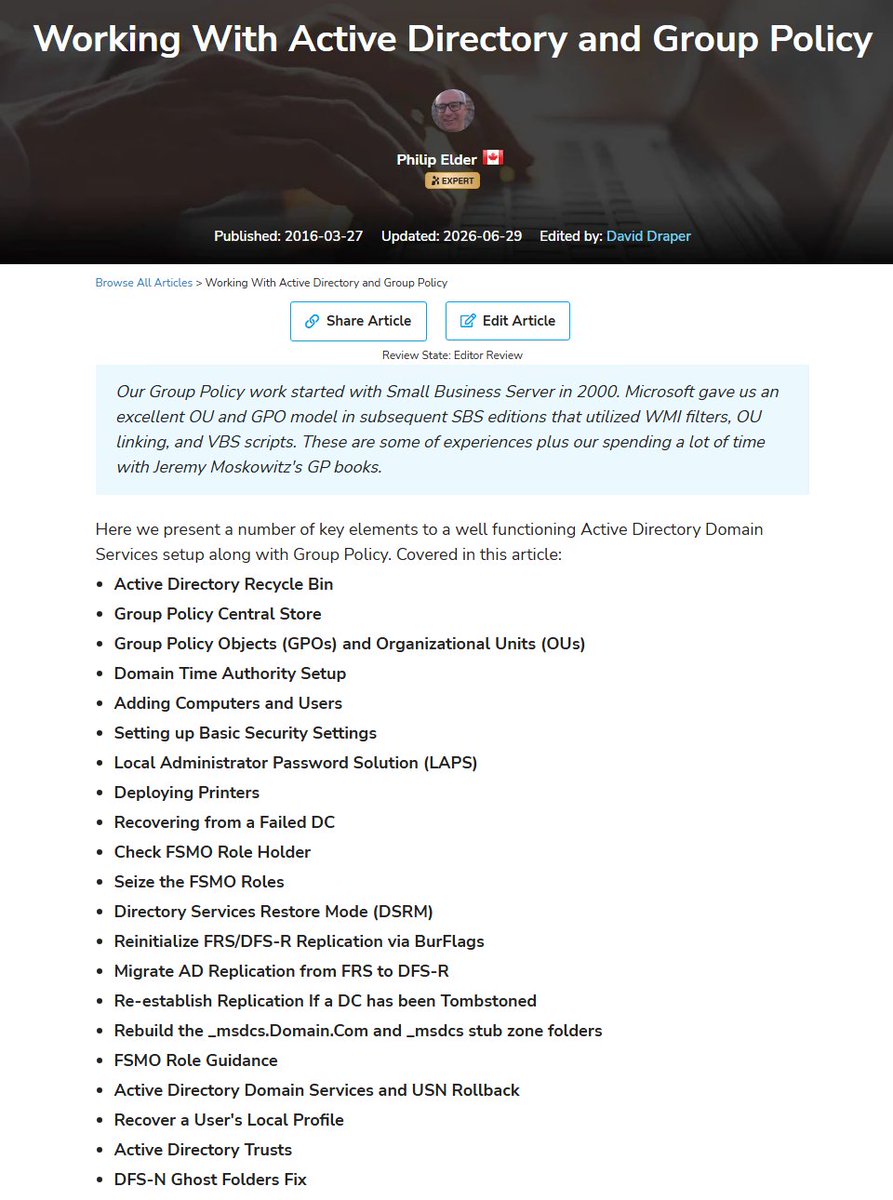
YUGE ACTIVE DIRECTORY KNOWLEDGE REPOSITORY
I've been curating my Experts Exchange article on Active Directory and Group Policy for over 10 years now.
It's very thorough though I catch some things I may have missed over the years and add them such as the "Rebuild the _msdcs.Domain.Com Forward Lookup Zone and _msdcs stub zone" section.
https://t.co/W8GUgWKLIm
Active Directory Recycle Bin
Group Policy Central Store
Group Policy Objects (GPOs) and Organizational Units (OUs)
Domain Time Authority Setup
Adding Computers and Users
Setting up Basic Security Settings
Local Administrator Password Solution (LAPS)
Deploying Printers
Recovering from a Failed DC
Check FSMO Role Holder
Seize the FSMO Roles
Directory Services Restore Mode (DSRM)
Reinitialize FRS/DFS-R Replication via BurFlags
Migrate AD Replication from FRS to DFS-R
Re-establish Replication If a DC has been Tombstoned
Rebuild the _msdcs.Domain.Com and _msdcs stub zone folders
FSMO Role Guidance
Active Directory Domain Services and USN Rollback
Recover a User's Local Profile
Active Directory Trusts
DFS-N Ghost Folders Fix
PING .@ExpertsExchange
One of the most important distributed systems concepts:
→ Idempotency
It's also crucial when designing REST APIs.
You can repeat an idempotent operation multiple times without changing the system's state after the first API request. This is especially important in distributed systems. Network failures or timeouts can lead to repeated requests. Your system should be able to handle transient errors like this.
Example flow for implementing idempotency:
1. The client generates a unique key for each operation and sends it in a custom header.
2. The server checks if it has seen this key before
- For a new key, process the request and store the result
- For a known key, return the stored result without reprocessing
Are you handling idempotency in your APIs?
SaveChanges looks like one line. It is actually six steps under the hood.
Before you call it, EF Core has been quietly watching. As you add, edit, or remove entities, the change tracker notes each one. Nothing has touched the database yet.
When you call SaveChanges, the change tracker detects every change you made and figures out what each one is: added, modified, or deleted.
Then EF Core generates the SQL for those changes. Insert statements, update statements, delete statements.
Next it opens a transaction. This is the important part. All your changes go inside one transaction.
Then it runs the SQL against the database.
Finally it commits the transaction and accepts the changes, so the tracker marks everything as saved.
The part most people miss is that one transaction. If you changed five rows and the third one fails, the whole thing rolls back. You do not get three rows saved and two lost. It is all or nothing. That is why you should make all your edits first, then call SaveChanges once, instead of calling it inside a loop. Calling it per row gives you a separate transaction per row, more round trips, and no safety net across them.
So SaveChanges is not just "send my changes to the database." It is "send all my changes as one unit that either fully succeeds or fully undoes itself."
Batch your edits, save once, and let the transaction protect you.
SAML really is so poorly supported by many vendors, and it usually costs extra... if they offer it at all :-/
Microsoft does recommend using your own PKI certs, set up your own monitoring, and automation to update them
Unfortunately, it's not native, you have to build it 👇
Exceptions and errors are not the same thing.
Why do you treat them like they are in your code?
This has a major impact on how you design your application.
A firm belief of mine: exceptions are for exceptional situations.
What does exceptional mean, then? Exceptional: you reach a state in your application where you can't recover.
This is different from encountering an error.
Error: an expected failure state or precondition.
It makes no sense to use exceptions in place of errors.
Yet, many developers do this - throwing exceptions everywhere.
This is how you end up using exceptions for flow control - an antipattern.
What's the solution?
Represent errors explicitly in your code and handle them.
Bonus: making errors explicit makes the intent of your code clear.
And there's a range of other benefits...
Are you still on team exceptions?
How do you implement event-driven architecture?
An order is placed.
Now what?
You may need to:
→ Reserve stock
→ Send a confirmation email
→ Update analytics
→ Start shipping
→ Notify another system
A simple app may call each service one by one.
But as the system grows, this gets harder to manage.
What happens if the email service is down?
Should the order fail because analytics is slow?
Does the order service need to know every new action that happens after checkout?
Event-driven architecture gives you another option.
The ordering service publishes one event:
An order was placed.
Other parts of the system can react to it on their own.
With RabbitMQ, you can choose how that event is handled:
→ One queue with many workers when you want to share the load
→ One queue per service when every service needs its own copy
This keeps the sender separate from the work that happens next.
It also gives you more room to scale and handle failures.
Of course, a message broker does not make a system reliable by itself.
You still need to think about message storage, acknowledgments, retries, and failed messages.
But the first step is simple: stop making one service responsible for calling everything else.
I wrote a practical .NET guide to RabbitMQ producers, consumers, queues, and fanout exchanges: https://t.co/VMKnZHa0Nq
CVE-2016-7255 is a good case study in Windows GUI internals.
The vulnerability resided in win32k.sys, where insufficient validation in "xxxNextWindow" allowed an attacker to turn a user-controlled "tagWND" field into an arbitrary kernel write primitive. It was exploited in the wild for local privilege escalation and is worth studying to understand Win32k, USER objects, tagWND, and how seemingly small validation bugs can become powerful exploitation primitives.
🛑 A new #Linux kernel exploit (CVE-2026-46331) gets root without modifying a single file on disk.
It poisons the cached copy of /bin/su in memory. The binary on disk stays untouched. File-integrity checks come back clean.
The root shell is already open.
Details here ↓ https://t.co/y2FDVjcSEq
API Security Best Practices
Most API breaches happen because of broken authorization, leaked secrets, or missing rate limits. Let's look at some of the basics.
- Use Modern OAuth/OIDC + MFA: PKCE for public clients, short-lived tokens, and step-up MFA for anything sensitive. Implicit and password grants should be dead by now.
- Enforce Fine-Grained Authorization: Check object, function, and field-level permissions on every request. BOLA is still the top API vulnerability.
- Minimize Scopes and Data: Give each client the smallest token scope and the least data it needs. Only return the fields the caller actually needs.
- Encrypt Every Hop: TLS for external traffic and mTLS between services. If it crosses a network boundary, encrypt it.
- Protect Secrets and Keys: Store signing keys in HSM-backed vaults. Rotate them.
- Validate Requests with Schemas: Reject unknown fields, oversized payloads, and suspicious URLs at the gateway. Don't let bad input reach your business logic.
- Rate Limit and Cap Resources: Quotas per user, payload size caps, and execution timeouts. Without these, one misbehaving client takes down your entire system.
- Defend Sensitive Business Flows: Protect login, checkout, and OTP with anti-bot, idempotency keys, and step-up auth.
- Control Outbound and Third-Party Calls: Allowlist where your API can call out to and block internal metadata endpoints. Your security is only as strong as your weakest integration.
- Harden Config and Error Handling: Deny by default on CORS, methods, and debug endpoints. Return generic errors, never stack traces.
- Inventory APIs and Versions: Track every endpoint, version, and shadow API. You can't secure what you don't know exists.
- Log, Detect, and Respond: Push auth decisions and anomalies to a SIEM. Alert on 401 spikes before they become incidents.
Over to you: Which of these best practices is the hardest to enforce across your services?




![AntonMartyniuk's tweet photo. If you already knew all 25 hacks, unfollow me.
Almost nobody makes it past .NET hack 11:
(#23 surprised even me):
1. async all the way down. One blocking .Result deadlocks the chain.
2. ConfigureAwait(false) belongs in libraries. Not in your app code.
3. Return the Task directly when you don't await it. Skip the state machine.
4. ValueTask for hot paths that usually finish synchronously. Not everywhere.
5. IEnumerable is lazy. Enumerate it twice, you run the query twice.
6. Here's where most people stop reading. IQueryable runs on the database. IEnumerable drags it all into memory first.
7. .ToList() too early kills your filters. Push Where before you materialize.
8. The N+1 problem is silent. Turn on EF Core query logging and watch it happen.
9. AsNoTracking() for reads. Change tracking isn't free.
10. Project to DTOs with Select. Never pull your whole entity.
11. Scoped inside a Singleton is a captured-dependency bug waiting to happen.
12. Don't new up HttpClient per request. Use IHttpClientFactory.
13. Span<T> and stackalloc parse without allocating. Zero GC pressure.
14. StringBuilder over += in loops. Every concat is a brand new string.
15. Prefer string.Create and pooled buffers over hidden allocations.
16. Records for immutable data. with gives you free non-destructive copies.
17. Pattern matching beats if/else ladders. Switch expressions read cleaner.
18. Nullable reference types on, day one. The warnings are bugs you haven't hit yet.
19. The Options pattern over IConfiguration injection. Strongly typed and validated.
20. CancellationToken everywhere async. Pass it down, don't swallow it.
21. BackgroundService, not a rogue Task[.]Run. Let the host own the lifetime.
22. Measure before you optimize. BenchmarkDotNet, not gut feeling.
23. This is the one that got me: sealed your classes by default. It's a free JIT optimization.
24. Native AOT for fast startup and a tiny footprint. Trim what you don't need.
25. Last one, and the only rule that matters: read the SQL EF Core generates. The abstraction lies until you look.
——
♻️ Repost to help others write faster, cleaner .NET
➕ Follow me ( @AntonMartyniuk ) to improve your .NET and Architecture Skills](https://pbs.twimg.com/media/HMCqrT-XYAAh-mm.jpg)