I’ve spent 30 years in IT operations and infrastructure.
Here’s what that really means:
• I’ve seen systems fail at the worst possible time
• Led teams through outages, pressure, projects, change, as well as growth and development
• Fixed more ‘this should’ve been caught earlier’ issues than I can count
Also:
• First and foremost, I'm a follower of Christ
• Next, I'm a husband, dad, grandad
• I'm also a soldier, Search & Rescue Instructor, and S-3 NCOIC for 3BN, 1BDE, Texas State Guard
On this account, I’ll share:
• Real-world leadership lessons, both military and civilian related
• Life experiences during my current job search as the result of a RIF
• The occasional meme—because some things deserve it
Currently exploring VP-level opportunities.
If you’re in this world, welcome. I look forward to learning from and sharing with, each one of you.
“Work/Life balance”, until some exec tries to get a hold of you while you’re on PTO. This is one of the main reasons I’ve had a decades long rule that if one of my team is on PTO and I have to call them, the World had better be in fire and we’ve exhausted every possible solution; and then I make it up to them with comp days.
Alright folks, I'm about to go work on my wife's car.
I'll be cleaning the throttle body and replacing the seal, replacing her downstream O2 sensor, and replacing her heater hose assembly (since it straight up broke).
I may be technically inclined, I'm not a car guy. So if you see a frustrated looking redhead walking around McKinney in the near future, you'll know I've failed. 🤣
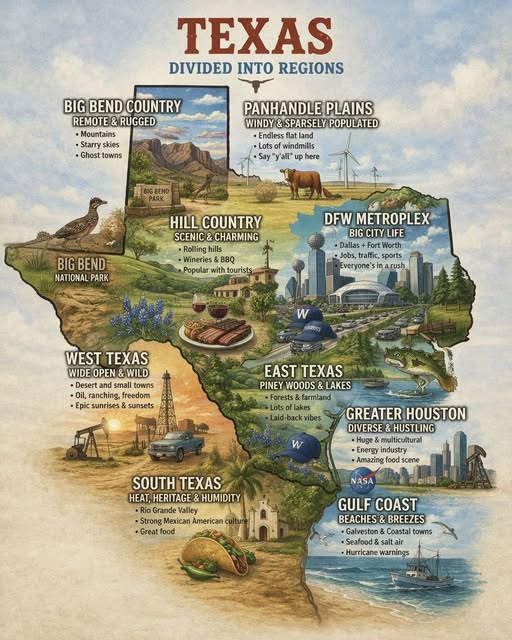
@tuuu28283 Texas is a state with varying environments, from the forests and swamps of East Texas to the deserts of West Texas; plains of North Texas to the beaches of the Gulf Coast.
@TheRealGameGod Getting out of tedious meetings by turning it off before going in and strategically turning it on when I was mentally done with the meeting. 🤣😎
What amazes me, other than the fact it’s all talking points prescribed to them from their masters, is they think @elonmusk can just run down to his bank and pull out that money.
I don’t know the exact amount, but I’d venture to guess that at least 75% of his actual wealth is tied up in stocks for his various companies. If he were to start exercising options or selling off real shares at any volume, he would start to tank the markets and the SEV would give him a quick visit.
Hands on learning with Claude, dashboard 2, a job search dashboard with tracking.
I've been using an Excel workbook to track my job search, and I thought it was pretty slick, until I started working with Claude to make my search more streamlined and tracking better.
My current workbook has a place for the title, company, recruiter, any LinkedIn contacts, when I saw the posting, if I applied and when, then similar areas for tracking follow ups and interviews, etc. All with conditional color coding and a "next steps" column based on the last entry made.
I took the same concepts and using Claude Cowork, the @gmail, @indeed, @ZipRecruiter, @apify, and the Claude in Chrome and Desktop Commander connectors. I'm also using the productivity and marketing plugins and the doc-coauthoring skill.
I have a daily scheduled task that goes out and finds all of the job postings that math my criteria of locations (with priority), job titles, company profiles and other data I put in an .md file that lists my near 30 years of IT experience, my personality, details from previous annual reviews, etc.
The dashboard, in it's current iteration, tracks all of the job postings opened in the last 24 hours; except Monday's run goes back to Fri morning. I can also go back to previous day's listings to review them.
Acting as a Senior Technology Recruiter, it scores my skills and experience to the job, identifies any keywords that need to be replaced, and also populates some of the same info as my workbook, after removing duplicates and any postings that are potentially data mining posts:
1. Title
2. Company
3. Recruiter and Hiring Manager, if it's published
4. Where it found the posting
5. LinkedIn connections, down to 2nd level
6. Etc.
When each card is clicked, I get more specifics, like the company profile, job description, etc.
If I click the apply button in my dashboard, I'm directed to the job posting, the agent tracks which ones I've applied to, and more.
The next iteration will include the follow up and interview data, with a place for me to enter my own interview notes. I'll also import all of my past search data, so I can track my job search as a whole.
Hands on learning with Claude, dashboard 1, a daily newsletter digest.
I subscribe to a handful of daily summary newsletters, like a few @tldr, @MorningBrew, @Substack, @HarvardBiz, etc. Each of these already send a summary Email to my Gmail account, but I'm pretty ADD and needed them to be even more summarized.
So I decided to try my hand at building a summary dashboard using Claude and the Gmail connector. I have a scheduled task that runs each morning at 6 AM that looks for new newsletters in my Gmail account I use for newsletters like this and summarizes them for me in a dashboard. I have the dashboard do a fresh look each time I use it so It also identifies any new ones that have been published since the scheduled task ran in the morning.
I can then scan each one's tile and decide if I want to know more.
I'm a very tactile learner, almost to a fault. I can't read a book/website and retain the material. I do slightly better with an in-person training course or online video course. But if I'm shown the basics and then let loose, it's a whole different ballgame.
Yesterday I started poking around with Claude to build 2 dashboards, and NOT using any of the goofy bait videos online, "Reply with Prompt in the comments...", that kind of crap.
Dashboard 1, daily newsletter digest.
Dashboard 2, a job search tracking dashboard, to replace my Excel workbook that I thought was pretty slick.
More to come on each dashboard.