John Cole found an Actor, built a data pipeline on it, and kept building. Alpha OSINT, his financial intelligence business, runs on a fleet of Actors. Check out his talk at Run by Apify: “Vibe coding to make real decisions.”
Nov 10, SF.
Get your ticket → https://t.co/3VL7XndnCK
Every agent needs proper tools. Apify is ranked #1 in Data Extraction on @G2dotcom, and reviews like this one are why.
Read what other users have to say, link in 🧵
This week, the Community Spotlight shines on Jan Danecki, an independent developer in Poland whose Apify profile makes one promise: “If it’s on the internet, I can scrape it.”
Ten years of coding, three of them on Apify ↓
Whatever you or your AI need from the web - there’s an Actor for that. Real-time data, competitor reviews, influencer lists.
Equip your AI agents with thousands of tools on Apify ↓
https://t.co/E08bkWLCDH
Run by Apify starts with an actual run 🏃
Join us for a 5K sunset run through SF on Monday, Nov 9, from Fort Point to Ghirardelli. Any pace works, and special edition swag waits at the finish.
Meet at 4:45 PM; the run starts at 5 PM.
Only 50 spots → https://t.co/6prXEg4UmZ
Here’s how to give your AI agent access to data from almost any website.
With Apify MCP, Claude can use 80,000+ tools to pull data from Google Maps, Instagram, LinkedIn, and more.
Watch here: https://t.co/KImLhbolk8
Get started with Apify and use code TIM25 for $25 in free credits: https://t.co/FXuhthUNPs
Same query, same LLM prompt, two search APIs. Apify RAG Web Browser: 8 usable results, $0.026. Jina AI: 6 usable, 3 blocked by 401/403. The gap: one CSIS source Apify found, and Jina missed. Full benchmark in the 🧵
How many tokens does your agent burn just reading its tool list?
@DivyanshT91162 walks through mcpc, Apify’s CLI that connects to Apify MCP through one Bash tool, finds tools on demand, and keeps credentials protected.
One install, and you’re in 👇
Your AI agent might be wasting thousands of tokens just figuring out which tools it can use.
Apify built a CLI to change how AI agents interact with MCP.
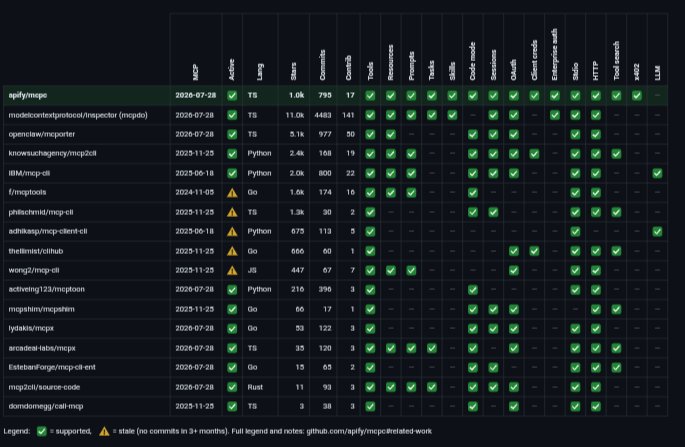
Meet "mcpc" — a universal MCP client that lets an AI agent access MCP servers through a single Bash tool instead of wiring up dozens of separate tool functions.
Here's why this is interesting:
→ Dynamic tool discovery: Find the tools you need instead of loading everything into context upfront.
→ Persistent sessions: Keep multiple MCP server connections alive in parallel.
→ Full MCP support: Access tools, resources, prompts, tasks, and skills through shell commands.
→ Security built in: OAuth 2.1, OS keychain credential storage, and a proxy to protect credentials from AI-generated code.
→ Composable workflows: Pipe JSON output into "jq", "xargs", and other shell utilities to build repeatable automations.
Get started:
"npm install -g @apify/mcpc"
Then connect to an MCP server:
"mcpc connect https://t.co/x8sIZ8ADtL @apify"
The bigger idea?
Stop flooding your AI agent with tools. Let it discover the right ones when it needs them.
MCP provides the standard. The CLI gives agents a familiar interface to use it.
REPOO👇
@0xMassi about 10k tokens for the default tool set, depending on the model. Actors get discovered on demand, so it doesn’t balloon as Apify Store grows 🎯