OAuth 2.0 Explained.
OAuth 2.0 is an authorization framework that enables applications to access a user’s data on another service (like Facebook or GitHub) without sharing the user’s password.
It’s essentially a digital handshake between the app, service, and user, with everyone agreeing on what is shared.
Now that we’ve covered what it is, let’s dive into how it works.
The process generally follows 6 steps with 4 components typically involved:
🔸 Client (app wanting access)
🔸 Resource owner (user)
🔸 Authorization server
🔸 Resource server
To understand the process, let’s take a look at how a game would connect to a player’s Facebook account.
Step 1) Request access
Within the game (client), the player (user) clicks on a “connect with Facebook” button to link their profile and find friends.
Step 2) Redirect to service
The game redirects the player to Facebook’s (service’s) login page.
Step 3) Permission request
After logging in, the data that the game is requesting access to will be shown to the player which they can either allow or deny.
Step 4) Authorization code
If the player gives their approval, Facebook redirects the player back to the game with an authorization code (from authorization server). The code is a temporary credential that proves the player’s consent.
Step 5) Exchange code for token
The game now sends the authorization code along with its own identification to Facebook’s server in the background. Facebook identifies the authorization code and the game’s identity and returns an access token.
Step 6) Use the token
The game can now use the access token to request the agreed-upon data from Facebook (from the resource server), like the player's friends list.
In this process, the player’s Facebook credentials were never shared, but the game was able to access the agreed-upon player data from Facebook. This is what OAuth 2.0 facilitates; allowing third-party applications to access data from services in a secure manner without sharing credentials.
~~
Thank you to our partner Kickresume who keeps our content free to the community.
Did you know you can turn your LinkedIn into a resume with one click?
Check it out: https://t.co/JT2uDp2SO1
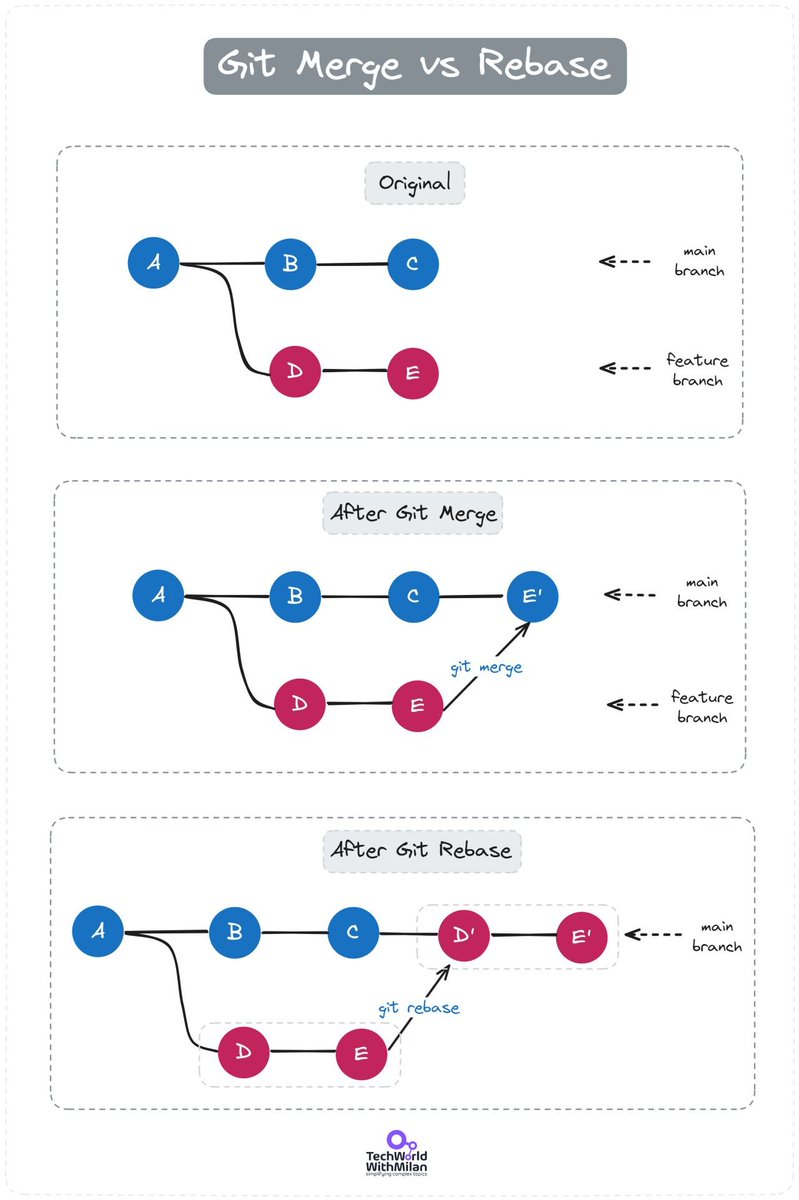
𝗚𝗶𝘁 𝗠𝗲𝗿𝗴𝗲 𝘃𝘀 𝗥𝗲𝗯𝗮𝘀𝗲
One of the most powerful Git features is branching. Yet, while working with it, we must integrate changes from one branch into another, and the way to do this can be different.
We have two ways to do it:
𝟭. 𝗠𝗲𝗿𝗴𝗲
When you merge Branch A into Branch B (with 𝚐𝚒𝚝 𝚖𝚎𝚛𝚐𝚎), Git creates a new merge commit. This commit has two parents, one from each branch, symbolizing the confluence of histories. It's a non-destructive operation that preserves the exact history of your project. Merges are particularly useful in collaborative environments where maintaining the integrity and chronological order of changes is essential. Yet, merge commits can clutter the history, making it harder to follow specific lines of development.
𝟮. 𝗥𝗲𝗯𝗮𝘀𝗲
When you rebase Branch A onto Branch B (with 𝚐𝚒𝚝 𝚛𝚎𝚋𝚊𝚜𝚎), you're essentially saying, "Let's pretend these changes from Branch A were made on top of the latest changes in Branch B." Rebase rewrites the project history by creating new commits for each commit in the original branch. This results in a much cleaner, straight-line history. Yet, it could be problematic if multiple people work on the same branch, as rebasing rewrites history, which can be challenging if others have pulled or pushed the original branch.
So, when to use them:
🔹 𝗨𝘀𝗲 𝗺𝗲𝗿𝗴𝗶𝗻𝗴 𝘁𝗼 𝗽𝗿𝗲𝘀𝗲𝗿𝘃𝗲 𝘁𝗵𝗲 𝗰𝗼𝗺𝗽𝗹𝗲𝘁𝗲 𝗵𝗶𝘀𝘁𝗼𝗿𝘆, especially on shared branches or for collaborative work. It's ideal for feature branches to merge into a main or develop branch.
🔸 𝗨𝘀𝗲 𝗿𝗲𝗯𝗮𝘀𝗶𝗻𝗴 𝗳𝗼𝗿 𝗽𝗲𝗿𝘀𝗼𝗻𝗮𝗹 𝗯𝗿𝗮𝗻𝗰𝗵𝗲𝘀 or when you want a clean, linear history for easier tracking of changes. Remember to rebase locally and avoid pushing rebased branches to shared repositories. Also, be aware 𝗻𝗼𝘁 𝘁𝗼 𝗿𝗲𝗯𝗮𝘀𝗲 𝗽𝘂𝗯𝗹𝗶𝗰 𝗵𝗶𝘀𝘁𝗼𝗿𝘆. If your branch is shared with others, rebasing can rewrite history in a way that is disruptive and confusing to your collaborators.
👉 I 𝗽𝗿𝗲𝗳𝗲𝗿 𝘁𝗵𝗲 𝗿𝗲𝗯𝗮𝘀𝗲 𝗮𝗽𝗽𝗿𝗼𝗮𝗰𝗵, as we get a cleaner Git history, but to use it requires a higher level of Git understanding to manage safely.
#programming #coding
API Gateway vs Load Balancer — What's the Difference?
An API Gateway acts as a single entry point for clients, handling request routing, composition, and protocol translation. It simplifies client interactions with microservices and offers features like rate limiting, authentication, and monitoring.
Load balancers are concerned with routing client requests across multiple servers to distribute load and prevent bottlenecks. This helps maximize throughput, reduce response time, and optimize resource use.
So what are the key differences?
API gateways focus on request management and microservice communication, while Load Balancers focus on traffic distribution and server load management.
API gateways operate at the application layer (L7), while Load Balancers can operate at both transport (L4) or application (L7) layers.
API gateways offer features like routing, rate limiting, authentication, service discovery, parameter validation, circuit breakers, and more. Load Balancers handle traffic distribution and failover.
An API gateway is Ideal for microservice architectures needing centralized API request management.
A load balancer is essential for applications requiring high availability, distributing traffic across multiple servers.
In summary, API Gateways manage and secure API calls, while Load Balancers ensure efficient traffic distribution.
💭 I’d love to hear your thoughts. What would you like to add? What topics would you like me to cover? 💬
~~
Thank you to our partner Postman who keeps our content free to the community.
Do you have team members who are blocked because they're waiting for you to ship a new API? Unblock them using mock servers.
Learn more here: https://t.co/ejCawV31lP
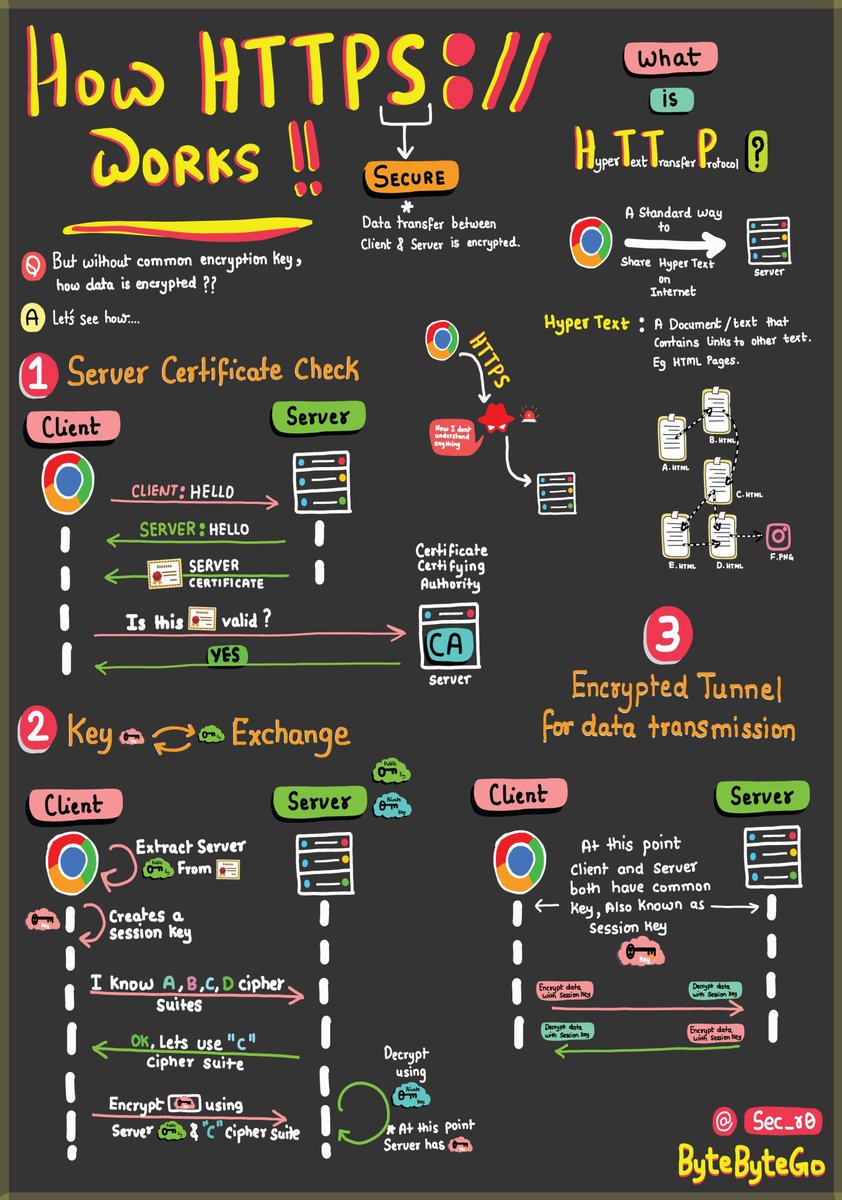
HTTPS, SSL Handshake, and Data Encryption Explained to Kids.
HTTPS: Safeguards your data from eavesdroppers and breaches. Understand how encryption and digital certificates create an impregnable shield.
SSL Handshake: Behind the Scenes — Witness the cryptographic protocols that establish a secure connection. Experience the intricate exchange of keys and negotiation.
Secure Data Transmission: Navigating the Tunnel — Journey through the encrypted tunnel forged by HTTPS. Learn how your information travels while shielded from cyber threats.
HTML's Role: Peek into HTML's role in structuring the web. Uncover how hyperlinks and content come together seamlessly. And why is it called HYPER TEXT.
Over to you: In this ever-evolving digital landscape, what emerging technologies do you foresee shaping the future of cybersecurity or the web?
–
Subscribe to our weekly newsletter to get a Free System Design PDF (158 pages): https://t.co/uc5M7CdXXC
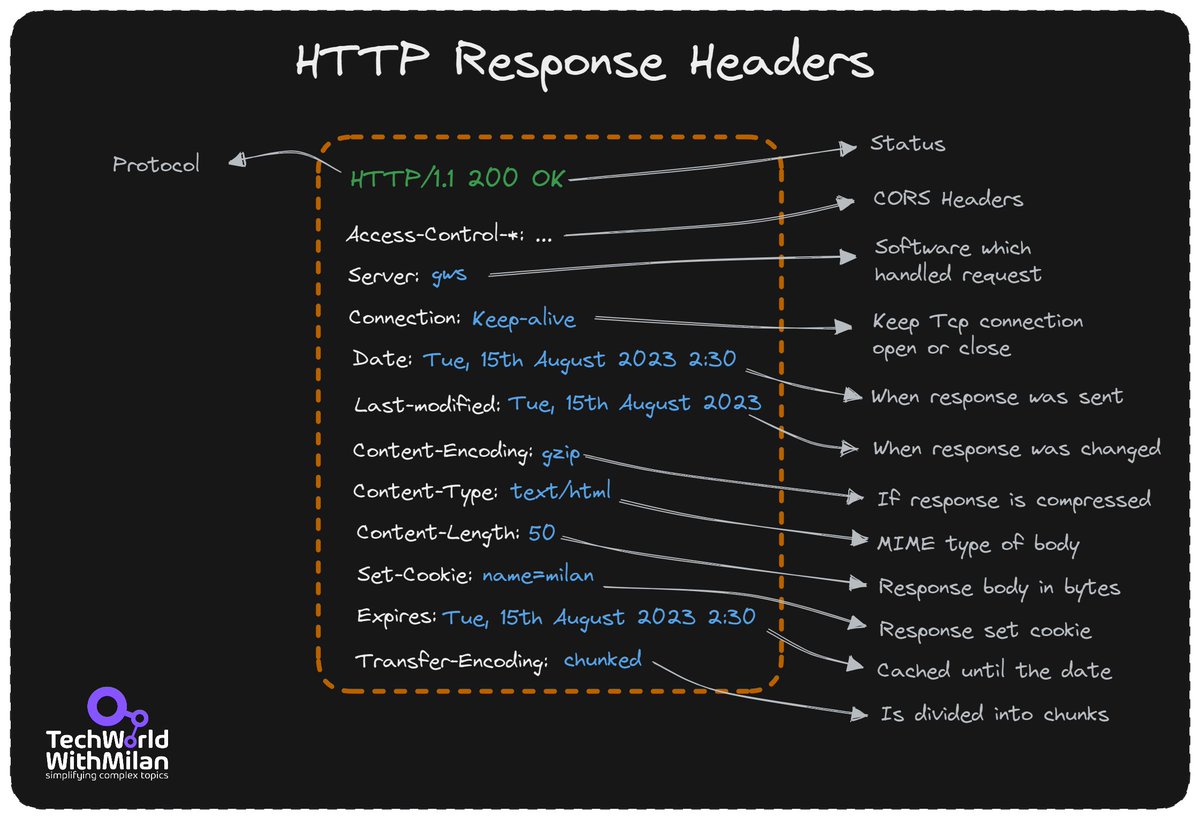
𝗨𝗻𝗱𝗲𝗿𝘀𝘁𝗮𝗻𝗱𝗶𝗻𝗴 𝗥𝗘𝗦𝗧 𝗛𝗲𝗮𝗱𝗲𝗿𝘀
The Hypertext Transfer Protocol (HTTP) header is a component of HTTP and transmits extra data during HTTP requests and responses. The server uses the HTTP header and the browser to share metadata about the document and the data sent to the browser by the website's web server.
A variety of data in the 𝗥𝗘𝗦𝗧 𝗵𝗲𝗮𝗱𝗲𝗿𝘀 can be used to trace down problems as they arise. As they show the meta-data related to the API request and response, HTTP Headers play a significant role in the API request and response. Headers contain data for:
𝟭. 𝗥𝗲𝗾𝘂𝗲𝘀𝘁 𝗮𝗻𝗱 𝗥𝗲𝘀𝗽𝗼𝗻𝘀𝗲 𝗕𝗼𝗱𝘆
𝟮. 𝗥𝗲𝗾𝘂𝗲𝘀𝘁 𝗔𝘂𝘁𝗵𝗼𝗿𝗶𝘇𝗮𝘁𝗶𝗼𝗻
𝟯. 𝗥𝗲𝘀𝗽𝗼𝗻𝘀𝗲 𝗖𝗮𝗰𝗵𝗶𝗻𝗴
𝟰. 𝗥𝗲𝘀𝗽𝗼𝗻𝘀𝗲 𝗖𝗼𝗼𝗸𝗶𝗲𝘀
In addition to the categories mentioned above, HTTP headers contain a variety of information about different HTTP connection types, proxies, etc. The majority of these headers are used to maintain connections between clients, servers, and proxies, so testing is not necessary.
In general, we have 𝗿𝗲𝗾𝘂𝗲𝘀𝘁 𝗮𝗻𝗱 𝗿𝗲𝘀𝗽𝗼𝗻𝘀𝗲 𝗵𝗲𝗮𝗱𝗲𝗿𝘀. We set a request header when sending a request to an API and get some headers with a response. The standard header structure is in the form 𝗡𝗮𝗺𝗲:𝘃𝗮𝗹𝘂𝗲, but it can have many values separated using a comma.
Some 𝗰𝗼𝗺𝗺𝗼𝗻 𝗵𝗲𝗮𝗱𝗲𝗿𝘀 are:
🔹 𝗔𝘂𝘁𝗵𝗼𝗿𝗶𝘇𝗮𝘁𝗶𝗼𝗻: which contains the client's authentication information for the requested resource.
🔹 𝗔𝗰𝗰𝗲𝗽𝘁-𝗖𝗵𝗮𝗿𝘀𝗲𝘁: This header instructs the server which character the client accepts and is set with the request.
🔹 𝗖𝗼𝗻𝘁𝗲𝗻𝘁-𝗧𝘆𝗽𝗲: Specifies the response's media type (text/html or text/JSON), which will aid the client in processing the response's body.
🔹 𝗖𝗮𝗰𝗵𝗲-𝗖𝗼𝗻𝘁𝗿𝗼𝗹: The client may keep and reuse a cached response for the duration specified by the Cache-Control header. This is the cache policy set by the server for this response.
#api
I'll say my part here
In set 9.0, game 11, I got griefed by the 32nd player by playing Kayle, he doesn't care anything just hold what unit that kayle use (and he lost to krug btw) and he also do the same for griefing me on game 12 and I got 10th
https://t.co/3KUq5mFXbb
How does SQL execution order work, and why is it so important?
A SQL query executes its statements in the following order:
1. FROM / JOIN
2. WHERE
3. GROUP BY
4. HAVING
5. SELECT
6. DISTINCT
7. ORDER BY
8. LIMIT / OFFSET
𝗧𝗵𝗲 𝘁𝗲𝗰𝗵𝗻𝗶𝗾𝘂𝗲𝘀 𝘆𝗼𝘂 𝗶𝗺𝗽𝗹𝗲𝗺𝗲𝗻𝘁 𝗮𝘁 𝗲𝗮𝗰𝗵 𝘀𝘁𝗲𝗽 𝗵𝗲𝗹𝗽 𝘀𝗽𝗲𝗲𝗱 𝘂𝗽 𝘁𝗵𝗲 𝗳𝗼𝗹𝗹𝗼𝘄𝗶𝗻𝗴 𝘀𝘁𝗲𝗽𝘀. This is why it's important to know their execution order.
𝗧𝗼 𝗺𝗮𝘅𝗶𝗺𝗶𝘇𝗲 𝗲𝗳𝗳𝗶𝗰𝗶𝗲𝗻𝗰𝘆, 𝗳𝗼𝗰𝘂𝘀 𝗼𝗻 𝗼𝗽𝘁𝗶𝗺𝗶𝘇𝗶𝗻𝗴 𝘁𝗵𝗲 𝘀𝘁𝗲𝗽𝘀 𝗲𝗮𝗿𝗹𝗶𝗲𝗿 𝗶𝗻 𝘁𝗵𝗲 𝗾𝘂𝗲𝗿𝘆.
With that in mind, let's take a look at some 𝗼𝗽𝘁𝗶𝗺𝗶𝘇𝗮𝘁𝗶𝗼𝗻 𝘁𝗶𝗽𝘀:
𝟭) 𝗠𝗮𝘅𝗶𝗺𝗶𝘇𝗲 𝘁𝗵𝗲 𝗪𝗛𝗘𝗥𝗘 𝗰𝗹𝗮𝘂𝘀𝗲
This clause is executed early, so it's a good opportunity to reduce the size of your data set before the rest of the query is processed.
𝟮) 𝗙𝗶𝗹𝘁𝗲𝗿 𝘆𝗼𝘂𝗿 𝗿𝗼𝘄𝘀 𝗯𝗲𝗳𝗼𝗿𝗲 𝗮 𝗝𝗢𝗜𝗡
Although the FROM/JOIN occurs first, you can still limit the rows. To limit the number of rows you are joining, use a subquery in the FROM statement instead of a table.
𝟯) 𝗨𝘀𝗲 𝗪𝗛𝗘𝗥𝗘 𝗼𝘃𝗲𝗿 𝗛𝗔𝗩𝗜𝗡𝗚
The HAVING clause is executed after WHERE & GROUP BY. This means you're better off moving any appropriate conditions to the WHERE clause when you can.
𝟰) 𝗗𝗼𝗻'𝘁 𝗰𝗼𝗻𝗳𝘂𝘀𝗲 𝗟𝗜𝗠𝗜𝗧, 𝗢𝗙𝗙𝗦𝗘𝗧, 𝗮𝗻𝗱 𝗗𝗜𝗦𝗧𝗜𝗡𝗖𝗧 𝗳𝗼𝗿 𝗼𝗽𝘁𝗶𝗺𝗶𝘇𝗮𝘁𝗶𝗼𝗻 𝘁𝗲𝗰𝗵𝗻𝗶𝗾𝘂𝗲𝘀
It's easy to assume that these would boost performance by minimizing the data set, but this isn’t the case. Because they occur at the end of the query, they make little to no impact on its performance.
If you want to create efficient queries, it's a good idea to understand how things work under the hood otherwise your efforts may be wasted. While these tips work best in most cases, you should consider your unique use case when choosing the best course of action.
~~~
A big thank you to our partner Postman who keeps our content free to the community.
You can now test API performance by simulating real-world traffic on your local machine with Postman. Check it out: https://t.co/WDhONXlWGU
📩 If you found this helpful, I write an email every Thursday to help you level up your engineering and system design skills. Sign up here: https://t.co/T4o0O5mWsA
I asked 121+ software developers this question and 5 methods came out on top.
“How to improve the performance of your API?”
[1] Caching
The idea of caching is simple.
Store frequently accessed data in a cache so that you can access it faster when needed.
If there’s a cache miss, fetch the data from the database.
It’s quite effective actually but cache invalidation and deciding on the caching strategy can be challenging.
[2] Scale-out with Load Balancing
If one server instance isn’t enough, you can think of scaling your API to multiple instances.
So - where’s the catch?
You need to find a way to distribute requests between these multiple instances.
Enter Load Balancing
It not only helps with performance but also makes your application more reliable.
However, load balancers work best when your application is stateless and easy to scale horizontally.
[3] Async Processing
Sometimes, you can’t solve multiple problems together.
The best way is to park them for later.
With async processing, you can let the clients know that their requests are registered and under process.
Then, you process the requests one by one and communicate the results to the client later on.
This allows your application server to take a breather and give its best performance.
But of course, async processing may not be possible for every requirement.
[4] Pagination
If your API returns a large number of records, you need to explore Pagination.
Basically, you limit the number of records per request.
This improves the response time of your API for the consumer.
[5] Connection Pooling
An API often needs to connect to the database to fetch some data.
Creating a new connection for each request can degrade performance.
It’s a good idea to use connection pooling to set up a pool of database connections that can be reused across requests.
This is a subtle aspect but in highly concurrent systems, connection pooling can have a dramatic impact on performance.
So - what is your number one method for improving API Performance?
I'm sure there are many more tricks to boost API performance
What makes an API RESTful?
Representational State Transfer (REST) is an architectural style that is commonly used for web-based APIs alongside HTTP as the transport protocol.
Key concepts:
🔸Stateless: The server shouldn’t need to store any information about a user between requests. Everything that the server needs to execute a task should be sent in the request.
🔸 Separation of concerns: The client and server should function independently of each other.
🔸Cacheable: Responses can be cached on the client to boost performance.
🔸Consistent interface: By using HTTP methods like GET, POST, and DELETE, API interfaces stay consistent.
🔸 Resource-based: RESTful APIs have an emphasis on resources rather than methods or functions. A resource can be an object, entity, or data within a system. Resources are uniquely identified using a Uniform Resource Identifier (URI).
🔸 Standard media types: Responses are usually sent as JSON, XML, or plain text. Clients can request a preferred media type.
By providing guidelines like statelessness, separation of concerns, and standardized interfaces, REST has made it easier to develop scalable, stable, high-performing applications.
Top 3 API Gateway Use Cases.
API gateway sits between the clients and services, providing API communications between them.
1. API gateway helps build an ecosystem.
The users can leverage an API gateway to access a wider set of tools. The partners in the ecosystem collaborate with each other to provide better integrations for the users.
2. API gateway builds API marketplace
The API marketplace hosts fundamental functionalities for everyone. The developers and businesses can easily develop or innovate in this ecosystem and sell APIs on the marketplace.
3. API gateway provides compatibility with multiple platforms
When dealing with multiple platforms, an API gateway can help work across multiple complex architectures.
–
Subscribe to our weekly newsletter to get a Free System Design PDF (158 pages): https://t.co/uc5M7CdXXC