@andrewgazelka@diabrowser hey there, curious one - unable to repro right now with a custom extension that uses both these APIs. can i ask what version of Dia you're currently on?
@IanYanusko@GeorgeSiosi@diabrowser@joshm@browsercompany hey George, stepping in for Ian while he's AFK - we believe we've isolated the issue and have a fix on our early birds program, if you can drop me a DM we'll get things updated for you
@pierbapt@IanYanusko@diabrowser@joshm that _may_ be related. not saying its the issue just yet, will see if i can spot anything else before then, but maybe worth an eye if you're open to updating to the latest OS
@pierbapt@IanYanusko@diabrowser@joshm for sure. you couldn't do me a favor and just click on the the Tahoe 26.0, it'll change to the specific build number itself (mix of letters and numbers). one small note is that 26.0 is most likely the first beta or release build of Tahoe, and there's been a few updates since
@pierbapt@IanYanusko@diabrowser@joshm Certainly frustrating! What version of macOS are you on? I’ll hammer away at things a little internally and see if I can get something to shake out 🙏
@pierbapt@IanYanusko@diabrowser@joshm thanks for giving that a shot! one other quick ask - does unpinning one of the tabs and then repinning it sort? for some reason there's a lot of extra space between the top row of pinned tabs that shouldn't be there, and may need something to retrigger the height calculations
@sdusteric@tieskuiper@diabrowser should be fixed in 1.31, will be out this Thursday, or on Early Birds a little earlier in the week - let me know if it still persists beyond then
@charlesowo445@IanYanusko@diabrowser thanks for flagging! we've pushed a fix for this now, the assistant should be behaving as expected again, but let us know if not!
@jamesmhaley@browsercompany Apologies, I may have misread “ Force quit, tried the same thing, hung again, this time with ~3gb in use”, that’s saying you couldn’t open Dia task manager even on fresh boot?
@jamesmhaley@browsercompany …have you take those same steps I outlined before, but to do it *now* when things aren’t frozen? That’ll allow to keep an on things before they grow so that we know exactly what is potentially consuming more mb than it should be, and we can tackle then! 🙏
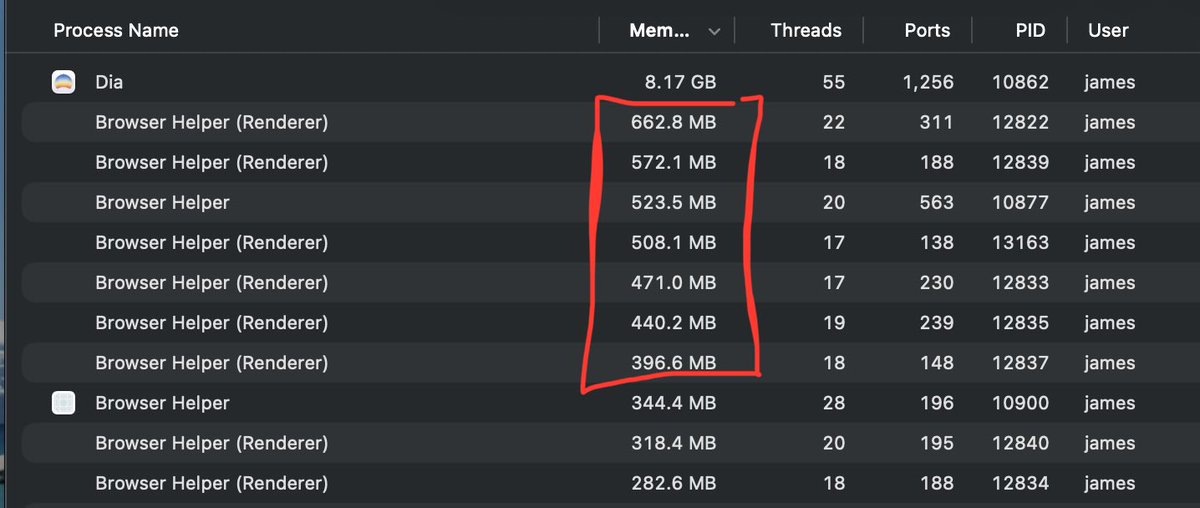
@jamesmhaley@browsercompany appreciate the detail! The 8gb would be a summation of the individual processes, rather than in addition. ie in this highlighted piece here, there’s nearly 3gb account for, spread across ~6 tabs. But I agree it’s still worth getting more context on to ensure no runaways. Can I…
@jamesmhaley@browsercompany hey there! can you select Window (between Extensions and Help) and open up the Task Manager? This will show you the actual titles of each helper here (you can match the PIDs to the process IDs) so that you can see what these are tied to. most likely, its tabs that you have active