This Black Friday, Polycam Business is $100 off.
Scan a space with your phone → 2D + 3D floor plans → export to AutoCAD, Revit or Xactimate. Unlimited scans, no per-space fees.
$300/year per seat: https://t.co/fQ93HWdll9
If this crew had Polycam in 1932, they’d have scanned the floor plan before the lunch whistle.
Lucky for you, it’s 2026. Polycam Business is $100 off this Black Friday, with unlimited floor plan scans.
Claim it: https://t.co/bIXzcqfrp5
#BlackFriday#Construction
100 years ago, site measurement looked a little different. Today it’s 100x faster, and $100 off.
This Black Friday, get Polycam Business for $300/year.
Claim your deal: https://t.co/pljBfDRek6
you can just build stuff now
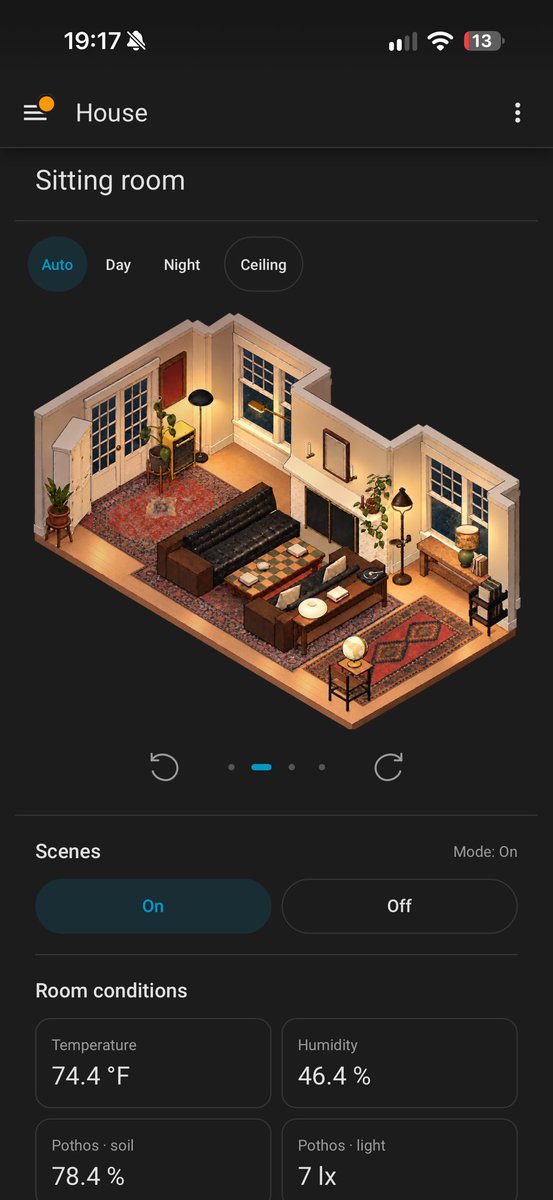
i built a digital version of my house in blender based on polycam lidar scans, then astra did a detail pass based on photos. basically every lamp, door, plant or electronic component is viewable in this format. i can toggle lights, see if plants need watering. The blender version is used by imagegen to create these stylized dioramas, that react to their actual state and time of day.
this is all seamless inside of the home assistant app as a dashboard.
when people talk about personalized software this is what I envision.
@YeheLiu@Scannerian1 processing time really depends on how many images or how much video goes in, so a big aerial scene like this takes longer than a quick object scan 🙃
@PMoppelpo@Scannerian1 good q! splats are actually processed in the cloud, so the images get uploaded to Polycam's servers. LiDAR and Space scans are the ones that process right on your phone: https://t.co/IsMRenXAtG
Have you tried annotations in the Polycam Floor Plan Creator yet? Add outlets, circle changes, leave notes, all on the floor plan itself.
Free 7-day Business trial:
https://t.co/Nc0sJVDzPd
@JiriCoufal77 Fair question! This is the raw LiDAR mesh. The 3D and 2D floor plans come out a bit more predictably. A whole multi-floor house can go in one capture, and takes as long as it would take you to walk around every room. Probably less than 10 minutes for this one!
New in Polycam’s Floor Plan Creator: annotations. Mark up plans with your own symbols, label in any language, and keep the 3D model, plan, and instructions in one place.
Start a Business trial: https://t.co/bJnCqAHMkT
Download on iOS: https://t.co/6DysGIdfIb
Scan the room. Measure the wall. Leave a note for your team. Pass it on.
Plus an editable floor plan from every scan.
iPhone: https://t.co/hAi7MNXDI1 Teams: https://t.co/qg3iCc9FXg
Polycam is now SOC 2 Type 2 compliant.
That means fewer security questionnaires and faster approvals when you bring Polycam to your team.
SOC 2 Type 2, GDPR, SSO, and the Content API are all included in Enterprise.
Try Enterprise free for 7 days: https://t.co/HOzoKAUhoD
It's kinda crazy that with an iphone and 15 minutes you can produce accurate 3D scans and point clouds
this is a part we're reverse engineering for a customer, window hinge from the 30's, no CAD or drawings available
@LarsMotzigkeit Hi Lars! Replying in English (I'm not very confident in my German translation), but Roof Reports are available on Business and Enterprise with drone captures.
Room Mode also supports angled walls, sloped ceilings, and slanted or curved walls.
https://t.co/844Fdg1a9B
Multi-story homes don't have to mean multi-day measuring. Capture both floors on your phone, then get a floor plan with room-by-room dimensions, wall and window areas, and an exportable report.
Try it free: https://t.co/M6NbMN0Q2z