The new Data Modelling view in #PowerBI Desktop Nov 2018 release allows you to create sub folders in your tables. Great for grouping columns or measures. Fantastic!!
Windows #OfficeInsiders, the release notes for #InsiderFast build 1812 11101.20000 are now available! We've got a new Outlook feature as well as the usual fixes, so go check it out! https://t.co/KMvhxyaviz
Showing actuals and forecasts in the same chart with Power BI - which means how to compute forecast combining past sales and future budget adjusted with previous variance in #dax - useful article from @FerrariAlberto#dax#powerbi https://t.co/TQ9xRZRdDV
The Nov version of #powerBI Desktop ships next week and will include Expand and collapse matrix row headers (like pivot tables) and Copy and paste between PBIX files. Early announcement here https://t.co/J1O5dAz5Li
Expression based formatting in Measures is coming to #PowerBI. I wonder if this will cover the use case for SWITCH() measures that can toggle between (say) a % and a $ value? I hope so. Read about the new feature here https://t.co/NFRVVKreVg
What's new in OneNote for #Windows10 and OneNote Online:
☁Cloud attachments in Windows 10
🔍Tag search in Windows 10
😎Emoji keyboard in OneNote online
Check out the blog for more details! https://t.co/Y7OATd5QXE
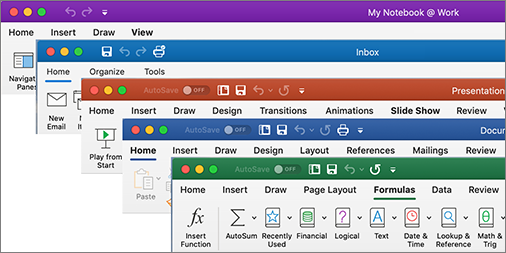
Mac #OfficeInsiders, you've been waiting for it, and it's here! The updated Ribbon is available in the latest #InsiderSlow update! All the same functionality, but with a sleek new look! https://t.co/Q5pd0EWuGd