🔬 Welcome to Praesagium Quant
💻We build, observe and test systematic market models.
🔎Not to prove that they work.
To find out whether they do.
📊 Every experiment leaves a record.
Every failure counts.
Every result stays.
➡️Models make predictions. Markets deliver evidence
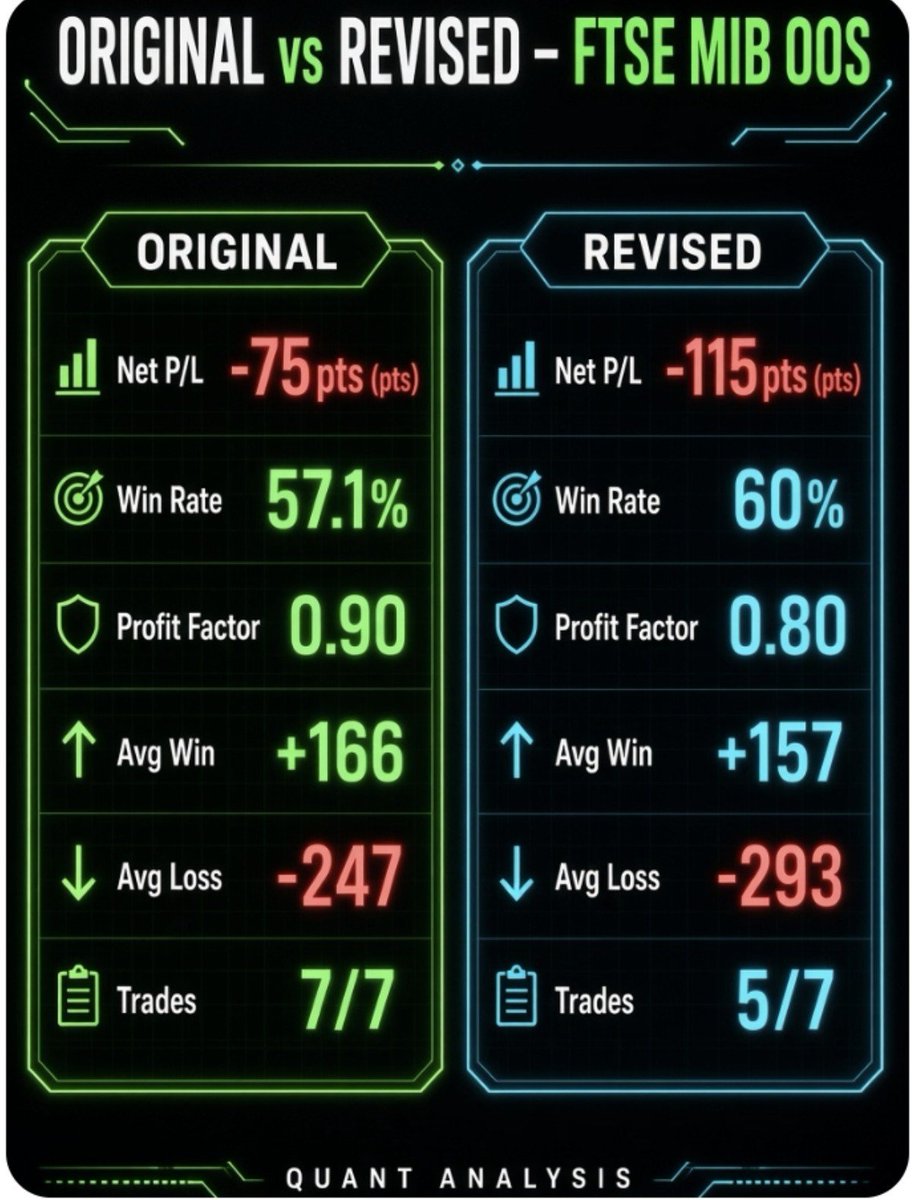
🚨 EXPERIMENT #001 UPDATE – FTSE MIB (minimib - sep)
🏟Original vs Revised: who’s winning the live OOS challenge?
📠After 7 publicly closed trades (#47 to #53), here are the raw metrics — no filters, no deleted losses.
L’AI dovrebbero temerla più di tutti i burocrati. In effetti, come dice Elon, lo sviluppo dell’AI rende difficile nascondere le malefatte. Già oggi l’AI può individuare autonomamente sprechi, operazioni sospette ed errori nel bilancio pubblico dello Stato. @GiorgiaMeloni, perché non fai fare all’AI un audit di tutte le spese dello Stato e vediamo cosa esce fuori? Siamo sicuri che non ci siano risorse e che la coperta sia sempre “corta”?
@QuantifiedStrat Maybe you could try using MACD in another AND condition.
The strategy seems to print nice returns, it could be interesting view other metrics.
GPT-6 built me 184 trading strategies in 8 hours.
Here's how you can run the same:
Step 1: Get ChatGPT desktop
Download it at https://t.co/NsTGDlQxET, open the Work tab and select GPT-6 Astra on High Thinking.
The Work tab gives you the full model plus access to your computer and schedules, and sessions last much longer.
Step 2: Give it a backtesting engine
Free account at https://t.co/K0aSTn63jR, click My Account, copy the line of code.
Paste it into ChatGPT and say "hey there buddy, could you install this MCP server globally, I want to use it in ChatGPT Work".
It'll ask for your activation key, copy that from the same page and paste it in.
Step 3: Check the connection
"Could you backtest a very simple trading strategy on BTCUSDT for me".
Stats come back with commission included, you're connected.
Step 4: Set the 8 hour sprint
Both prompts are free at https://t.co/rYakJskLKi.
Paste the first, it onboards ChatGPT and explains the job, then paste the second to set the loop running and accept when it asks.
It builds strategies one by one and logs everything to a mission control dashboard.
Step 5: Come back and check the board
Mine built 184 strategies, some flat, some losing, the best ones genuinely good.
Green is the backtest, pink is forward testing, every profitable strategy keeps running daily on live data.
Step 6: Verify the best one on TradingView
Download the Pine Script from mission control, open it in a text editor, copy it.
On https://t.co/dxyXEXzBn5 click the Pine Editor icon, paste, save, add to chart.
Mine came back at:
695 trades.
1.35 profit factor.
And +3,130% against a buy and hold that made almost nothing.
Step 7: Automate it
Connect your broker through https://t.co/gCY0tzYsUC, free, your API keys stay off their servers.
On TradingView add an alert, set fill orders only, paste https://t.co/gCY0tzYsUC's message and webhook URL, apply.
Entry, stop loss and take profit all fire on your broker automatically.
I'll be honest, that strategy's max drawdown was too high for me, and 8 hours of backtests is not a trading system.
Leave them in forward testing for 3 months before you decide your winning strategies.
🚨 EXPERIMENT #001 UPDATE – FTSE MIB (minimib - sep)
🏟Original vs Revised: who’s winning the live OOS challenge?
📠After 7 publicly closed trades (#47 to #53), here are the raw metrics — no filters, no deleted losses.
• Trades taken: 5/7 (2 strategic flats)🔥
Revised skillfully avoided the -155 pts loss on trade #51…
but also missed the +195 pts winner on #53.Right now Original is slightly ahead on net P/L.