As a react developer did you ever faced slow build up time of your application?
.
Do you know what internal mechanism cause this?
.
Are there any solution to optimize the slow build up time?
Read here:
https://t.co/O1Com58L7s
#react#developer#vite#gatsby#razzle#npx
EXPLOITING THE VULNERABILITY IN IPHONE AND ANDROID
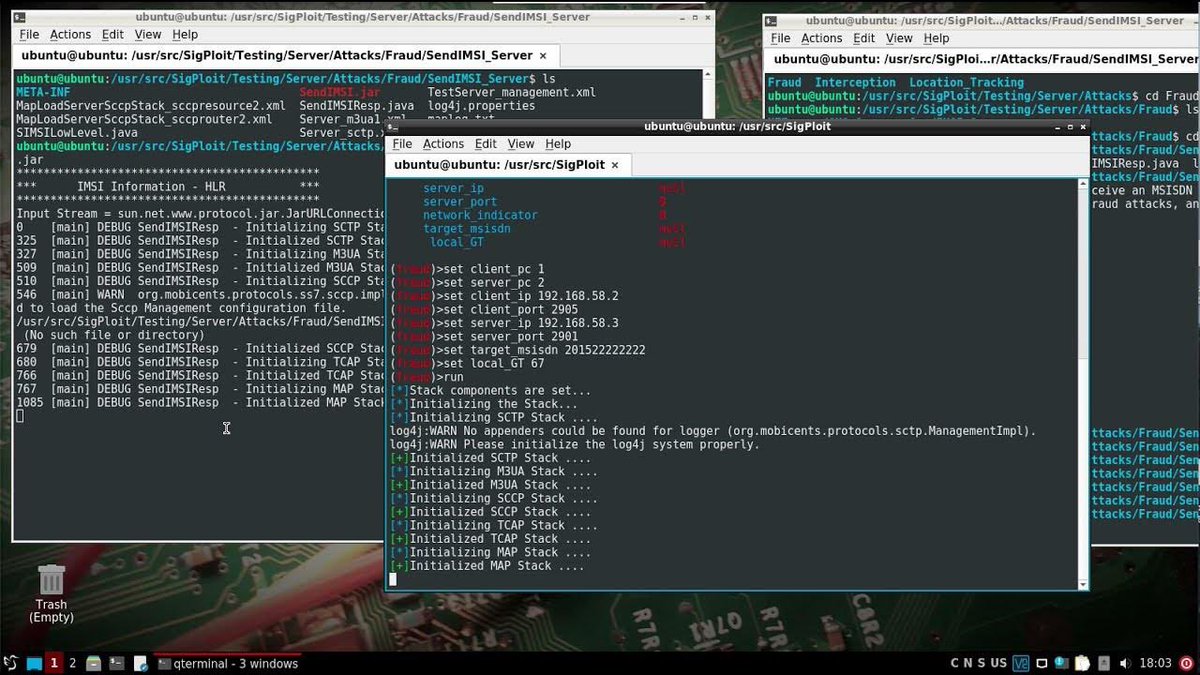
As a penetration tester and security researcher, I want to talk about SS7; a vulnerability that exist in iPhones and android. People don’t know about it.
It can’t be patched. I don’t need to install malware on your phone before I collect data. Your phone number is enough. This is a form of radio penetration testing.
SS7, or Signaling System 7, is a set of telecommunication protocols used worldwide for handling phone calls and text messages. While SS7 serves a critical role in telecommunications, it has been known to have vulnerabilities that security researchers and malicious actors have exploited.
Governments and intelligence agencies had the power to intercept calls and exploit the power of SS7; but now individuals with powerful tools have the capabilities to do that.
Hackers can read text messages, listen to phone calls and track mobile phone users’ locations with just the knowledge of their phone number using a vulnerability in the worldwide mobile phone network infrastructure.
The exploit centres on a global system that connects mobile phone networks, and can give hackers, governments or anyone else with access to it remote surveillance powers that the user cannot do anything about.
Here's some information on SS7 vulnerabilities, how they can be exploited, and steps to mitigate these risks:
Exploiting SS7 Vulnerabilities
1. SMS Interception: One significant vulnerability is SMS interception. Malicious actors can exploit SS7 to intercept and read SMS messages sent to a target's phone number. This can lead to privacy breaches and unauthorized access to sensitive information like two-factor authentication codes.
2. Call Interception: Another vulnerability allows attackers to intercept phone calls and listen in on conversations. This is a significant concern for privacy and security.
3. Location Tracking: SS7 can be exploited to track the physical location of a mobile device, potentially enabling stalking or unauthorized surveillance.
4. Call and Message Spoofing: Attackers can use SS7 to spoof phone numbers, making it appear as though calls or messages are coming from a trusted source.
5. Denial of Service (DoS): While less common, SS7 networks can be targeted with DoS attacks, disrupting telecommunications services and causing inconvenience or financial losses.
6. Fraudulent Activities: Criminals can use SS7 attacks to commit fraud, such as bypassing international call charges, making premium-rate calls, or conducting fraudulent financial transactions.
Hackers can transparently forward calls, giving them the ability to record or listen in to them. They can also read SMS messages sent between phones, and track the location of a phone using the same system that the phone networks use to help keep a constant service available and deliver phone calls, texts and data.
The tools to perform this attack is sold on the open market today.
The problem with ss7 attack is, while targeting only one phone number, you will end up collecting data from thousands of phone numbers in seconds.
While is fun to play with ss7, make sure you have the permission to perform the exploit if you’re not researching.
The good thing it can be used to perform investigations and help bodies counter terrorism and fraud.
#CyberSecurityAwareness #cybersecurity #pentesting #ss7
SQL interviews are common in data engineering. They’re even more common in big tech.
I wrote an article today revealing everything I know about them in my nine years of data engineering experience!
Link in my bio since Elon would bury it otherwise!
#dataengineering
The death of SEO is near.
Google just released its new AI search engine, and it completely changes the SEO game.
Here's everything you need to know about it:
Here is the Complete Linux File System [Explained]:
📁 /
∟ 📄boot
∟ 📁bin
∟ 📄ls
∟ 📄mkdir
∟ 📁dev
∟ 📄sda
∟ 📁etc
∟ 📄hostname
∟ 📄passwd
∟ 📄nginx .conf
∟ 📁home
∟ 📁user1
∟ 📄.bashrc
∟ 📁user2
∟ 📄notes.txt
∟ 📄.bashrc
∟ 📁lib
∟ 📄libcrypto .so
∟ 📄libssl .so
∟ 📁mnt
∟ 📁opt
∟ 📁app1
∟ 📄app1_executable
∟ 📁app2
∟ 📄app2_executable
∟ 📁proc
∟ 📁root
∟ 📁sbin
∟ 📄init
∟ 📄shutdown
∟ 📁srv
∟ 📁sys
∟ 📁tmp
∟ 📁usr
∟ 📁bin
∟ 📄gcc
∟ 📄python
∟ 📁include
∟ 📁lib
∟ 📄libncurses .so
∟ 📁local
∟ 📁bin
∟ 📄custom_app
∟ 📁lib
∟ 📄libcustom_lib .so
∟ 📁share
∟ 📁var
∟ 📁log
∟ 📄syslog
∟ 📄nginx .log
∟ 📁www
∟ 📁html
∟ 📄index .html
------------- Explained --------------
Certainly, let's go through the components of this Linux file system:
1. /boot: This directory contains essential files for booting the system.
2. /bin: Basic system binaries reside here, such as common command-line utilities like `ls`, `mkdir`, and `cp`.
3. /dev: This directory contains device files that represent various devices connected to the system, such as hard drives (`sda`, `sdb`) and pseudo devices like `null`.
4. /etc: Configuration files for the system and installed applications are stored here. Examples include `fstab` (filesystem table), `hostname` (system's hostname), `passwd` (user account information), `sudoers` (sudo configuration), and `nginx .conf` (configuration for the Nginx web server).
5. /home: User home directories are typically found here. Examples include `user1`, `user2`, and `user3`, each with their files and settings.
6. /lib: Shared libraries (similar to Windows DLLs) that programs can use are stored here. Examples are `libcrypto .so` and `libssl .so`.
7. /mnt: This directory is often used as a mount point for temporary filesystems.
8. /opt: Additional software packages and applications that are not part of the core system can be installed here. Each package may have its own subdirectory, like `app1` and `app2`.
9. /proc: A virtual filesystem that provides information about running processes and system status.
10. /root: The home directory for the root user.
11. /sbin: System binaries essential for system administration, like `init` (the first process) and `shutdown` (to shut down the system).
12. /srv: This directory is typically used for data served by the system.
13. /sys: Another virtual filesystem that provides information about kernel and devices.
14. /tmp: Temporary files are stored here. They are usually cleared on system startup.
15. /usr: This directory contains user programs and data.
- /usr/bin: User-level command binaries.
- /usr/include: Header files for C/C++ libraries.
- /usr/lib: Libraries for programming and software.
- /usr/local: Software manually installed by the system administrator.
16. /var: Variable data that changes frequently.
Overall, this file system structure reflects a standard layout found in many Linux distributions, with key directories serving specific purposes, from system binaries to user files, libraries, configuration, and temporary data. Keep in mind that while this is a general representation, individual distributions might have variations or additional directories based on their design and purpose.
FREE CYBERSECURITY MATERIALS 📢📢
Here are some courses I discovered this week that will teach Cybersecurity for free!.
Course
https://t.co/ClmauJlZbY
1/2
🚫 Don't venture into hackathons where a glitchy code is shrugged off, yet a glitch in your demo video sends your project to the bottom of the rank list, like a leftover garbage. 📉
90% of the people I meet are confused.
Confused about - what to do in life , what career to choose , is this company good for me , should I manage CGPA or a good placement , what if I dont get a placement out of college , i need to get a 15 Lakh base salary , etc etc.
Thread 🧵
Growth @ One2N is defined by incremental spheres (well, hexagons🙂) of influence.
As you grow, your influence grows along the 6 attributes (vertices) of:
Delivery
Technology
System Design
Client engagement
Mentorship, and
Processes+practices.
Here's what those levels look like: